As an Amazon Associate, we earn from qualifying purchases made through links on this page, at no extra cost to you.


Finding the best gaming laptops under 1000 means balancing three things that rarely come together at this tier: a real dedicated graphics card, a screen fast enough to show it off, and enough memory and storage to run modern games without constant compromise.
The five laptops in this guide all clear the same bar. Each one pairs an NVIDIA GeForce RTX graphics card with a high-refresh display, at least 8 GB of memory, a solid-state drive, and Windows 11. They are all full gaming laptops, not thin-and-light ultrabooks with a gaming badge or Chromebooks dressed up for play. Every pick below is a current-generation or recent-generation configuration that roundups and retailer listings place in the sub-1000 tier by its positioning, and each one is sold on Amazon US.
Our Top Picks
Top 3 picks at a glance
Quick Picks
Our Short List of 3
- Best for: Gamers who want one laptop that does everything well, from competitive shooters to single-player adventures to everyday school or work tasks.
- Strong 8-core Ryzen 7 170 processor with plenty of multitasking headroom
- 144 Hz IPS display with full sRGB coverage, rare in this tier
- 16 GB of DDR5 memory and upgrade paths to 64 GB of RAM and 2 TB of storage
- 512 GB of storage fills quickly with large modern games
- Best for: Buyers who want the newest graphics architecture and the most video memory in this guide, plus the biggest and fastest screen.
- RTX 5050 with 8 GB of GDDR7 memory and DLSS 4 support
- 16-inch 180 Hz WUXGA display, the fastest panel in this guide
- 16 GB of DDR5 memory and a 6-core Ryzen processor boosting to 5.0 GHz
- 512 GB of storage is the tightest fit for a large game library

- Best for: Gamers with big libraries who hate uninstalling games, and anyone who wants a durable 16-inch machine.
- 1 TB SSD, double the storage of the other picks in this guide
- Large 16-inch 144 Hz WUXGA display with G-Sync
- TUF durability pedigree and a backlit keyboard
- Heavier and larger than the 15.6-inch picks, so less portable
All 5 Picks at a Glance
| Product | Specs | Action |
|---|---|---|
| 1. Lenovo LOQ 15 (Ryzen 7 170, RTX 4050) — Best Overall Balance |
| Check price on Amazon |
| 2. Acer Nitro V 16 AI (Ryzen 5 240, RTX 5050) — Newest Graphics Generation |
| Check price on Amazon |
| 3. ASUS TUF Gaming A16 (Ryzen 7 7445HS, RTX 4050) — Biggest Storage and Screen |
| Check price on Amazon |
 4. Lenovo LOQ Essential (i5-12450HX, RTX 4050) — Lightest Carry |
| Check price on Amazon |
 5. HP Victus 15 (Ryzen 7 7445HS, RTX 4050) — Everyday All-Rounder |
| Check price on Amazon |
1. Lenovo LOQ 15 (Ryzen 7 170, RTX 4050) — Best Overall Balance
- Best for: Gamers who want one laptop that does everything well, from competitive shooters to single-player adventures to everyday school or work tasks.
- Strong 8-core Ryzen 7 170 processor with plenty of multitasking headroom
- 144 Hz IPS display with full sRGB coverage, rare in this tier
- 16 GB of DDR5 memory and upgrade paths to 64 GB of RAM and 2 TB of storage
- 512 GB of storage fills quickly with large modern games
Gamers who want one laptop that does everything well, from competitive shooters to single-player adventures to everyday school or work tasks.
The Lenovo LOQ 15 is the most complete package in this guide. Its AMD Ryzen 7 170 processor has 8 cores and 16 threads with a boost clock up to 4.75 GHz, which gives it headroom for streaming, voice chat, and background apps while a game is running. The NVIDIA GeForce RTX 4050 with 6 GB of GDDR6 graphics memory handles 1080p gaming with ray tracing and DLSS support, and the 16 GB of DDR5 memory means you are not forced into an upgrade on day one.
The screen is a 15.6-inch Full HD IPS anti-glare panel running at 144 Hz with 300 nits of brightness and 100 percent sRGB color coverage. That color coverage is genuinely unusual at this tier and makes the LOQ 15 a reasonable choice for light photo and video work as well as gaming. Storage is a 512 GB PCIe SSD, upgradeable to 2 TB, and memory can be expanded to 64 GB. Wi-Fi 6, USB-C, HDMI, and a backlit keyboard round out a practical spec sheet, and Windows 11 Home comes preinstalled.
Pros:
Cons:
2. Acer Nitro V 16 AI (Ryzen 5 240, RTX 5050) — Newest Graphics Generation
- Best for: Buyers who want the newest graphics architecture and the most video memory in this guide, plus the biggest and fastest screen.
- RTX 5050 with 8 GB of GDDR7 memory and DLSS 4 support
- 16-inch 180 Hz WUXGA display, the fastest panel in this guide
- 16 GB of DDR5 memory and a 6-core Ryzen processor boosting to 5.0 GHz
- 512 GB of storage is the tightest fit for a large game library
Buyers who want the newest graphics architecture and the most video memory in this guide, plus the biggest and fastest screen.
The Acer Nitro V 16 AI is the only laptop in this guide with a current-generation RTX 50-series graphics card. Its NVIDIA GeForce RTX 5050 carries 8 GB of GDDR7 video memory, two gigabytes more than the RTX 4050 picks, along with DLSS 4 support. That extra video memory matters in newer titles that push texture budgets higher, and the newer architecture is the most forward-looking graphics option in this price band.
The processor is an AMD Ryzen 5 240 with 6 cores and 12 threads, boosting up to 5.0 GHz. It is paired with 16 GB of DDR5 memory and a 512 GB SSD. The display is the largest and fastest here: a 16-inch WUXGA IPS panel at 1920 by 1200 resolution running at 180 Hz, giving you a taller 16:10 view and smoother motion than the 144 Hz panels. A backlit keyboard and Wi-Fi 6 are included, and the machine runs Windows 11.
Pros:
Cons:
3. ASUS TUF Gaming A16 (Ryzen 7 7445HS, RTX 4050) — Biggest Storage and Screen
- Best for: Gamers with big libraries who hate uninstalling games, and anyone who wants a durable 16-inch machine.
- 1 TB SSD, double the storage of the other picks in this guide
- Large 16-inch 144 Hz WUXGA display with G-Sync
- TUF durability pedigree and a backlit keyboard
- Heavier and larger than the 15.6-inch picks, so less portable
Gamers with big libraries who hate uninstalling games, and anyone who wants a durable 16-inch machine.
The ASUS TUF Gaming A16 solves the storage problem that every other laptop in this guide shares. It ships with a full 1 TB SSD, double the capacity of the 512 GB picks, so you can keep several large games installed at once instead of deleting one to make room for the next.
Under the hood is an AMD Ryzen 7 7445HS processor with 6 cores and 12 threads, boosting up to 4.7 GHz, and an NVIDIA GeForce RTX 4050 with 6 GB of GDDR6 graphics memory. Memory is 16 GB of DDR5. The display is a 16-inch WUXGA IPS panel at 1920 by 1200 resolution with a 144 Hz refresh rate, G-Sync support, and an anti-glare finish. The TUF line is built to military-grade durability standards, which is a real advantage if the laptop travels in a backpack every day, and the backlit keyboard, USB 4 port, and Wi-Fi 6 cover connectivity. Windows 11 is preinstalled.
Pros:
Cons:
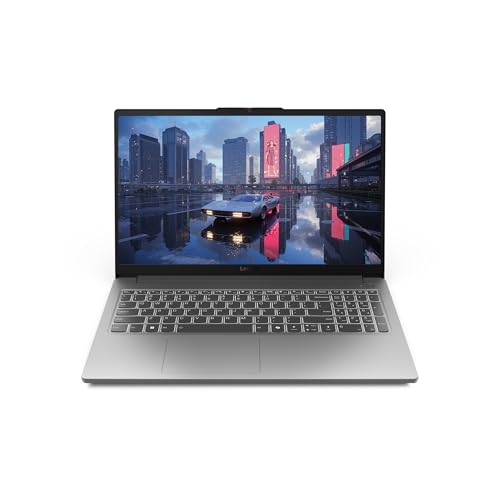
4. Lenovo LOQ Essential (i5-12450HX, RTX 4050) — Lightest Carry
- Best for: Students and commuters who carry their laptop daily and want the lightest RTX gaming machine in this guide.
- Lightest pick here at 4.2 pounds, easy to carry all day
- 144 Hz IPS display with 100 percent sRGB coverage
- RTX 4050 graphics with DLSS 3 and a rapid-charge battery
- 8 GB of memory is the lowest in this guide and limits heavy multitasking
Students and commuters who carry their laptop daily and want the lightest RTX gaming machine in this guide.
The Lenovo LOQ Essential is the lightest laptop in this guide at 4.2 pounds, and it is the pick if the laptop needs to travel. It pairs an Intel Core i5-12450HX processor with an NVIDIA GeForce RTX 4050 with 6 GB of GDDR6 graphics memory, so it still delivers real 1080p gaming with DLSS 3 support. The 15.6-inch Full HD IPS display runs at 144 Hz with 300 nits of brightness and 100 percent sRGB coverage, the same strong panel quality as its bigger LOQ sibling.
The trade-off is memory: 8 GB of DDR5 out of the box, upgradeable to 32 GB. For esports titles and lighter games, 8 GB is workable. For demanding AAA games with a browser and voice chat open, a memory upgrade is the first thing to plan. Storage is a 512 GB SSD. The machine includes rapid-charge technology, a 57 Wh battery, and three months of PC Game Pass. It runs Windows 11 Home and comes in Luna Grey.
Pros:
Cons:
5. HP Victus 15 (Ryzen 7 7445HS, RTX 4050) — Everyday All-Rounder
- Best for: Anyone who wants one dependable laptop for gaming, study, and work without paying for features they will never use.
- Balanced Ryzen 7 and RTX 4050 combination with 16 GB of DDR5
- Understated design that works anywhere, not just at a gaming desk
- Largest battery in this guide at 70 Wh
- 512 GB of storage is the standard budget limit and fills quickly
Anyone who wants one dependable laptop for gaming, study, and work without paying for features they will never use.
The HP Victus 15 is the steady, no-drama pick. Its AMD Ryzen 7 7445HS processor has 6 cores and 12 threads with a boost clock up to 4.7 GHz, paired with an NVIDIA GeForce RTX 4050 with 6 GB of GDDR6 graphics memory and 16 GB of DDR5 memory. That combination covers 1080p gaming comfortably, from competitive shooters at high refresh rates to single-player games at medium to high settings with DLSS enabled.
The display is a 15.6-inch Full HD IPS panel at 144 Hz with 300 nits of brightness. Storage is a 512 GB SSD. The Victus design is deliberately understated for a gaming laptop, without aggressive angles or loud branding, so it looks at home in a classroom or an office as well as on a desk at home. A backlit keyboard, numeric keypad, Wi-Fi 6, USB-C, and HDMI 2.1 cover everyday needs, the 70 Wh battery is the largest in this guide, and DTS:X Ultra audio adds depth to games and media. It ships with Windows 11 Home.
Pros:
Cons:
Buying Guide: How to Choose a Gaming Laptop Under 1000
Start with the graphics card
The graphics card decides which games run well and at what settings. In this tier, the realistic choices are the RTX 4050 with 6 GB of video memory and the RTX 5050 with 8 GB. Both handle 1080p gaming well. The RTX 5050 adds newer architecture, DLSS 4, and two extra gigabytes of video memory, which helps in newer titles with larger texture budgets. If you mostly play esports titles, either card is plenty. If you play large single-player releases, favor the card with more video memory.
Do not accept less than 8 GB of memory, and prefer 16 GB
Memory is the most common bottleneck in budget gaming laptops. With 8 GB, the system can run a game, but opening a browser, voice chat, and a streaming app at the same time will push it to its limit. With 16 GB, that same workload runs comfortably. Four of the five laptops in this guide ship with 16 GB. The LOQ Essential ships with 8 GB but can be upgraded to 32 GB, so treat its lower memory as a planned upgrade rather than a permanent limit.
Screen refresh rate matters more than resolution
At this tier, a 1080p or 1200p screen at 144 Hz or higher is the right target. A higher refresh rate makes motion visibly smoother in fast games and makes the whole system feel more responsive. All five laptops here have at least a 144 Hz panel, and the Nitro V 16 AI reaches 180 Hz. Do not trade a high-refresh screen for a higher-resolution one at this budget: a 1440p panel paired with a budget graphics card forces you to lower settings or resolution anyway.
Check the storage before you buy
Modern games are large, and several popular titles now take well over 100 GB each. A 512 GB drive holds the operating system, a handful of games, and not much else. The TUF Gaming A16 is the only pick here with a 1 TB drive from the start. For the others, confirm the exact configuration on the listing and plan your library around the space you actually have.
Confirm the exact configuration on the listing
Model names hide many configurations. Two laptops both called Nitro V 16 or LOQ 15 can ship with different processors, graphics cards, memory amounts, and screen refresh rates. Always confirm the processor model, graphics card, memory, storage, and screen refresh rate on the exact Amazon listing before ordering, and make sure the seller and the listed specifications match the configuration you expect. Gaming laptops run hot, so sustained performance depends on cooling: dual-fan designs such as the LOQ series are built to hold frame rates steady during long sessions, and battery life is modest across this whole tier, so treat these as machines that spend most of their gaming time plugged in.
Frequently Asked Questions
Can you get a good gaming laptop under 1000?
Yes. Current budget gaming laptops pair an RTX 4050 or RTX 5050 graphics card with a high-refresh display and at least 8 GB of memory, which is enough for smooth 1080p gaming in most modern titles. The compromises at this tier are storage capacity, usually 512 GB, and build materials, not gaming performance itself.
Do I need 16 GB of RAM for gaming?
16 GB is the sweet spot for this tier. It covers the game, voice chat, a browser, and background apps at the same time. 8 GB works for lighter games and esports but will feel tight in demanding AAA titles, so if you buy the 8 GB LOQ Essential, plan a memory upgrade as your first improvement. The RTX 4050 remains a solid value pick for 1080p gaming, while the RTX 5050 in the Nitro V 16 AI is the more forward-looking option, with 8 GB of video memory and DLSS 4 for the newest releases.
Is 512 GB of storage enough?
It is enough to start, but not generous. The operating system takes a share, and a few large games can fill the rest. The TUF Gaming A16 with 1 TB is the comfortable choice if you keep many games installed.
Conclusion
The best gaming laptops under 1000 in this guide all clear the same bar: a real RTX graphics card, a high-refresh screen, and enough memory to play modern games without constant compromise. The Lenovo LOQ 15 is the best overall balance, with an 8-core processor, a color-accurate 144 Hz display, and 16 GB of memory. The Acer Nitro V 16 AI is the pick for the newest graphics generation, with an RTX 5050, 8 GB of video memory, and a 180 Hz screen. The ASUS TUF Gaming A16 is the storage king, with a full terabyte drive and a durable 16-inch chassis. The Lenovo LOQ Essential is the lightest carry for students and commuters. And the HP Victus 15 is the dependable all-rounder with the biggest battery in the group.
Whichever one fits how you play, confirm the exact configuration on the Amazon listing before ordering, since model names cover many different builds.
How We Verified These Picks
Each laptop in this guide was matched to its Amazon US listing by product name, model number, and ASIN, using Amazon product-page data surfaced through search results and independent roundups that cite Amazon listings. Direct live loading of Amazon product pages is blocked for AI agents: Amazon returns an access-restricted response to automated requests, and direct page loads fail, so no ASIN in this article was confirmed by a live page view. Instead, each ASIN below was corroborated by at least one independent source that reproduces Amazon listing data.
- Lenovo LOQ 15, ASIN B0GZJXCT3P: Amazon listing data in search results shows the Ryzen 7 170 processor, RTX 4050 graphics, 16 GB DDR5 memory, 512 GB SSD, and 144 Hz display, with the ASIN in the listing details.
- Acer Nitro V 16 AI, ASIN B0FTT7JVJM: Amazon listing data in search results shows the Ryzen 5 240 processor, RTX 5050 graphics, 16 GB of memory, 512 GB SSD, and 180 Hz WUXGA display.
- ASUS TUF Gaming A16, ASIN B0FWKK9QSH: Amazon listing data in search results shows the Ryzen 7 7445HS processor, RTX 4050 graphics, 16 GB DDR5 memory, 1 TB SSD, and 144 Hz WUXGA display.
- Lenovo LOQ Essential, ASIN B0FMLCQZM8: Amazon listing data in search results shows the Core i5-12450HX processor, RTX 4050 graphics, 8 GB DDR5 memory, 512 GB SSD, and 144 Hz display, with the ASIN in the listing details. Corroborated by a November 2026 roundup tracking the same listing as in stock.
- HP Victus 15, ASIN B0G2LWJ8YP: Amazon listing data in search results shows the Ryzen 7 7445HS processor, RTX 4050 graphics, 16 GB DDR5 memory, 512 GB SSD, and 144 Hz display, with the ASIN in the listing details. Corroborated by a November 2026 roundup citing Amazon listing specs for the same configuration.
Specifications in this guide come from published listing data and vendor spec sheets, not from detailed research. Listings change, so confirm the exact configuration, seller, and availability on the Amazon page before ordering.
Related guides
More from Amazon
Programs that pair well with the guide above. Offers and eligibility are set by Amazon and may change.
A free business account with business pricing and bulk-buying tools for work, shop or home office.
Create a business accountFree shipping on eligible items, Prime Video and more. Eligible new members can start with a free trial.
Start a Prime free trialAudiobooks and podcasts to listen to on the go. Eligible new members can start with a free trial.
Try Audible freeAd-free music streaming. Eligible new subscribers can start with a free trial.
Try Music Unlimited freeAs an Amazon Associate we earn from qualifying purchases.