Our Short List of 3

- Best for: PC players who want a light, no-fuss wired headset for long sessions.
- 40mm drivers
- DTS Headphone:X Spatial Audio
- Swivel-to-mute microphone
- Lightweight over-ear design

- Best for: Competitive PC players who listen for footsteps and direction.
- 50mm Razer TriForce drivers
- 7.1 surround sound
- Razer HyperClear cardioid microphone
- Advanced passive noise cancellation
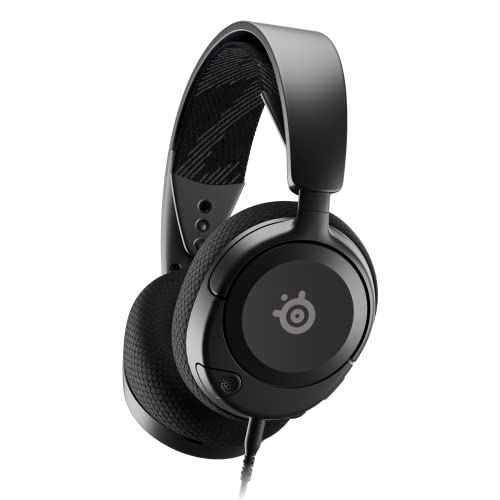
- Best for: Players who switch between PC, PlayStation, Switch, and Xbox.
- Hi-Fi drivers
- 360° Spatial Audio
- Noise-cancelling microphone
- AirWeave memory foam ear cushions
All 4 Picks at a Glance
| Product | Specs | Action |
|---|---|---|
| HyperX Cloud Stinger 2 Core |
| Check price on Amazon |
| Razer BlackShark V2 X |
| Check price on Amazon |
| SteelSeries Arctis Nova 1 |
| Check price on Amazon |
 Turtle Beach Recon 70 |
| Check price on Amazon |
An inexpensive gaming headset has to solve the same problem as a costly one: you need to hear the game clearly, your teammates need to hear you, and the headset has to stay comfortable for a whole evening. The cheapest options often fail on one of those three points, with muddy sound that hides footsteps, a microphone that makes callouts hard to understand, or earcups that ache after an hour. The real decision is not how little you can spend, but which corners you can live with and which ones will spoil a session.
This guide is for PC and console players who want a solid headset without a premium budget, including first-time buyers and anyone replacing a broken pair. Each headset below was chosen from its name and listed specifications on its Amazon product page, with the focus on sound, microphone, comfort, and compatibility rather than extras.
Our Top Picks
- Razer BlackShark V2 X Wired Gaming Headset with3.5 mm7.6 x 6.76 x 3.86 inches0.5 poundsCheck on Amazon
Top 3 picks at a glance
Quick Picks
As an Amazon Associate we earn from qualifying purchases.
| Product | Best for | Key spec from title |
|---|---|---|
| HyperX Cloud Stinger 2 Core | PC players who want light, simple wired comfort | 40mm drivers with DTS Headphone:X Spatial Audio |
| Razer BlackShark V2 X | Competitive PC players who listen for footsteps | 50mm TriForce drivers with 7.1 surround sound |
| SteelSeries Arctis Nova 1 | Players who switch between PC, PlayStation, Switch, and Xbox | Hi-Fi drivers with 360° Spatial Audio |
| Turtle Beach Recon 70 | First-time buyers who want the simplest multiplatform headset | 40mm speakers with flip-to-mute mic |
How to Choose
Sound comes first
Driver size tells you something, but it is not the whole story. A 40mm driver in a well-tuned headset can sound clearer than a larger driver in a careless one, so look at the whole package: the driver size, whether the listing mentions spatial or surround sound, and whether that feature works on your platform. Surround sound on many budget headsets only works on PC through software, so console players should expect stereo sound in most cases. If you play competitive shooters, clear mid-range detail matters more than heavy bass, because footsteps, reload sounds, and distant gunfire all sit in that range, and a headset that buries them under bass will cost you rounds.
Judge the microphone by its design
A headset microphone is only useful if your teammates understand you the first time you speak. Look for a cardioid or noise-cancelling microphone, which picks up your voice and rejects some of the noise around you, and check how muting works before you buy. A flip-to-mute boom or a swivel-to-mute design lets you silence yourself in one motion without hunting for a small button in the middle of a match. A flexible boom also helps you position the microphone near your mouth, which matters more than any software setting. If you stream or record regularly, treat a headset microphone as a starting point rather than a replacement for a dedicated microphone.
Comfort decides whether you keep it
A headset you take off after an hour is a bad purchase at any price. Lightweight designs with memory foam cushions spread pressure across your ears instead of concentrating it in one spot, and a padded headband matters once a session passes two hours. Over-ear cups suit most players better than on-ear cups because they enclose the ear instead of pressing on it. If you wear glasses, look for softer cushions and a lighter clamp, and remember that a headset that feels fine for ten minutes can still ache after a long night. Weight, cushion material, and clamp force together decide comfort far more than looks do.
Match the connection to your setup
Almost every inexpensive gaming headset is wired, and at this level that is usually a strength rather than a weakness: there is no battery to charge, no wireless signal to drop, and no delay between the game and your ears. Check the connector before you buy. A single 3.5mm jack plugs straight into a controller, a handheld, or a phone, while a desktop PC may need a splitter cable for separate headphone and microphone jacks, which some headsets include in the box. Also check the platform list in the product title, because a headset made for one console may still work elsewhere, but chat or surround features often stay locked to a single system.
The 4 Best Options
HyperX Cloud Stinger 2 Core
- Best for: PC players who want a light, no-fuss wired headset for long sessions.
- 40mm drivers
- DTS Headphone:X Spatial Audio
- Swivel-to-mute microphone
- Lightweight over-ear design
PC players who want a light, no-fuss wired headset for long sessions.
Wired only, so you stay tethered to your PC, and the plain design offers no wireless mode or extra features.
The Cloud Stinger 2 Core is the simplest headset in this list, and that is its strength. It is a lightweight wired headset for PC, built around 40mm drivers and DTS Headphone:X Spatial Audio, with a microphone that mutes when you swivel it up out of the way. There is no software to install and no battery to watch, so it works the moment you plug it in. The over-ear design and light frame suit long sessions at a desk, and the straightforward controls keep the focus on the game rather than on settings you will never touch.
Watch out for: Wired only, so you stay tethered to your PC, and the plain design offers no wireless mode or extra features.
Razer BlackShark V2 X
- Best for: Competitive PC players who listen for footsteps and direction.
- 50mm Razer TriForce drivers
- 7.1 surround sound
- Razer HyperClear cardioid microphone
- Advanced passive noise cancellation
Competitive PC players who listen for footsteps and direction.
The 7.1 surround sound needs PC software, so play on consoles and handhelds is stereo.
The BlackShark V2 X is the pick for players who care most about hearing detail. Its 50mm TriForce drivers and 7.1 surround sound are aimed squarely at competitive play, where the direction of a footstep or a reload can decide a round. The HyperClear cardioid microphone keeps your voice clear while cutting background noise, and the memory foam cushions with passive noise cancellation help block out the room around you. It connects with a standard 3.5mm jack, so it also works with PlayStation, Switch, and mobile, which makes it easy to move between setups.
Watch out for: The 7.1 surround sound needs PC software, so play on consoles and handhelds is stereo.
SteelSeries Arctis Nova 1
- Best for: Players who switch between PC, PlayStation, Switch, and Xbox.
- Hi-Fi drivers
- 360° Spatial Audio
- Noise-cancelling microphone
- AirWeave memory foam ear cushions
Players who switch between PC, PlayStation, Switch, and Xbox.
Wired only, with no wireless mode, and the slim, lightweight build feels less substantial than heavier headsets.
The Arctis Nova 1 is the most versatile headset here, and the one to choose if your games live on more than one machine. It works with PC, PlayStation, Switch, and Xbox, pairing Hi-Fi drivers with 360-degree spatial audio and a noise-cancelling microphone. The comfort design uses AirWeave memory foam ear cushions in an ultra-lightweight frame, so it stays easy to wear through long sessions. It is wired, which keeps the setup simple, and the durable build is made to survive being carried between rooms and setups without fuss.
Watch out for: Wired only, with no wireless mode, and the slim, lightweight build feels less substantial than heavier headsets.
Turtle Beach Recon 70
- Best for: First-time buyers who want the simplest headset that works everywhere.
- 40mm speakers
- Flip-to-mute microphone
- 3.5mm wired connection
- Lightweight design
First-time buyers who want the simplest headset that works everywhere.
No surround sound or tuning software, and the basic build is the plainest of the four headsets here.
The Recon 70 is the plainest headset in this list, and for a first headset that is exactly the point. It is a lightweight multiplatform headset with 40mm speakers, a flip-to-mute microphone, and a single 3.5mm wired connection that plugs into PlayStation, Xbox, PC, and mobile. There is nothing to install, charge, or configure, and the microphone mutes with a simple flip of the boom. If you want a headset that just works across every device in the house, this is the easiest starting point of the four.
Watch out for: No surround sound or tuning software, and the basic build is the plainest of the four headsets here.
Which One Fits Your Situation
You want the cheapest simple start
If this is your first gaming headset, or a replacement for a broken one, the Turtle Beach Recon 70 is the safe choice. It plugs into almost anything with a 3.5mm jack, the flip-to-mute mic is obvious to use, and there is no software or battery to manage. You give up surround sound and tuning options, but you get a headset that works on every device in the house from day one, which is what a first headset should do.
You play competitive shooters on PC
Choose the Razer BlackShark V2 X. Its 50mm drivers and 7.1 surround sound are built for hearing direction and detail, and the cardioid mic keeps callouts clear. The memory foam cushions and passive noise cancellation help you stay focused in a noisy room. Just remember that the surround effect needs PC software, so this pick shines brightest on a computer rather than on a console.
You game on several platforms
Choose the SteelSeries Arctis Nova 1. It is the only headset here that lists PC, PlayStation, Switch, and Xbox together, so one headset covers the whole household. The 360-degree spatial audio and noise-cancelling mic work across those systems, and the ultra-lightweight frame stays comfortable when a session moves from the desk to the couch. Buying one headset instead of two also saves space and money.
You want light comfort for long PC sessions
Choose the HyperX Cloud Stinger 2 Core. It is built around a lightweight over-ear design, with DTS spatial audio for PC play and a swivel-to-mute mic that stays out of the way when you are not talking. With no battery and no software to manage, it is a good fit for players who sit at a desk for hours and want a simple headset that stays comfortable.
Common Mistakes
- Buying on driver size alone: a bigger driver does not guarantee clearer sound, and tuning, comfort, and the microphone matter as much.
- Assuming surround sound works everywhere: on most budget headsets it needs PC software, so console play is usually stereo.
- Forgetting the PC splitter: a single 3.5mm plug may need a splitter cable for separate headphone and microphone jacks on a desktop.
- Choosing a headset that only fits one platform when you play on two or more: check the compatibility list in the product title before ordering.
- Ignoring comfort and clamp force: a headset that hurts after an hour will sit unused, however good it sounds.
Frequently Asked Questions
Do inexpensive gaming headsets sound good enough for competitive play?
Yes, for most players. The headsets here use 40mm or 50mm drivers with clear detail, and models with surround or spatial audio help with direction on PC. They will not match premium headsets for refinement, but they reproduce footsteps, reloads, and callouts clearly enough to compete. Comfort and microphone quality matter more than small differences in sound at this level.
Is a wired headset better than a wireless one at a low budget?
Usually, yes. A wired connection has no battery to charge, no wireless interference, and no delay to worry about, and the money goes into sound and comfort instead of a radio and battery. Wireless headsets at this level often cut corners on drivers or microphones. If you want wireless, expect to spend more for the same sound quality.
Will these headsets work with PS5, Xbox, and Switch?
Most of them will. The SteelSeries Arctis Nova 1 and Turtle Beach Recon 70 list PlayStation, Xbox, Switch, PC, and mobile in their titles, and the Razer BlackShark V2 X covers PC, PlayStation, and Switch. Check the title of the exact model you order, because console-specific versions exist, and chat or surround features can vary by platform.
What should I check before I order?
Confirm the platform list in the product title, check whether your PC needs a splitter for separate headphone and microphone jacks, and make sure the microphone mutes in a way you like. Also check the return policy of the seller, so you can send the headset back if the fit is uncomfortable or the microphone does not suit your voice.
Related guides
More from Amazon
Programs that pair well with the guide above. Offers and eligibility are set by Amazon and may change.
A free business account with business pricing and bulk-buying tools for work, shop or home office.
Create a business accountFree shipping on eligible items, Prime Video and more. Eligible new members can start with a free trial.
Start a Prime free trialAudiobooks and podcasts to listen to on the go. Eligible new members can start with a free trial.
Try Audible freeAd-free music streaming. Eligible new subscribers can start with a free trial.
Try Music Unlimited freeAs an Amazon Associate we earn from qualifying purchases.