A 16-inch laptop sits in an awkward middle ground. It gives you far more room than a 14-inch ultraportable, enough for two windows side by side or a timeline with its panels open, yet it still fits in a regular backpack and does not need the dedicated desk space of an 18-inch machine. The real decision is whether that extra screen is worth the extra weight, and which 16-inch model gives you a display and processor that justify it. Some of the listings below carry a 16:10 style panel with taller resolution, others are business machines built around anti-glare screens, and a few are low-cost generics where the title promises more than it explains.
This guide is for buyers who want more screen than a standard 15.6-inch laptop without moving up to a heavy workstation. Spreadsheet users, students juggling documents and video lectures, remote workers, and creators who edit on the go all fall into that group. Every pick here is judged only on the specs stated in its listing title, so where a detail is missing, the article says so rather than guessing. Going into 2026, the smart move is to compare the memory, storage, and panel details first and ignore the marketing adjectives.
Our Top Picks
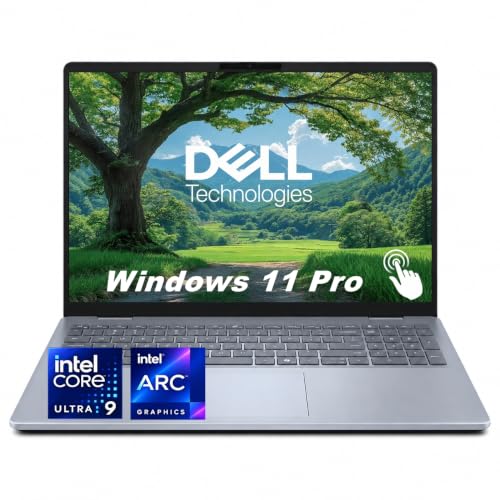
Top 3 picks at a glance
Quick Picks
As an Amazon Associate we earn from qualifying purchases at no extra cost to you.



| Product | Best for | Key spec from the title |
|---|---|---|
| HP OmniBook 3 16 | Budget home use with a touch screen | 2K touchscreen, 8 GB RAM, 512 GB SSD |
| Dell Pro 16 PC16250 | Office and business fleets | 16 GB DDR5, 16″ FHD+ anti-glare |
| Generic 16-inch Pentium laptop | Very light tasks on a tight budget | 8 GB DDR, 256 GB SSD, 9000 mAh battery |
| Lenovo ThinkPad E16 Gen 3 | Daily professional work | Ryzen 7, 16 GB / 512 GB, backlit keyboard |
| Generic 16-inch A9 laptop | Basic browsing and typing | 8 GB DDR, 256 GB SSD, numeric keypad |
| Dell 16 Plus | Premium Windows productivity | Core Ultra 9 288V, 32 GB RAM, 1 TB SSD |
| Apple MacBook Pro 16.2-inch | Heavy creative and AI-assisted work | M5 Pro, 24 GB unified memory, Liquid Retina XDR |
How to Choose
Check the panel resolution, not just the diagonal
A 16-inch screen at 1920 x 1080 spreads the same pixels over a larger area, so text looks softer than on a 15.6-inch panel. Look for 1920 x 1200 (FHD+) as the floor, since the taller 16:10 shape shows more rows of a spreadsheet or document. Anything labeled 2K or QHD+ is a bonus for photo and video work. Anti-glare coatings help in bright offices, while glossy touch panels look punchier but reflect more light.
Set memory and storage by workload
For general office work and browsing, 8 GB of RAM is workable but tight; 16 GB is the comfortable minimum for many browser tabs, video calls, and a spreadsheet open together. Creators and anyone running virtual machines should look at 24 GB or 32 GB. On storage, 256 GB fills up quickly after system updates and a few apps, so 512 GB is a sensible baseline and 1 TB suits large media libraries. Treat any “expandable” claim cautiously and confirm how the upgrade is done.
Match the processor class to the job
Entry chips such as Pentium or older AMD A-series parts handle email, documents, and streaming at a modest pace. Mainstream Ryzen 5 or Core 5 class chips handle multitasking more smoothly, and Ryzen 7, Core Ultra 9, or Apple M-series chips are the right tier for editing and compiling. Pay attention to whether the title names a specific processor or just a vague “quad-core” label, since the latter tells you very little about real speed.
Think about weight, battery, and ports
Larger screens usually mean a heavier chassis, so decide whether you will carry the laptop daily. Ignore big milliamp-hour figures from unknown brands unless the title also states a runtime, because battery capacity alone does not predict hours of use. Budget models tend to cut corners on display brightness, keyboard backlighting, and port selection, so check that the ports you need, such as USB-C or HDMI, are actually listed. If you only need a cheap second laptop for the couch, either unbranded 16-inch listing could fill that role, but keep expectations modest and buy only from a seller with a clear return policy.
The 7 Best Options
HP OmniBook 3 16
This model is aimed at households and students who want a large touch display without paying for a premium chassis. The listing names a 2K touchscreen, an AMD Ryzen 3 processor, 8 GB of RAM, a 512 GB SSD, and Radeon 610M graphics, with Windows 11 Home preinstalled.
- The 2K touchscreen is a clear step above a plain 1080p panel for reading and browsing.
- 512 GB of SSD space is generous at this tier.
- Trade-off: 8 GB of RAM leaves little headroom for heavy multitasking.
Skip it if you plan to edit video or run several demanding apps at once, since the entry-level processor and memory will be the limit.
Dell Pro 16 PC16250
The Dell Pro 16 targets office environments where reliability and a sober design matter more than flash. The title lists an Intel Core 5 120U, 16 GB of DDR5 memory, a 512 GB SSD, and a 16″ FHD+ anti-glare display, and it is branded as a business AI PC in the Latitude family.
- 16 GB of DDR5 is the right memory amount for everyday office multitasking.
- The anti-glare FHD+ panel suits bright rooms and long documents.
- Trade-off: the title also mentions a different Intel Ultra part, so confirm the exact processor before ordering.
Skip it if you want a touch screen or discrete graphics for gaming, as neither appears in the listing.
Generic 16-inch Pentium Laptop
This unbranded listing promises a 16-inch screen, 8 GB of DDR memory, a 256 GB SSD that is expandable to 1 TB, a Pentium quad-core CPU up to 2.64 GHz, a 9000 mAh battery, and USB 3 connectivity. It is built for the lowest budget bracket.
- The large screen and expandable storage are rare at this entry tier.
- USB 3 connectivity and a quad-core chip cover basic desk work such as documents and web pages.
- Trade-off: the title gives no screen resolution, panel type, or battery runtime, so quality is hard to judge.
Skip it if you need dependable support, a sharp display, or anything beyond web browsing and documents.
Lenovo ThinkPad E16 Gen 3
The ThinkPad E16 is the workhorse pick for professionals who type all day. The title lists a 16″ FHD+ display, a Ryzen 7 processor with eight cores, 16 GB of RAM, a 512 GB SSD, a backlit keyboard, and Copilot support, marketed as a premium business PC.
- An eight-core Ryzen 7 gives real headroom for spreadsheets, calls, and multitasking.
- The 16 GB and 512 GB pairing is a balanced baseline.
- Trade-off: the title mentions no dedicated graphics, so heavy 3D work is off the table.
Skip it if you want a thin consumer-style design or a touch screen, since the listing highlights neither.
Generic 16-inch A9 Laptop
This second unbranded listing pairs a 16-inch screen with 8 GB of DDR memory, a 256 GB SSD expandable to 1 TB, an AMD A9-9400 with Radeon R5 graphics running up to 3.2 GHz, a 9000 mAh battery, and a numeric keypad.
- The numeric keypad suits data entry on a large chassis.
- Expandable storage gives some room to grow.
- Trade-off: the A9 class processor is dated, so expect slow performance with modern browsers and many tabs.
Skip it if you plan to run video calls with shared screens or any creative software.
Dell 16 Plus
The Dell 16 Plus sits at the premium Windows end of this list. The title names an Intel Core Ultra 9 288V, 32 GB of RAM, a 1 TB SSD, Intel Arc 140V graphics, a 16″ FHD+ touchscreen at 1920 x 1200, Copilot+ AI features, and a backlit keyboard with fingerprint reader.
- 32 GB of memory and 1 TB of storage handle large projects and many open apps.
- The fingerprint reader and touch display add convenience for daily sign-in and navigation.
- Trade-off: premium-tier models like this generally sit well above the business and budget picks in this list.
Skip it if your tasks are light, because the specs go well beyond what email and documents require.
Apple MacBook Pro 16.2-inch
Apple’s 16.2-inch MacBook Pro is the top-tier option for creative professionals. The title states an M5 Pro chip with an 18-core CPU and 20-core GPU, a 16.2-inch Liquid Retina XDR display, and 24 GB of unified memory, positioned for AI-related work.
- The XDR display and Pro-class chip suit photo, video, and audio editing.
- Unified memory of 24 GB is a strong base for large timelines.
- Trade-off: it runs macOS, so Windows-only software needs a workaround.
Skip it if you depend on Windows-only business apps or want a low-cost machine.
Which One Fits Your Situation
You live in spreadsheets and email all day
The Lenovo ThinkPad E16 Gen 3 is the practical choice here, with an eight-core Ryzen 7, 16 GB of RAM, a backlit keyboard, and a roomy FHD+ screen that shows more rows per page.
You want the biggest budget-friendly screen with touch
The HP OmniBook 3 16 delivers a 2K touchscreen and 512 GB of storage, which is a rare combination at an entry tier, as long as your workload stays light.
You edit photos or video on the move
The MacBook Pro 16.2-inch is built for that, with its XDR display, Pro-class chip, and 24 GB of unified memory. Windows users who prefer that platform should look at the Dell 16 Plus with 32 GB of RAM.
You manage a small office fleet
The Dell Pro 16 PC16250 fits managed environments with its business branding, DDR5 memory, and anti-glare panel. Verify the processor wording with the seller before standardizing on it.
Common Mistakes
- Assuming a 16-inch screen is automatically sharp; always check the stated resolution.
- Buying 8 GB of RAM for a machine meant to last several years of updates.
- Trusting a big battery capacity figure without a stated runtime.
- Ignoring weight, then discovering the laptop is a chore to carry daily.
- Choosing an unbranded listing without confirming warranty and support terms.
Related guides
- Replacement Cables For Gaming Mice And Headsets
- Nvidia Control Panel Best Settings For Gaming
- How To Test Gpu Stability After Overclocking
Frequently Asked Questions
Is a 16-inch laptop too big for travel?
It is manageable in a standard backpack, but heavier than a 14-inch model. If you commute daily, weigh the extra screen space against shoulder strain.
How much RAM do I need on a 16-inch laptop?
Plan on 16 GB for general office work and 24 GB to 32 GB for creative tasks or virtual machines. 8 GB works only for light browsing and documents.
Are touchscreens worth it on a large laptop?
They help with note-taking and quick navigation, but they add reflections and can shorten battery life. Skip touch if you work mainly in bright, glare-heavy rooms.
Should I trust unbranded laptops with huge battery numbers?
Treat them carefully. A milliamp-hour figure without a stated voltage or runtime does not tell you how long the laptop will last, and support options are often thin.