For a new gaming build in 2026, DDR5 is effectively the only choice, because current AMD AM5 and Intel LGA1851 platforms do not accept DDR4. For an existing DDR4 system that already runs your games well, upgrading memory alone is rarely worth it, since the speed gain does not carry over to an older board. The real decision is the platform upgrade, not the RAM. Below are the verified differences, how much they matter in games, and how to judge whether a switch is worth the money.
Our Top Picks
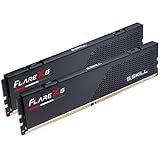
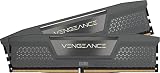
 Corsair Vengeance RGB RS DDR5 32GB32GB (2 x 16GB)5.43 x 0.27 x 1.77 Inches0.11 poundsCheck on Amazon

Top 3 picks at a glance
Quick Verdict
| Your situation | Our verdict |
|---|---|
| Building a new PC on AM5 or LGA1851 | DDR5 is required. Aim for 32GB at 6000 MT/s with an EXPO or XMP profile. |
| Happy with a Ryzen 5700X3D/5800X3D or 12th-14th Gen Intel build on DDR4 | Stay put. DDR4 is still fine, and a RAM swap is not possible without a new board. |
| CPU-limited at 1080p with a fast GPU | A platform move to DDR5 can help, though part of the gain comes from the newer CPU. |
| GPU-limited at 1440p or 4K | The RAM generation matters little. Spend on the GPU first. |
| 16GB of RAM and stutter in modern games | Add capacity before chasing speed: 32GB of either type is the bigger fix. |
The Key Differences
What changed in the standard
JEDEC’s DDR5 standard started at 4800 MT/s, where DDR4 launched at 2133 and topped out around 3200 as an official speed. DDR5 lowers the supply voltage from 1.2 V to 1.1 V, moves the power management chip onto each module, splits each 64-bit module into two independent 32-bit sub-channels, and doubles the burst length to 16 so a single burst on one sub-channel delivers a full 64-byte cache line. It also adds on-die error correction inside the chips, a feature that helps manufacturers at advanced process nodes and is separate from the full ECC found on workstation memory.
Those changes raise bandwidth, but they do not automatically lower latency. That is why early DDR5 kits did not beat well-tuned DDR4 in every game.
Bandwidth versus latency in real terms
Gamers care about both. Bandwidth is how much data moves per second; latency is how long the first piece takes. You can estimate latency yourself: first-word latency in nanoseconds equals the CAS latency number times 2000 divided by the transfer rate. A DDR4-3200 CL16 kit works out to 10.0 ns. A DDR5-6000 CL30 kit also works out to 10.0 ns, while a DDR5-6000 CL36 kit comes to 12.0 ns and a CL38 kit to about 12.7 ns. So a good DDR5 kit roughly matches good DDR4 on latency while offering far more bandwidth, and a loose-timing DDR5 kit gives some of that back. When comparing DDR5 kits, the timing number matters.
What testing shows, and what it does not
Published comparisons from outlets such as TechSpot and Tom’s Hardware generally find that DDR5 gains in games are real but uneven. In a TechSpot comparison on a high-end Intel processor, fast DDR5 beat fast DDR4 by single-digit to low-double-digit percentages on average at 1080p, with some CPU-heavy games showing larger gains and others showing no meaningful difference. Gains shrink as resolution rises and the GPU becomes the limit. Treat any specific percentage as belonging to its test setup, because CPU, GPU, game selection and memory kits all vary.
There is a second caveat: comparing a DDR4 platform with a DDR5 platform changes the processor as well as the memory. When a Ryzen 7 5800X3D (DDR4) is compared with a 7800X3D (DDR5), part of the difference comes from the newer architecture and clocks, so it is not a clean measure of the memory type. The large L3 cache on X3D chips also makes them less sensitive to memory speed, so memory tuning pays less on those parts than on non-X3D chips.
Platform lock-in
The memory type is decided by the CPU socket. AM5 accepts DDR5 only, and so does Intel’s LGA1851 for Core Ultra 200S. Intel’s 12th to 14th Gen LGA1700 boards come in either DDR4 or DDR5 versions, and AM4 is DDR4. Because of that, “DDR5 vs DDR4” is really a choice between platforms. Official support also differs: AMD lists DDR5-5600 for Ryzen 9000, with kits above that running on a profile, while the AM4 X3D chips list DDR4-3200.
Capacity and configuration matter as much as speed
Most of the gaming-relevant choices are not about the memory generation at all. Two matched modules in dual channel give the controller its full width, while a single module halves the available bandwidth. A 2 x 16GB layout also avoids the stability trouble that four-module setups can bring on AM5, where AMD’s published guidance lists lower official speeds for four-module configurations. If you are weighing 16GB of fast memory against 32GB of ordinary memory, the larger pool usually prevents more stutter in recent open-world games and when a browser, chat app and capture software run alongside the game. Speed tuning is the last ten percent of the job, not the first.
Cost and supply in 2026
Market trackers report that memory prices rose steeply in 2026 as manufacturers redirected capacity to AI-oriented memory, and that DDR4 is being phased out. Consumer DDR4 has generally stayed cheaper than DDR5, but the gap and the direction vary by region and week. These are market reports, not guarantees. The sensible rule is to avoid paying a premium for DDR4 just to save a little, and to buy the capacity you need once.
| Factor | DDR4 | DDR5 |
|---|---|---|
| Standard starting speed | 2133 MT/s | 4800 MT/s |
| Voltage | 1.2 V | 1.1 V |
| Typical gaming kit | 3200-3600 MT/s | 6000 MT/s with EXPO/XMP |
| Platforms | AM4, LGA1700 DDR4 boards | AM5, LGA1851, LGA1700 DDR5 boards |
| First-word latency, good kit | About 10 ns (3200 CL16) | About 10 ns (6000 CL30) |
How to Decide
- Find your bottleneck. If your GPU sits near full load in your favorite games at your resolution, memory generation will not move the needle.
- Check your CPU. If it is a DDR4 chip such as a 5700X3D, the cheaper path is to keep the platform.
- Price the full platform. A DDR5 switch means CPU, board and RAM. As a rule of thumb, only consider it when you are replacing the CPU anyway.
- Choose capacity first. 32GB is a safer baseline for modern games than 16GB, regardless of generation.
- Pick timings. For DDR5, favor 6000 MT/s with a lower CL, which gives better first-word latency at the same speed.
Worked example (illustrative): You game at 1440p with a mid-range GPU on a DDR4 platform and average 90 fps with the GPU at 95-99% load. Faster memory will not raise that number. If instead you play a strategy or simulation game where the CPU is the limit at 1080p, a newer platform with DDR5 could help more, and a 6000 CL30 kit gives the same 10 ns first-word latency as a good DDR4 kit with much higher bandwidth.
Products That Fit
All four kits below are 32GB (2 x 16GB) DDR5-6000-class kits from the Corsair Vengeance RS family, so they suit readers who decided to move to a DDR5 platform. Timings vary by SKU, so check them before comparing against the latency math above.
Corsair Vengeance RS 32GB DDR5-6000 – clean look, no RGB
As an Amazon Associate we earn from qualifying purchases at no extra cost to you.

This non-RGB kit suits builders who want a DDR5 upgrade without lighting. The listing describes dual AMD EXPO and Intel XMP 3.0 profiles, so one kit works across AM5 and Intel DDR5 boards. Onboard voltage regulation is described as helping stable tuning through Corsair’s iCUE software, though you do not need the software for basic EXPO or XMP use.
- 32GB (2 x 16GB) DDR5, up to 6000 MHz.
- AMD EXPO and Intel XMP 3.0 dual profiles.
- Listed dimensions about 5.43 x 1.73 inches, so roughly 44 mm tall.
- CAS latency and exact SKU timings: confirm on listing.
Caveat: RS-line kits have been listed with looser timings than the best 6000 CL30 kits, so check the number.
Corsair Vengeance RGB RS 32GB DDR5-6000 – lighting on a DDR5 build

If your build has lighting and you want the same speed class, this RGB variant keeps the 32GB, 6000 MHz target. It makes sense where the memory sits in a visible window and you plan to sync colors with the rest of the system. Performance is governed by speed and timings, not the lighting.
- 32GB (2 x 16GB) DDR5, up to 6000 MHz per listing name.
- Works with AMD EXPO and Intel XMP 3.0 boards; confirm on listing.
- RGB lighting; software support: confirm on listing.
- Maximum speed needs BIOS adjustment, as Corsair notes for the line.
Caveat: RGB adds software overhead you may not want, and the kit is as tall as other RS modules.
Corsair Vengeance RGB RS 32GB DDR5-6000 (alternate SKU) – matching a color scheme

This listing is another RGB RS variant with the same headline specs. It suits a reader who has settled on the RS family and needs a particular color or part number, or whose first choice is out of stock. The DDR5 benefits are the same; what changes is the exact SKU, which affects timings and color.
- 32GB (2 x 16GB) DDR5-6000 class.
- Part number and color: confirm on listing.
- Check EXPO versus XMP labeling for your CPU.
- Dimensions and height: confirm on listing.
Caveat: near-identical titles make it easy to buy the wrong SKU, so compare part numbers.
Corsair Vengeance RGB RS 32GB DDR5-6000 (another SKU) – second alternative
The final listing is another RGB RS variant. It is useful when you want to compare availability, or when a particular color suits your case. Think of it as an interchangeable option once you have confirmed timings and height match what you need.
- 32GB (2 x 16GB) DDR5, up to 6000 MHz in the title.
- Profile type and timings: confirm on listing.
- Do not mix with another kit, to avoid stability problems.
- RGB control software: confirm on listing.
Caveat: if two RGB RS listings look the same, the one that is in stock is a reasonable tiebreaker, but only after you have matched timings.
Common Mistakes
- Believing a memory swap alone upgrades an old platform; the generation is tied to the CPU socket and board.
- Judging DDR5 only by the MT/s number and ignoring CAS latency.
- Skipping the EXPO or XMP profile in the BIOS, so the kit runs at default speed.
- Trading capacity for speed: 32GB of slower RAM often beats 16GB of faster RAM in modern titles.
- Expecting large gains at 4K where the GPU is the limit.
- Attributing a whole platform upgrade’s gain to the RAM generation.
Questions
Is DDR5 better for gaming than DDR4?
On a platform that supports it, DDR5 offers more bandwidth and can improve CPU-bound games, especially at 1080p. The gain varies by game and shrinks when the GPU is the limit.
Is DDR4 still good enough in 2026?
Yes, for an existing system. A Ryzen 5700X3D or 5800X3D on DDR4-3200 to 3600 still handles most games well. DDR4 just has no future upgrade path, since new platforms use DDR5.
Should I get 16GB or 32GB?
32GB is the safer target for modern games and background apps. If you must choose between more capacity and a small speed bump, take the capacity.
What speed should I buy for DDR5?
DDR5-6000 with a low CAS latency is the commonly recommended target for AM5. AMD officially lists DDR5-5600 for Ryzen 9000, and profile speeds above that are validated overclocks.
Does RGB RAM perform differently?
No. Lighting does not change speed or timings. Compare the speed, timings and height instead.
Update History
- October 14, 2026 – Initial publication.
- Check the product page for current specifications and availability before buying.
Sources
- JEDEC DDR5 SDRAM standard overview (starting speed, voltage, sub-channels, burst length)
- AMD Ryzen processor specification pages (supported memory type and official speeds)
- Intel material on LGA1851 and LGA1700 memory support
- Published game-performance comparisons from TechSpot and Tom’s Hardware (used qualitatively)
- Corsair Vengeance RS product listing fields
- Trade and retail market trackers on 2026 memory supply (general context only)