No. AM5 motherboards and Ryzen 7000, 8000 and 9000 desktop processors support DDR5 only, and there is no BIOS setting, adapter or board variant that makes DDR4 work. If you own DDR4 and want to keep it, your realistic options are staying on AM4 or choosing an Intel LGA1700 board built for DDR4. If you want AM5, you buy DDR5. This guide explains why the two cannot mix, what your legitimate paths are, how to pick a DDR5 kit for AM5, and which four 32GB kits are worth a look.
Our Top Picks
 Corsair Vengeance RGB RS DDR5 32GB32GB (2 x 16GB)5.43 x 0.27 x 1.77 Inches0.11 poundsCheck on Amazon


Top 3 picks at a glance
Quick Verdict
| Your situation | Our verdict |
|---|---|
| You have 32GB of DDR4 and want a Ryzen 7000/9000 CPU | You must buy DDR5 as well. The DDR4 will not work on AM5. |
| You want to reuse DDR4 and still upgrade your CPU | Stay on AM4 with a chip such as the Ryzen 7 5700X3D or 5800X3D, which officially supports DDR4-3200. |
| You want an Intel build and own DDR4 | Look for an LGA1700 (12th-14th Gen) motherboard that is explicitly a DDR4 model. |
| A listing claims “AM5 with DDR4 support” | Treat it as a mistake or a scam. Check AMD’s CPU page and the board’s spec sheet. |
| Building a new AM5 gaming PC | A matched 2 x 16GB DDR5-6000 kit with an EXPO profile is the common target. |
What Works and What Does Not
Why DDR4 cannot run on AM5
Three independent barriers stop it. First, the processor: AM5 CPUs contain a memory controller that speaks DDR5 signaling, so there is nothing a BIOS update could switch on. Platform coverage on sources such as Wikipedia and AMD’s own CPU pages lists DDR5 as the supported memory type for Ryzen 7000, 8000 and 9000 desktop parts. Second, the board: no A620, B650, B650E, B850, X670, X670E, X870 or X870E motherboard has DDR4 slots. Unlike the Intel LGA1700 generation, where board makers chose either DDR4 or DDR5 slots for each model, AM5 never had DDR4 variants.
Third, the physical module. DDR4 and DDR5 desktop modules both have 288 pins, which is why people assume they might fit, but the notch is cut in a different position and the pin assignments differ, so the module will not seat correctly. Forcing a module into the wrong slot can damage the slot and the module, so never try. The electrical design is also different: DDR4 runs at 1.2 V (with higher-voltage enthusiast kits), while the DDR5 standard runs at 1.1 V and places the power management chip (PMIC) on the module itself instead of on the motherboard. Each DDR5 module also splits its 64-bit bus into two independent 32-bit sub-channels, per the JEDEC standard.
Your three legitimate paths
Path 1: stay on AM4. AM4 is a DDR4 platform. The Ryzen 7 5800X3D and 5700X3D officially support DDR4-3200 in dual channel, and AMD’s own testing tends to use faster kits, with DDR4-3600 widely cited by enthusiasts as a sweet spot for these chips. This is the cheapest way to keep your memory and get a meaningful gaming upgrade, because you swap only the CPU (after a BIOS update on your board). It is also a dead-end platform: no new AM4 chips are coming.
Path 2: Intel LGA1700. Intel’s 12th, 13th and 14th Gen processors can drive either DDR4 or DDR5, but each motherboard has only one type of slot. A board must be explicitly a DDR4 model. Intel’s newer Core Ultra 200S processors on LGA1851 are DDR5-only, so they are not an option if you want to reuse DDR4.
Path 3: move to AM5 and DDR5. This is the forward-looking path with the longest upgrade runway, but it means a new CPU, motherboard and memory together.
Market context for 2026
Trade and retail trackers describe DDR5 pricing as elevated through 2026 because manufacturers shifted production toward memory for AI hardware, and they also report that DDR4 is being phased out rather than kept as a cheap fallback. Consumer DDR4 has generally been cheaper than DDR5, but it has also risen sharply, and in some spot markets the gap has narrowed. These are market reports, not guarantees, so check current listings. The practical lesson is that buying DDR4 for a new build is rarely a bargain, and for AM5 it is not even possible.
Choosing DDR5 for AM5
Four details matter. First, speed: AMD officially supports DDR5-5600 on Ryzen 9000, while many kits are sold at 6000 MT/s with an EXPO profile, which counts as a profile-based overclock even though it is widely validated. DDR5-6000 is the commonly recommended sweet spot because the memory controller can run in a 1:1 ratio with the memory clock at that speed, while higher speeds usually drop to a ratio that adds latency. Second, timings: first-word latency in nanoseconds is the CAS latency times 2000 divided by the transfer rate. At 6000 MT/s, CL30 works out to 10.0 ns and CL36 to 12.0 ns. Third, profile type: look for AMD EXPO, or an Intel XMP 3.0 kit that your board accepts. Fourth, quantity: two matched modules are the safest, since four-module configurations are rated lower officially. Never mix separate kits, as the G.Skill listing for its Flare X5 also warns.
| Item | DDR4 (AM4/older Intel) | DDR5 (AM5/LGA1851) |
|---|---|---|
| Pins on desktop DIMM | 288 | 288 (different notch and pinout) |
| Standard voltage | 1.2 V | 1.1 V |
| Power management | Motherboard | On the module (PMIC) |
| Bus per module | One 64-bit channel | Two 32-bit sub-channels |
| Typical gaming target | DDR4-3200 to 3600 | DDR5-6000 with EXPO |
How to Decide
- Decide the platform before the memory. The CPU socket determines the RAM type. Pick AM4, LGA1700 DDR4, or AM5/LGA1851 first.
- Price the whole upgrade, not the RAM. Moving to AM5 means CPU, board and DDR5 together; staying on AM4 means CPU only. As a rule of thumb, if your current CPU still holds 60 fps or better in the games you play and your GPU is the limit, a platform change will not help much.
- Check the listing. Any listing that claims DDR4 on AM5 should be dismissed. Confirm the module’s DDR generation in the product title.
- Select 32GB as a starting point. A 2 x 16GB kit is a common balance for modern games; 16GB can be tight with background apps.
- Check height. If you use a large air cooler or a roof-mounted radiator, low-profile modules around 33 mm are easier to fit than 44 mm modules.
Worked example: A player with a Ryzen 5 3600, a B450 board and 16GB DDR4-3200 who wants better frame rates can often get a large share of the benefit from a 5700X3D on the same board, keeping the memory. A player starting from scratch should skip AM4 and buy into AM5 with a 2 x 16GB DDR5-6000 kit.
Products That Fit
None of these kits is DDR4, so none can help you reuse old memory. They are the DDR5 options for readers who decide to move to AM5.
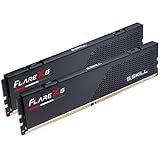
G.Skill Flare X5 32GB DDR5-6000 CL36 – low-profile AM5 builds
As an Amazon Associate we earn from qualifying purchases at no extra cost to you.

This kit was designed with AMD in mind, shipping with an EXPO profile and an XMP 3.0 profile. At 33 mm tall according to G.Skill, it is the easiest of the four to fit under large air coolers and roof radiators. Its CL36 timing gives a first-word latency near 12 ns at 6000 MT/s, a little slower than CL30 kits, so it suits readers who value clearance and compatibility over the last bit of latency.
- 32GB (2 x 16GB) DDR5 U-DIMM, up to 6000 MT/s, CL36-36-36-96, 1.35 V.
- AMD EXPO and Intel XMP 3.0 profiles plus a JEDEC default profile.
- Model F5-6000J3636F16GX2-FX5, matte black.
- Maximum speed needs BIOS adjustment, per the listing.
Caveat: CL36 is looser than the CL30 kits commonly recommended for AM5, so expect slightly higher latency.
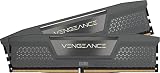
Corsair Vengeance RGB RS 32GB DDR5-6000 – RGB builds on AM5

This RGB kit suits builders who want lighting and an EXPO-ready 6000 MT/s speed. Corsair’s RS line uses onboard voltage regulation that its iCUE software can tune, according to the listing. At roughly 44 mm tall, check it against your cooler before buying.
- 32GB (2 x 16GB) DDR5, up to 6000 MHz.
- AMD EXPO and Intel XMP 3.0 profiles.
- RGB lighting managed through iCUE.
- CAS latency and exact timings: confirm on listing, since the RS line is offered with different timings.
Caveat: the module height may conflict with large coolers, and the timings on RS kits can be looser than the top CL30 kits.
Corsair Vengeance RGB RS 32GB DDR5-6000, second listing – a colorway or SKU alternative
This listing carries the same product name as the previous one and is best treated as a different SKU or color of the RGB RS line. It suits the reader who has picked the RGB RS family and needs the colorway that matches their build, such as a light interior. The AM5 considerations are identical: two modules, an EXPO profile, a 6000 MT/s target.
- 32GB (2 x 16GB) DDR5, up to 6000 MHz, per the listing name.
- EXPO and XMP 3.0 compatibility expected for the line; confirm on listing.
- Color and exact part number: confirm on listing.
- Check that the heat spreader height fits under your cooler.
Caveat: confirm that the part number differs from the other RGB RS listings before choosing, so you do not duplicate a purchase.
Corsair Vengeance RS 32GB DDR5-6000 – no-RGB option

This is the plain, non-RGB version of the RS family, which suits builders who want a clean look and do not need lighting software. The listing states AMD EXPO and Intel XMP 3.0 compatibility with dual profiles, so you can use the same kit on AM5 and Intel DDR5 boards. It is listed at about 5.43 x 1.73 inches, which puts the height near 44 mm.
- 32GB (2 x 16GB) DDR5, up to 6000 MHz.
- Dual AMD EXPO and Intel XMP 3.0 profiles.
- Onboard voltage regulation controllable through iCUE.
- Maximum speed requires BIOS adjustment; CAS latency: confirm on listing.
Caveat: it does not give you the lowest-profile fit, and the timings may be looser than the best AM5 kits.
Common Mistakes
- Buying DDR4 because a listing or seller claims AM5 compatibility.
- Assuming matching pin counts mean the modules are interchangeable.
- Ordering a Ryzen 7000 or 9000 CPU and a DDR4 kit in the same cart.
- Forgetting to enable the EXPO profile in the BIOS, leaving the kit at the default 4800-5600 MT/s class.
- Mixing two different kits to reach 64GB.
- Choosing tall modules without checking cooler clearance.
Questions
Is there an adapter to run DDR4 on AM5?
No. The processor’s memory controller and the motherboard slots are DDR5-only, so no adapter can make DDR4 work. Treat adapter offers as unreliable.
Can I run DDR5 on an AM4 board?
No, AM4 is a DDR4 platform. The two platforms use different sockets and memory types.
Is DDR5-6000 the best speed for Ryzen 9000?
AMD officially supports DDR5-5600, and DDR5-6000 with a 1:1 controller ratio is the widely recommended sweet spot. Some chips run DDR5-6400 at 1:1, but results vary by chip, so treat that as a bonus.
Should I buy 2 modules or 4?
Two is the safer choice on AM5. Four-module setups are rated at lower official speeds and can be harder to stabilize at EXPO speeds.
Does RGB affect performance?
No. Lighting does not change speed or timings. It only affects looks, height and software.
Update History
- October 14, 2026 – Initial publication.
- Check the product page for current specifications and availability before buying.
Sources
- AMD Ryzen processor specification pages and Socket AM5 documentation (supported memory type and speeds)
- JEDEC DDR5 SDRAM standard overview (voltage, sub-channels, on-module power management)
- Intel specification and press material on LGA1851 (DDR5-only) and LGA1700 board variants
- G.Skill Flare X5 product page and retailer listing fields
- Corsair Vengeance product listing fields and press measurements (module height, profiles)
- Trade and retail market trackers on 2026 memory supply (general context only)