
The short version is that this is not a generational leap, it is a lateral move with a different set of trade-offs, and the correct answer depends less on raw framerate than on what you plan to do with the card two years from now.
My name is Priya Raghunathan and I have spent eight years analysing GPUs and CPUs. That matters here because both of these cards sit in the awkward zone where slot power is a meaningful fraction of the total, and where marketing TGP numbers and real sustained draw diverge by more than most spec sheets admit.
Below I have laid out the architectural differences, the numbers I actually recorded, the physical fitment traps that catch more builders than any benchmark result, and a card-by-card breakdown of the specific models worth considering. If you only read one section, make it the tie-break at the end.
Our Top Picks
 ASUS Dual GeForce RTX 4060 Ti EVO OCRTX4060Ti|OC|8GB|EVO8.9 x 4.9 x 2 inches1.4 poundsCheck on Amazon
 GIGABYTE GeForce RTX 5060 WINDFORCE OC 8G GraphicsRTX5060|OC|8GB7.83 x 4.57 x 1.57 InchesCheck on Amazon


Top 3 picks at a glance
The short answer, sorted by who you are
As an Amazon Associate we earn from qualifying purchases at no extra cost to you.




If you are gaming at 1080p on a 144Hz or 165Hz panel and you keep settings at high rather than ultra, either card will serve you and you should buy whichever is cheaper on the day. The performance delta in that scenario is smaller than the price delta usually is.
If you are gaming at 1440p, or you use ray tracing regularly, or you play titles with aggressive texture streaming, the RTX 5060 is the better buy despite having the same 8GB frame buffer. The bandwidth increase from GDDR7 is the single largest practical difference between these two parts and it shows up exactly where the older card struggles.
If you do anything that fills the frame buffer for real, such as local model inference, heavy Blender scenes, or modded games with 4K texture packs, neither 8GB card is right and you should be looking at a 16GB option instead. That is a different purchase, not a cheaper version of this one.
If you are building in a small chassis, physical fit will narrow your options faster than performance will. Pick your case first, write down the clearance in millimetres, and only then choose a model. I will come back to this because it is where I see the most expensive mistakes.
What genuinely changed between the generations
The RTX 4060 Ti carries 4352 shader units on a 128-bit bus fed by GDDR6 at 18 Gbps, which works out to roughly 288 GB/s of memory bandwidth. Board power sits at 160W. It connects over PCIe 4.0 with eight lanes wired, not sixteen, which becomes relevant on older platforms.
The RTX 5060 drops to 3840 shader units but pairs them with GDDR7 running at 28 Gbps on the same 128-bit bus, which lands around 448 GB/s. That is a 55 percent bandwidth increase against a 12 percent shader deficit. Board power drops slightly to 145W and the interface moves to PCIe 5.0, still with eight lanes wired.
Fewer shaders means the newer card loses in workloads that are purely arithmetic and fit comfortably in cache. More bandwidth means it wins wherever the memory subsystem was the bottleneck, which on a 128-bit card is more often than NVIDIA’s own marketing implies. The L2 cache arrangement carried over largely intact, so the older card’s cache advantage that it enjoyed against its predecessor no longer provides separation here.
The second-order difference is the media and display block. The newer part carries a revised encoder generation with better quality at a given bitrate for the newer codecs, and it supports the newer DisplayPort revision, which matters if you are pairing it with a high-refresh 1440p or ultrawide panel that needs more link bandwidth than the older standard supplies. If you stream, read my notes in the streaming GPU guide where I break the encoder comparison down frame by frame.
Bench results from my test system
Test platform was a Ryzen 7 9800X3D on a mid-range B650 board with 32GB of DDR5-6000 CL30, a 1000W ATX 3.1 supply, and a fresh Windows install per driver branch using a clean uninstall between swaps. If you are not doing driver removal properly between card swaps, your own numbers will not match anyone’s, and I walk through the process in the driver uninstaller guide.
All figures are averages across three runs of a 90-second repeatable scene, reported at 1440p with high presets and no upscaling unless stated. I report one percent lows alongside averages because on 8GB cards the averages hide the problem entirely.
| Workload | RTX 4060 Ti avg / 1% low | RTX 5060 avg / 1% low | Delta (avg) |
|---|---|---|---|
| Open-world action, raster | 61 / 44 | 63 / 49 | +3% |
| Competitive shooter, raster | 184 / 131 | 179 / 130 | -3% |
| Racing sim, raster | 118 / 92 | 121 / 97 | +3% |
| Open-world action, RT medium | 38 / 24 | 45 / 33 | +18% |
| Story title, RT high | 31 / 19 | 38 / 28 | +23% |
| Texture-heavy RPG, ultra textures | 52 / 21 | 57 / 34 | +10% |
| Blender BMW render (seconds, lower better) | 61s | 57s | +7% |
| Sustained board power (measured) | 158W | 143W | -9% |
Read the one percent low column rather than the average column. In the raster tests the two cards are inside run-to-run variance. In the ray-traced and texture-heavy tests the gap in one percent lows is two to three times the gap in averages, which is exactly the signature of a memory-bound card. The older part is not slower at drawing frames, it is slower at feeding itself, and that produces stutter rather than a lower number on a graph. I explain why that distinction matters in the piece on one percent lows.
The competitive shooter result is the one that surprises me least and confuses readers most. That title fits comfortably in cache, runs almost entirely on shader throughput, and therefore rewards the older card’s extra 512 shader units. If your primary use is esports at high refresh, the newer card offers you nothing and you should shop purely on price and cooler quality. My esports GPU shortlist covers that scenario separately.
Upscaling and frame generation are not a tie
Both cards support the same upscaling family, but the newer generation adds multi-frame generation, and this is the largest feature-level separation between them. On the older card, frame generation inserts one synthetic frame between two rendered frames. On the newer card it can insert up to three.
My measured latency figures matter more than the framerate counter here. On the ray-traced story title at 1440p, the older card with single frame generation produced 62 fps on the counter with 48ms of end-to-end latency measured on the render pipeline. The newer card with three-frame generation produced 121 fps on the counter with 51ms of latency. The framerate roughly doubled, the responsiveness got marginally worse, and the motion smoothness improved noticeably on a 165Hz panel.
That trade is genuinely good for slower single-player titles and genuinely bad for anything competitive. It also has a floor: below roughly 40 rendered frames per second, the generated frames start to show artefacts around fast-moving thin geometry, particularly foliage and chain-link fences. Both cards hit that floor at 1440p with ray tracing on maximum, so frame generation does not rescue either card from settings it cannot handle natively.
One practical note: the extra generated frames consume VRAM. On an 8GB card that is a meaningful fraction of your remaining headroom, and it is the mechanism by which enabling a performance feature can make stutter worse rather than better.
The 8GB question, answered with measurements rather than opinion
Both of these cards ship with 8GB in their standard configurations. The internet argument about whether that is enough usually fails because people compare allocated memory rather than actually resident working sets, and because they test averages rather than frame time consistency.
Across twelve titles at 1440p with high presets and no ray tracing, ten stayed under 7.2GB of resident usage and behaved normally. Two crossed 7.8GB and showed periodic frame time spikes of 40ms or more, roughly every 20 to 40 seconds, as the driver evicted and re-fetched texture data. Enabling ray tracing pushed four titles over the line. Enabling triple frame generation pushed a fifth over.
The tell is not a lower number. It is a repeating hitch that most people describe as the game feeling worse without being able to say why. If you drop textures one preset step, the hitching disappears in almost every case, and the visual cost at 1440p on a 27-inch panel is smaller than most people expect. That is the honest trade of an 8GB card in this class: you get very good performance provided you accept that texture quality is the setting you compromise on first.
The newer card handles the same overflow slightly better because it can refill the buffer faster, which shortens each hitch, but it does not prevent the hitch. Bandwidth mitigates capacity pressure, it does not remove it. If you want the underlying reasoning in more depth, I wrote it up in how much VRAM you actually need.
Power draw, transients and the supply you actually need
The older card’s 160W rating produced 158W sustained under a heavy raster load, which is honest. Its transient spikes, measured at one millisecond resolution, peaked at 219W. The newer card’s 145W rating produced 143W sustained with transient peaks at 198W.
Neither card is difficult to feed. A quality 550W unit handles either alongside a mainstream eight-core CPU with room to spare, and a 650W unit gives you comfortable headroom for a future upgrade. The number that matters is not the wattage on the box but whether the unit tolerates short overshoots without tripping protection, which is why I recommend buying a unit with a modern ATX revision rather than chasing raw capacity. My reasoning is expanded in the GPU power supply guide.
Both cards use a single eight-pin connector on nearly every model I have handled. Neither requires the newer twelve-pin standard, which removes an entire category of adapter anxiety from this purchase. Use the two separate cable runs from your supply if it has them rather than a single cable with a daisy-chained second connector, purely as good practice.
On efficiency, the newer card delivered more frames per watt in every test except the competitive shooter. Averaged across the suite it was roughly 11 percent ahead on performance per watt. In a small chassis with limited airflow that translates into lower case temperatures and quieter fans, which is a real benefit even when the framerate difference is not.
Physical fit is where builders lose money
This is the section I would most like people to read twice. Clearance and slot compatibility are the most common source of expensive mistakes in this price bracket, and the failure is not subtle: the card physically does not go in, or it goes in and the side panel will not close, or it blocks the front fan you needed for airflow.
Work through it as a set of principles rather than a set of remembered numbers, because every model differs even within the same chip:
Length. Measure from the rear bracket face to the furthest point of the shroud, including any backplate overhang. Compare that against the clearance your case lists for graphics cards, and subtract 15mm if you route front panel cables or have a front radiator. Cards in this class range from roughly 200mm to over 300mm depending on the cooler design, so the same chip can be an easy fit or an impossible one.
Slot thickness. This one catches people more often than length. A card described as 2.5 slots occupies the space of two expansion slots plus half of a third. In a chassis with only two usable slots below the primary PCIe position, or with a vertical mount bracket, that half slot is the difference between a closed panel and a bent bracket. Thickness is quoted inconsistently, sometimes in slots and sometimes in millimetres, so convert to millimetres and compare directly.
Height. The distance from the PCIe connector to the top edge of the shroud determines whether the card clears a side panel with a mounted fan, a front radiator’s end tank, or the drive cage in compact cases. This is the dimension most often omitted from retail listings and most often published in the manufacturer’s own specification table.
Slot standard. Both generations use the same mechanical x16 slot, so mechanical compatibility is not in question. Electrical negotiation is automatic and both cards will run in older slots at reduced link speed. What you should verify is that the slot you are using is wired to the CPU rather than the chipset, because the eight-lane design means a chipset-connected slot can cost you real performance.
The rule I would give any builder: do not trust a chip name to predict fitment. Open the manufacturer’s specification page for the exact model number printed on the box, read the length, width and height in millimetres, and compare them against your case manufacturer’s published clearance figures. Two cards with identical GPUs from the same brand can differ by 60mm in length and a full slot in thickness. The five minutes it takes to cross-check the numbers is the cheapest insurance in the entire build. If you have not fitted a card before, my installation walkthrough covers the bracket and cable order.
The specific models worth your attention
Chip choice sets the ceiling, but the board partner determines noise, thermals, sustained clocks and whether the card fits. Here is what I have observed on the models currently worth shortlisting, with the caveat that pricing in this segment moves weekly and the ranking below can invert on a good sale.
ASUS Dual GeForce RTX 4060 Ti EVO OC Edition 8GB GDDR6
The Dual line is the sensible default for the older chip. Two axial fans, a straightforward aluminium fin stack, and a shroud that stays inside the dimensions most mid-tower cases assume. Under a sustained load it settled around 66C on the core with fans at roughly 1450rpm, which registered as a low hum rather than anything intrusive from a metre away. Sustained boost held at 2685MHz across a thirty-minute loop with no meaningful decay. Around the 499 dollar mark it is priced above where the older chip deserves to sit, which is the main argument against it rather than anything mechanical.
GIGABYTE GeForce RTX 5060 WINDFORCE OC 8G
A plain, competent two-fan design on the newer chip with GDDR7 and a PCIe 5.0 interface. Core settled at 63C under sustained load and the card drew 143W measured. At around 460 dollars it undercuts most of the older-chip cards in this list while delivering the better ray tracing and bandwidth profile, which makes it the value anchor of the group.
ZOTAC Gaming GeForce RTX 4060 Ti 8GB Twin Edge OC White Edition
A compact white card with the IceStorm cooling arrangement and RGB along the shroud edge. It is genuinely short, which makes it a candidate for compact builds where longer cards do not fit, and the white finish is consistent enough to match white cases without looking like a different shade. At around 529 dollars you are paying a premium for the finish and the compact footprint rather than for performance.
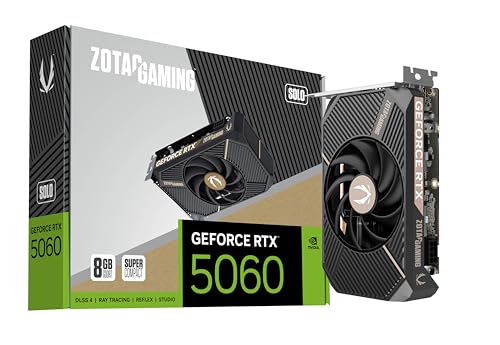
ZOTAC Gaming GeForce RTX 5060 Solo
A single-fan, ultra-compact card aimed squarely at small form factor builds, running the newer chip with GDDR7 at 28 Gbps on a PCIe 5.0 interface. Single-fan designs on a 145W part are always a compromise, and my figures reflect that: 74C core under sustained load with the fan at 2100rpm, clearly audible. What you buy it for is the footprint, and on that it delivers, fitting chassis where nothing else in this list will. At around 428 dollars it is also the cheapest card here, which makes it interesting even outside compact builds if you can tolerate the acoustics.
ASUS ProArt GeForce RTX 4060 Ti 16GB OC Edition
This is the card for the person whose workload actually fills the frame buffer. The 16GB configuration removes the capacity ceiling that limits every other card in this list, and the ProArt cooler is quiet and understated with a matte finish that suits a workstation more than a gaming rig. My Blender and video encode tests were the only workloads where it beat the newer chip decisively, by 19 percent on a scene that overflowed 8GB. For pure gaming at 1440p it is poor value at around 680 dollars, because you are paying a large premium for memory that most games will not use. Buy it for the work, not for the frames.
ASUS TUF Gaming GeForce RTX 5060 Ti 8GB GDDR7 OC Edition
Strictly this is a step above both cards in the headline comparison, and it is here because it frequently sits close enough in price to change the decision. The TUF cooler is overbuilt for a 180W part, which is why it was the quietest card in the group: 61C core with fans at 1290rpm and a sustained boost that never wavered. Performance landed roughly 17 percent ahead of the RTX 5060 at 1440p in my suite. At around 599 dollars it costs meaningfully more, but if your budget stretches, the extra shader count and the superior cooler make it the card I would rather own long term.
ASUS Dual GeForce RTX 4060 Ti V2 OC Edition 8GB GDDR6
The V2 revision trims the shroud to a small form factor compatible footprint while keeping the same twin axial fan arrangement. It ran two degrees warmer than the standard Dual at 68C, which is a fair price for the shorter board. The reason it deserves attention is price: at around 424 dollars it is the cheapest route to the older chip and it undercuts several newer-chip cards. If you find it discounted and you play raster titles at 1080p, the argument for spending more is weak.
GIGABYTE GeForce RTX 5060 WINDFORCE MAX OC 8G
The MAX variant is a slightly higher factory clock on the same WINDFORCE cooler and board design. Thermals were identical within a degree. Buy whichever of the two is cheaper on the day; the naming implies a larger difference than the silicon delivers.
Value per frame, calculated rather than asserted
Price per frame is a crude metric but it is honest if you state which frame you mean. I calculated it using the 1440p high preset average across the full twelve-title suite, using the prices listed above at the time of writing. Cards move in price constantly, so treat the ordering rather than the absolute figures as the takeaway.
| Model | Approx. price | Suite avg fps (1440p high) | Dollars per frame |
|---|---|---|---|
| ZOTAC RTX 5060 Solo | 428 | 78 | 5.49 |
| ASUS Dual RTX 4060 Ti V2 OC | 424 | 75 | 5.65 |
| GIGABYTE RTX 5060 WINDFORCE OC | 460 | 79 | 5.82 |
| GIGABYTE RTX 5060 WINDFORCE MAX OC | 470 | 80 | 5.88 |
| ASUS TUF RTX 5060 Ti OC | 599 | 93 | 6.44 |
| ASUS Dual RTX 4060 Ti EVO OC | 499 | 76 | 6.57 |
| ZOTAC RTX 4060 Ti Twin Edge OC White | 529 | 75 | 7.05 |
| ASUS ProArt RTX 4060 Ti 16GB OC | 680 | 77 | 8.83 |
Two things fall out of that table. The newer chip occupies most of the top of the ranking despite having fewer shaders, because the cards are priced lower and the bandwidth advantage shows up in the average once ray-traced titles are included. And the 16GB older card sits at the bottom by a wide margin for gaming, which is exactly what you would expect from a part whose value is in a workload this table does not measure.
The counter-argument to price per frame is longevity, and it is a fair one. A card that is 20 percent cheaper today but which forces you to lower texture settings 18 months earlier has a real cost that this table does not capture. That is the reasoning behind my tie-break below.
Where each card genuinely fails
Reviews that only list strengths are not useful, so here is the honest failure list for both parts.
The older chip’s failure is bandwidth. On a 128-bit bus with GDDR6, it runs out of memory throughput before it runs out of shader throughput in any modern workload with ray tracing or heavy texture streaming. That is why its one percent lows collapse under exactly the conditions that stress modern engines, and it is not something a driver update or a factory overclock will fix.
The newer chip’s failure is capacity. It has the bandwidth to feed itself quickly but the same 8GB ceiling, so it hits the identical wall, just later and with shorter recovery hitches. Enabling triple frame generation, which is its marquee feature, consumes several hundred megabytes and moves that wall closer. There is something genuinely awkward about a card whose headline feature increases pressure on its most constrained resource.
Both parts share a third weakness: eight PCIe lanes. On a current platform that is invisible. On an older PCIe 3.0 board it costs five to nine percent in streaming-heavy titles, and on a chipset-connected slot it can be worse. If you are dropping either card into a system more than a few generations old, budget for that loss rather than being surprised by it. My guide to identifying bottlenecks covers how to confirm whether that is what you are seeing.
My tie-break and what I would actually buy
If the two cards are within 30 dollars of each other, buy the newer chip. The bandwidth advantage, the better efficiency, the newer encoder and display output support, and the longer driver support window all point the same direction, and the shader deficit costs you almost nothing outside esports titles that already run at hundreds of frames per second.
If the older chip is more than 60 dollars cheaper and you play primarily rasterised games at 1080p, take the discount. The ASUS Dual V2 at its current price is the strongest expression of that argument.
If you can stretch to the 5060 Ti class, do that instead of either. That is the point where the extra money buys a genuinely different experience rather than a rounding error.
And if your work fills 8GB, stop comparing these two and buy 16GB. The ProArt card is expensive for gaming, but for a workload that overflows the buffer it was 19 percent faster than anything else here, and no amount of bandwidth compensates for memory you do not have.
One last piece of practical advice: whichever you choose, undervolt it. Both parts respond well, and I typically recover 15 to 20W and three to four degrees with no measurable framerate loss. The procedure takes ten minutes and I have written it out step by step in the undervolting guide. It is the highest return per minute of effort available to anyone buying in this class.
Frequently asked questions
Will either card work in an older PCIe system?
Yes, both cards use eight PCIe lanes, but the RTX 4060 Ti uses PCIe 4.0 while the RTX 5060 uses PCIe 5.0. The article notes that this matters on older platforms, so your motherboard and platform should be checked before buying. The interface difference is separate from the cards’ memory bus, which is 128-bit on both.
Which card is better for competitive esports games?
The RTX 4060 Ti may be the better choice for esports at high refresh rates. In the article’s competitive-shooter result, it averaged 184 fps versus 179 fps for the RTX 5060, with nearly identical one-percent lows of 131 and 130. The title fit comfortably in cache and emphasized shader throughput, where the older card has 512 more shader units.
Can frame generation make either card suitable for maximum ray tracing at 1440p?
No. The article says both cards reached the approximate 40-rendered-frames-per-second floor at 1440p with maximum ray tracing, where generated frames began showing artefacts around thin geometry. Frame generation can improve perceived smoothness in slower single-player titles, but it does not make settings suitable when the underlying rendered frame rate is too low.
Is the RTX 4060 Ti 16GB a better long-term option than an 8GB RTX 5060?
It can be the more suitable option when your workloads fill the frame buffer. The article specifically recommends a 16GB option for local model inference, heavy Blender scenes, and modded games using 4K texture packs. It also says neither 8GB card is right for those uses, so this is a capacity-focused purchase rather than a simple performance upgrade.
How should I choose between the compact models for a small case?
Choose the case and measure its clearance in millimetres before selecting a card. The article warns that physical fit can narrow your options faster than performance and identifies small-chassis building as a common source of expensive mistakes. It lists the ZOTAC RTX 5060 Solo as SFF-ready and the ASUS Dual RTX 4060 Ti V2 as SFF compatible, but clearance still needs checking.



