
Shopping for a 4GB graphics card under Rs. 15,000 in 2026 puts you in a tight spot. New 8GB cards now start well above this budget, and modern games expect more VRAM. That does not mean this price range is useless, but you need to buy for the right job: esports, older AAA titles at 1080p, office work with multiple monitors, or reviving an old PC without upgrading the power supply.
If you expect to play GTA VI, Alan Wake 2, or Hogwarts Legacy with high textures on a 4GB card, you will be disappointed. If you play Valorant, CS2, GTA V, League of Legends, and do light editing, a 4GB card under 15k is still perfectly usable.
As an Amazon Associate we earn from qualifying purchases at no extra cost to you.


Updated October 2026 – specs and picks rechecked against maker listings.
Our Top Picks
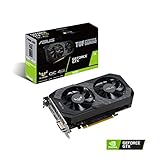
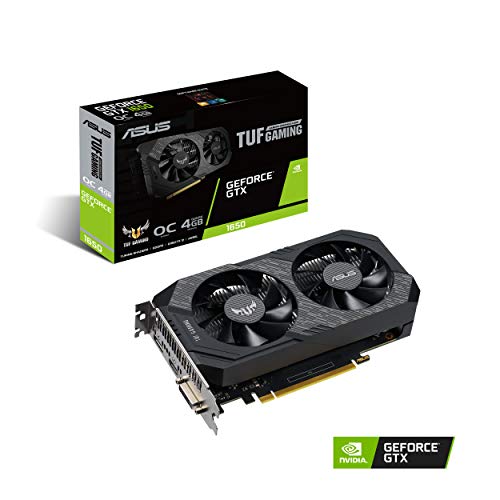
 ASUS TUF Gaming GeForce GTX 1650 Super OverclockedTUF GTX 1650 Super8.1 x 4.9 x 1.8 inchesCheck on Amazon
 ASRock Radeon RX 6400 Challenger ITX 4GB GraphicsRX 6400 4GB9.89 x 8.55 x 2.52 inches0.6 poundsCheck on Amazon


Top 3 picks at a glance
Quick Answer: Best 4GB Graphics Card Under 15000
The best 4GB graphics card under 15000 rupees is a GTX 1650 with GDDR6 memory for older PCs, or an RX 6400 if your motherboard has PCIe 4.0. Both run on slot power alone and handle esports and older games at 1080p with medium textures.
| Best 4GB graphics card under 15000 by need | Pick | Why |
|---|---|---|
| Older PC, PCIe 3.0, weak power supply | GTX 1650 GDDR6 | Full x16 link, hardware encoder |
| New PCIe 4.0 build, low power | RX 6400 | 53 W, no power cable |
| Slim office PC upgrade | RX 550 4GB low profile | Fits half-height cases |
| Want more VRAM headroom | An 8GB card such as the RX 7600 | Costs more than this budget |
The reality check on 4GB in 2026
4GB VRAM is the main limit, not raw GPU speed. Stutter in newer games is usually VRAM spilling over to system RAM. Lowering textures to Medium or Low usually fixes it, at the cost of blurrier surfaces.
Driver support matters too. NVIDIA still supports the GTX 1050 Ti and GTX 1650 with Game Ready drivers, but they no longer get DLSS or RTX features. AMD still supports the RX 550 and RX 6400, and the RX 6400 gets FSR support which helps a lot. Avoid very old cards like the GT 710 or GT 730 4GB DDR3 versions for gaming – that 4GB is slow DDR3 memory and performs worse than modern integrated graphics.
What to actually buy under Rs. 15,000
There are only three categories worth buying new in this budget. Everything else is either overpriced old stock or a fake rebadged card.
1. Best all-rounder for gaming: GTX 1650 4GB GDDR6
Even years after launch, the GTX 1650 GDDR6 version remains the safest sub-15k gaming card in India. It needs no external power on most models, works with a 300W PSU, and runs Valorant at 150+ fps, GTA V at 70-80 fps (High, 1080p), and Cyberpunk 2077 at 30-40 fps (Low-Medium with FSR/ upscaling where available). Look specifically for GDDR6, not GDDR5 – the GDDR5 version is about 10-12% slower and often sold at the same price. When you browse GTX 1650 4GB GDDR6 listings, check the specs line carefully before adding to cart.
Who it suits: Someone with a 3-5 year old i3/i5 or Ryzen office PC who wants 1080p gaming without changing the PSU. Failure mode: 75W models run hot in small cases. Pick a dual-fan version if your cabinet allows it, and clean dust every 3 months.
2. Best for modern budget builds: RX 6400 4GB
The RX 6400 is newer, more efficient, and often sells for Rs. 13,500-15,000. On a PCIe 4.0 board, it is about 5-10% faster than the GTX 1650 and supports FSR, but it has no AV1 decode and no hardware video encoder, so it is a weaker pick for streaming. On PCIe 3.0 boards – common with older Intel 8th/9th gen or Ryzen 2000 systems – it loses about 12-15% performance because it only uses 4 PCIe lanes. That is the critical trade-off.
Who it suits: New builds with Ryzen 5000 / Intel 12th gen or newer where you have PCIe 4.0. Also good for a low-power HTPC because it idles under 8W. Check current AMD RX 6400 4GB prices – when it dips under Rs. 13,000, it is a better buy than a used 1050 Ti.
3. Cheapest usable option: RX 550 4GB / GTX 1050 Ti (used or clearance)
If your budget is really Rs. 8,000-10,000, these are the only 4GB cards I would still recommend. The RX 550 4GB low-profile is excellent for slim office PCs from Dell/HP/Lenovo that cannot take a full-height card. The GTX 1050 Ti 4GB is still capable for esports and GTA V, and sips power. Do not pay over Rs. 11,000 for either new – at Rs. 13,000+ just get a GTX 1650. You can often find them by searching RX 550 4GB low profile options for prebuilt upgrades.
Who it suits: Students upgrading a college PC for Valorant, Minecraft, and Photoshop. Failure mode: Many cheap RX 550 listings are refurbished mining or OEM pulls with no warranty. Buy only sealed box with at least 2-year brand warranty from Sapphire, Gigabyte, Asus, or MSI.
Quick comparison
All prices are typical street prices in India for new sealed units. Used prices are 30-40% lower but carry no warranty.
| Card | Memory | Needs Power Pin? | 1080p Esports | 1080p AAA (Med) | Best For |
|---|---|---|---|---|---|
| GTX 1650 GDDR6 | 4GB GDDR6 | No (most models) | 120-180 fps | 35-55 fps | Old PSU, no upgrade needed |
| RX 6400 | 4GB GDDR6 | No | 130-190 fps* | 40-60 fps* | New PCIe 4.0 builds, low power |
| GTX 1050 Ti | 4GB GDDR5 | No | 90-130 fps | 28-40 fps | Used market under Rs. 8k |
| RX 550 4GB | 4GB GDDR5 | No | 70-110 fps | 25-35 fps | Slim PCs, display + light play |
| GT 730 4GB DDR3 | 4GB DDR3 | No | 20-35 fps | Not playable | Office display only, not gaming |
* RX 6400 numbers are on PCIe 4.0. Subtract ~15% on PCIe 3.0 systems.
What to avoid
Avoid any listing that says GT 730 4GB, GT 710 4GB, or R7 240 4GB for gaming. Sellers push these as 4GB gaming cards under Rs. 6,000-7,000, but the DDR3 memory and 10-year-old chip are slower than AMD Vega 8 or Intel UHD 750 integrated graphics. Only buy them if you need extra HDMI/VGA ports for an office.
Also avoid no-brand GTX 1650 or RX 580 4GB cards shipping from unknown sellers. They crash as soon as you launch a game. Stick to known board partners and check the seal and serial number on the brand website.
Finally, be honest about used RX 570 / RX 580 4GB and GTX 1060 3GB under Rs. 9,000. They are faster than a GTX 1650, but most were used for mining, need a 450W+ PSU with an 8-pin connector, and run hot. Fine if you know how to repaste and test with FurMark + HWInfo, not fine as a gift or first build.
How to buy right in this budget
First, check your power supply and cabinet. If you have a 300-350W OEM PSU with no 6-pin cable, you are limited to cards under 75W – that means GTX 1650, RX 6400, 1050 Ti, or RX 550. Measure length too; many Dell/HP towers only fit single-fan cards under 180mm.
Second, prioritize GDDR6 over DDR3/DDR4, even if VRAM size is the same. A GTX 1650 4GB GDDR6 is roughly 3x faster than a GT 730 4GB DDR3 in games. Memory type matters more than the 4GB number on the box.
Third, update drivers cleanly. Use DDU to remove old drivers when swapping from NVIDIA to AMD or vice versa. For 4GB cards, enable Resizable BAR in BIOS if available, set textures to Medium, and use FSR Balanced in supported games. FSR can add a large fps boost in supported games, though gains vary by title.
More 4GB Graphics Card Picks Worth Checking
The cards above cover the main options. The extra models below share the same 4GB class, so the buying rules are identical: confirm GDDR6 memory, the power connector and the case length before you order. Specs come from each maker listing title, not from our own benchmarks.
ZOTAC Gaming GeForce GTX 1650 OC 4GB GDDR6 – Best for Small Cases
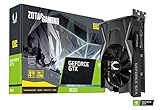
The ZOTAC GTX 1650 OC is sold as a super compact card, which makes it a sensible fit for the small towers and slim prebuilts that dominate this budget. It uses the GDDR6 memory this guide recommends over older GDDR5 versions, and its short board leaves room for cable routing in tight cabinets.
- GeForce GTX 1650 OC, 4GB GDDR6, 128-bit bus
- Super compact board design
- Model ZT-T16520F-10L
- Good match for 1080p esports and older AAA titles
Pros: compact; GDDR6; the hardware encoder helps with recording; easy to place in small cases.
Cons: single-fan cooling runs warmer under long sessions; no DLSS or ray tracing.
Skip it if your motherboard is PCIe 4.0 and you want the lowest power draw, since the RX 6400 uses less.
GIGABYTE GeForce GTX 1650 D6 OC 4G – Best Compact Option

The GIGABYTE GTX 1650 D6 OC is listed as a 170mm compact card with 4GB of GDDR6 on a 128-bit bus. The D6 name signals the GDDR6 variant, which is the version to look for. It suits buyers who want a known board partner and a short card without moving to low profile.
- GeForce GTX 1650, 4GB GDDR6, 128-bit
- 170mm compact size
- Factory overclock (OC) edition
- Model GV-N1656OC-4GD
Pros: short length; GDDR6; established brand warranty path; full-height bracket.
Cons: a factory-overclocked 1650 may draw a little more than the 75 W reference; check the product page for connector details.
Skip it if you need a half-height bracket for a slim office PC.
MSI GeForce GTX 1650 4GB GDDR6 Ventus XS OCV1 – Best Dual-Fan Pick

The MSI Ventus XS OCV1 is the Ventus-series GTX 1650 with GDDR6. A larger cooler usually means lower temperatures and less fan noise in long gaming sessions, which is why it is the pick when your case has room.
- GeForce GTX 1650, 4GB GDDR6
- Ventus XS cooler design
- Factory OC edition (OCV1)
- Aimed at 1080p esports and older titles
Pros: better cooling headroom than compact models; GDDR6; recognizable brand.
Cons: longer than the compact cards; confirm case clearance first.
Skip it if your case only fits cards under about 180mm.
XFX Speedster SWFT105 Radeon RX 6400 4GB – Best for Low Power on PCIe 4.0
The XFX Speedster SWFT105 is a full-size RX 6400 with 4GB of GDDR6. It is the pick for a new PCIe 4.0 build where the 53 W power draw and slot-only power matter more than encoder features.
- Radeon RX 6400, 4GB GDDR6
- RDNA 2 architecture, PCIe 4.0 x4 link
- No external power connector needed
- No AV1 decode and no hardware video encoder
Pros: very low power draw; FSR support; efficient; runs on small supplies.
Cons: loses roughly 12-15% on PCIe 3.0 boards; weak for streaming or recording.
Skip it if you have an older Intel 8th/9th gen or Ryzen 2000 system.
MAXSUN GeForce GTX 1050 Ti 4GB Low Profile – Best for Slim Office PCs

The MAXSUN GTX 1050 Ti is a 4GB GDDR5 low-profile card for small form factor PCs that cannot fit a full-height card. It is older than the GTX 1650 and slower, but it works for esports and light 3D on a slim Dell, HP or Lenovo desktop.
- GeForce GTX 1050 Ti, 4GB GDDR5, 128-bit
- Low-profile, small form factor design
- Low-power class that runs from the slot
- Targeted at slim and SFF cases
Pros: fits slim cases; low power; handles Valorant, CS2 and GTA V at lower settings.
Cons: GDDR5 memory; clearly slower than a GTX 1650; small coolers get loud.
Skip it if your case takes a full-height card, because a GTX 1650 is a better buy.
Also Consider: Spending a Little More for 8GB
If you can stretch past this budget, 8GB of VRAM removes the biggest limit described above. The model below is outside the 15000 rupee range but is the clearest next step.
ASRock Radeon RX 7600 Challenger 8GB OC – Best Step-Up Pick

The ASRock RX 7600 Challenger 8GB OC doubles the VRAM of every card in this guide. It targets 1080p gaming with high textures and is a better long-term buy for story-driven AAA games that stutter on 4GB.
- Radeon RX 7600, 8GB GDDR6, 128-bit
- RDNA 3 architecture, PCIe 4.0
- Dual-fan cooler with 0dB silent mode
- 2695MHz boost clock
Pros: 8GB VRAM; much faster than any 4GB card; quiet cooler.
Cons: costs well above 15000 rupees; needs an external power connector and a stronger supply.
Skip it if you are on a 300W OEM supply with no spare 8-pin cable.
What to Look For in a 4GB Card
With so little memory to spare, small design choices make a large difference. Four details are worth checking on any listing before you commit to a card in this class.
PCIe Generation and Lane Count
The RX 6400 uses a PCIe 4.0 x4 connection, which is a narrow link by design. On a PCIe 4.0 motherboard it has the bandwidth it needs, but TechSpot found that on a PCIe 3.0 board it fell further behind the GTX 1650, and that matters because many budget builds use older boards. The GTX 1650 uses a full x16 interface and does not share that weakness. If your motherboard is PCIe 3.0, that single fact can decide the whole purchase.
Power Draw and Connectors
The RX 6400 is specified at 53 W and takes all its power from the slot. The GTX 1650 is specified at 75 W, and many models also run from the slot alone, though some factory-overclocked versions add a 6-pin connector. Check the individual product page rather than assuming. A card that needs no cable is ideal for an office prebuilt with a small supply.
Video Features
The RX 6400 lacks AV1 decoding, and TechSpot reports no hardware video encoding, while the GTX 1650 includes an NVIDIA encoder that streaming and recording software can use. If you stream or record gameplay, that difference is worth weighing. Sources disagree on exactly which encoding formats the AMD card omits, so confirm on the listing if encoding matters to you.
Cooler and Size
Many 4GB cards ship as compact single-fan or low-profile models. Low-profile versions fit small cases but often run louder and hotter. Measure your case and check whether a short bracket is included if you need one.
Which One Should You Choose?
| If you… | Choose… |
|---|---|
| Have a PCIe 3.0 motherboard | GTX 1650, which does not lose performance to a narrow link |
| Have a PCIe 4.0 motherboard and a very weak power supply | RX 6400, which draws the least power |
| Stream or record gameplay | GTX 1650, for its hardware encoder |
| Want the cheapest way to add display outputs and basic 3D | Whichever of the two is available with a good warranty and return window |
| Play mostly esports and older titles at 1080p | Either card, with textures set to medium |
Tips for Getting the Most From 4GB
- Set textures to medium or low first, since texture quality is the setting that uses the most memory.
- Turn off ultra shadow and volumetric effects, which cost performance without improving clarity much on a small screen.
- Close browsers and overlays before gaming. Both consume video memory in the background.
- Use a monitor at 1080p. Higher resolutions use more memory and rarely suit this class.
- Keep the driver current, since game-specific fixes often arrive in updates.
Common Mistakes When Buying a 4GB Card
- Expecting modern high settings. Many recent games exceed 4GB on their top texture presets. Plan on medium and lower textures from the start.
- Ignoring the motherboard. The RX 6400’s narrow PCIe 4.0 x4 link is the big gotcha on older boards, so confirm the slot generation first.
- Assuming the power supply is fine. A 75 W card is easy on a supply, but weak or damaged units still cause crashes. Check the label and the age of the unit.
- Buying a half-height card for a full-size case. Low-profile models often cool worse and run louder, so choose them only when the case demands it.
- Skipping used-card checks. Ask for proof that the card runs a game without artifacts, and keep a return window.
Checklist Before You Order
- Write down your motherboard’s PCIe generation, either in the manual or from a system information tool.
- Check your power supply label for wattage and any spare 6-pin or 8-pin connectors.
- Measure the case for card length, and note whether you need a low-profile bracket.
- Decide whether you stream, record or play older games, because that changes which card’s features matter.
- Confirm the display outputs on the card match the connectors on your monitor.
More Questions About 4GB Graphics Cards
Is the GTX 1650 still worth buying in 2026?
Yes for esports and older games on a tight budget, because it runs on slot power and keeps a hardware encoder. For new AAA games it is held back by 4GB of VRAM, so expect medium textures.
Does the RX 6400 need a power cable?
No. The RX 6400 is specified at 53 W and takes all its power from the PCIe slot, so it works with small office power supplies.
Which is better for streaming, GTX 1650 or RX 6400?
The GTX 1650 is better, since it has an NVIDIA hardware encoder while the RX 6400 has no hardware video encoder. Recording on the AMD card falls back to the CPU.
Is GDDR6 really better than GDDR5 on a 4GB card?
Yes. The GDDR6 GTX 1650 is roughly 10-12% faster than the GDDR5 version, so check the memory type on the listing before you buy.
FAQ
Is 4GB VRAM enough for 1080p gaming?
For esports and games before 2020, yes. For new AAA games in 2024-2026, it is minimum. You will need Medium textures and FSR to avoid stutter. If you mainly play story games, save up for an 8GB card like an RX 6600 instead.
GTX 1650 or RX 6400 under Rs. 15,000?
On PCIe 4.0, pick the RX 6400 – it is newer and slightly faster. On PCIe 3.0 or with an older CPU, pick the GTX 1650 GDDR6. It loses less performance on old boards and has better NVENC encoding for recording.
Can I run a 4GB card on a 300W PSU?
Yes, if it draws power only from the PCIe slot (GTX 1650, RX 6400, 1050 Ti, RX 550). Do not use Molex-to-6-pin adapters on a cheap PSU. If your PSU is more than 6 years old, replace it before adding any card.
Should I buy used to get more performance?
Sometimes. A used GTX 1060 6GB or RX 580 8GB for under Rs. 10,000 beats any new 4GB card, but test it in person for artifacts, fan noise, and temperatures over 85C. For most buyers who want warranty and low power use, a new GTX 1650 or RX 6400 is safer.



