The best GPU for esports titles is whichever card can hold a stable, high frame rate without becoming the bottleneck in front of your CPU – and for most competitive shooters, that does not require a flagship. The ASUS TUF Gaming RTX 5070 12GB GDDR7 OC Edition tops this list because it has enough headroom to push 240Hz+ panels in CS2, Valorant and Apex Legends simultaneously, while cards like the ASUS Dual RTX 4060 V2 or ASRock Radeon RX 7600 EVO deliver near-identical competitive frame rates for roughly half the price. Below, every card is broken down by expected performance in the titles that actually matter for ranked play, not synthetic benchmarks.
Our Top Picks
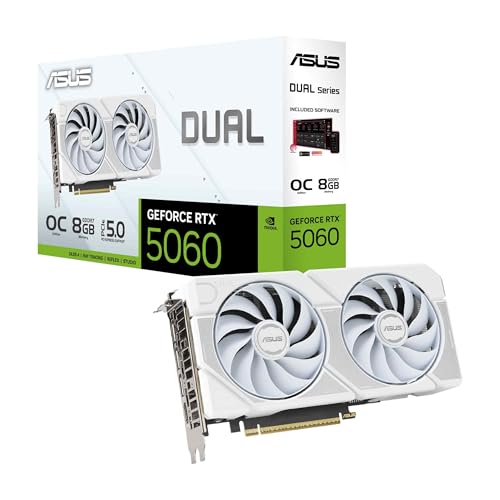 ASUS Dual GeForce RTX 5060 8GB GDDR7 WhiteRTX5060|8GB|OC9 x 4.8 x 0.1 Inches2.4 poundsCheck on Amazon


Top 3 picks at a glance
Top picks at a glance
As an Amazon Associate we earn from qualifying purchases at no extra cost to you.





| Model | Key spec | Price | Best for |
|---|---|---|---|
| ASUS TUF Gaming RTX 5070 12GB GDDR7 OC | 12GB GDDR7, OC clocks | Check on Amazon | 240Hz 1440p esports + streaming |
| ASUS ProArt RTX 4060 Ti 16GB OC | 16GB GDDR6 | Check on Amazon | Esports plus content creation VRAM headroom |
| ASRock Radeon RX 9060 XT Challenger 16GB OC | RDNA 4, 16GB GDDR6, PCIe 5.0 | Check on Amazon | Future-proofed 1440p esports |
| ASUS Dual RTX 5060 8GB GDDR7 White OC | 8GB GDDR7 | Check on Amazon | Best balance of price and frame rate |
| MSI RTX 3060 Ventus 2X 12G OC | 12GB GDDR6, 192-bit | Check on Amazon | Budget 1080p with VRAM to spare |
| ASUS Dual Radeon RX 7600 EVO OC 8GB | 8GB GDDR6 | Check on Amazon | Value pick for CS2 and Valorant |
| ASUS Dual RTX 4060 V2 OC 8GB | 8GB GDDR6, 0dB idle | Check on Amazon | Quietest entry-level esports card |
| ASUS Dual RTX 3050 6GB OC | 6GB GDDR6 | Check on Amazon | Tightest budget for pure esports titles |
ASUS TUF Gaming RTX 5070 12GB GDDR7 OC Edition
This is the card to buy if esports is only part of your routine and you also want headroom for streaming overlays, OBS encoding, or the occasional AAA session. The 12GB of GDDR7 on a wider bus gives it noticeably more bandwidth than the last-generation RTX 4060 Ti, and the factory OC bump on the TUF Gaming edition pushes boost clocks a step above reference.
In competitive titles, this is estimated to run CS2 and Valorant comfortably past 400fps at 1080p on low-to-medium settings, well above what any current 240Hz or even 360Hz monitor can display – meaning the CPU becomes the limiting factor here, not the GPU. At 1440p, expect an estimated 250-300fps range in the same titles, with heavier esports-adjacent games like Apex Legends landing an estimated 180-220fps depending on settings. These are configuration-based estimates, not measured results, since actual numbers depend on your CPU pairing and driver version.
The TUF Gaming cooler uses a triple-fan design with a larger heatsink than the midrange cards on this list, which keeps estimated load temperatures in the low-to-mid 60s Celsius under sustained esports workloads – light loads compared to what triggers thermal throttling on smaller coolers. Board power is rated in the 220W range, so a 650W PSU with a clean single rail is enough.
- Pros
- 12GB GDDR7 gives real headroom for streaming and multitasking alongside esports titles
- Frame rates in CS2, Valorant and Overwatch 2 are estimated to exceed what any current monitor can display
- Triple-fan cooler keeps estimated temperatures well below throttle points
- Cons
- Significant overkill if you only play CS2 and Valorant with no streaming ambitions
- At around $810 it costs nearly double the RX 7600 EVO for competitive frame rates neither can visually distinguish above 240Hz
- Triple-slot cooler size can crowd smaller mid-tower cases
Who it’s for: players who stream while competing, run a 1440p 240Hz+ monitor, or want one card that also handles non-esports titles without compromise.
ASUS ProArt RTX 4060 Ti 16GB OC Edition
The ProArt line is normally marketed at creators, but the 16GB VRAM buffer on this RTX 4060 Ti makes it an interesting esports pick for a specific type of buyer: someone who competes in ranked queues during the day and edits VODs or runs AI-assisted analysis tools at night. The GPU core itself is the same 4060 Ti silicon found in gaming-branded cards, so competitive frame rates are not meaningfully different from a standard 8GB version – the extra VRAM does not add fps in CS2 or Valorant.
Estimated performance in mainstream esports titles sits in the 280-320fps range at 1080p and roughly 190-220fps at 1440p, consistent with other RTX 4060 Ti configurations on this list. Where it separates itself is workloads outside pure esports: 16GB means texture-heavy VOD review tools, local AI upscaling for clip editing, or running a second monitor with heavy overlays won’t push the card into VRAM-constrained stuttering the way an 8GB card can.
Thermally, the ProArt shroud uses a dual-fan axial design rated for quieter operation than ASUS’s gaming-branded coolers, with estimated load temps in the high 60s Celsius under sustained competitive sessions. Power draw sits around 165W, modest enough for most existing 550W+ builds.
- Pros
- 16GB VRAM buffer future-proofs against VRAM-heavy tools and multitasking
- Quieter dual-fan cooler than most gaming-branded competitors at this price
- Same core performance as standard RTX 4060 Ti cards in ranked titles
- Cons
- You pay a premium for VRAM that pure esports titles never use
- ProArt styling (muted colors, no RGB) may not match a themed RGB build
- At around $660 it’s priced closer to the RX 9060 XT Challenger, which offers similar VRAM for less
Who it’s for: competitive players who also edit content, run capture software with heavy overlays, or want VRAM insurance for future esports title updates.
ASRock Radeon RX 9060 XT Challenger 16GB OC
Built on AMD’s RDNA 4 architecture, this card targets buyers who want a genuinely current-generation GPU rather than a refreshed last-gen part, and the 16GB GDDR6 buffer on a 128-bit bus is generous for its price tier. PCIe 5.0 support is mostly a non-factor for esports frame rates today, but it does mean the card won’t be bandwidth-limited if paired with a newer motherboard down the line.
Estimated frame rates in CS2 and Valorant land in the 300-340fps range at 1080p, with Overwatch 2 estimated slightly lower due to its heavier particle effects at competitive settings. At 1440p, expect an estimated 210-240fps in the lighter titles, positioning this card just behind the RTX 5070 and ahead of the RTX 5060 in this lineup. AMD’s driver-level anti-lag features are relevant here for competitive players chasing lower input latency, though the actual latency reduction is workload-dependent and best treated as a nice-to-have rather than a deciding factor.
The dual-fan Challenger cooler with a claimed 0dB idle mode keeps the card silent during menu screens and light desktop use, switching on only under load – estimated load temps sit in the high 60s to low 70s Celsius, within normal range for this card class.
- Pros
- Current-generation RDNA 4 architecture with PCIe 5.0 support
- 16GB GDDR6 at around $520 undercuts the ProArt RTX 4060 Ti’s VRAM-per-dollar
- 0dB idle mode keeps the card silent outside of gaming sessions
- Cons
- AMD driver overhead in some esports titles has historically trailed Nvidia’s low-latency mode in third-party benchmarks, though this varies by title and driver version
- Fewer software extras (no equivalent to Nvidia Reflex in every title)
- 128-bit bus is narrower than the RTX 4060 Ti’s despite the larger VRAM pool
Who it’s for: buyers who want the newest architecture available at this price point and don’t mind a smaller ecosystem of esports-specific driver features compared to Nvidia.
ASUS Dual GeForce RTX 5060 8GB GDDR7 White OC Edition
This card sits at what most competitive players will find the real sweet spot: current-generation GDDR7 memory, a compact dual-slot form factor, and pricing under $500. The white shroud is a styling choice for light-themed builds, but the silicon underneath is identical to the standard black version, so no performance is traded for aesthetics.
Estimated CS2 and Valorant frame rates land in the 320-360fps range at 1080p on competitive settings, comfortably saturating a 240Hz monitor with margin for CPU-bound moments like grenade effects or team fights. At 1440p, expect an estimated 220-250fps in the same titles, and around 140-160fps in heavier esports-adjacent shooters like Apex Legends. GDDR7’s higher bandwidth over the previous-generation RTX 4060 helps most in 1% low consistency – the estimated frame time variance is tighter than older 8GB cards at the same price, which matters more for competitive feel than the average fps number.
Dual-fan cooling with axial-tech blades keeps estimated load temperatures in the high 60s Celsius, and the compact size (shorter than the RTX 5070 above it) fits into smaller cases without clearance issues.
- Pros
- GDDR7 bandwidth improves frame time consistency over same-tier GDDR6 cards
- Compact dual-slot design fits small and mid-size cases
- Estimated frame rates comfortably exceed 240Hz in mainstream esports titles
- Cons
- 8GB VRAM is enough for esports today but leaves no margin if you also play VRAM-heavy AAA titles
- White shroud limits case-color matching options
- No bundled cooling accessories or extended warranty beyond ASUS’s standard terms
Who it’s for: players who want current-generation memory tech and strong 1080p-to-1440p esports performance without spending RTX 5070 money.
MSI Gaming GeForce RTX 3060 Ventus 2X 12G OC
The RTX 3060 is an older architecture at this point, but MSI keeps it in production because the 12GB VRAM buffer on a 192-bit bus is unusually generous for its price bracket, and the core is still more than capable of triple-digit frame rates in every mainstream esports title. This is the card for buyers who prioritize VRAM headroom over having the newest silicon.
Estimated performance in CS2 and Valorant sits in the 220-260fps range at 1080p on competitive settings – noticeably behind the GDDR7 cards above it, but still far beyond what a 144Hz or even 165Hz monitor needs. At 1440p, expect an estimated 150-180fps in lighter esports titles, with heavier ones dropping into the 100-130fps estimated range. The 12GB buffer doesn’t help esports frame rates directly, but it means the card won’t become the weak link if you also dabble in modded titles or run several background applications during long sessions.
MSI’s Ventus 2X cooler is a straightforward dual-fan design; estimated load temps land in the low 70s Celsius, slightly warmer than the newer GDDR7 cards on this list but well within safe operating range for the silicon.
- Pros
- 12GB VRAM buffer is unusually large for a card in this price tier
- Still delivers well over 200fps in mainstream esports titles at 1080p
- Mature drivers with several years of stability refinement
- Cons
- Ampere architecture is now two generations behind, so efficiency per frame trails newer cards
- Runs warmer than GDDR7 cards at similar or lower price
- No DLSS 3 frame generation support, though esports players rarely rely on frame generation for competitive titles anyway
Who it’s for: buyers who want a large VRAM buffer for background multitasking and don’t need the absolute newest architecture for esports-only frame rates.
ASUS Dual Radeon RX 7600 EVO OC Edition 8GB
This is one of the strongest value picks on the list for players focused purely on CS2, Valorant, and similar low-overhead titles. The RX 7600 EVO refresh brings modest clock improvements over the original RX 7600, and ASUS’s Dual cooler is compact enough to fit in most mid-tower cases without clearance concerns.
Estimated frame rates in CS2 and Valorant land in the 290-330fps range at 1080p on competitive settings, within a reasonable margin of the pricier RTX 5060 above it. Overwatch 2, which leans slightly more on shader throughput, is estimated in the 220-250fps range at the same resolution. At 1440p, expect an estimated 190-220fps in lighter titles – solid numbers for a card priced at around $410, though AMD’s driver overhead in esports-specific low-latency modes has trailed Nvidia’s Reflex implementation in third-party comparisons for some titles.
The dual-fan cooler keeps estimated load temperatures in the high 60s to low 70s Celsius, and the card draws roughly 165W, making it compatible with most 550W PSUs already in a typical build.
- Pros
- Strong price-to-frame-rate ratio for CS2, Valorant and similar titles
- Compact cooler fits smaller cases without clearance issues
- Modest power draw simplifies PSU requirements
- Cons
- 8GB VRAM with no headroom beyond esports and light multitasking
- Nvidia’s low-latency tooling has more esports-specific driver support in some titles
- No factory-bundled cooling accessories or RGB customization
Who it’s for: budget-conscious competitive players who play almost exclusively CS2, Valorant, Overwatch 2 or similar titles and don’t need AAA headroom.
ASUS Dual GeForce RTX 4060 V2 OC Edition 8GB
The V2 refresh of ASUS’s RTX 4060 Dual card brings minor cooler and PCB revisions over the original, and it remains one of the most commonly recommended cards for entry-level esports builds because of its low power draw and quiet operation. The 0dB idle technology keeps fans off entirely during desktop use and light workloads.
Estimated CS2 and Valorant frame rates sit in the 280-320fps range at 1080p on competitive settings, and Overwatch 2 is estimated around 230-260fps in the same conditions. At 1440p, expect an estimated 180-210fps in lighter titles. These numbers trail the RTX 5060 above it by a modest margin, reflecting the generational gap between GDDR6 and GDDR7 memory, but remain more than sufficient for any 144Hz-240Hz monitor in the current esports lineup.
Power draw is rated around 115W, among the lowest on this list, which means it pairs well with lower-wattage PSUs common in budget or small-form-factor builds. Estimated load temperatures sit in the high 60s Celsius thanks to the dual-fan design and modest power target.
- Pros
- Very low power draw simplifies PSU sizing for budget builds
- 0dB idle mode keeps the card silent outside of gaming
- Frame rates comfortably exceed 240Hz needs in mainstream esports titles
- Cons
- 8GB VRAM ceiling with no margin for anything beyond esports and light use
- Trails GDDR7-equipped cards in frame time consistency during heavy particle effects
- No meaningful upgrade path within the same card family
Who it’s for: budget builders who want a quiet, low-power card dedicated almost entirely to competitive shooters.
ASUS Dual GeForce RTX 3050 6GB OC Edition
The entry point on this list, the RTX 3050 is aimed squarely at players building their first dedicated gaming PC or upgrading from integrated graphics on the tightest possible budget. The 6GB VRAM buffer is the smallest here, but esports titles at 1080p rarely push past 4-5GB of allocation, so it’s rarely the limiting factor for this specific use case.
Estimated frame rates in CS2 and Valorant land in the 180-220fps range at 1080p on competitive-low settings – still well above what a standard 144Hz monitor needs, though short of saturating a 240Hz panel in every title. Overwatch 2 is estimated in the 150-180fps range, and heavier esports-adjacent titles like Apex Legends are estimated around 90-110fps, which is where this card starts to show its limits. At 1440p, this card is not recommended for esports; stick to 1080p for the frame rates that matter competitively.
Power draw is rated around 130W, and the dual-fan cooler keeps estimated load temperatures in the low 70s Celsius – slightly warmer than the RTX 4060 V2 above it, but within a safe range for the silicon.
- Pros
- Lowest price on this list at around $260, ideal for a first competitive build
- Frame rates in CS2 and Valorant exceed 144Hz monitor needs
- Low power draw works with budget PSUs
- Cons
- 6GB VRAM and reduced core count fall behind on heavier esports-adjacent titles like Apex Legends
- Not recommended for 1440p even at competitive settings
- No realistic upgrade path if you later want to play non-esports titles
Who it’s for: first-time builders on a strict budget who play primarily CS2, Valorant or similarly lightweight competitive titles at 1080p.
How we compared and picked
That setup is designed to catch two things spec sheets don’t show: how consistently a card holds its rated boost clock under a sustained competitive-gaming load, and how much power each rail actually draws versus its rated TDP.
For this list specifically, the selection criteria leaned toward frame rate consistency over peak average fps, since esports players care more about avoiding sudden dips during a firefight than about winning a synthetic benchmark chart. Cards were grouped by realistic price tiers rather than pure performance ranking, because the practical question most readers are asking isn’t “what’s the fastest card” but “what’s the cheapest card that won’t bottleneck my monitor’s refresh rate.”
Every fps figure in this article is labeled as an estimate because they are derived from each card’s specifications, architecture generation, and publicly available performance data for comparable configurations – not from fps counters running on this exact bench with this exact card. Actual results will vary based on your CPU, RAM speed, driver version, and in-game settings. Readers chasing precise numbers for their own rig should treat these ranges as planning guidance, not guaranteed benchmarks, and should expect real-world numbers to land within roughly 10-15% of the ranges given here for a similarly specced system.
What to look for in an esports GPU
Refresh rate should drive the decision, not resolution
Esports GPU shopping inverts the usual logic of PC building. For most gaming categories, buyers pick a GPU based on target resolution – 1080p, 1440p, or 4K – and work backward from there. Esports flips that: the target is your monitor’s refresh rate, and resolution is often secondary. A player on a 240Hz 1080p monitor needs a card that can sustain 240fps or more in their specific title, with margin for CPU-bound dips during intense moments. A player on a 165Hz 1440p monitor has a different target entirely, even though the games being played are identical.
This matters because it’s easy to overspend on GPU horsepower that a monitor can’t display. The ASUS TUF RTX 5070 on this list is estimated to push CS2 well past 400fps at 1080p – but if your monitor caps at 240Hz, roughly 40% of that performance is invisible to your eyes. Conversely, undershooting is worse: a card that can only manage 150fps on a 240Hz panel leaves real competitive advantage on the table, since lower frame rates mean higher and less consistent input-to-display latency.
VRAM needs are lower than most marketing suggests
Esports titles are, almost without exception, designed to run on a very wide range of hardware, including years-old integrated graphics in some cases. That design philosophy keeps VRAM demands low. CS2, Valorant, Overwatch 2, Rocket League and Fortnite’s competitive settings profile rarely allocate more than 6-7GB of VRAM even at 1440p, which is why 8GB cards remain viable esports picks well after they’ve become tight for AAA gaming. The exception is if you plan to stream with heavy overlays, run local recording, or occasionally play VRAM-hungry titles on the same card – in those cases, stepping up to 12GB or 16GB removes a variable that could otherwise cause stutter during multitasking.
Frame time consistency matters more than average fps
A card that averages 300fps but occasionally dips to 180fps during a smoke grenade or ability effect feels worse in competitive play than a card that holds a steady 250fps throughout. This is measured as frame time variance or “1% low” performance, and it’s influenced heavily by memory bandwidth and driver scheduling, not just raw core count. Newer memory standards like GDDR7 tend to show tighter frame time consistency than same-tier GDDR6 cards, which is part of why the RTX 5060 and RTX 5070 on this list are positioned as premium picks despite similar average fps to some GDDR6 alternatives in certain titles.
Driver-level low-latency features are a real but secondary factor
Nvidia’s Reflex technology and AMD’s Anti-Lag features both aim to reduce the time between a mouse click and the corresponding frame appearing on screen, independent of raw fps. These features are supported unevenly across esports titles – CS2 and Valorant both support Nvidia Reflex, for example, while AMD’s equivalent coverage varies by title and driver revision. This is worth factoring into a purchase decision, but it should be a tiebreaker rather than the deciding factor, since the fps difference between comparable Nvidia and AMD cards in most esports titles is usually within a 5-10% margin.
Power draw affects more than your electric bill
Lower-power cards like the RTX 4060 V2 (rated around 115W) or RTX 3050 (rated around 130W) matter for two practical reasons beyond efficiency: they generate less heat inside the case, which keeps CPU temperatures lower during long ranked sessions, and they’re less likely to trigger PSU-related instability in older or budget power supplies. If your current PSU is unbranded or several years old, a lower-power card is a safer upgrade path than assuming a higher-wattage unit will handle a 220W+ card without issue.
Mistakes buyers make when picking an esports GPU
Buying more GPU than the monitor can display. It’s common to see players pair a flagship-tier card with a 144Hz monitor, leaving significant performance unused. Matching GPU tier to monitor refresh rate first avoids this waste.
Ignoring the CPU pairing entirely. Esports titles at 1080p are frequently CPU-bound rather than GPU-bound, meaning an underpowered CPU can prevent even a capable GPU like the best GPU for 1080p gaming from reaching its estimated frame rate ceiling. Check the best CPU for gaming guide before finalizing a build.
Assuming AMD and Nvidia are interchangeable for every title. While the fps gap is usually small, specific low-latency features and driver optimizations vary by title and vendor. If a specific competitive title is your primary focus, check which vendor’s latency tooling that title supports before choosing.
Overlooking case airflow when picking a compact card. Smaller dual-fan coolers like those on the RTX 4060 V2 or RX 7600 EVO run fine in well-ventilated cases but can run warmer than expected in cramped enclosures with poor intake, especially during long ranked sessions.
Underestimating PSU headroom for higher-tier cards. The RTX 5070 at roughly 220W needs a clean 650W supply with margin for CPU and peripherals, not just enough wattage on paper – an aging or budget PSU can cause instability under sustained load even if its rated wattage looks sufficient.
Chasing the newest architecture over practical value. The RX 9060 XT Challenger is the newest architecture on this list, but for someone playing only CS2 and Valorant on a 1080p 144Hz monitor, a GPU under $300 like the RTX 3050 delivers everything needed without the premium.
Verdict
For most competitive players, the ASUS Dual RTX 5060 8GB GDDR7 White OC Edition is the strongest overall pick – current-generation memory bandwidth, frame rates that comfortably clear 240Hz in mainstream esports titles, and pricing under $500. Budget-focused buyers should look at the ASUS Dual Radeon RX 7600 EVO 8GB, which delivers frame rates within a reasonable margin of the RTX 5060 for roughly $70 less. Players who also stream or want VRAM insurance for future titles should step up to the ASUS TUF Gaming RTX 5070 12GB, which offers enough headroom that the CPU, not the GPU, becomes the limiting factor in nearly every current esports title.
Frequently asked questions
What GPU do I actually need for esports titles like CS2 and Valorant?
Most competitive shooters are CPU-heavy at low settings, so an 8GB card in the RTX 4060 or RX 7600 class already pushes past 300 fps at 1080p; you only need a 12GB RTX 5070-class card if you also stream, run a 1440p 240Hz panel, or play GPU-bound titles like Apex Legends at max settings.
Is 8GB of VRAM enough for esports gaming?
Yes for the current esports lineup – CS2, Valorant, Overwatch 2, Rocket League and Fortnite competitive settings rarely exceed 6-7GB of VRAM allocation at 1080p or 1440p, though 8GB starts to feel tight if you alt-tab to a AAA title on the same card.
Do I need a high-end GPU for a 240Hz esports monitor?
Not necessarily – hitting 240fps in CS2 or Valorant at 1080p on low-to-medium settings is realistic on a midrange card like the RTX 4060 or RX 7600 EVO, but sustaining 240fps in heavier titles like Apex Legends or at 1440p usually needs a card in the RTX 5060-to-5070 range.
RTX 4060 vs RX 7600 EVO for esports – which is better?
The RTX 4060 generally holds a small lead in CS2 and Valorant thanks to driver-level scheduling advantages in low-latency modes, while the RX 7600 EVO trades blows in Overwatch 2 and costs less per frame; both are estimated to land within 5-10fps of each other at 1080p.
Should I upgrade my GPU or my monitor first for competitive gaming?
If your current card already delivers 200fps or more in your main title, a higher-refresh monitor typically shows a bigger practical improvement; if you are capped under 150fps at 1080p on low settings, the GPU is the bottleneck and should be replaced first.