Our Short List of 3
All 3 Picks at a Glance
| Product | Specs | Action |
|---|---|---|
 Lenovo IdeaPad 1i Laptop | Check price on Amazon | |
 ASUS Vivobook Go 15 Laptop | Check price on Amazon | |
 Dell Inspiron 15 3535 Touchscreen Laptop | Check price on Amazon |
Not every laptop needs a cavernous drive. The best laptops that have smaller hard drives pair a modest 256GB or 512GB solid-state drive with a capable processor, enough memory for everyday multitasking, and a screen that is comfortable for long sessions. For students, office workers, and anyone whose files live mostly in the cloud, a smaller drive keeps the laptop lighter on cost and quicker to manage, while still leaving room for the operating system, a browser full of tabs, office apps, and a reasonable media library. The trick is choosing a machine where the small drive is a deliberate trade-off rather than a bottleneck, and that means looking past the storage number to the processor, the memory, the display, and the upgrade path.
A laptop with a smaller hard drive makes the most sense when your workflow is already light on local storage. If you stream music and video instead of downloading it, keep documents in cloud storage, and uninstall apps you no longer use, 256GB can feel generous. If you edit photos, keep a large game library, or work with video files, 512GB is the safer floor. Either way, the five laptops below all ship with smaller drives by design, and each one balances that compact storage with hardware that keeps everyday computing smooth.
Our Top Picks
Top 3 picks at a glance
How to Choose
Storage size and type
The first decision is how small you are willing to go. A 256GB drive holds the operating system, your apps, and a working set of files with room to spare, as long as large media collections live elsewhere. A 512GB drive roughly doubles that breathing room and suits people who keep a photo library or a handful of large apps installed at once. Just as important as capacity is the drive type: every laptop in this guide uses a solid-state drive, which boots faster, wakes instantly, and handles everyday file work far more responsively than an older spinning hard drive ever could.
Processor
The processor decides how the laptop feels when several apps are open at once. An Intel Core i3 or AMD Ryzen 3 handles browsing, documents, video calls, and streaming without fuss. Stepping up to a Core i5 or Ryzen 5 adds headroom for heavier multitasking, photo editing, and dozens of browser tabs. A Ryzen 7, like the one in the Dell pick below, is the strongest chip in this group and suits buyers who want the laptop to stay responsive for years. Match the processor to your busiest day, not your lightest one.
Memory
Memory matters even more than storage for day-to-day smoothness. Eight gigabytes is the practical minimum for comfortable use with a browser, office apps, and a video call running together. Sixteen gigabytes gives the laptop room to keep many tabs and apps open without slowing down, and it is the configuration we favour for anyone who multitasks heavily. Four of the five laptops here ship with 16GB, and the 8GB models still work well for lighter, single-focus use.
Display
Most laptops with smaller drives are 15.6-inch machines, and the display is where daily comfort lives. A Full HD panel with 1920 by 1080 resolution keeps text sharp and video clear, while a lower-resolution HD panel is acceptable on a budget machine used mainly for documents and browsing. Touchscreen models add a handy way to scroll and tap through apps, and an anti-glare finish helps when you work near a window. Check the resolution before you buy, because it affects everything you look at all day.
Portability and battery life
A smaller drive often goes hand in hand with a thinner, lighter chassis, but weight still varies. A laptop around three and a half pounds slips easily into a bag for class or the office, while heavier models are better suited to a desk. Battery life matters just as much: look for a machine that can get through a school day or a work shift without hunting for an outlet, and remember that screen brightness and background apps are the biggest drains on a charge.
Upgrade path and ports
A smaller drive is much easier to live with when the laptop can grow later. Some models let you swap in a larger internal drive or add an external drive over a fast USB port, while others have their storage soldered in place. Before buying, check whether the drive bay is accessible and whether the laptop has USB-C, HDMI, and a memory card slot. Those ports decide how easily you can attach external storage, a second monitor, or the peripherals you already own.
Operating system and included software
Every laptop here runs Windows 11, but the edition matters. Windows 11 Home covers everyday use, while Windows 11 Pro adds business features such as enhanced device management and remote desktop tools. Some configurations also bundle productivity software or accessories, which can be a genuine bonus, but only if the software is something you would actually use. Read the listing carefully so you know exactly which edition and extras are included.
Top Picks
Acer Aspire 3 Slim Laptop
The Acer Aspire 3 Slim is the straightforward pick for anyone who wants a full-size laptop with a modest 256GB drive and no fuss. Its Intel Core i3-1305U processor and 8GB of memory handle browsing, documents, streaming, and video calls with ease, and the 15.6-inch Full HD display keeps text crisp across long work sessions. A backlit keyboard is a welcome touch at this level, making it easier to type in dim rooms, and Windows 11 keeps the whole package current.
Who it is for: students and home users who want an affordable everyday laptop with a smaller drive, a clear Full HD screen, and a backlit keyboard for evening work.
Caveats: 8GB of memory is the floor for comfortable multitasking, so heavy tab users should keep their browser tidy. The 256GB drive fills up faster than a 512GB one, so plan on cloud storage or an external drive for large media collections. The processor is built for everyday tasks rather than demanding creative work.
Lenovo IdeaPad 1i Laptop
The Lenovo IdeaPad 1i pairs a stronger Intel Core i5-1335U processor with 16GB of memory and the same compact 256GB drive, making it the best balance of speed and storage discipline in this group. The 15.6-inch Full HD display, integrated Iris Xe graphics, and built-in webcam cover work, study, and video calls, while the Copilot key puts Windows 11 AI assistance within reach. With 16GB of memory, this is the laptop to choose if your typical day involves many open tabs and several apps at once.
Who it is for: students and office workers who multitask heavily and want a faster processor and more memory, while accepting a smaller 256GB drive in exchange for a leaner machine.
Caveats: the 256GB drive is the tightest fit in this guide for anyone who stores large files locally, so regular cloud backups or an external drive are worth planning for. The bundled HDMI cable is a convenience, not a reason to choose this model on its own. As with any 256GB machine, a growing photo or video library will need somewhere else to live.
HP 15.6-Inch Touchscreen Laptop
The HP 15.6-inch touchscreen laptop, model 15-fd0123dx, adds touch to the smaller-drive formula. Its Intel Core i3-1315U processor and 16GB of memory keep everyday work fluid, the 256GB solid-state drive keeps boot times short, and the touchscreen makes scrolling, tapping, and navigating feel natural. Wi-Fi 6 keeps wireless connections fast and stable, and the lightweight design suits carrying between rooms, classrooms, and the office.
Who it is for: buyers who want touch input on a full-size laptop, along with 16GB of memory and a compact 256GB drive for school, home, or office use.
Caveats: the display resolution is HD rather than Full HD, so text and video are a little less sharp than on the Full HD models in this guide. The Core i3 processor is fine for everyday tasks but is not the choice for heavier creative work. Touchscreen fans will love it, but buyers who never touch their screen may prefer a Full HD non-touch model instead.
ASUS Vivobook Go 15 Laptop
The ASUS Vivobook Go 15, model E1504FA-AB34, is the durable traveller of the group. Its AMD Ryzen 3 7320U processor and 8GB of DDR5 memory deliver responsive everyday performance, the 256GB solid-state drive keeps the machine light on storage, and the 15.6-inch Full HD display is a step up from the HD panels found on some budget laptops. Military-grade durability testing and a fast-charging battery round out a laptop built to be carried around and used hard.
Who it is for: commuters, students, and travellers who want a slim, tough laptop with a Full HD display, a smaller 256GB drive, and fast charging for life on the move.
Caveats: 8GB of memory limits heavy multitasking compared with the 16GB models here. The Ryzen 3 processor is an everyday chip, so demanding creative apps will feel its limits. The 256GB drive is best paired with cloud storage for anyone with a large local library.
Dell Inspiron 15 3535 Touchscreen Laptop
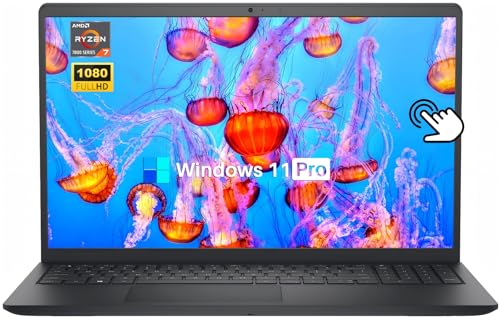
The Dell Inspiron 15 3535 is the roomiest pick in this guide, and the only one with a 512GB drive. Its AMD Ryzen 7 7730U processor with eight cores is the most powerful chip here, backed by 16GB of memory, a 15.6-inch Full HD touchscreen, and Windows 11 Pro. That combination makes it the best choice for buyers who want a smaller drive by laptop standards but still need room for a photo library, a few large apps, and serious multitasking without compromise.
Who it is for: power users, business buyers, and anyone who wants the strongest processor and the largest drive in this guide while still staying well below the 1TB tier.
Caveats: 512GB is generous for a smaller-drive laptop, but it is still half the capacity of a 1TB machine, so very large game or video libraries will eventually need external storage. The touchscreen and Pro edition add capability that casual users may not need. It is also the most capable machine here, so buyers with truly light needs may find a 256GB model sufficient.
Comparison Table
| Laptop | Drive | Memory | Processor | Display | Touchscreen | Operating System |
|---|---|---|---|---|---|---|
| Acer Aspire 3 Slim | 256GB SSD | 8GB | Intel Core i3-1305U | 15.6-inch Full HD | No | Windows 11 |
| Lenovo IdeaPad 1i | 256GB SSD | 16GB | Intel Core i5-1335U | 15.6-inch Full HD | No | Windows 11 Home |
| HP 15.6-inch Touchscreen | 256GB SSD | 16GB | Intel Core i3-1315U | 15.6-inch HD | Yes | Windows 11 |
| ASUS Vivobook Go 15 | 256GB SSD | 8GB DDR5 | AMD Ryzen 3 7320U | 15.6-inch Full HD | No | Windows 11 Home |
| Dell Inspiron 15 3535 | 512GB SSD | 16GB | AMD Ryzen 7 7730U | 15.6-inch Full HD | Yes | Windows 11 Pro |
Which One Is Right for You?
Start with how much local storage you genuinely use. If your files live in the cloud and your apps are few, any of the 256GB models will serve you well, and the choice comes down to memory and display. The Lenovo IdeaPad 1i is the best all-rounder for multitaskers thanks to its Core i5 processor and 16GB of memory. The Acer Aspire 3 Slim is the sensible budget choice with its Full HD screen and backlit keyboard, while the ASUS Vivobook Go 15 suits anyone who carries their laptop everywhere and values durability and fast charging.
If you want touch input, the HP 15.6-inch touchscreen laptop is the affordable route, though its HD display is a step below Full HD. If you want the most room and the most power without leaving the smaller-drive category, the Dell Inspiron 15 3535 is the clear pick: its 512GB drive, Ryzen 7 processor, 16GB of memory, and Windows 11 Pro make it the most capable machine in this guide. Whatever you choose, pair the laptop with a cloud backup habit and an external drive for archives, and a smaller hard drive will never feel like a limitation.
Frequently Asked Questions
Is 256GB enough for a laptop?
For many people, yes. A 256GB solid-state drive holds Windows 11, your apps, documents, and a working set of photos and files with room to spare, as long as large media collections live in cloud storage or on an external drive. It starts to feel tight if you store a large photo library, many games, or video projects locally, in which case a 512GB model such as the Dell Inspiron 15 3535 is the safer choice.
Do laptops with smaller hard drives run slower?
No, a smaller drive does not make a laptop slower on its own. What matters is the drive type, and every laptop in this guide uses a solid-state drive, which is far more responsive than an older spinning hard drive. Processor, memory, and display have a bigger effect on how fast a laptop feels day to day than the difference between 256GB and 512GB of storage.
Can I add more storage later?
It depends on the model. Some laptops let you replace the internal drive with a larger one or add an external drive over USB, while others have storage that is fixed in place. Before buying, check the laptop’s upgrade options and make sure it has the ports you need, such as USB-C and a memory card slot, so external storage is easy to attach when you need it.
Should I choose 256GB or 512GB?
Choose 256GB if your files live mostly in the cloud, you stream rather than download media, and you are comfortable managing storage occasionally. Choose 512GB if you keep a photo library, install several large apps, or simply want extra breathing room without thinking about storage for a long time. The 512GB Dell in this guide is the best fit for that second group.
Disclosure: As an Amazon Associate, we may earn from qualifying purchases.
Related guides
More from Amazon
Programs that pair well with the guide above. Offers and eligibility are set by Amazon and may change.
A free business account with business pricing and bulk-buying tools for work, shop or home office.
Create a business accountFree shipping on eligible items, Prime Video and more. Eligible new members can start with a free trial.
Start a Prime free trialAudiobooks and podcasts to listen to on the go. Eligible new members can start with a free trial.
Try Audible freeAd-free music streaming. Eligible new subscribers can start with a free trial.
Try Music Unlimited freeAs an Amazon Associate we earn from qualifying purchases.