Our Short List of 3
All 3 Picks at a Glance
| Product | Specs | Action |
|---|---|---|
 2. Seagate IronWolf 3TB ST3000VN006 | Check price on Amazon | |
 3. WD Red Pro 3TB WD3001FFSX | Check price on Amazon | |
 4. HGST Deskstar NAS 3TB 0S03660 | Check price on Amazon |
The best 3TB NAS hard drives are built for a job that ordinary desktop drives were never designed to handle: spinning around the clock inside a network-attached storage enclosure, sharing vibration with neighbouring drives, and rebuilding arrays without dropping out. A 3TB capacity point suits a two-bay or four-bay home NAS, a small media library, a photo backup target, or a first RAID array where larger capacities would sit mostly empty. The drives below are all 3.5-inch SATA models with NAS-tuned firmware, conventional magnetic recording, and published workload figures, so they belong in the same conversation even though they come from different generations and different makers.
Capacity deserves a plain note before anything else. The 3TB point is shrinking. Several current NAS drive families now begin at 4TB, and some 3TB models below are older designs that remain in circulation through third-party sellers. That does not make them unusable, but it does mean buyers should confirm the exact model number, the recording technology, and the condition on the exact listing before ordering. A NAS is only as dependable as its weakest drive, and a mismatched or mislabelled drive can turn a simple upgrade into a rebuild.
Every pick in this guide is a 3TB NAS hard drive, nothing else. There are no desktop drives, no surveillance drives, and no external enclosures here. Each one is a 3.5-inch internal SATA drive intended for always-on NAS use, and each one is discussed with its real specifications, its fit, and its caveats.
Our Top Picks
Top 3 picks at a glance
How to Choose
1. Insist on CMR recording
Conventional magnetic recording, usually shortened to CMR, writes data in parallel tracks that do not overlap. Shingled magnetic recording, or SMR, overlaps tracks to squeeze more capacity onto the same platters, which can slow sustained writes and complicate RAID rebuilds. For a NAS, CMR is the safer choice, and every drive in this guide uses CMR. When comparing listings, check the recording technology in the specification table rather than trusting the product title. The plain WD Red 3TB model WD30EFAX uses SMR, which is why this guide uses the WD Red Plus version of the same capacity instead.
2. Match the drive to the bay count
NAS drives are tuned for a certain number of bays. A drive built for up to eight bays handles the vibration of a small enclosure well, while a drive built for up to sixteen bays adds stronger vibration sensing for larger arrays. Buying a drive rated for fewer bays than the enclosure holds is a common mistake, and it usually shows up as slow rebuilds or drives dropping from the array. Check the enclosure manual, count the bays, and choose a drive whose bay guidance covers that number.
3. Check the workload figure
A workload figure, given in terabytes per year, describes how much data the maker expects the drive to read and write over twelve months. Desktop drives are often built around a far lower annual workload, while NAS drives in this guide carry figures around 180 terabytes per year, with the Pro-class model going higher. A home media server that streams films and backs up laptops will stay well inside that figure, but a NAS that also runs surveillance recording or constant sync jobs can approach it faster than expected.
4. Weigh rotational speed against noise and heat
A 5400 RPM class drive runs cooler and quieter than a 7200 RPM class drive, and it draws less power over a year of continuous operation. A 7200 RPM class drive answers requests faster and sustains higher transfer speeds, which matters when several people pull files at once or when a RAID rebuild is running. For a NAS that sits in a living room or a bedroom, the quieter drive is often the better neighbour. For a NAS in a ventilated closet or office, the faster drive is easier to justify.
5. Look for vibration protection and RAID-friendly error recovery
Several drives spinning in one enclosure shake each other. Rotational vibration sensors detect that movement and adjust the head position, while NAS-tuned firmware limits how long a drive spends retrying a difficult read before handing the error back to the RAID controller. Desktop firmware can retry for so long that the controller assumes the drive has failed. This behaviour is invisible in everyday use and decisive during a rebuild, so it belongs on every shortlist.
6. Compare warranty length and recovery services
NAS drives in this guide carry three-year or five-year limited warranties, and some include a data recovery service for a fixed period. A longer warranty does not prevent failure, but it does change the cost of a failure, and a bundled recovery service can matter when the data has no second copy elsewhere. Read the warranty terms on the maker site, and keep in mind that a NAS is not a backup by itself: a second copy on separate hardware remains the only real protection against loss.
7. Confirm the enclosure compatibility list
Synology, QNAP, Asustor, and other NAS makers publish compatibility lists for their enclosures, and a drive that is absent from the list can still work, but a drive on the list has been checked against that exact hardware and firmware. Before ordering, search the enclosure model and the drive model together. Also confirm the drive height: most 3.5-inch NAS drives are standard height, but a small number of high-capacity models are taller, and a tight enclosure can refuse a drive that is a few millimetres too tall.
Top Picks
1. WD Red Plus 3TB WD30EFRX
The WD Red Plus 3TB, model WD30EFRX, is the most straightforward pick in this guide. It is a 3.5-inch SATA drive running at 5400 RPM class speed, with a 6 Gb/s SATA interface, CMR recording, and a 64 MB cache. WD tunes the Red Plus line for NAS enclosures of up to eight bays, with NASware firmware that manages vibration, power, and error recovery for always-on use. The drive carries a three-year limited warranty.
In a two-bay or four-bay home NAS, this drive is easy to live with. It runs cool and quiet, it sips power compared with faster drives, and its CMR recording keeps RAID rebuilds predictable. It suits media libraries, photo archives, document storage, and backup targets, where steady behaviour matters more than peak transfer speed. It also suits buyers who want to fill several bays with identical drives, since matched drives simplify RAID setup and replacement.
The caveats are about age and condition rather than design. The WD30EFRX is an older model, and renewed listings circulate under a separate identifier, so the exact listing deserves a careful look before ordering. Confirm that the listing names WD30EFRX, that it describes the drive as new, and that the capacity is 3TB rather than a nearby capacity from the same family. Also keep expectations in line with the spindle speed: this drive will not match a 7200 RPM class drive for sustained transfers, and a household that edits video directly from the NAS may prefer a faster model.
Who it is for: Home NAS owners who want a quiet, cool, CMR drive for media, photos, and backups in a two-bay to four-bay enclosure.
Caveats: Older design; renewed listings exist under a different identifier, so confirm new condition and the exact model number on the listing.
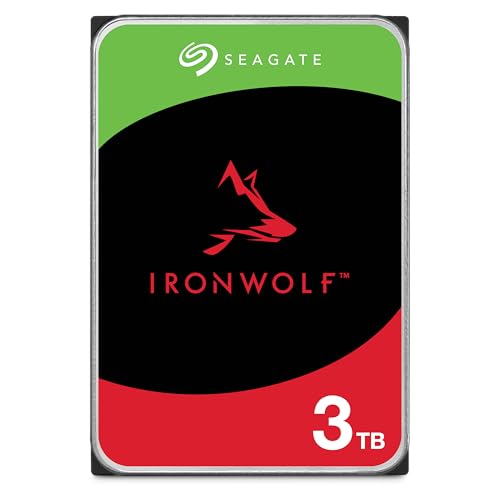
2. Seagate IronWolf 3TB ST3000VN006
The Seagate IronWolf 3TB, model ST3000VN006, is the Seagate counterpart to the WD Red Plus, and it brings a larger cache and a bundled recovery service to the same capacity point. It is a 3.5-inch SATA drive at 5400 RPM, with a 6 Gb/s interface, CMR recording, and a 256 MB cache. Seagate rates it for NAS enclosures of up to eight bays, with a workload figure of 180 terabytes per year, AgileArray firmware for multi-bay use, rotational vibration sensors, and a three-year limited warranty that includes Rescue Data Recovery Services.
The larger cache and the vibration sensing give this drive a practical edge in a busy four-bay enclosure, where several users or services read and write at once. The recovery service is a genuine comfort for a home NAS that holds a family photo archive with no second copy elsewhere, although it is no substitute for a backup. The drive also suits a first RAID array, since its CMR recording and error-recovery behaviour are designed for exactly that workload.
The caveat is model-number confusion. The retail kit version of this drive carries the model number ST3000VNZ06, and a closely related variant, ST3000VN007, runs at 5900 RPM with a 64 MB cache. Listings sometimes mix the two, so confirm the model number, the spindle speed, and the cache size on the exact listing before ordering. Also note that the IronWolf line has shown limited availability at some sellers, so the listing should be checked for current stock and for the seller behind it.
Who it is for: Home and small-office NAS owners who want a larger cache, vibration sensing, and a bundled recovery service in a quiet 5400 RPM drive.
Caveats: Retail-kit and variant model numbers are easily confused; confirm ST3000VN006 or ST3000VNZ06, 5400 RPM, and 256 MB cache on the exact listing.
3. WD Red Pro 3TB WD3001FFSX
The WD Red Pro 3TB, model WD3001FFSX, is the performance pick of this guide. It is a 3.5-inch SATA drive at 7200 RPM class speed, with a 6 Gb/s interface, CMR recording, and a 64 MB cache. WD builds the Red Pro line for medium and large NAS enclosures of up to sixteen bays, with NASware 3.0 firmware, rotational vibration sensors, and a five-year limited warranty. Its workload figure is higher than the standard Red Plus, which suits heavier multi-user use.
In a larger enclosure or a busy small-business NAS, the extra spindle speed shows up as faster sustained transfers and quicker RAID rebuilds. The longer warranty also changes the ownership picture: five years of cover on a drive that runs around the clock is a meaningful commitment from the maker. This drive suits a NAS that serves several people at once, hosts virtual machines or databases alongside file storage, or runs in an enclosure with eight or more bays.
The caveats are age, heat, and noise. The WD3001FFSX dates from an earlier generation of the Red Pro line, so listings should be checked for condition and for the exact model number. A 7200 RPM drive runs warmer and louder than a 5400 RPM drive, and in a small enclosure with limited airflow that can matter. It also draws more power over a year of continuous use. Buyers who keep a NAS in a living space should weigh that against the speed advantage.
Who it is for: Small-business and power-user NAS owners with larger enclosures or heavier multi-user workloads who want faster transfers and a five-year warranty.
Caveats: Older model; runs warmer and louder than 5400 RPM drives, and listings should be checked for new condition and the exact model number.
4. HGST Deskstar NAS 3TB 0S03660
The HGST Deskstar NAS 3TB, kit number 0S03660, is the legacy performance option in this guide. It is a 3.5-inch SATA drive at 7200 RPM, with a 6 Gb/s interface, CMR recording, and a 64 MB cache. The drive carries a 1 million hour mean time between failures figure, a rotational vibration sensor, and a three-year limited warranty, and it was designed for desktop NAS systems running around the clock.
Its appeal is speed at a capacity point where most current options run at 5400 RPM. Sustained transfers are strong for a 3TB drive, and the vibration sensor helps it hold up in a multi-bay enclosure. It suits a NAS that needs faster reads for media streaming to several devices at once, or a buyer replacing a failed drive in an existing array built around the same model.
The caveats are substantial and should be read before ordering. This is a legacy model from a brand that WD has since folded into its own lines, and most listings come from third-party sellers rather than the maker. Confirm the kit number 0S03660, the 7200 RPM speed, and the condition on the exact listing, and be aware that warranty support for a legacy model can be harder to arrange than for a current WD or Seagate drive. If the listing cannot confirm those details, the WD Red Pro above is the safer fast option.
Who it is for: Buyers replacing a Deskstar NAS drive in an existing array, or NAS owners who want 7200 RPM speed at 3TB and are comfortable checking a third-party listing carefully.
Caveats: Legacy model sold mainly by third-party sellers; confirm kit number 0S03660, 7200 RPM, and new condition, and check warranty support before ordering.
Comparison Table
| Drive | Spindle Speed | Cache | Recording | Bay Guidance | Warranty |
|---|---|---|---|---|---|
| WD Red Plus 3TB WD30EFRX | 5400 RPM class | 64 MB | CMR | Up to 8 bays | 3 years |
| Seagate IronWolf 3TB ST3000VN006 | 5400 RPM | 256 MB | CMR | Up to 8 bays | 3 years, with recovery service |
| WD Red Pro 3TB WD3001FFSX | 7200 RPM class | 64 MB | CMR | Up to 16 bays | 5 years |
| HGST Deskstar NAS 3TB 0S03660 | 7200 RPM | 64 MB | CMR | Desktop NAS, multi-bay | 3 years |
Which One Is Right for You?
For a quiet home NAS with two to four bays, the WD Red Plus 3TB is the default choice. It is cool, quiet, and predictable, and its CMR recording keeps RAID behaviour simple. The Seagate IronWolf 3TB is the alternative for the same enclosure when a larger cache and a bundled recovery service matter, or when the household wants the extra reassurance of vibration sensing in a busy four-bay box.
For a larger enclosure or a NAS that serves several people at once, the WD Red Pro 3TB is the better fit. Its 7200 RPM spindle speed and sixteen-bay guidance suit heavier workloads, and the five-year warranty matches the longer service life expected of a business NAS. The HGST Deskstar NAS 3TB fills a narrower role: it is the choice for replacing a matching drive in an existing array, or for a buyer who specifically wants 7200 RPM speed at 3TB and is willing to verify a third-party listing in detail.
Whatever the choice, buy matched drives for a RAID array where possible. Mixing spindle speeds, cache sizes, and firmware behaviours in one array works, but it can slow rebuilds and complicate troubleshooting. Also plan the capacity honestly: a 3TB drive in a two-bay mirrored array holds 3TB of usable space, not 6TB, and a four-bay array with one drive of redundancy holds 9TB. If the library is already close to those limits, a larger capacity point may be the wiser buy.
Frequently Asked Questions
Can I use a desktop hard drive in a NAS instead?
A desktop drive will often work for a short while, but it is not built for the job. Desktop firmware can spend so long retrying a difficult read that the RAID controller assumes the drive has failed, and desktop drives lack the vibration sensing that multi-bay enclosures need. For a NAS that runs around the clock, a NAS-rated drive is the safer choice, and the difference in behaviour shows up during rebuilds rather than during ordinary use.
Is 3TB enough for a home NAS?
It depends on the array and the library. A two-bay mirrored NAS with 3TB drives holds 3TB of usable space, which covers documents, photos, and a modest media library comfortably. A household with a large film collection, years of camera raw files, or several computers backing up to the same NAS will outgrow it sooner. Count the current library, add a year of growth, and remember that a RAID array is not a backup: a second copy on separate hardware is still needed.
Should all the drives in my NAS be the same model?
Matched drives are the simplest path. Identical models share spindle speed, cache, and firmware behaviour, which keeps rebuilds predictable and makes replacement straightforward. Mixed drives can work, and many NAS units accept them, but the array will run at the pace of its slowest member, and troubleshooting becomes harder when the drives behave differently under load.
Why do some 3TB NAS drives seem hard to find?
The capacity point is shrinking. Several current NAS drive families now begin at 4TB, and some 3TB models in this guide are older designs that remain in circulation through third-party sellers. That is not a reason to avoid them, but it is a reason to confirm the exact model number, the recording technology, and the condition on the listing before ordering, and to consider a 4TB drive if the budget allows.
Disclosure: As an Amazon Associate, we may earn from qualifying purchases.
Related guides
More from Amazon
Programs that pair well with the guide above. Offers and eligibility are set by Amazon and may change.
A free business account with business pricing and bulk-buying tools for work, shop or home office.
Create a business accountFree shipping on eligible items, Prime Video and more. Eligible new members can start with a free trial.
Start a Prime free trialAudiobooks and podcasts to listen to on the go. Eligible new members can start with a free trial.
Try Audible freeAd-free music streaming. Eligible new subscribers can start with a free trial.
Try Music Unlimited freeAs an Amazon Associate we earn from qualifying purchases.