Our Short List of 3
All 5 Picks at a Glance
| Product | Specs | Action |
|---|---|---|
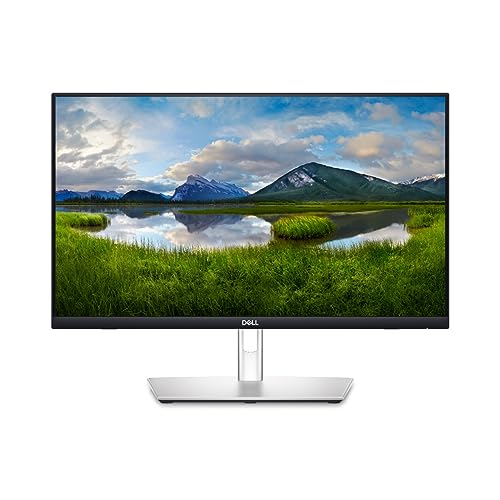 Dell P2424HT — the one-cable desk hub | Check price on Amazon | |
 ASUS BE24ECSBT — touch with a camera for calls | Check price on Amazon | |
 ViewSonic TD2760 — the 27-inch counter screen | Check price on Amazon | |
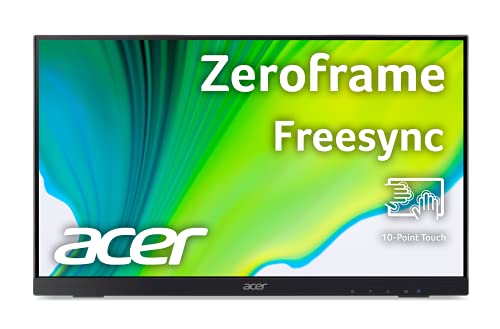 Acer UT222Q — 75Hz touch for compact desks | Check price on Amazon | |
 ASUS VT229H — the straightforward 21.5-inch option | Check price on Amazon |
As an Amazon Associate, we earn from qualifying purchases made through links on this page.
A touch monitor earns its place on a desk when reaching for the screen is faster than reaching for the mouse: tapping through a till queue at a checkout counter, signing off a delivery form, sketching a quick annotation over a drawing, running a kitchen or workshop PC with wet or gloved hands nearby, or giving a child a drawing app on the family computer. Touch also suits shared screens — check-in desks, information points and meeting-room displays — where several people walk up and interact without a keyboard in the way.
Every pick below is a desktop monitor with a proper stand, sized from 21.5 to 27 inches. Portable USB-C panels are a different product class and are left out on purpose, so the comparison stays honest. All five linked models use 10-point multi-touch according to their makers, all are Full HD IPS or VA panels, and all connect to Windows PCs, which is where touch support is complete. One further model, the HP E24t G5, is covered in its own section without a purchase link: it is a genuine desktop touch monitor that is still sold, but its Amazon US listing code could not be verified through the channels open to this guide, so it is named for completeness rather than linked on a guess.
Our Top Picks
Top 3 picks at a glance
What to look for in a touch monitor
Touch technology. Most desktop touch monitors use projected capacitive sensing, the same approach as a phone screen: it registers up to ten contact points, works through a sheet of hardened glass and needs no pressure. HP uses an in-cell design on the E24t G5, where the touch layer sits inside the panel itself for a thinner bezel and a surface that sits closer to the image. Infrared frames exist on larger interactive displays but are rare at desk sizes. Whichever type you choose, confirm the touch point count on the maker spec sheet — ten points is the current norm, and anything lower limits gestures such as pinch zoom and two-handed input.
The second cable rule. HDMI and DisplayPort carry the picture only. Touch data travels over a separate USB connection — USB-C on newer models, USB-B upstream on others. A monitor wired with a video cable alone will show a picture and ignore your fingers, which is the single most common setup mistake with this product type. USB-C models that combine video, touch and power in one lead are the cleanest option for laptops.
Pen support. Desktop touch monitors are finger-first devices. Most accept any passive capacitive stylus, which behaves like a fingertip and gives no pressure sensitivity or palm rejection. Active pen protocols are the exception rather than the rule at this size, so if you plan to write or draw with pressure levels, check the spec sheet for a named pen protocol before buying; none of the five linked picks here claims one.
Stand and viewing angle. Touch changes how a stand gets used. A panel you tap all day should tilt well back toward the desk so your arm works at a natural angle, and the better models here tilt close to flat. Height adjustment matters too, because a touch screen usually sits lower and closer than a viewing-only display. A 100 x 100 VESA pattern lets you move the panel to an arm or a counter mount later.
Panel limits. Touch monitors are built for interaction, not for fast competitive play. Refresh rates in this group run from 60Hz to 75Hz and response times from 5ms to 6ms, which is fine for casual and touch-friendly games, strategy titles and everyday work, but anyone chasing high frame rates should pair a touch screen with a fast gaming panel rather than replace it.
Platform support. Windows handles these monitors as standard touch devices with no extra software for basic tapping and gestures. macOS does not natively accept touch input from external monitors, so a Mac connected to any screen here gets a picture but no touch. Keep that in mind before buying for a mixed desk.
Dell P2424HT — the one-cable desk hub
See the Dell P2424HT on Amazon
Dell built the P2424HT around a single USB-C lead: one cable carries the picture, the touch data and up to 90W of power delivery to a laptop, and the monitor adds an RJ45 Ethernet port so the wired network arrives through the same dock. The panel is a 23.8-inch IPS unit at 1920 x 1080 with 10-point touch, a 60Hz refresh rate, 5ms grey-to-grey response in fast mode, 300 cd/m2 brightness and 99 percent sRGB coverage on Dell spec sheet. The articulating stand is the highlight for touch work — it tilts the screen down toward the desk for tapping and writing angles, and also adjusts for height, swivel and pivot. Around the back there are HDMI 1.4 and DisplayPort 1.2 inputs, a USB hub and a built-in 3W speaker.
This is the fitting pick for a laptop-based desk that needs touch without a separate docking station, and for hot-desk offices where one cable has to do everything. The limits follow from the specs: 60Hz and Full HD cap both gaming speed and workspace, and Dell lists no active pen support, so input is fingers or a passive stylus only.
ASUS BE24ECSBT — touch with a camera for calls
See the ASUS BE24ECSBT on Amazon
The BE24ECSBT is a 23.8-inch Full HD IPS business monitor that combines 10-point touch with the kit for video meetings: a Full HD webcam and a microphone array are built into the frame. ASUS lists a 75Hz refresh rate, 5ms grey-to-grey response, 300 cd/m2 brightness and 100 percent sRGB coverage. Connectivity is the deepest in this group — USB-C with up to 80W power delivery, DisplayPort input and output for daisy chaining a second screen, HDMI, and a USB hub — and an ambient light sensor adjusts brightness automatically as room light changes. The stand adjusts for height, tilt, swivel and pivot, and a pair of 2W speakers is built in.
Pick it for a home office desk where the same screen handles touch tasks and daily calls, or for a small meeting space. Its limits: the camera is fixed in the bezel, so framing depends on where the monitor sits, and touch remains finger-based with no active pen protocol in the ASUS spec.
ViewSonic TD2760 — the 27-inch counter screen
See the ViewSonic TD2760 on Amazon
The TD2760 stretches touch to 27 inches. Its Full HD SuperClear MVA panel gives wide 178-degree viewing angles for people standing at a counter, and the 10-point projected capacitive layer is rated by ViewSonic for kiosk, checkout and interactive signage duty. The spec sheet lists a 60Hz refresh rate, 6ms grey-to-grey response and 230 cd/m2 brightness, with HDMI, DisplayPort, VGA and a USB hub for connections, plus RS232 and HDMI CEC for remote control in installed setups — a feature none of the desk-first models here match. The ergonomic stand tilts, lifts and lays the screen back for signing and tapping, and twin 2W speakers are built in. ViewSonic lists compatibility across Windows, Android and Linux hosts.
This is the pick for shared and public-facing screens: reception points, retail counters, classroom podiums. The trade-offs are size-related — 1080p across 27 inches looks coarse up close compared with the 24-inch models, and 230 cd/m2 is the dimmest panel in this group, so bright window light is its enemy.
Acer UT222Q — 75Hz touch for compact desks
Acer’s UT222Q is a 21.5-inch Full HD IPS touch monitor with a gaming-adjacent twist: a refresh rate of up to 75Hz over HDMI or DisplayPort and AMD FreeSync support, which no other pick here lists. Acer specifies 10-point touch behind an anti-glare coating, 5ms response time, 250 cd/m2 brightness and a stand that tilts from 15 to 70 degrees — a range shaped for leaning the panel back and tapping rather than sitting it upright. Ports cover DisplayPort, HDMI, VGA and the USB 2.0 upstream connection that carries touch, and a pair of speakers totalling 4W is built in. The 100 x 100 VESA pattern allows wall or arm mounting.
Choose it for a smaller desk, a kitchen or workshop PC, or as a touch side screen next to a main gaming monitor, where the 75Hz and FreeSync support keep motion smoother than the 60Hz models. Its limits are the smaller canvas, a tilt-only stand with no height adjustment, and a USB 2.0 touch link that reflects its simpler hub-free design.
ASUS VT229H — the straightforward 21.5-inch option
The VT229H has been the default small touch monitor for years because it keeps the formula plain: a 21.5-inch Full HD IPS panel, 10-point touch, a 60Hz refresh rate, 5ms response and 250 cd/m2 brightness, behind glass with a 7H hardness figure for resistance to scratches. Inputs are HDMI and VGA for video with USB carrying touch — there is no DisplayPort and no USB-C — and the stand tilts from -5 to 20 degrees, with a 100 x 100 VESA mount behind it. Built-in speakers, flicker-free backlighting and low blue light modes round out the ASUS spec.
It suits a fixed single-purpose station — a check-in desk, a family PC, a control screen for home equipment — where the host computer is a desktop that stays put. The limits are the legacy port mix, the narrow tilt range compared with the Acer and Dell stands, and no height adjustment, so budget for a riser or an arm if the desk height is not right.
HP E24t G5 — named, without a link
The HP E24t G5 deserves a mention even though this guide cannot attach a verified purchase link to it. HP builds this 23.8-inch Full HD IPS monitor around Advanced In-Cell Touch, its in-cell touch design, with 10 points of touch, a 75Hz refresh rate, 5ms grey-to-grey response with overdrive, 300 cd/m2 brightness and 99 percent sRGB coverage. It connects over HDMI 1.4 and DisplayPort 1.2, with a USB-B upstream port feeding a four-port USB-A hub, and the stand covers height, tilt, swivel and pivot. On paper it sits between the two ASUS models above. It is named here without a link because the Amazon US listing code for this model could not be confirmed through the sources available to this guide; search the model number on the store and check that the listing matches HP part 6N6E6AA#ABA before buying, since several similar E-series HP monitors have near-identical names.
Comparison table
| Model | Size and panel | Touch | Refresh | Stand | Key connections |
|---|---|---|---|---|---|
| Dell P2424HT | 23.8-inch IPS, 1920 x 1080 | 10-point | 60Hz | Articulating tilt, height, swivel, pivot | USB-C 90W, HDMI, DisplayPort, Ethernet, USB hub |
| ASUS BE24ECSBT | 23.8-inch IPS, 1920 x 1080 | 10-point | 75Hz | Height, tilt, swivel, pivot | USB-C 80W, DisplayPort in and out, HDMI, webcam |
| ViewSonic TD2760 | 27-inch MVA, 1920 x 1080 | 10-point | 60Hz | Tilt, height, lay-back | HDMI, DisplayPort, VGA, USB hub, RS232 |
| Acer UT222Q | 21.5-inch IPS, 1920 x 1080 | 10-point | 75Hz | Tilt 15 to 70 degrees | DisplayPort, HDMI, VGA, USB 2.0 touch |
| ASUS VT229H | 21.5-inch IPS, 1920 x 1080 | 10-point | 60Hz | Tilt -5 to 20 degrees | HDMI, VGA, USB touch |
| HP E24t G5 (no link) | 23.8-inch IPS, 1920 x 1080 | 10-point in-cell | 75Hz | Height, tilt, swivel, pivot | HDMI, DisplayPort, USB-B hub |
FAQ
Why does the touch layer need a USB cable as well as HDMI?
HDMI and DisplayPort carry video only. Touch positions travel back to the computer over USB, either through the same USB-C lead on the Dell and the ASUS BE24ECSBT, or through a separate USB upstream cable on the other models. Connect both, or the screen will show a picture and ignore your fingers.
Do these monitors need driver software on Windows?
For basic tapping, swiping and pinch gestures, no — Windows treats them as standard touch input devices. Maker utilities only add extras such as on-screen menus or split-screen tools. macOS is the exception to keep in mind: it does not natively accept touch input from external monitors, so a Mac gets the picture without the touch.
Can I draw on one of these with a pen?
With a passive capacitive stylus, yes, in the same way a fingertip works — fine for sketching shapes, signing and marking up. Pressure-sensitive drawing is different: none of the linked models here lists an active pen protocol, so pen strokes carry no pressure levels and your palm will register as touch. For pressure-based artwork, a pen display is the correct product type instead.
Is a touch monitor a good main screen for gaming?
For touch-friendly titles, strategy games, point-and-click adventures and everyday desktop work, yes. For fast shooters and racing games, the 60Hz to 75Hz refresh rates and 5ms to 6ms response times in this group sit well below gaming panels, so treat a touch monitor as a second screen or a casual-play screen rather than a competitive one.
Which size works best for a shared counter or check-in desk?
The 27-inch ViewSonic TD2760 gives the largest targets for people standing and tapping, and its stand lays back for signing. For a single seated user, the 23.8-inch models balance target size against desk space, and their pixels sit closer together, so text looks sharper at desk distance.
Conclusion
For most desks, the Dell P2424HT is the most complete touch monitor here: one USB-C cable for picture, touch, power and network, on a stand that folds toward the angle touch work wants. The ASUS BE24ECSBT is the better meeting-room and home-office pick thanks to its built-in camera and daisy chain output, while the ViewSonic TD2760 owns the shared-counter role at 27 inches. The Acer UT222Q adds 75Hz and FreeSync for smaller or secondary setups, and the ASUS VT229H remains the plain, durable answer for a fixed station. Whichever you choose, plan the cabling before the panel arrives — picture plus USB for touch — and the screen will respond from the first tap.
Related guides
More from Amazon
Programs that pair well with the guide above. Offers and eligibility are set by Amazon and may change.
A free business account with business pricing and bulk-buying tools for work, shop or home office.
Create a business accountFree shipping on eligible items, Prime Video and more. Eligible new members can start with a free trial.
Start a Prime free trialAudiobooks and podcasts to listen to on the go. Eligible new members can start with a free trial.
Try Audible freeAd-free music streaming. Eligible new subscribers can start with a free trial.
Try Music Unlimited freeAs an Amazon Associate we earn from qualifying purchases.