Our Top Picks
Top 3 picks at a glance

Introduction
A 24-inch monitor remains one of the most sensible choices for a gaming desk, a home office, or a compact dual-screen setup. The panel is large enough for comfortable Full HD gaming and everyday work, yet small enough to fit on a narrow desk, sit close to a wall, or pair with a second screen without crowding the workspace. Pixel density at 1920 x 1080 on a 24-inch panel keeps text sharp and game detail clear, and the smaller screen keeps the whole image inside a natural field of view, so fast action stays easy to follow without turning the head from edge to edge.

This guide rounds up five 24-inch monitors covering the main uses for this size: high-refresh competitive gaming, smooth everyday play, and calm, color-consistent work. Every model below is a 24-inch class panel with Full HD 1920 x 1080 resolution and a different mix of panel type, refresh rate, and stand flexibility. Use the comparison table to narrow the field, then read the individual sections for the details that matter to your desk and your daily workload.
At a Glance
| Monitor | Panel | Refresh Rate | Response Time | Sync Support | Stand Adjustment |
|---|---|---|---|---|---|
| ASUS VG248QG | TN | 165Hz | 0.5ms | G-Sync Compatible, Adaptive-Sync | Height, tilt, swivel, pivot |
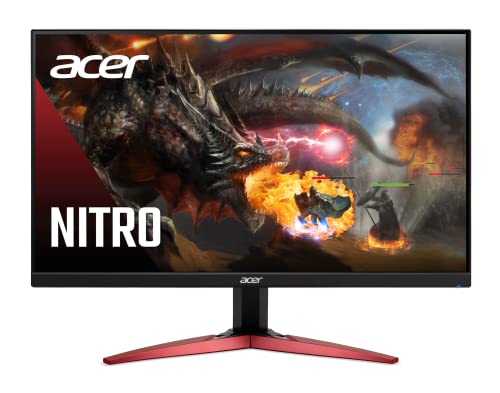
| Acer Nitro KG241Y Sbiip | VA | 165Hz | 1ms VRB | FreeSync Premium | Tilt |
| Samsung Odyssey G3 G30D | VA | 180Hz | 1ms | FreeSync | Height, tilt, pivot |
| AOC Gaming 24G2S | IPS | 165Hz | 1ms | Adaptive-Sync | Height |
| LG 24MP400-B | IPS | 75Hz | 5ms | FreeSync | Tilt |
ASUS VG248QG
ASUS VG248QG 24-Inch G-Sync Compatible Gaming Monitor, 165Hz Full HD 1080p
The ASUS VG248QG is the fastest-feeling panel in this roundup, and it is built for players who want every frame to land cleanly. Its 24-inch TN panel runs at 165Hz with a 0.5ms response time, which keeps motion crisp in fast shooters and racing games, where smeared edges and ghosting make targets harder to track. G-Sync Compatible support and Adaptive-Sync keep the refresh rate matched to the graphics card output, so tearing and stutter stay out of the picture during uneven frame delivery.
ASUS Extreme Low Motion Blur is available for players who want even sharper motion, and the Eye Care package pairs a flicker-free backlight with a low blue light mode for long sessions. The stand is the most flexible here, with height, tilt, swivel, and pivot adjustment, so the panel can rotate into portrait orientation for chat windows, code, or reading. Connectivity covers DisplayPort, HDMI, and DVI-D, which makes the monitor easy to connect to a modern graphics card, a console, or an older desktop that still relies on DVI.
Key Features
- 24-inch Full HD 1920 x 1080 TN panel with a 165Hz refresh rate
- 0.5ms response time with Extreme Low Motion Blur
- G-Sync Compatible and Adaptive-Sync support
- ASUS Eye Care with flicker-free backlight and low blue light mode
- DisplayPort, HDMI, and DVI-D inputs
- Height, tilt, swivel, and pivot stand with VESA mounting
Considerations
The TN panel trades some viewing angle and color richness for speed, so colors shift a little when viewed from far off center, and the image looks its best viewed straight on. The 165Hz refresh rate needs a DisplayPort connection on most systems, so check the cable in the box and the outputs on the graphics card before setup. This is the pick for players who put motion clarity first and sit directly in front of the screen.
Acer Nitro KG241Y Sbiip
Acer Nitro KG241Y Sbiip 23.8-Inch Full HD VA Gaming Monitor, 165Hz
The Acer Nitro KG241Y Sbiip pairs a 165Hz refresh rate with a VA panel, which gives it deeper blacks and stronger contrast than the TN options in this guide. Dark scenes in horror games and moody open-world titles hold more depth, and movies look richer on the same screen. The 23.8-inch panel is a true 24-inch class display, and its ZeroFrame design keeps the bezels slim on three sides, which matters when two monitors sit side by side and the gap between them should stay minimal.
FreeSync Premium support smooths out frame pacing with compatible AMD graphics cards, and the 1ms Visual Response Boost mode tightens motion when the action speeds up. The monitor ships with one DisplayPort 1.2 input and two HDMI 2.0 inputs, so a gaming PC, a console, and a laptop can all stay connected at once without swapping cables. The stand tilts for basic angle adjustment, and the panel is VESA compatible for an arm or wall mount when desk space is tight.
Key Features
- 23.8-inch Full HD 1920 x 1080 VA panel with a 165Hz refresh rate
- 1ms Visual Response Boost for sharper fast motion
- AMD FreeSync Premium support
- ZeroFrame slim-bezel design for clean multi-monitor setups
- One DisplayPort 1.2 input and two HDMI 2.0 inputs
- VESA mounting support
Considerations
The stand adjusts tilt only, so height and rotation changes need a separate monitor arm. VA panels can show a little smearing on very dark, fast-moving content, which is the usual trade for their deeper contrast. This monitor suits players who want strong contrast and a high refresh rate in one panel and who game in a dim room where deep blacks stand out.
Samsung Odyssey G3 G30D
Samsung 24-Inch Odyssey G3 G30D Series FHD Gaming Monitor, 180Hz
The Samsung Odyssey G3 G30D brings the highest refresh rate in this guide at 180Hz, on a 24-inch Full HD panel with a 1ms response time. That extra headroom keeps motion smooth for high-frame-rate competitive play, and FreeSync support keeps the picture free of tearing when frame rates move up and down. The three-sided borderless design gives the screen a modern look and keeps the focus on the game rather than the frame around it.
Samsung adds several gaming aids to this model, including Black Equalizer, which lifts shadow detail so opponents hiding in dark corners are easier to spot, and Virtual Aim Point, which places a crosshair overlay on screen for games that lack one. Eye Saver Mode and a flicker-free backlight reduce eye fatigue during long sessions. The adjustable stand covers height, tilt, and pivot, so the panel can move into portrait mode for secondary tasks, and the VESA mount points open the door to an arm setup later.
Key Features
- 24-inch Full HD 1920 x 1080 panel with a 180Hz refresh rate
- 1ms response time with AMD FreeSync support
- Black Equalizer and Virtual Aim Point gaming aids
- Eye Saver Mode with a flicker-free backlight
- Three-sided borderless design
- Height, tilt, and pivot adjustable stand with VESA mounting
Considerations
The 180Hz refresh rate is reached over DisplayPort on most systems, so the connection type matters during setup. The gaming aids are handy in competitive titles but add little for everyday work, so buyers who mainly browse and write may not use them. This is the pick for players who want the fastest refresh rate available in a 24-inch panel at this level, with a stand that adjusts in every direction that matters.
AOC Gaming 24G2S
AOC Gaming 24G2S 24-Inch Frameless Gaming Monitor, Full HD 165Hz
The AOC Gaming 24G2S is the IPS pick for players who want wide viewing angles and steady colors alongside a high refresh rate. Its 24-inch Full HD IPS panel runs at 165Hz with a 1ms response time, so motion stays clean in fast games while colors stay consistent when the screen is viewed from the side, which matters in a shared room or a dual-monitor setup where the second screen sits at an angle. The frameless design on three sides keeps the bezel out of the way and makes a two-monitor row look like one wide workspace.
Adaptive-Sync support keeps frames tear-free with compatible graphics cards, and the height-adjustable stand makes it easy to line the screen up with eye level, which reduces neck strain over long sessions. The panel handles everyday work just as well as gaming, with text that stays sharp and colors that stay even across the screen, so it works as a single do-everything display for a desk that mixes play and productivity.
Key Features
- 24-inch Full HD 1920 x 1080 IPS panel with a 165Hz refresh rate
- 1ms response time with Adaptive-Sync support
- Frameless design on three sides for clean multi-monitor rows
- Wide viewing angles with consistent color from off-center positions
- Height-adjustable stand with VESA mounting support
Considerations
IPS glow can be visible in very dark scenes when the room is fully dark, which is a normal trait of the panel type rather than a fault in this model. The stand adjusts height but does not pivot into portrait mode, so a monitor arm is needed for vertical orientation. This monitor suits players and workers who share a desk, sit at an angle, or want one panel that handles gaming and daily work with equal ease.
LG 24MP400-B
LG 24MP400-B 24-Inch Full HD IPS Computer Monitor, 75Hz
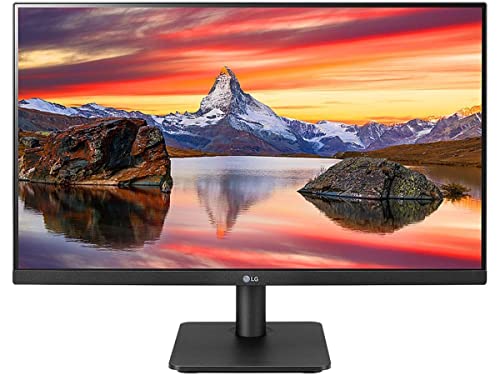
The LG 24MP400-B is the calm, work-first option in this guide, built for desks where comfort and color consistency matter more than raw speed. Its 24-inch Full HD IPS panel runs at 75Hz with a 5ms response time, which is smooth enough for casual gaming, streaming, and everyday tasks, while the IPS panel keeps colors accurate and viewing angles wide. The three-side virtually borderless design gives the monitor a light, modern look on the desk and works well in dual-screen arrangements.
Reader Mode shifts the color temperature toward warmer tones for long reading sessions, and Smart Energy Saving adjusts brightness to cut power use without dimming the screen into uselessness. AMD FreeSync support keeps casual games free of tearing, and OnScreen Control software lets the screen be split into zones for multitasking. The stand tilts for basic angle adjustment, and the panel carries VESA 75 mounting points for an arm or wall bracket.
Key Features
- 24-inch Full HD 1920 x 1080 IPS panel with a 75Hz refresh rate
- 5ms response time with AMD FreeSync support
- Three-side virtually borderless design
- Reader Mode and Smart Energy Saving for comfortable long sessions
- OnScreen Control for split-screen multitasking
- HDMI and D-Sub inputs with tilt stand and VESA 75 mounting
Considerations
The 75Hz refresh rate is a clear step below the gaming panels in this guide, so competitive players who chase high frame rates should look at the 165Hz and 180Hz models above instead. The stand tilts only, so height changes need a monitor arm or a riser. This is the pick for home offices, study desks, and casual setups where a sharp, comfortable, color-steady screen matters more than maximum refresh speed.
How to Choose
Start with the refresh rate, because it shapes how motion feels more than any other single number. A 165Hz or 180Hz panel makes fast games feel fluid and responsive, while a 75Hz panel is fine for office work, streaming, and casual play. Match the refresh rate to the games actually played: competitive shooters and racing titles benefit the most from high refresh rates, while strategy games, office work, and video playback gain little from them.
Panel type comes next. TN panels deliver the fastest response times and the lowest motion blur, but their colors shift when viewed off-center. VA panels bring deeper blacks and stronger contrast, which suits dark games and movies, with a small risk of smearing in very dark motion. IPS panels keep colors steady from wide angles and look the most consistent across the screen, which suits shared desks, creative work, and dual-monitor setups.
Sync support matters whenever frame rates fluctuate. G-Sync Compatible, FreeSync, and Adaptive-Sync all match the monitor refresh rate to the graphics card output, which removes tearing and keeps motion smooth when frame rates dip. Check which sync standard matches the graphics card in the system, since the benefit only appears when both sides speak the same language.
Resolution is settled for this size: Full HD 1920 x 1080 is the natural fit for a 24-inch panel, giving sharp text and clear game detail without demanding a powerful graphics card. Connectivity deserves a quick check too, since high refresh rates usually need DisplayPort, while HDMI covers consoles and laptops with ease. Count the inputs against the devices that will connect, and leave one spare for a laptop or a second console.
Fit and Installation Considerations
Measure the desk before choosing, since a 24-inch monitor needs roughly 21 to 22 inches of width with its stand, plus room for a keyboard in front and speakers or a headset stand at the sides. The screen should sit about an arm’s length away, with the top edge at or slightly below eye level, so the neck stays neutral during long sessions. A height-adjustable stand makes this easy, while a tilt-only stand may need a monitor riser or a stack of books under the base to reach the right height.
For dual-monitor setups, slim bezels matter more than they seem on paper. Two 24-inch panels side by side create a wide field that still fits on a standard desk, and thin bezels keep the seam between them narrow. Mounting both screens on a dual monitor arm frees the desk surface and lets each panel angle independently, which helps when one screen faces the user directly and the other angles in from the side.
Cable planning saves frustration later. Route the DisplayPort or HDMI cable and the power cable through the stand or a cable channel so they do not pull on the ports when the screen moves. Keep the cable slack generous enough for height and tilt changes, and leave the ports accessible in case a laptop needs a quick connection. When wall mounting, confirm the VESA pattern on the monitor matches the mount, and check that the wall can hold the combined weight of the mount and the panel before drilling.
Frequently Asked Questions
What size monitor is best for a small desk?
A 24-inch monitor is one of the best fits for a small desk, because it delivers a full Full HD workspace while leaving room for a keyboard, a mouse pad, and a notebook. Larger panels push the user further back or crowd the edges of the desk, while smaller panels shrink text and game detail. Measure the desk width first, then leave a few inches of clearance on each side for airflow and for reaching the ports.
Is 165Hz enough for competitive gaming on a 24-inch monitor?
Yes, 165Hz is enough for competitive gaming on a 24-inch panel, and it is a large step up from a standard 60Hz or 75Hz screen. Motion stays clear, aiming feels responsive, and the panel keeps up with high frame rates from a capable graphics card. The 180Hz Samsung model in this guide adds a little more headroom, but the difference between 165Hz and 180Hz is subtle compared with the jump from 75Hz to 165Hz.
Do I need DisplayPort for a high refresh rate monitor?
In most cases, yes. DisplayPort is the usual connection for reaching 144Hz and above on a gaming monitor, while HDMI may limit the refresh rate depending on the version and the graphics card. Check the monitor manual and the graphics card outputs before setup, and use the cable that ships with the monitor when possible, since it is matched to the panel. A laptop with only HDMI may still run the panel, just at a lower refresh rate.
Can a 24-inch monitor work for both gaming and office work?
Yes, a 24-inch monitor handles both roles well, and the IPS models in this guide are the strongest all-rounders. They keep colors steady for documents and browsing, while their 165Hz refresh rates keep games smooth after work ends. A height-adjustable stand helps here too, since the screen can sit at eye level for typing and stay in the same position for gaming without any readjustment.
Conclusion
The best 24 monitors share the same foundation: a 24-inch Full HD panel that fits a normal desk, keeps text sharp, and keeps the whole screen inside a natural field of view. From there, the choice comes down to use. Competitive players should lean toward the 165Hz and 180Hz gaming panels: the ASUS VG248QG for motion clarity, the Samsung Odyssey G3 G30D for the highest refresh rate, and the Acer Nitro KG241Y Sbiip for deep contrast. Players and workers who share a desk or sit at an angle will get the most from the IPS panels, with the AOC Gaming 24G2S covering gaming and daily work in one screen and the LG 24MP400-B serving as the calm office pick. Measure the desk, match the sync support to the graphics card, and choose the panel type that fits the room.
As an Amazon Associate, we earn from qualifying purchases.
Related guides
More from Amazon
Programs that pair well with the guide above. Offers and eligibility are set by Amazon and may change.
A free business account with business pricing and bulk-buying tools for work, shop or home office.
Create a business accountFree shipping on eligible items, Prime Video and more. Eligible new members can start with a free trial.
Start a Prime free trialAudiobooks and podcasts to listen to on the go. Eligible new members can start with a free trial.
Try Audible freeAd-free music streaming. Eligible new subscribers can start with a free trial.
Try Music Unlimited freeAs an Amazon Associate we earn from qualifying purchases.