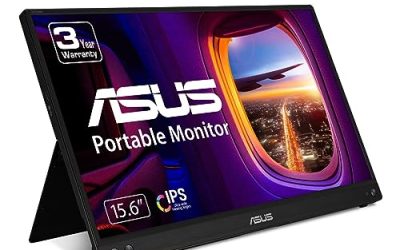
Our Short List of 3

- Best for: Designers and presenters working in bright, glare-heavy rooms.
- 15.6-inch 1080P IPS matte screen
- 60Hz refresh rate
- 400 nits brightness
- 8000mAh battery for 4 to 5 hours

- Best for: Office workers on locked-down corporate networks.
- 16-inch 1920 x 1200 IPS panel
- 16:10 aspect ratio
- 60Hz refresh rate
- Built-in 4000mAh battery for up to 3 hours

- Best for: Home offices where one screen covers work, streaming and video calls.
- 32-inch screen
- 4K UHD 3840 x 2160 resolution
- HDR10+ support
- AI upscaling
All 3 Picks at a Glance
| Product | Specs | Action |
|---|---|---|
| HotYeah 15.6-Inch Wireless Portable Monitor |
| Check price on Amazon |
| ViewSonic VG1656N |
| Check price on Amazon |
| Samsung Smart Monitor M8 M80D |
| Check price on Amazon |
The real choice with a wireless monitor is not whether cutting the video cable feels convenient, but whether the screen behaves like a second display once the cable is gone. A weak wireless link turns every scroll into a stutter and every video call into a frozen frame, while a strong one lets a laptop, phone or tablet throw its picture across the room without a second thought. Battery life decides how long that freedom lasts, and the casting standard decides which of your devices can use it.
This guide is for laptop owners who work from cafés, meeting rooms and spare desks, for presenters who want a big screen without hunting for a cable, and for anyone building a tidy desk around a single machine. Every monitor below was picked from its Amazon listing title and specifications, and each one states wireless casting or wireless display support on that listing, so you can match the panel to your devices, your bag and the rooms you work in.
Our Top Picks
Top 3 picks at a glance
Quick Picks
As an Amazon Associate we earn from qualifying purchases
| Product | Best for | Key spec from title |
|---|---|---|
| EVICIV 15.6-Inch Wireless Portable Monitor | Long cord-free workdays away from outlets | 8000mAh battery with AirPlay and Miracast |
| HotYeah 15.6-Inch Wireless Portable Monitor | Bright color work in glare-heavy rooms | 1080P IPS matte panel at 400 nits |
| ViewSonic VG1656N | Office networks that block open casting | WiFi dongle with 4000mAh battery |
| Samsung Smart Monitor M8 M80D | A desk screen that streams with no PC attached | 32-inch 4K display with built-in apps |
How to Choose
Match the casting standard to your devices
AirPlay and Miracast are the two casting paths most wireless monitors use, and they split neatly along device lines. iPhones, iPads and Macs lean on AirPlay, while most Windows laptops and Android phones lean on Miracast, so a monitor that lists only one of them can leave half your devices wired. A few models dodge the question entirely with a dedicated WiFi dongle in the box, which sets up its own link instead of asking the office network for permission. Before ordering, open the listing and check that your exact laptop or phone is named as compatible, because Chromebooks and some Pixel phones connect by wire only on many of these screens.
Treat battery life as your real workday limit
A wireless monitor is only as free as its battery, and the milliamp-hour figure on the listing is the honest starting point. An 8000mAh cell typically carries a 15.6-inch panel through four to five hours of office work, while a 4000mAh cell in a 16-inch ViewSonic covers around three hours before it needs a socket. Brightness is the hidden drain: a panel pushed to full brightness in a sunny room empties noticeably faster than the same panel dimmed indoors. Check whether the listing states a recharge time as well, since a two-hour refill fits a lunch break and a slow one does not, and remember that a desk-bound smart monitor has no battery at all.
Expect wireless to cap refresh and streaming
Casting over Wi-Fi tops out at 60Hz on nearly every screen in this guide, even when the same panel reaches 100Hz over a wired HDMI or USB-C connection. That ceiling is fine for documents, slides and video calls, but fast games and high-frame-rate video belong on the cable, so look for a model with HDMI and USB-C ports in reserve. Streaming apps add a second limit: copy protection blocks services like Netflix from casting wirelessly on most of these monitors, which means films and shows need the wired path too. If smooth motion or streaming matters to you, treat the wireless link as a convenience for work, not a replacement for every cable.
Size the panel for the bag or the desk
A 15.6-inch portable monitor disappears into a laptop sleeve and weighs little more than a hardback book, which is exactly what a traveller needs, while a 16-inch 16:10 panel trades a little bulk for extra vertical room that suits documents and code. Step up to a 27-inch or 32-inch desk monitor and portability ends entirely: the screen needs mains power, a fixed stand and a permanent spot, but it pays you back with room for side-by-side windows. Check the stand and mounting too, since a folding kickstand, a magnetic stand or VESA holes decide whether the screen props up on a café table, hangs on an arm or simply leans against a wall.
The 4 Best Options
EVICIV 15.6-Inch Wireless Portable Monitor
The EVICIV is the straightforward travel pick: a 15.6-inch screen with its own 8000mAh battery, so it keeps working through a meeting-heavy afternoon when the nearest socket is across the room. AirPlay and Miracast handle the casting from iPhones, Android phones, Macs and Windows laptops, and the matte screen keeps glare down under office lighting. USB-C and HDMI ports sit in reserve for the moments wireless latency gets in the way, and VESA mounting lets the same panel hang on an arm once you are back at a real desk. At 3.41 pounds it is no featherweight, but it is still an easy carry next to a laptop.
Specs
- 15.6-inch screen with FHD 1080p resolution
- Matte screen surface
- 8000mAh built-in battery
- AirPlay and Miracast wireless casting
- USB-C and HDMI ports
- VESA mounting support
- 350 candela brightness
- 0.23 x 8 x 14 inches, 3.41 pounds
Best for: Remote workers who want a full afternoon away from wall outlets.
Watch out for: Confirm it is still sold before buying, since the live Amazon page could not be opened during checks; also check that your phone or laptop supports AirPlay or Miracast before ordering.
HotYeah 15.6-Inch Wireless Portable Monitor
- Best for: Designers and presenters working in bright, glare-heavy rooms.
- 15.6-inch 1080P IPS matte screen
- 60Hz refresh rate
- 400 nits brightness
- 8000mAh battery for 4 to 5 hours
Designers and presenters working in bright, glare-heavy rooms.
Confirm it is still sold before buying, since the live Amazon page could not be opened during checks; streaming apps do not cast wirelessly, so plan on a cable for films and shows.
The HotYeah earns its place on brightness and color: a 15.6-inch 1080P IPS matte panel at 400 nits that stays readable beside a window, with wide sRGB coverage that keeps slides and photos looking rich rather than washed out. The 8000mAh battery is listed for four to five hours of cord-free use, and the kickstand adjusts through 180 degrees while VESA holes offer a wall or arm mount. Two USB-C ports, a Mini HDMI port and a 3.5mm audio jack cover wired backup and headphones, and auto-rotation flips the picture to portrait when a phone is attached. At 1.5 pounds it is one of the lightest wireless screens here.
Watch out for: Confirm it is still sold before buying, since the live Amazon page could not be opened during checks; streaming apps do not cast wirelessly, so plan on a cable for films and shows.
ViewSonic VG1656N
- Best for: Office workers on locked-down corporate networks.
- 16-inch 1920 x 1200 IPS panel
- 16:10 aspect ratio
- 60Hz refresh rate
- Built-in 4000mAh battery for up to 3 hours
Office workers on locked-down corporate networks.
Confirm it is still sold before buying, since the live Amazon page could not be opened during checks; auto-rotation works over USB-C only, not through the wireless dongle.
The ViewSonic is the corporate pick, built for offices where casting standards stumble on locked-down networks. Instead of relying on AirPlay or Miracast alone, it ships with a WiFi dongle that sets up the wireless link by hardware, so the screen mirrors from a laptop where network rules are strict. The 16-inch 1920 x 1200 IPS panel uses a 16:10 shape that suits documents and spreadsheets, two-way 60W USB-C carries video, audio, data and power over one cable, and dual speakers cover calls without extra gear. A 4000mAh battery gives up to three hours away from a socket, and the three-year warranty is the longest backing in this guide.
Watch out for: Confirm it is still sold before buying, since the live Amazon page could not be opened during checks; auto-rotation works over USB-C only, not through the wireless dongle.
Samsung Smart Monitor M8 M80D
- Best for: Home offices where one screen covers work, streaming and video calls.
- 32-inch screen
- 4K UHD 3840 x 2160 resolution
- HDR10+ support
- AI upscaling
Home offices where one screen covers work, streaming and video calls.
Confirm it is still sold before buying, since the live Amazon page could not be opened during checks; it needs mains power and a Wi-Fi network, so it is a desk screen rather than a battery portable.
The Samsung is the odd one out: a 32-inch 4K monitor that runs streaming apps, video calls and a games hub with nothing plugged into it except power. Wireless PC sharing lets a compatible phone or laptop throw its screen across the room, while the SlimFit camera and built-in speakers turn the panel into a meeting station. HDR10+ support and AI upscaling sharpen films and shows, the ergonomic stand adjusts to a working height, and a USB-C port handles a wired laptop when latency matters. This is a permanent desk fixture, not a travel screen, and it makes sense when one display has to cover work, entertainment and calls.
Watch out for: Confirm it is still sold before buying, since the live Amazon page could not be opened during checks; it needs mains power and a Wi-Fi network, so it is a desk screen rather than a battery portable.
Which One Fits Your Situation
You work from cafés and client offices
Pick the EVICIV 15.6-inch. Its 8000mAh battery and matte screen suit long stretches away from outlets, AirPlay and Miracast cover the phones and laptops you are likely to carry, and VESA mounting lets it hang on a spare arm when a client office has one. The wired ports are there when the wireless link stutters.
You work in bright rooms with color-heavy files
Pick the HotYeah 15.6-inch. The 400-nit matte IPS panel holds up beside windows where dimmer screens wash out, the wide color coverage keeps slides and photos honest, and the listed four to five hours of battery cover a working session without hunting for a socket. The 180-degree kickstand props it at any angle you need.
Your office network blocks open casting
Pick the ViewSonic VG1656N. The bundled WiFi dongle sets up the wireless link by hardware instead of asking the network for permission, the 16:10 panel suits documents, and dual speakers cover calls without extra gear on the desk. The three-year warranty fits a screen bought for a work fleet rather than a single trip.
One screen must cover work, streaming and calls
Pick the Samsung Smart Monitor M8 M80D. Its 32-inch 4K panel, built-in apps, SlimFit camera and speakers replace a monitor, a streaming box and a webcam in one unit, and wireless sharing still lets a laptop or phone throw its screen across the room when needed. The ergonomic stand keeps long sessions comfortable.
Common Mistakes
- Assuming wireless means no cables at all: every screen here still needs power, whether from its battery, a USB-C charger or a wall socket.
- Buying before checking whether your devices use AirPlay, Miracast or a dongle link, since a mismatch leaves you wired anyway.
- Expecting 100Hz refresh or streaming apps over the wireless link, when most panels cap casting at 60Hz and copy protection blocks wireless streaming.
- Choosing a dim panel for a sunny room, then fighting glare all day instead of checking the brightness figure on the listing first.
- Picking a portable screen with no stand or mount, then propping it against a bag or a wall every time you set it down.
Frequently Asked Questions
Do wireless monitors need Wi-Fi?
Most portable wireless monitors do not need a router: AirPlay and Miracast set up a direct link between your device and the screen, so they work in rooms with no network at all. A dongle model creates its own link the same way. Only a smart monitor like the Samsung M8 needs a home network, and that is for its built-in streaming apps rather than for casting.
Can I use a wireless monitor for gaming?
Casual play works, but competitive play does not suit the wireless link. Casting caps at 60Hz on nearly every screen here and adds latency you can feel in fast games, so plug in over HDMI or USB-C when smooth motion matters. The 100Hz figures on these listings apply to the wired connection only, which is why every portable pick keeps wired ports in reserve.
Will a wireless monitor work with my iPhone?
It depends on the casting standard the listing states. Monitors with AirPlay mirror iPhones and iPads directly, while Miracast-only models do not connect to Apple phones at all. Check the listing before ordering, and note that phones and tablets mirror only: a true extended desktop with separate windows is a laptop feature, and it usually needs manual display settings.
How long does a wireless monitor battery last?
The 8000mAh models in this guide list four to five hours of cord-free use, while the ViewSonic with its smaller 4000mAh cell lists up to three hours. Brightness, volume and open apps all shorten that figure, so dimming the panel stretches it. The Samsung M8 has no battery and must stay plugged in, which is the trade-off for its larger 4K screen.
Related guides
More from Amazon
Programs that pair well with the guide above. Offers and eligibility are set by Amazon and may change.
A free business account with business pricing and bulk-buying tools for work, shop or home office.
Create a business accountFree shipping on eligible items, Prime Video and more. Eligible new members can start with a free trial.
Start a Prime free trialAudiobooks and podcasts to listen to on the go. Eligible new members can start with a free trial.
Try Audible freeAd-free music streaming. Eligible new subscribers can start with a free trial.
Try Music Unlimited freeAs an Amazon Associate we earn from qualifying purchases.