Our Short List of 3

- Best for: Film fans who want widescreen movies to fill the whole panel in a dim room.
- 34-inch curved QD-OLED panel, 21:9 aspect ratio
- 3440 x 1440 WQHD resolution
- 165 Hz refresh rate over DisplayPort, 100 Hz over HDMI
- 0.1 ms GtG response time
- Best for: Viewers who want one flat 4K screen for films, series and general desk use.
- 32-inch OLED panel
- 3840 x 2160 4K UHD resolution
- 240 Hz refresh rate
- 0.03 ms response time

- Best for: Laptop owners who want a single-cable desk screen that doubles as the film screen.
- 32-inch QD-OLED panel
- 3840 x 2160 4K UHD resolution
- 240 Hz refresh rate
- 0.03 ms response time
All 3 Picks at a Glance
| Product | Specs | Action |
|---|---|---|
| Alienware AW3423DWF |
| Check price on Amazon |
| LG UltraGear 32GS95UE |
| Check price on Amazon |
| MSI MPG 321URX QD-OLED |
| Check price on Amazon |
A monitor that flatters fast games can still flatten a film. Night scenes turn grey on a panel with weak contrast, letterbox bars glow instead of disappearing, and a token HDR badge adds brightness without adding depth. The real decision is which panel technology keeps blacks black in a dim room while holding the wide color that modern films are graded in, and which screen shape fits the way you actually sit down to watch.
This guide is for desk-based viewers who watch films and streamed series where they sit to work or play. Every pick below is an OLED model chosen from facts printed on its Amazon page: panel type, listed contrast, HDR tier, color gamut and the inputs a media player or console needs.
Our Top Picks
- Alienware AW3423DWF Curved QD-OLED Gaming Monitor34.0" OLED32.1 x 12 x 20.7 inches20.5 poundsCheck on Amazon
- LG 32GS95UE 32-inch Ultragear OLED Gaming Monitor UHD32 inch10.9 x 28.1 x 24.6 inches19.8 poundsCheck on Amazon
Top 3 picks at a glance
Quick Picks
As an Amazon Associate we earn from qualifying purchases.
| Product | Best for | Key spec from title |
|---|---|---|
| Alienware AW3423DWF | Widescreen films without letterbox bars | 34-inch QD-OLED, 3440 x 1440, DisplayHDR True Black 400 |
| LG UltraGear 32GS95UE | 4K films on a flat 32-inch screen | 32-inch OLED, 3840 x 2160, DisplayHDR True Black 400 |
| MSI MPG 321URX QD-OLED | One screen for a laptop, console and films | 32-inch QD-OLED, 3840 x 2160, 90W USB Type-C |
How to Choose
Panel Type and Black Depth
Panel technology decides how a dark scene looks more than any other line on the box. OLED pixels switch off one by one, so a night sky or a shadowed room renders as genuine black and letterbox bars vanish into the bezel. A VA panel with local dimming is the next step down, while a plain IPS panel holds blacks at a grey level that a dim room exposes quickly. If films are the main use, put panel type first and treat every other figure as secondary.
HDR Tier and Peak Brightness
An HDR label only matters when the panel can deliver the brightness and the black floor at the same time. VESA DisplayHDR True Black tiers are written for OLED panels and pair high peak brightness with per-pixel blacks, which is what makes candlelit scenes and night exteriors hold their depth. A basic HDR10 badge on a low-contrast panel mostly lifts the whole image. Check the listing for the named tier and a peak brightness figure, and match them against the panel type before trusting either one.
Screen Shape and Viewing Distance
Shape changes how a film fills your field of view. A 21:9 ultrawide shows most modern films edge to edge with no bars above or below, and a gentle curve wraps the frame at desk distance. A 16:9 screen keeps the bars but suits a mix of films, series shot for television and everyday work on the same display. Size follows distance: at a desk, 32 to 34 inches fills your view without forcing head movement, while smaller screens leave widescreen films feeling shrunk.
Color Gamut and Inputs for Sources
Films are graded in the DCI-P3 color space, so a listing that names DCI-P3 coverage near or above 99 percent is showing you the gamut the content was made in. Inputs matter just as much: a console or media player needs an HDMI port with enough bandwidth for 4K HDR, and a laptop viewer gains from USB Type-C that carries picture and charging on one cable. Count the HDMI ports on the listing, because a single port means swapping cables between a console and a player.
The 3 Best Options
Alienware AW3423DWF
- Best for: Film fans who want widescreen movies to fill the whole panel in a dim room.
- 34-inch curved QD-OLED panel, 21:9 aspect ratio
- 3440 x 1440 WQHD resolution
- 165 Hz refresh rate over DisplayPort, 100 Hz over HDMI
- 0.1 ms GtG response time
Film fans who want widescreen movies to fill the whole panel in a dim room.
The listing spec block puts full-screen brightness at 250 nits, so a bright room dulls HDR impact; it also lists a single HDMI port, so check that one port covers your console or player.
This is the pick for viewers whose film library leans widescreen. The 34-inch QD-OLED panel runs at 3440 x 1440 in a 21:9 shape, so most modern films fill the screen with no glowing bars, and the 1800R curve keeps the edges in view at desk distance. Per-pixel blacks, a listed contrast figure of 1,000,000:1 and 99.3 percent DCI-P3 coverage give night scenes real depth, while the 165 Hz refresh rate and FreeSync Premium Pro keep it a fully capable gaming screen between film nights.
Watch out for: The listing spec block puts full-screen brightness at 250 nits, so a bright room dulls HDR impact; it also lists a single HDMI port, so check that one port covers your console or player.
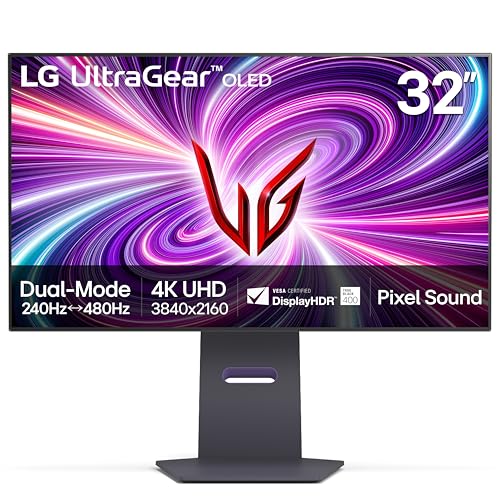
LG UltraGear 32GS95UE
- Best for: Viewers who want one flat 4K screen for films, series and general desk use.
- 32-inch OLED panel
- 3840 x 2160 4K UHD resolution
- 240 Hz refresh rate
- 0.03 ms response time
Viewers who want one flat 4K screen for films, series and general desk use.
A near-identical white variant, the 32GS95UV, sits on its own listing, so confirm the black 32GS95UE-B model name on the page before ordering.
Choose this one if you want a flat 4K screen that treats films and everything else on the desk equally. The 32-inch OLED panel runs at 3840 x 2160, so 4K streams and discs show their full detail, and per-pixel blacks keep letterbox bars invisible against the frame. DisplayHDR True Black 400 anchors the HDR picture, HDMI 2.1 feeds a console or player at full bandwidth, and the 240 Hz refresh rate with a 0.03 ms response time means the same screen handles fast games without compromise on your off nights.
Watch out for: A near-identical white variant, the 32GS95UV, sits on its own listing, so confirm the black 32GS95UE-B model name on the page before ordering.
MSI MPG 321URX QD-OLED
- Best for: Laptop owners who want a single-cable desk screen that doubles as the film screen.
- 32-inch QD-OLED panel
- 3840 x 2160 4K UHD resolution
- 240 Hz refresh rate
- 0.03 ms response time
Laptop owners who want a single-cable desk screen that doubles as the film screen.
A curved sibling, the MPG 321CURX, shares most of the model name, so match the exact 321URX name and ASIN on the listing before ordering.
This model suits a desk where one screen serves a laptop by day and films by night. Its 32-inch QD-OLED panel runs at 3840 x 2160 with True Black HDR 400, so streamed films get the same per-pixel blacks and deep shadow detail as the other picks here. The difference is the connection set: USB Type-C with 90 W power delivery carries picture to a laptop and charges it on the same cable, while HDMI and DisplayPort inputs leave room for a console or media player alongside.
Watch out for: A curved sibling, the MPG 321CURX, shares most of the model name, so match the exact 321URX name and ASIN on the listing before ordering.
Which One Fits Your Situation
You Watch Mostly Widescreen Films at Your Desk
Pick the Alienware AW3423DWF. Its 21:9 panel matches the shape most modern films are shot in, so the picture fills the screen instead of floating between two grey bars. The curve suits a single viewer sitting centrally, and the QD-OLED blacks hold up when the room lights go down for a long film.
You Split the Screen Between Films and Everything Else
Pick the LG UltraGear 32GS95UE. The flat 16:9 shape behaves for documents, browsing and series shot for television, while the 4K OLED panel still gives films true blacks and a named HDR tier. Height and swivel adjustment on the stand also make it easier to share the screen with a second seat.
Your Laptop Is Your Main Film Source
Pick the MSI MPG 321URX. One USB Type-C cable carries the picture from your laptop and charges it at 90 W, so film night does not begin with a hunt for extra leads. The 4K QD-OLED panel then does the same dark-room work as the other picks, with HDMI left free for a console.
You Also Game on the Same Screen
Any of the three covers you, so choose by shape. The Alienware runs at 165 Hz with FreeSync Premium Pro, while the LG and MSI panels reach 240 Hz. If your evenings mix a film with a gaming session, the two 4K models add the sharper desktop picture, and the ultrawide adds the wider film frame.
Common Mistakes
- Buying on the HDR badge alone: a plain HDR10 label on a low-contrast panel lifts blacks instead of deepening them, so check the named DisplayHDR tier and the panel type together.
- Ignoring the letterbox question: on a 16:9 screen, widescreen films sit between bars, and on a grey-black panel those bars glow through every dark scene.
- Counting ports after delivery: a single HDMI input is a daily annoyance when a console, a media player and a laptop all want the screen.
- Judging brightness by one peak figure: a high peak number describes small highlights, not a full bright scene, so read it beside the panel type and the listed full-screen figure.
- Leaving static images on an OLED for hours: paused menus and desktop icons held all day are hard on any OLED, so use the panel care settings the maker provides.
Frequently Asked Questions
Is OLED really better than IPS for watching films?
For dark-room viewing, yes, and the reason is black depth. Each OLED pixel makes its own light and can switch off fully, so shadows and letterbox bars render as true black. An IPS panel lights the whole screen from behind, which leaves dark scenes looking grey by comparison, however sharp the picture is.
Do I need 4K for films on a 32-inch monitor?
It helps, and most current film streams and discs are mastered in 4K with HDR. At a normal desk distance, a 32-inch 4K panel shows that detail cleanly, and the HDR grade matters as much as the pixel count. A 1440p ultrawide still looks strong with widescreen films, because the shape fills your view even at the lower count.
Will an ultrawide monitor show black bars on films?
On most modern films, no. The majority are shot wider than a television frame, close to the 21:9 shape of an ultrawide panel, so they fill the screen edge to edge. Older films and series made for television are narrower, and those show bars at the sides instead of above and below the picture.
Can I watch films from a console or media player on these monitors?
Yes. Each pick here lists HDMI inputs that accept a console, a streaming stick or a media player directly, and the screens handle HDR signals from those sources. Check the port count on the listing if you plan to keep two sources plugged in, and remember that sound needs the speakers or headphones you already use at the desk.
Related guides
More from Amazon
Programs that pair well with the guide above. Offers and eligibility are set by Amazon and may change.
A free business account with business pricing and bulk-buying tools for work, shop or home office.
Create a business accountFree shipping on eligible items, Prime Video and more. Eligible new members can start with a free trial.
Start a Prime free trialAudiobooks and podcasts to listen to on the go. Eligible new members can start with a free trial.
Try Audible freeAd-free music streaming. Eligible new subscribers can start with a free trial.
Try Music Unlimited freeAs an Amazon Associate we earn from qualifying purchases.