Our Short List of 3

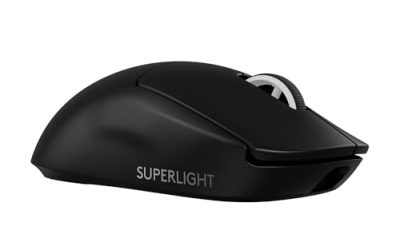
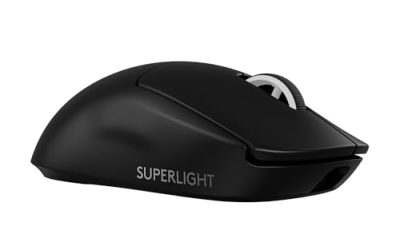
- Best for: Competitive players who want a proven, no-frills ultralight shape for ranked play.
- Sensor: HERO 2, up to 44,000 DPI
- Weight: 60 grams
- Polling rate: Up to 2,000 Hz wireless
- Switches: LIGHTFORCE hybrid optical-mechanical switches, 70-million-click lifespan

- Best for: Palm-grip players who want an ergonomic shape for long sessions.
- Sensor: Razer Focus Pro 30K Optical, up to 30,000 DPI
- Weight: 63 grams
- Polling rate: 1,000 Hz wireless standard, up to 4,000 Hz with the separate HyperPolling dongle
- Switches: Razer Optical Mouse Switches Gen-3, 90-million-click lifespan

- Best for: FPS players who want aim-training software tied to their mouse settings.
- Sensor: ROG AimPoint optical, up to 36,000 DPI
- Weight: 54 grams
- Polling rate: 1,000 Hz
- Switches: ROG Micro Switches, 70-million-click lifespan
All 4 Picks at a Glance
| Product | Specs | Action |
|---|---|---|
| Logitech G Pro X Superlight 2 |
| Check price on Amazon |
| Razer DeathAdder V3 Pro |
| Check price on Amazon |
| ASUS ROG Harpe Ace Aim Lab Edition |
| Check price on Amazon |
 Logitech G502 HERO |
| Check price on Amazon |
Rainbow Six Siege is a game of small margins. Most gunfights are decided by a single headshot at a doorway, a fast flick to a window, or steady tracking while an enemy peeks an angle. The mouse in your hand shapes all of that. A heavy mouse slows flicks, a sensor that loses tracking during a fast swipe ruins aim, and a switch that misses a click can end a round.
The five mice in this guide all earned their place in competitive first-person shooters. Each one pairs a clean-tracking sensor with switches that register every click, and each one suits long ranked sessions. Four are ultralight wireless models built for fast aim, while the fifth is a wired classic with extra buttons for gadgets and drones. Pick the shape and weight that match your grip, and any of them will serve you well in Siege.
Our Top Picks
- Logitech G Pro X Superlight 2 Lightspeed WirelessClassic1.57 x 2.5 x 4.92 inches0.1 poundsCheck on Amazon
- Razer DeathAdder V3 Pro Wireless Gaming Mouse1000 Hz5.01 x 2.65 x 1.69 inches0.1 poundsCheck on Amazon
Top 3 picks at a glance
Quick Picks
As an Amazon Associate we earn from qualifying purchases
| Product | Best for | Key spec |
|---|---|---|
| Logitech G Pro X Superlight 2 | All-round ranked play | HERO 2 sensor, 60 g |
| Razer Viper V3 Pro | Lightest flick aim | Focus Pro 35K sensor, 54 g |
| Razer DeathAdder V3 Pro | Ergonomic palm grip | Focus Pro 30K sensor, 63 g |
| ASUS ROG Harpe Ace Aim Lab Edition | Aim training | AimPoint sensor, 54 g |
| Logitech G502 HERO | Extra buttons and weight tuning | HERO 25K sensor, 11 buttons |
How to Choose
Sensor Accuracy and Polling Rate
Aim in Siege depends on micro-adjustments more than raw speed, so sensor consistency matters more than a big DPI number. Look for a sensor that holds tracking through fast flicks without smoothing or acceleration, which every mouse in this guide does. Polling rate decides how often the mouse reports its position to the PC. A 1,000 Hz rate is enough for most players, while 4,000 Hz and 8,000 Hz options give smoother motion for players who notice the difference. Keep in mind that higher polling drains battery faster on wireless models, so the best setting is the one you can run all session without worry.
Weight and Shape
Four of the five mice here weigh between 54 and 63 grams, and that lightness makes fast flicks and repeated repositioning easier on the wrist. Shape matters at least as much as weight, though. A symmetrical mouse suits claw and fingertip grips, while an ergonomic right-handed shape supports the palm through long sessions. Hand size decides which length and width feel right, so a mouse that fits a large hand can feel cramped in a small one. If possible, match the shape to the grip you already use rather than forcing a new grip to fit a popular mouse.
Switches and Click Feel
Siege rewards single precise shots, controlled bursts, and quick gadget use, so every click needs to land. Optical switches register clicks with a light beam instead of a metal contact, which removes debounce delay and avoids the double-click faults that wear down older mechanical switches. All five mice here use switches built for tens of millions of clicks. Click feel still varies between models, from crisp and firm to light and soft, and that feel shapes how confident each shot feels. Side buttons matter too, since they put gadgets, melee, and lean controls within easy reach of the thumb.
Wireless vs Wired and Battery Life
Modern wireless mice match wired mice for response time, so the choice comes down to habits rather than speed. Wireless models in this guide run for around 90 hours at 1,000 Hz, which covers weeks of evening sessions before a recharge. Turn the polling rate up to 8,000 Hz and that battery life falls to under a day, so high polling suits players who charge often. A wired mouse never needs charging and costs less in most cases, at the cost of cable drag unless the cable is light and flexible. Onboard memory is worth having either way, since it carries your sensitivity and button setup to any PC.
The 5 Best Options
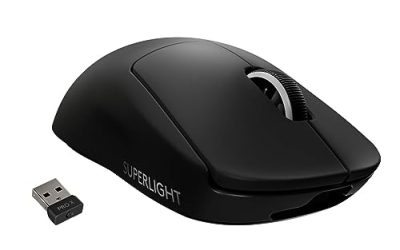
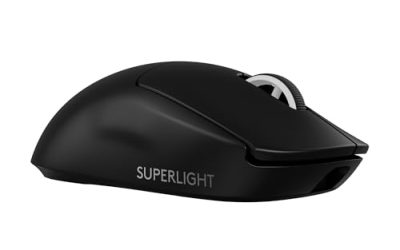
Logitech G Pro X Superlight 2
- Best for: Competitive players who want a proven, no-frills ultralight shape for ranked play.
- Sensor: HERO 2, up to 44,000 DPI
- Weight: 60 grams
- Polling rate: Up to 2,000 Hz wireless
- Switches: LIGHTFORCE hybrid optical-mechanical switches, 70-million-click lifespan
Competitive players who want a proven, no-frills ultralight shape for ranked play.
Some owners report the scroll wheel can reverse direction, so check the wheel in the first week.
The Superlight 2 is the default pick for competitive Siege players, and its record in professional play backs that up. The HERO 2 sensor tracks cleanly at high flick speeds with no smoothing, and the 60-gram body moves with almost no effort during fast repositioning. LIGHTFORCE switches give a crisp click that stays reliable over long use, and the symmetrical shape suits claw, palm, and fingertip grips alike. Battery life reaches around 95 hours, so a single charge covers weeks of ranked sessions. The only real complaint owners raise is the scroll wheel, which can reverse direction on some units.
Watch out for: Some owners report the scroll wheel can reverse direction, so check the wheel in the first week.
Razer Viper V3 Pro
The Viper V3 Pro is the lightest mouse in this guide at 54 grams, and that weight shows in how fast it changes direction during flicks. Its Focus Pro 35K sensor tracks up to 35,000 DPI with a 750 IPS ceiling, and the included HyperPolling dongle pushes wireless polling to 8,000 Hz. Gen-3 optical switches feel firm and consistent, with no double-click history in owner feedback. The symmetrical shape suits claw and fingertip grips best, while palm players may find it a little narrow. Note that Razer has since released the V4 Pro, so this model makes most sense when found at a discount.
Specs
- Sensor: Razer Focus Pro 35K Optical Sensor Gen-2, up to 35,000 DPI
- Weight: 54 grams
- Polling rate: Up to 8,000 Hz wireless with HyperPolling dongle
- Switches: Razer Optical Mouse Switches Gen-3, 90-million-click lifespan
- Battery life: Up to 95 hours at 1,000 Hz, about 17 hours at 8,000 Hz
- Buttons: 6 programmable buttons
- Feet: PTFE feet
- Dimensions: 127.1 x 63.9 x 39.9 mm
Best for: Claw and fingertip players who want the lightest mouse here with top polling.
Watch out for: Battery life drops sharply at 8,000 Hz, and the newer V4 Pro now exists, so this model suits buyers who find it at a discount.
Razer DeathAdder V3 Pro
- Best for: Palm-grip players who want an ergonomic shape for long sessions.
- Sensor: Razer Focus Pro 30K Optical, up to 30,000 DPI
- Weight: 63 grams
- Polling rate: 1,000 Hz wireless standard, up to 4,000 Hz with the separate HyperPolling dongle
- Switches: Razer Optical Mouse Switches Gen-3, 90-million-click lifespan
Palm-grip players who want an ergonomic shape for long sessions.
The DPI button sits underneath the mouse, and the 4,000 Hz dongle is sold separately.
The DeathAdder V3 Pro brings the classic DeathAdder shape into ultralight territory, and it is the ergonomic pick in this guide. At 63 grams it is heavier than the two mice above it, but the right-handed curve fills the palm and supports long sessions without hand fatigue. The Focus Pro 30K sensor tracks cleanly up to 30,000 DPI, and Gen-3 optical switches keep clicks crisp and free of double-click faults. Battery life reaches around 90 hours at the standard 1,000 Hz polling rate. The DPI button sits underneath the mouse, so sensitivity changes need a quick lift rather than a thumb press.
Watch out for: The DPI button sits underneath the mouse, and the 4,000 Hz dongle is sold separately.
ASUS ROG Harpe Ace Aim Lab Edition
- Best for: FPS players who want aim-training software tied to their mouse settings.
- Sensor: ROG AimPoint optical, up to 36,000 DPI
- Weight: 54 grams
- Polling rate: 1,000 Hz
- Switches: ROG Micro Switches, 70-million-click lifespan
FPS players who want aim-training software tied to their mouse settings.
The Aim Lab Settings Optimizer only works with this mouse, and the DPI button is on the underside.
The Harpe Ace Aim Lab Edition is the only mouse here built with an aim trainer in mind, and its shape was refined with professional players at Aim Lab. At 54 grams it matches the Viper V3 Pro for lightness, while the ROG AimPoint sensor reaches 36,000 DPI with tracking up to 650 IPS. Tri-mode connectivity covers wired USB, low-latency 2.4 GHz wireless, and Bluetooth, and battery life reaches around 90 hours in wireless mode. The Aim Lab Settings Optimizer analyzes your aim and suggests settings tailored to your play style, which is a genuine extra for players who train between matches.
Watch out for: The Aim Lab Settings Optimizer only works with this mouse, and the DPI button is on the underside.
Logitech G502 HERO
- Best for: Players who want extra buttons for gadgets and drones plus a tunable weight.
- Sensor: HERO 25K optical, up to 25,600 DPI
- Weight: 121 grams, plus five 3.6-gram tuning weights
- Buttons: 11 programmable buttons
- Scroll wheel: Dual-mode hyper-fast with tilt left and right
Players who want extra buttons for gadgets and drones plus a tunable weight.
At 121 grams it is the heaviest mouse here, and some owners report double-click switch failures over time.
The G502 HERO is the veteran of this guide, and it earns its place with buttons rather than weight. Eleven programmable buttons cover gadgets, drones, melee, and lean controls without reaching for the keyboard, and the dual-mode scroll wheel switches between notched and free spin. The HERO 25K sensor tracks up to 25,600 DPI with no smoothing, and onboard memory stores five profiles. Five tuning weights let you add up to 18 grams to the 121-gram body. It is the heaviest mouse here by a wide margin, and its right-handed shape suits palm and claw grips only.
Watch out for: At 121 grams it is the heaviest mouse here, and some owners report double-click switch failures over time.
Which One Fits Your Situation
You play ranked most nights and want the safest pick
The Superlight 2 fits this role best. Its sensor, weight, and shape are proven at the highest level of competitive play, and nothing about it fights you during long sessions. Battery life covers weeks of play, and the symmetrical shape works with any grip. Check the scroll wheel in the first week, since some owners report it reversing direction, and keep the firmware updated through the companion software.
You use a claw or fingertip grip and flick a lot
The Viper V3 Pro or the Harpe Ace will serve you best here, since both weigh 54 grams and use symmetrical shapes built for fast movement. The Viper V3 Pro adds 8,000 Hz wireless polling for the smoothest motion of any mouse in this guide. The Harpe Ace adds tri-mode connectivity and the Aim Lab Settings Optimizer for players who train. Either one rewards a light, fast grip with quick direction changes.
You want extra buttons for gadgets and utility
The G502 HERO is the clear pick for this situation. Its eleven programmable buttons put every gadget, drone, and lean control on the mouse, and the sniper button drops sensitivity for long angles. The dual-mode scroll wheel also speeds through menus and inventory. Accept the extra weight in exchange for that control, and tune the balance with the included weights until the mouse feels steady in your hand.
You want a wired mouse with no charging to think about
The G502 HERO is the only wired mouse in this guide, and it suits players who dislike charging and dongles. Its cable is braided and light, the sensor needs no wireless link, and onboard memory carries your settings to any PC. The DeathAdder V3 Pro can also run wired over USB-C when its battery runs low, which covers the same need in a lighter, wireless-first package.
Common Mistakes
- Chasing the biggest DPI number instead of sensor consistency, since most Siege players aim best between 400 and 1,600 DPI with a sensor that tracks cleanly.
- Picking a mouse that fights your grip, since a shape that suits a palm player can feel awkward for a claw player, and the wrong shape costs accuracy.
- Running 8,000 Hz polling all the time without checking battery life, since wireless battery can fall from around 90 hours to under a day at the highest rate.
- Forgetting the scroll wheel and side buttons, since Siege uses the wheel and thumb buttons for gadgets, leaning, and quick actions in every round.
- Buying a color or special edition without checking the listing, since white variants and themed editions use different listings and sometimes different stock.
Frequently Asked Questions
What DPI should I use in Rainbow Six Siege?
Most Siege players settle between 400 and 1,600 DPI with an in-game sensitivity that gives a full 360-degree turn across a comfortable mousepad sweep. Lower sensitivity favors steady aim on long angles, while higher sensitivity helps fast turns in close quarters. Pick a setting you can repeat every session, and let muscle memory do the rest.
Is a wireless mouse fast enough for ranked play in Siege?
Yes. Modern wireless mice report movement as fast as wired mice, and the four wireless models in this guide all use low-latency wireless links proven in competitive play. Keep the receiver close to the mouse, charge the battery before long sessions, and you will not feel a delay. A wired mouse still suits players who want zero charging and the simplest setup.
Do I need 8,000 Hz polling for Rainbow Six Siege?
No. A 1,000 Hz polling rate already reports your aim a thousand times per second, which is enough for ranked play. Higher polling gives slightly smoother motion on high-refresh monitors, but it drains wireless battery much faster and most players will not notice the difference in a match. Treat 8,000 Hz as a bonus for players with fast monitors, not a requirement for good aim.
Which grip style suits Rainbow Six Siege best?
There is no single best grip for Siege, since aim style depends on your hand and habits. Palm grip gives stability for holding angles, claw grip balances speed and control for flicks, and fingertip grip offers the fastest micro-adjustments. The mice in this guide cover all three styles, so pick the grip that feels natural and choose a shape that supports it.
Related guides
More from Amazon
Programs that pair well with the guide above. Offers and eligibility are set by Amazon and may change.
A free business account with business pricing and bulk-buying tools for work, shop or home office.
Create a business accountFree shipping on eligible items, Prime Video and more. Eligible new members can start with a free trial.
Start a Prime free trialAudiobooks and podcasts to listen to on the go. Eligible new members can start with a free trial.
Try Audible freeAd-free music streaming. Eligible new subscribers can start with a free trial.
Try Music Unlimited freeAs an Amazon Associate we earn from qualifying purchases.