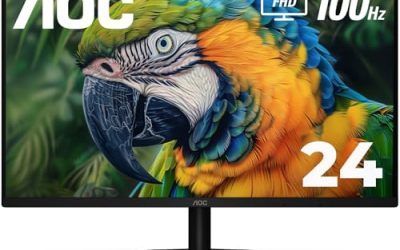
A true 10-bit monitor shows 1,024 levels per color channel, about 1.07 billion colors, and the best choice depends on your use: a 27-inch 4K IPS with 10-bit input and wide gamut coverage for color work, or a high-refresh 1440p panel with 8-bit plus FRC (frame rate control) for gaming. Many monitors advertised as 10-bit are 8-bit with FRC, which is perfectly adequate for most people. Expect to pay roughly $300 to $600 for a good 4K IPS and $200 to $400 for a gaming monitor with 10-bit support.
What “10-bit” actually means on a monitor
Color depth is how many shades a panel can display per red, green and blue channel. An 8-bit panel shows 256 shades per channel, or 16.7 million colors. A 10-bit panel shows 1,024 shades per channel, or about 1.07 billion. The practical benefit is smoother gradients with less banding in skies, shadows and HDR content. Some monitors use an 8-bit panel with FRC, which flickers pixels between two nearby shades to approximate 10-bit. Per the manufacturers’ spec sheets this is labelled “8-bit + FRC” or “10-bit (8-bit + FRC)”.
Quick comparison of monitor classes and models
| Pick | Best for | Key specs | Typical price range |
|---|---|---|---|
| ASUS ProArt PA279CRV class (27-inch 4K IPS) | Best overall for color work | 4K, ~99% DCI-P3 class, 10-bit via FRC, factory calibration | $400–$600 |
| Dell UltraSharp U2723QE class | Best for office and creators | 4K IPS Black, 98% DCI-P3 class, USB-C hub, 10-bit via FRC | $450–$650 |
| High-refresh 1440p IPS (144–180 Hz) | Best for gaming plus color | QHD, 8-bit + FRC, ~95% DCI-P3, 1 ms class response | $250–$400 |
| 27-inch 1440p or 4K OLED gaming monitor | Best for HDR gaming | True 10-bit input, near-instant response, 240 Hz class | $600–$1,000 |
| Budget 4K IPS | Best budget | 60 Hz, 8-bit + FRC, ~90% DCI-P3 class | $250–$350 |
Best overall: a factory-calibrated 4K IPS
For photo and video work, a 27-inch 4K IPS monitor with wide gamut and a factory calibration report is the most useful pick. The ASUS ProArt and Dell UltraSharp families are the standard references: both list 10-bit processing (via FRC at their price) and individual calibration data. The trade-off is refresh rate. Most are 60 to 75 Hz, so they are better for editing than for fast shooters.
Best for gaming: high-refresh IPS or OLED
If you game, refresh rate and response time come first, and 10-bit is a bonus. A 1440p IPS at 144 to 180 Hz with 8-bit plus FRC gives you smooth motion and enough color accuracy for most players. If you want deep contrast and HDR, a 27-inch OLED gaming monitor accepts a 10-bit signal and has near-instant pixel response, but costs more and carries a burn-in consideration that the manufacturer’s warranty addresses.
Best budget: a 4K IPS with 8-bit + FRC
A budget 4K IPS at 60 Hz offers sharp text and good color for $250 to $350. It will not match professional gamut coverage, but it is a notable step up for editing, spreadsheets and casual gaming. Be careful with cheap panels advertised as “1.07 billion colors” that do not publish gamut coverage; that figure alone does not tell you the quality.
Worked example: bandwidth for 10-bit at high refresh
A 10-bit signal needs more bandwidth than 8-bit. Uncompressed data rate equals width times height times refresh rate times bits per pixel (3 channels times 10 bits = 30 bits). For 3840 x 2160 at 144 Hz: 3840 x 2160 = 8.29 million pixels, times 144 = 1.19 billion pixels per second, times 30 bits = 35.8 Gbps, before blanking overhead. Add roughly 5 to 10 percent for blanking and you need around 38 to 40 Gbps.
| Resolution / refresh | Color depth | Approx. bandwidth | Fits on |
|---|---|---|---|
| 2560×1440 @ 144 Hz | 10-bit | ~13 Gbps | HDMI 2.0 (14.4 Gbps usable), DisplayPort 1.2/1.4 |
| 3840×2160 @ 60 Hz | 10-bit | ~16 Gbps | DisplayPort 1.4 (25.9 Gbps), HDMI 2.1 |
| 3840×2160 @ 144 Hz | 10-bit | ~38–40 Gbps | DisplayPort 1.4 with DSC, HDMI 2.1 (42.6 Gbps usable) |
| 2560×1440 @ 240 Hz | 10-bit | ~22 Gbps | DisplayPort 1.4, HDMI 2.1 |
This is why 4K at 144 Hz in 10-bit relies on DisplayPort 1.4 with DSC compression or HDMI 2.1. A cheap or old cable that only supports HDMI 2.0 forces the PC down to 8-bit or chroma-subsampled color.
How to enable 10-bit on Windows and your GPU
- Use a DisplayPort 1.4 or HDMI 2.1 cable certified for the bandwidth in the table above. An old cable is the most common cause of missing 10-bit options.
- In the NVIDIA Control Panel, open “Change resolution”, choose “Use NVIDIA color settings”, then set Output color depth to 10 bpc. In AMD Software, open Display and set color depth to 10 bpc.
- Set output color format to RGB or YCbCr 4:4:4. YCbCr 4:2:2 or 4:2:0 hurts text clarity.
- For HDR content, enable HDR in Windows Display settings. HDR requires 10-bit to avoid banding.
- In creative software such as Photoshop, turn on 30-bit display in the performance settings (this usually requires a professional-class GPU driver or recent compatible drivers).
How to choose: decision matrix
| Your priority | Choose | Why |
|---|---|---|
| Photo/video editing | 4K IPS, 10-bit via FRC, 98%+ DCI-P3, factory calibration | Color accuracy and gradients matter most |
| Competitive gaming | 1440p, 144–240 Hz, fast IPS or OLED | Motion clarity beats color depth |
| HDR movies and games | OLED or mini-LED with certified HDR | Contrast beats 8-bit versus 10-bit panel type |
| Office and coding | 27-inch 4K IPS, USB-C | Sharp text and single-cable docking |
| Tight budget | 8-bit + FRC IPS | Most people cannot tell it from true 10-bit |
Common pitfalls
- Assuming “10-bit” means better gaming performance. It does not change frame rate or response time.
- Ignoring the cable and port. Many monitors list 10-bit only on specific ports.
- Buying for gamut but skipping calibration. A colorimeter calibration improves accuracy more than an extra bit of depth.
- Believing HDR labels alone. A “HDR400” monitor has modest brightness and local dimming, so contrast is limited.
Panel types and what they mean for color
IPS panels offer the best mix of wide viewing angles and color accuracy and are the default for creators. VA panels have stronger contrast but slower pixel transitions and weaker off-angle color. OLED panels deliver per-pixel contrast and the fastest response, but peak full-screen brightness is lower than mini-LED. Mini-LED LCDs add hundreds of dimming zones to lift HDR performance and avoid burn-in concerns. If color accuracy is your priority, check the published Delta E figure: a value under 2 out of the box is considered difficult to distinguish from perfect by most viewers.
Frequently Asked Questions
Is 8-bit plus FRC the same as true 10-bit?
Not exactly, but it is very close in practice. FRC rapidly alternates two shades to simulate the in-between value, and most people see no difference in games or photos. A true 10-bit panel is a premium feature found mainly on professional displays.
Do I need a 10-bit monitor for gaming?
No. Refresh rate, response time and resolution matter more for games. A 10-bit signal helps with HDR games and reduces banding, but the gain is subtle.
Will my graphics card output 10-bit?
Almost every recent GeForce and Radeon card can output 10-bit over DisplayPort and HDMI. Some applications need specific driver settings, and older cables can limit what you get.
Does 10-bit color matter for video editing?
Yes, especially for HDR and log footage, where gradients stretch across a wide range. A 10-bit workflow with a calibrated panel lowers the risk of banding in your final grade.
How can I check whether my monitor is running 10-bit?
Open your GPU control panel and look at the output color depth setting. You can also check Windows Advanced Display settings, which shows the bit depth in use, or view a gradient test image to look for visible banding.
Related guides
More from Amazon
Programs that pair well with the guide above. Offers and eligibility are set by Amazon and may change.
A free business account with business pricing and bulk-buying tools for work, shop or home office.
Create a business accountFree shipping on eligible items, Prime Video and more. Eligible new members can start with a free trial.
Start a Prime free trialAudiobooks and podcasts to listen to on the go. Eligible new members can start with a free trial.
Try Audible freeAd-free music streaming. Eligible new subscribers can start with a free trial.
Try Music Unlimited freeAs an Amazon Associate we earn from qualifying purchases.