A wireless hard drive is a different kind of purchase from a plain external drive. It creates its own Wi-Fi hotspot, so a phone, tablet, or laptop can reach the files on it without a cable and without an internet connection. The real decision is not just capacity. It is whether the drive’s app still works, how fast files move over Wi-Fi, whether it can copy a memory card on its own, and how long its battery lasts when no outlet is nearby.
Photographers use these drives to back up memory cards in the field. Families use them to share movies on long trips. Home users use them as a small personal cloud for phones and laptops. The products below were chosen from names and specifications on Amazon pages, and each one is a true wireless drive with its own hotspot and app access, not a standard USB-only external drive.
Top 3 picks at a glance

Quick Picks
As an Amazon Associate we earn from qualifying purchases
| Product | Best for | Key spec from title |
|---|---|---|
| WD My Passport Wireless Pro 4TB | Backing up camera cards on location | 4TB Wi-Fi hard drive with SD reader |
| SSK 2TB Portable NAS | A personal cloud at home and on trips | 2TB NAS hard drive with own hotspot |
| Seagate Wireless Plus 1TB | Sharing movies with family offline | 1TB Wi-Fi hard drive, 10-hour battery |
| WD My Passport Wireless Pro 1TB | A smaller wireless drive for photo trips | 1TB Wi-Fi hard drive with SD reader |
How to Choose
Check the Wireless Setup First
Every drive here creates its own Wi-Fi hotspot, but the details differ. Some run on 2.4 GHz only, which keeps the range steady and the speed modest, while others add 5 GHz for faster short-range transfers. Check whether the drive needs its companion app for setup and file access, and whether that app is still available for your phone. A drive that depends on a discontinued app can still work over a browser or USB, yet the wireless experience becomes clumsy. Also confirm how many devices can connect at once, since a family sharing movies needs more simultaneous connections than a single photographer does.
Match Capacity to Your Media Library
Capacity decides how much of your life fits on the drive. A 1TB drive holds a large photo library and a season of shows, which suits a single traveler or a photographer on a short trip. A 2TB drive gives a family room for movies, music, and backups without constant pruning. A 4TB drive suits a working photographer carrying RAW files and 4K clips from many shoots. Remember that wireless transfers are slow, so filling a big drive over Wi-Fi takes a long time. Load large libraries over USB first, then use Wi-Fi for day-to-day access.
Look for an SD Card Slot and USB Ports
An SD card slot turns a wireless drive into a field backup station. With one-touch copy, a photographer can move a full card onto the drive without opening a laptop, which matters when the next shoot starts in an hour. A USB port for external storage adds a second route: plug in a flash drive or a card reader and copy its contents the same way. Check which card formats the slot accepts and whether copying starts with a button or needs the app. If your camera uses microSD or CFexpress, confirm the slot or an adapter covers it before you buy.
Weigh Battery Life and App Support
Battery life decides how useful a wireless drive is away from an outlet. Drives in this group run for around six to ten hours of streaming on a charge, and several double as a power bank for a phone. That sounds generous until a long travel day drains both the drive and the phone, so check the battery size in milliamp-hours and whether the drive charges while it streams. App support matters just as much. Some makers ended support for older wireless drives, and their apps left the app stores. Before buying, confirm the companion app is still listed for your phone and that the drive works through a browser as a fallback.
The 5 Best Options
WD My Passport Wireless Pro 4TB
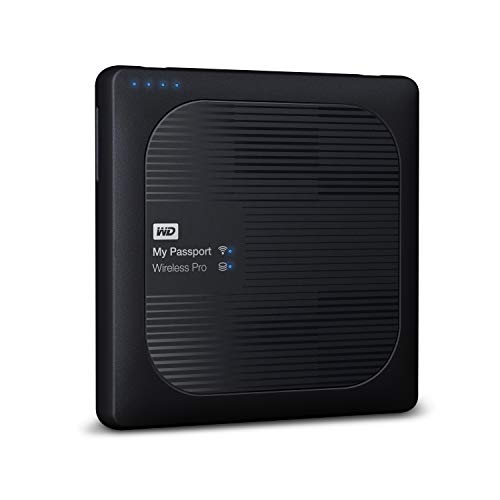
The 4TB My Passport Wireless Pro is the largest wireless drive in this group, and it is built for photographers who work far from a desk. Its built-in SD 3.0 card reader copies a full memory card at the touch of a button, so a day of RAW photos and 4K clips lands on the drive before the next shoot. The drive creates its own fast 802.11ac Wi-Fi connection, streams video to a phone or tablet, and shares its connection with up to eight devices. A 6,400 mAh battery keeps it running for up to ten hours and can top up a phone.
Specs
- 4TB digital storage capacity, 2.5-inch form factor
- Connectivity: USB 3.0 and Wi-Fi 802.11ac
- Built-in SD 3.0 card reader with one-touch copy
- Up to 10 hours of continuous use; 6,400 mAh power bank
- Dimensions: 5 x 5 x 0.94 inches; weight: 16 ounces
- 2-year limited warranty
Best for: Photographers backing up memory cards on location.
Watch out for: WD ended support for this line and the companion app left app stores at the end of 2024, so confirm browser access works for your devices before buying.
ASIN: B06X6H1LY6
SSK 2TB Portable NAS Wireless Hard Drive
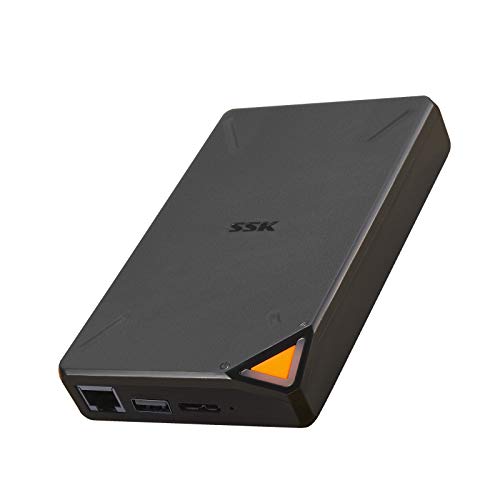
The SSK 2TB drive is the most modern option here, built as a small personal cloud rather than a simple media streamer. It creates its own Wi-Fi hotspot, and the SSKCloud app handles uploads, downloads, and one-click phone backups, with remote access when the drive is online. Samba and DLNA support let smart TVs, laptops, and phones share the same files across a home network. A USB host port takes extra storage and card readers, and an RJ45 port plugs the drive into a wired network. The 2TB mechanical drive spins at 5400 RPM.
Specs
- 2TB mechanical hard disk, 2.5-inch form factor, 5400 RPM
- Connectivity: Wi-Fi, USB 3.0, SATA, RJ45 port, USB host port
- Own Wi-Fi hotspot, up to 300Mbps wireless transmission
- SSKCloud app for iOS, Android, Windows, and Mac; Samba and DLNA support
- Built-in 3800mAh lithium-polymer battery; up to 10 devices connected at once
- Dimensions: 5.12 x 3.15 x 0.79 inches; weight: 12.3 ounces
Best for: Home users who want a small personal cloud for phones, laptops, and TVs.
Watch out for: Wireless transfers run around 5 to 10 MB/s in practice, so load large libraries over USB first; the package does not include a USB charger.
ASIN: B07T3KD58D
Seagate Wireless Plus 1TB
The Seagate Wireless Plus 1TB is the lightest drive in this group, made for travelers who want movies and music on a phone or tablet without an internet connection. Its built-in Wi-Fi creates a hotspot for up to eight devices and streams HD video to three of them at the same time, with up to ten hours of battery life. A removable USB 3.0 adapter loads files quickly from a computer, and the Seagate Media app organizes the library on iOS, Android, and Kindle Fire devices. At 1TB it suits a personal media collection rather than a working archive.
Specs
- 1TB storage capacity, 2.5-inch form factor
- Connectivity: USB 3.0 and Wi-Fi 802.11 b/g/n
- Up to 10 hours of battery life; streams to 3 devices at once
- Connects up to 8 devices to one hotspot
- Dimensions: 127 x 89 x 21 mm; weight: 272 g
Best for: Travelers sharing movies and music with family offline.
Watch out for: Seagate moved this drive to vintage support status, and its Amazon page would not open during checking, so confirm the listing and the app situation before buying.
ASIN: B00AQRUW4Q
WD My Passport Wireless Pro 1TB

The 1TB My Passport Wireless Pro is the same field-ready drive as its 4TB sibling, in a smaller capacity for lighter trips. It keeps the built-in SD 3.0 card reader with one-touch copy, the 802.11ac hotspot for up to eight devices, and the 6,400 mAh battery that runs for up to ten hours and charges a phone. RAW photos and 4K clips move from a memory card to the drive without a laptop, and the My Cloud app streams them to a phone or tablet. For a photographer who travels light and clears cards often, 1TB is enough without carrying a larger drive.
Specs
- 1TB digital storage capacity, 2.5-inch form factor
- Connectivity: USB 3.0 and Wi-Fi 802.11ac
- Built-in SD 3.0 card reader with one-touch copy
- Up to 10 hours of continuous use; 6,400 mAh power bank
- Dimensions: 5 x 5 x 0.94 inches
- 2-year limited warranty
Best for: Photographers who travel light and clear memory cards often.
Watch out for: WD ended support for this line and the companion app left app stores at the end of 2024; this listing was last tracked in 2022, so confirm availability and browser access before buying.
ASIN: B06X19D3ZB
Which One Fits Your Situation
Photographers Backing Up Cards in the Field
Pick the WD My Passport Wireless Pro 4TB. Its SD card reader copies a full card with one touch, and 4TB holds many shoots of RAW photos and 4K clips. The ten-hour battery and power bank keep it going through a long day on location, and eight connected devices let an assistant check files on a tablet while you keep shooting.
Families Sharing Movies Without Internet
Pick the Seagate Wireless Plus 1TB. It creates a hotspot for up to eight devices and streams HD video to three at once, which covers a car full of tablets on a long trip. The ten-hour battery lasts through a travel day, and the removable USB adapter loads the library quickly at home before you leave.
Home Users Who Want a Personal Cloud
Pick the SSK 2TB Portable NAS. Its app handles backups and remote access, Samba and DLNA share files with TVs and laptops, and the RJ45 port ties it into a wired network. The 2TB drive holds a household library, and the USB host port adds storage or a card reader when you need more room.
Buyers Who Want a Smaller Wireless Drive
Pick the WD My Passport Wireless Pro 1TB. It has the same SD reader, hotspot, and ten-hour battery as the 4TB model, in a capacity that suits short trips and a single camera. Clear the cards after each shoot and the drive never fills up, and the smaller library is quicker to load over USB before a trip.
Common Mistakes
- Buying a plain USB external drive and expecting it to create a Wi-Fi hotspot.
- Assuming the companion app still works, when WD ended support and its app left app stores at the end of 2024.
- Expecting USB speeds over Wi-Fi; wireless transfers run far slower, so load big libraries over a cable first.
- Choosing a discontinued model without checking the seller, return terms, and whether the drive still works through a browser.
- Forgetting to charge the drive; a dead battery turns a wireless drive into a paperweight until it finds an outlet.
Frequently Asked Questions
Do wireless hard drives work without the internet?
Yes. Each drive here creates its own Wi-Fi hotspot, so a phone, tablet, or laptop connects directly to the drive with no router and no internet connection. You open the companion app or a browser, browse the files, and stream or copy them. Internet access only matters for remote access features, which need the drive online, and for downloading the app in the first place.
Can I use a wireless hard drive with my phone?
Yes, that is the main use case. Install the drive’s companion app, join the drive’s Wi-Fi hotspot, and your photos, videos, and music appear in the app for streaming or download. Some drives also back up a phone’s camera roll with one tap. Check that the app is still listed in your phone’s app store first, since older drives lost app support and may only work through a browser.
Are wireless hard drives still being sold?
Mostly as leftover stock. The big names ended these lines years ago: WD stopped supporting My Passport Wireless and its app left app stores at the end of 2024, and Seagate moved Wireless Plus to vintage support. The SSK 2TB is the currently sold option in this group. Treat the older models as legacy hardware, check the seller and return terms, and confirm the listing is for a new unit.
How fast are file transfers over Wi-Fi?
Slower than a cable. The SSK lists wireless speeds up to 300Mbps but notes real transfers run around 5 to 10 MB/s, and older drives are slower still. That is fine for streaming a movie or pulling a few photos, but moving a full card of RAW files takes a long time. Use the USB port for the first big load, then let Wi-Fi handle day-to-day access.
Related guides
More from Amazon
Programs that pair well with the guide above. Offers and eligibility are set by Amazon and may change.
A free business account with business pricing and bulk-buying tools for work, shop or home office.
Create a business accountFree shipping on eligible items, Prime Video and more. Eligible new members can start with a free trial.
Start a Prime free trialAudiobooks and podcasts to listen to on the go. Eligible new members can start with a free trial.
Try Audible freeAd-free music streaming. Eligible new subscribers can start with a free trial.
Try Music Unlimited freeAs an Amazon Associate we earn from qualifying purchases.