An Intel X299 system still has plenty of life left, yet its storage can feel like the weakest link when a machine boots from an old SATA drive or a small NVMe module that fills up too quickly. Choosing a new M.2 drive means matching the board, the workload, and the amount of space a large game library or editing project really needs, rather than chasing the largest headline speed number on a box.
Owners of X299 workstations, HEDT gaming rigs, and editing machines built around Core X processors will find three useful paths below. A Gen3 specialist suits a faithful X299 upgrade, a fast Gen4 drive suits a buyer who may move the drive to a newer board later, and a balanced Gen3 gaming drive suits a machine that needs dependable everyday speed without extra complexity.
Top 3 picks at a glance


Quick Picks
As an Amazon Associate we earn from qualifying purchases
| Product | Best for | Key spec from title |
|---|---|---|
| Samsung 970 EVO Plus SSD 1TB NVMe M.2 | A direct Gen3 upgrade for X299 | PCIe Gen 3.0 x4, NVMe 1.3, M.2 2280, up to 3,500 MB/s read |
| WD_BLACK SN750 NVMe SSD 1TB | Gaming loads on an X299 rig | Gen3 PCIe, M.2 2280, 3D NAND, up to 3,470 MB/s read |
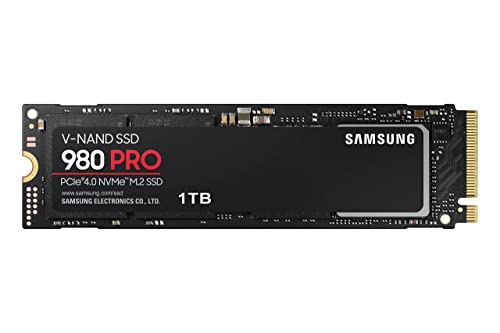
| Samsung 980 PRO SSD 1TB PCIe 4.0 NVMe | A drive that can move to a newer board later | PCIe 4.0 NVMe Gen 4, M.2 2280, up to 7,000 MB/s read |
How to Choose
Match the M.2 slot, key, and lane layout
X299 boards usually carry one or more M.2 slots, yet details differ by board, so open the manual before ordering anything. Look for a slot that accepts a 2280 module with an M key and a PCIe x4 link, because an NVMe drive will not reach its rated speed in a slot wired for SATA only or for a single lane. Some slots share lanes with SATA ports or with a PCIe slot, which means fitting a second M.2 drive can disable another connector on the board. Check the length supported by the standoff, confirm whether the slot sits under a graphics card, and leave room to remove the drive later without taking the machine apart.
Remember the PCIe 3.0 ceiling on X299
Every X299 board uses PCIe 3.0 lanes for its M.2 slots, so a Gen4 drive will function but will run at Gen3 speed rather than the higher speed printed on its packaging. That limit changes how a buyer should judge value, because paying for Gen4 headroom only makes sense when the drive will later move into a newer Gen4 system or when its endurance and features justify the choice on their own. A Gen3 drive such as the 970 EVO Plus or the SN750 is a closer match to what the platform can actually deliver. Compare drives by Gen3 behaviour, capacity, and endurance, and treat any Gen4 number as a future benefit rather than a present gain.
Size capacity and endurance around the real workload
A 1TB drive is a sensible baseline for an X299 machine, since Windows, a handful of large games, and a current editing project can consume a smaller drive within a few months. Video editors, 3D artists, and anyone who moves large files every day should weigh endurance alongside capacity, because a drive that handles heavy writes will age more gracefully under that kind of use. Look at the endurance rating in terabytes written, favour TLC NAND over QLC NAND for sustained write work, and keep enough free space for the drive to manage writes cleanly. A drive that is nearly full will feel slower than the same model with room to breathe, whatever its headline speed may claim.
Plan cooling, fit, and firmware before fitting the drive
M.2 drives sit close to hot components on many X299 boards, and a drive that gets too warm will slow itself down to protect its own circuits, so cooling deserves the same attention as speed. Many X299 boards include a metal M.2 shield or heatsink, and that factory part often works well, provided the drive underneath is a standard single-sided 2280 module without a tall pre-fitted heatsink of its own. Check clearance under a large graphics card, keep airflow moving across the board, and confirm that the drive firmware is current through the maker software after the drive is fitted. A careful fit now avoids a drive that throttles during a long render or a long gaming session.
The 3 Best Options
Samsung 970 EVO Plus SSD 1TB NVMe M.2
The 970 EVO Plus is the most direct match for X299 in this group, because it was built around the same PCIe Gen 3.0 x4 link that X299 boards provide, so nothing about its speed is wasted on the platform. Its V-NAND design and Dynamic Thermal Guard help it hold steady during long writes, while Samsung Magician software gives the owner a clear way to check drive health and apply firmware updates. For a machine that needs a dependable boot drive and a roomy home for games and projects, this 1TB module covers the basics without asking the buyer to learn a new platform.
Specs
- Digital Storage Capacity: 1 TB
- Interface: PCIe Gen 3.0 x4, NVMe 1.3
- Form Factor: M.2 2280
- Sequential read speed: up to 3,500 MB/s
- Sequential write speed: up to 3,300 MB/s
- Endurance: 600 TBW for the 1TB model
- Warranty: 5-year limited warranty
Best for: Owners who want a Gen3 drive that matches X299 lane for lane.
Watch out for: The 1TB model is a single-sided module, so confirm the board shield sits flat over it, and check the exact listing variant before ordering.
ASIN: B07MFZY2F2
WD_BLACK SN750 NVMe SSD 1TB
The WD_BLACK SN750 brings a gaming focus to an X299 build, with a Gen3 PCIe x4 link that lines up neatly with the lanes an X299 board can give an M.2 slot. Its 3D NAND layout and DRAM cache help it stay responsive when a game loads a large map or when several applications compete for the same drive at once. The plain black module also sits neatly under most board shields, which matters on crowded HEDT boards where a tall heatsink would clash with nearby parts. It is a straightforward pick for a rig that spends most of its time running games and everyday creative work.
Specs
- Digital Storage Capacity: 1 TB
- Interface: PCIe Gen3 x4, NVMe
- Form Factor: M.2 2280
- Sequential read speed: up to 3,470 MB/s
- Sequential write speed: up to 3,000 MB/s
- NAND type: 3D NAND, TLC
- Endurance: 600 TBW for the 1TB model
- Warranty: 5-year limited warranty
Best for: Gaming rigs that need quick loading and a clean fit under a board shield.
Watch out for: Western Digital has moved on to newer SN models, so remaining stock of this model is finite, and the heatsink version is a separate listing with a different model number.
ASIN: B07M64QXMN
Samsung 980 PRO SSD 1TB PCIe 4.0 NVMe
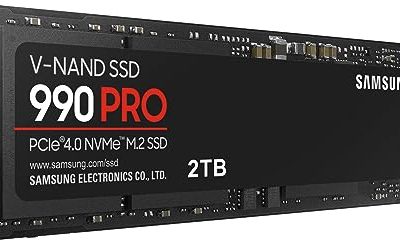
The 980 PRO is the forward-looking choice here, because it is a PCIe 4.0 drive that remains compatible with PCIe 3.0, so it will run on an X299 board today and can move into a Gen4 machine later. On X299 it will be limited to Gen3 speed, yet its V-NAND design, encryption support, and strong endurance still make it a capable drive for editing and gaming while it waits for a faster home. Buyers who plan a platform change within a year or two get more long-term use from this module than from a drive that only ever matches Gen3, provided they accept the Gen3 limit for now.
Specs
- Digital Storage Capacity: 1 TB
- Interface: PCIe 4.0 NVMe, Gen 4, backward compatible with PCIe 3.0
- Form Factor: M.2 2280
- Sequential read speed: up to 7,000 MB/s
- Sequential write speed: up to 5,000 MB/s
- Additional features: AES 256-bit encryption, Samsung V-NAND flash technology
- Endurance: 600 TBW for the 1TB model
- Warranty: 5-year limited warranty
Best for: Buyers who will move the drive to a Gen4 board later and want Gen4 speed then.
Watch out for: Its headline speeds do not apply on X299, and the heatsink version is a separate listing, so match model MZ-V8P1T0B/AM to the plain module.
ASIN: B08GLX7TNT
Which One Fits Your Situation
You are refreshing an older X299 gaming rig
Pick the Samsung 970 EVO Plus when the aim is a simple refresh with no wasted capability. Its Gen3 link matches the board, its 1TB capacity holds Windows and a solid set of games, and its thermal guard helps it stay steady during long sessions. Fit it in the main M.2 slot, use the board shield if one is fitted, and keep the old drive as a second volume for files that do not need NVMe speed.
You edit video or move large files every day
Pick the drive with the strongest endurance and the most predictable sustained write behaviour for the workload, which in this group points toward either Samsung module. The 970 EVO Plus is the cleaner X299 match, while the 980 PRO adds encryption and a later Gen4 home if a new board is already on the horizon. Keep at least a fifth of the drive free, and place the editing cache on the NVMe drive rather than on a slower volume.
You plan to move to a newer platform soon
Pick the Samsung 980 PRO when a Gen4 board is part of the plan within the next year or so. It will run at Gen3 speed on X299 for now, then deliver its full Gen4 speed after the move, which makes it the only drive here that gains speed from a platform change. Label the drive, note its model number, and keep its firmware current so the move goes smoothly when the new board arrives.
You need a second fast drive for a game library
Pick the WD_BLACK SN750 when the boot drive already works and the goal is extra fast space for games. Its Gen3 link suits X299, its plain module fits under most board shields, and its 1TB capacity holds a useful set of large titles without crowding the boot drive. Check the manual first, because a second M.2 slot can share lanes with a SATA port or a PCIe slot on some X299 boards.
Common Mistakes
- Buying a SATA M.2 module by mistake, because a SATA M.2 drive fits the same slot shape yet runs far below NVMe speed on an X299 board.
- Expecting Gen4 headline speed on X299, when every M.2 slot on the platform is limited to PCIe 3.0 and a Gen4 drive will run at that lower speed.
- Ignoring lane sharing in the manual, which can disable a SATA port or slow a PCIe slot when a second M.2 drive is fitted.
- Ordering a heatsink version without checking clearance, since a tall pre-fitted heatsink can clash with the board shield or with a graphics card above it.
- Cloning a boot drive without a full backup first, because a failed clone can leave the machine without a working system until the original drive is restored.
Frequently Asked Questions
Do Gen4 SSDs work on X299 boards?
Yes, a Gen4 NVMe drive will work in an X299 M.2 slot, because the link negotiates down to the Gen3 speed the board supports. The drive will boot, load games, and handle files normally, yet it will not reach Gen4 headline speed until it moves to a Gen4 board. Buy a Gen4 drive for X299 only when its other qualities, or a planned move to a newer board, justify it.
How many M.2 drives can an X299 board hold?
That depends on the board, since most X299 boards carry two or three M.2 slots, while a few carry one and rely on an add-in card for more. Open the manual, count slots, then check which lanes each slot uses and whether fitting a drive disables a SATA port. A board with three slots can lose a SATA connector, so plan the storage layout before ordering a second drive.
Is 1TB enough for an X299 gaming or workstation build?
For many owners, 1TB is a workable baseline that holds Windows, applications, and a reasonable set of games or one editing project. It becomes tight when a library holds many large titles, or when several editing projects stay on the drive together. In that case, add a second drive for the library, or choose a larger capacity for the main drive, rather than running the boot drive nearly full.
Should I use the motherboard M.2 heatsink?
In most cases, yes, because the metal shield or heatsink on an X299 board helps spread heat away from the drive during long writes and gaming sessions. Remove the film from the thermal pad, seat the drive flat, and tighten the shield evenly so it makes full contact. Leave the shield off only when the drive already carries its own tall heatsink and the two parts cannot fit cleanly.
Related guides
More from Amazon
Programs that pair well with the guide above. Offers and eligibility are set by Amazon and may change.
A free business account with business pricing and bulk-buying tools for work, shop or home office.
Create a business accountFree shipping on eligible items, Prime Video and more. Eligible new members can start with a free trial.
Start a Prime free trialAudiobooks and podcasts to listen to on the go. Eligible new members can start with a free trial.
Try Audible freeAd-free music streaming. Eligible new subscribers can start with a free trial.
Try Music Unlimited freeAs an Amazon Associate we earn from qualifying purchases.