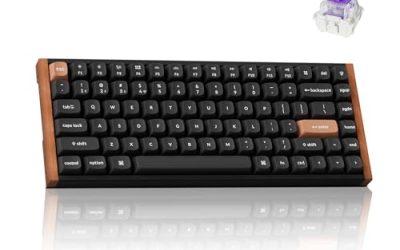
The best affordable computer keyboard for most people is a wired tenkeyless (TKL) mechanical model such as the Redragon K552 Kumara or the hot-swappable Keychron C3 Pro. If you want a quiet, no-fuss office board, a membrane keyboard like the Logitech K120 does the job for very little money. For laptops, tablets and multi-device desks, the Bluetooth Logitech K380 is the safer budget pick. The right choice depends on layout, connection type and switch feel more than on brand.
Quick comparison of the picks
| Pick | Best for | Key specs | Price tier |
|---|---|---|---|
| Redragon K552 Kumara | Best budget mechanical | Wired USB, 87-key TKL, mechanical switches, backlit variants available | Budget |
| Keychron C3 Pro | Best upgradeable budget board | Wired, TKL, hot-swappable switches, QMK/VIA remapping per manufacturer | Budget to lower mid-range |
| Logitech G413 TKL SE | Best brand-backed gaming board | Wired, TKL, mechanical tactile switches, backlit | Budget to lower mid-range |
| Redragon K617 Fizz | Best 60% for small desks | Wired, 61 keys, mechanical, compact layout | Budget |
| Logitech K120 | Best for plain office and home use | Wired USB, full-size membrane, number pad, spill-resistant design per Logitech | Very low |
| Logitech MK270 | Best wireless keyboard and mouse combo | Wireless 2.4 GHz via USB receiver, full-size keyboard, mouse included | Budget |
| Logitech K380 | Best for laptops and tablets | Bluetooth, up to 3 paired devices, compact, AAA-powered | Budget |
Best budget mechanical: Redragon K552 Kumara
The K552 is a long-running TKL board that gives you real mechanical switches at a price close to many membrane boards. It suits first-time mechanical buyers, gamers and anyone who types a lot. The TKL layout drops the number pad, which frees up mouse space. Trade-off: the stock switches and keycaps are functional rather than refined. Expect some stabilizer rattle on the larger keys, and software and lighting options are basic compared with premium brands.
Best upgradeable budget board: Keychron C3 Pro
The C3 Pro is a wired TKL with hot-swappable switch sockets and QMK/VIA support, according to Keychron. You can change switches without soldering and remap keys without proprietary software. It suits people who expect to tinker. Trade-off: it usually costs a little more than the cheapest mechanical options, and hot-swap sockets only help if you actually buy new switches later.
Best brand-backed gaming board: Logitech G413 TKL SE
The G413 TKL SE is a wired, backlit TKL with mechanical tactile switches. It suits buyers who want a mainstream brand, simple setup and a sturdy chassis. Trade-off: it isn’t hot-swappable and its lighting is simpler than on more expensive boards, so you’re paying partly for the brand and build quality.
Best 60% for small desks: Redragon K617 Fizz
The K617 Fizz is a 61-key wired mechanical board. It suits tight desks, low-sensitivity mouse players and travel setups. Trade-off: arrows, function keys and navigation keys sit on a function layer. If you edit spreadsheets or code all day, that gets tiring fast.
Best for plain office use: Logitech K120
The K120 is a full-size wired membrane keyboard with a number pad and plug-and-play USB. It suits shared PCs, school machines, home offices and anyone who values quiet keys. Trade-off: there is no backlight, no hot-swap and no premium typing feel. It works well but won’t be a pleasure to type on.
Best wireless combo: Logitech MK270
The MK270 bundles a full-size keyboard and mouse that share one USB receiver. It suits a living-room PC or an office desk with few free ports. Trade-off: the mouse is basic and the keyboard isn’t backlit. Wireless 2.4 GHz boards also add a small battery-replacement chore.
Best for laptops and tablets: Logitech K380
The K380 is a compact Bluetooth keyboard that pairs with up to three devices and switches between them with a key press. Logitech rates its AAA battery life at up to two years. It suits anyone moving between a PC, tablet and phone. Trade-off: it is a flat, low-travel keyboard, so it isn’t ideal for fast-paced gaming. Bluetooth can also add slight latency compared with a wired or 2.4 GHz connection.
How to choose: the decision criteria that matter
1. Layout and desk space
Typical widths, which vary by model, are about 440 mm for full-size (104 keys), about 360 mm for TKL (87 keys) and about 295 mm for 60% (61 keys). Moving from full-size to TKL frees roughly 80 mm. If your mouse hand needs a 400 mm sweep for a low-sensitivity setup, that extra room matters more than the number pad does for most gamers. Keep full-size if you enter numbers daily.
2. Switch type and feel
- Linear: smooth, with no bump. Usually around 45 g actuation force. Good for gaming, but easy to mistype on.
- Tactile: a bump marks actuation, usually 45–55 g. This is the safest all-round choice for mixed typing and gaming.
- Clicky: a loud audible click. Satisfying, but a poor choice for shared rooms.
- Membrane or rubber dome: quiet and cheap, with a softer, mushier feel. Fine for office work.
3. Connection: latency worked example
A keyboard’s polling rate sets the maximum interval between reports to the PC. At 125 Hz that interval is 1000 ÷ 125 = 8 ms. At 1000 Hz it is 1 ms. A 7 ms gap won’t matter for typing, but it is part of the reason competitive players prefer 1000 Hz wired or 2.4 GHz boards. Bluetooth adds its own variable delay, so use it for office work and portability rather than for fast shooters.
4. Battery runtime check for wireless boards
Illustrative calculation: two AAA cells in series give about 1000 mAh at 3 V. If the keyboard averages 0.05 mA across typing and sleep, 1000 ÷ 0.05 = 20,000 hours, or about 833 days. Allow a 30% real-world margin for heavy use, and you get roughly 580 days, or about 1.6 years. That is why the manufacturers’ “up to two years” claim is plausible for light use. Backlit wireless boards drain much faster, often to weeks or months, so skip backlighting if you want a low-maintenance wireless setup.
5. Anti-ghosting and rollover
For gaming, look for N-key rollover or at least 6-key rollover over USB. Cheap office membrane boards can fail to register three or more simultaneous keys in some combinations. Mechanical gaming boards in this class generally handle typical game inputs without trouble.
Decision matrix: your situation to a pick
| Your situation | Choose | Why |
|---|---|---|
| Gaming on a tight budget | Redragon K552 Kumara | Mechanical switches, TKL layout and wired response |
| You like to customize | Keychron C3 Pro | Hot-swap sockets and QMK/VIA remapping |
| Small desk, low-sensitivity mouse | Redragon K617 Fizz | 60% layout saves about 145 mm against full-size |
| Shared or quiet room | Logitech K120 | Quiet membrane keys |
| Laptop plus tablet | Logitech K380 | Three-device Bluetooth switching |
| Living-room PC | Logitech MK270 | One receiver for keyboard and mouse |
| Heavy number entry | Logitech K120 or MK270 | Full-size layouts with a number pad |
What corners cheap keyboards cut
- Keycaps: thin ABS plastic that develops shine over time. Replacement keycap sets are cheap if you want to upgrade.
- Stabilizers: the spacebar and shift keys can rattle. A dab of lubricant helps if you are comfortable opening the board.
- Cables: often fixed rather than detachable, so a damaged cable can end the keyboard’s life.
- Software: basic or absent. Hot-swap boards with VIA support usually have the best remapping tools in this tier.
- Layout quirks: some compact boards use unusual bottom-row spacing, which limits keycap replacement.
Frequently Asked Questions
Are cheap mechanical keyboards worth it over membrane?
For gaming and heavy typing, usually yes. Budget mechanical boards offer a crisper key feel, and many have switches you can replace or at least keycaps you can swap. If you want near-silent keys for shared spaces, a decent membrane keyboard may suit you better.
Is a TKL or full-size keyboard better on a budget?
TKL is better if you game or want more mouse space, since it saves roughly 80 mm of width. Full-size is better if you use the number pad regularly for accounting, data entry or spreadsheets. Both are available at similar budget levels.
Should I buy a wireless keyboard to save money?
Wireless usually costs more for equivalent build quality, and it adds battery management. It’s worth it for a clean desk, a living-room PC or switching between devices. For a main gaming PC, a wired keyboard is simpler and avoids latency and battery concerns.
What switch should a beginner choose?
A tactile switch is the safest starting point. It gives feedback on each press, which helps typing accuracy, and it is still responsive for gaming. Choose linear if you mostly game, and avoid clicky switches if anyone shares your room.
Do I need RGB lighting?
No. Lighting adds cost and, on wireless boards, drains the battery quickly. A plain white backlight or none at all is fine unless you type in the dark often. Spend the savings on a better layout or switch type instead.
How long should a budget keyboard last?
Most budget mechanical switches are rated by manufacturers for tens of millions of keystrokes, and membrane boards usually for fewer. In practice, cables, keycap wear and stabilizers fail before the switches do. A board with a detachable cable and swappable keycaps will typically last the longest.
Related guides
More from Amazon
Programs that pair well with the guide above. Offers and eligibility are set by Amazon and may change.
A free business account with business pricing and bulk-buying tools for work, shop or home office.
Create a business accountFree shipping on eligible items, Prime Video and more. Eligible new members can start with a free trial.
Start a Prime free trialAudiobooks and podcasts to listen to on the go. Eligible new members can start with a free trial.
Try Audible freeAd-free music streaming. Eligible new subscribers can start with a free trial.
Try Music Unlimited freeAs an Amazon Associate we earn from qualifying purchases.