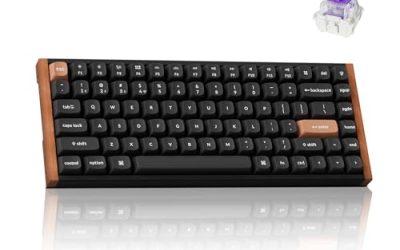
The best keyboard for a Fire tablet (the “Kindle Fire” line) is a compact Bluetooth keyboard such as the Logitech K380s, because it pairs in seconds, runs for months on a battery and costs little. If you want something that fits in a bag with the tablet, the Logitech Keys-To-Go 2 is the slimmer step up. Typists who want a full mechanical feel should look at a wireless Keychron model. Any Bluetooth keyboard should work with Fire OS, but fit, battery type and shortcut support decide which one you will actually keep using.
As an Amazon Associate we earn from qualifying purchases at no extra cost to you.


Top 3 picks at a glance
Quick comparison of the best Fire tablet keyboards
| Pick | Best for | Key specs | Typical price |
|---|---|---|---|
| Logitech K380s (Pebble Keys 2) | Best overall | Bluetooth, up to 3 paired devices, replaceable battery rated in years by the manufacturer, compact low-profile layout | $30–$50 |
| Logitech Keys-To-Go 2 | Best portable | Bluetooth, ultra-thin, rechargeable over USB-C, fabric-style top, rated in months per charge | $60–$100 |
| Logitech MX Keys Mini | Best for long typing | Bluetooth, backlit, rechargeable, compact layout with spherically dished keys | $90–$120 |
| Keychron K2 series (wireless mechanical) | Best mechanical | Bluetooth, 75% layout, hot-swap on some versions, rechargeable, heavier than slim boards | $80–$120 |
| Logitech K400 Plus (USB receiver) | Best with a built-in trackpad | 2.4 GHz receiver, needs a USB OTG adapter, integrated touchpad, battery powered | $25–$40 |
| Generic Bluetooth case keyboard (spec class) | Best budget | Bluetooth 3.0–5.x, 7–10 inch size, often rechargeable at roughly 100–400 mAh | $15–$35 |
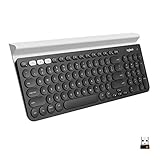
Best overall: Logitech K380s
The K380s is the safe default for a Fire HD 8, HD 10 or Max 11. It is a small, round-keyed Bluetooth board that stores up to three devices. You can type on the tablet, then switch to a phone with one key press. It has no backlight and no rechargeable cell, which keeps the price down and the battery life long.
Trade-off: it is wider than a Fire HD 8 in landscape, so it cannot sit on a small tablet’s case. The keys are shallow, and heavy typists may find them mushy.
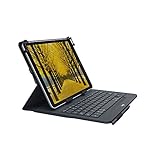
Best portable: Logitech Keys-To-Go 2
This is the pick if the keyboard has to travel inside a sleeve with the tablet. It is very thin and the keys are low-travel, so it is a typing surface, not a gaming deck. Per Logitech’s spec sheet it charges over USB-C and lasts weeks to months between charges. You can charge it from the same cable as a USB-C Fire tablet.
Trade-off: it costs two to three times as much as a basic Bluetooth board, and the flat keys take some adjusting to.
Best for long typing: Logitech MX Keys Mini
If you write long documents or emails on the tablet, the dished keys and backlight make a real difference. It is rechargeable and pairs over Bluetooth, and it works with Fire OS as a standard keyboard. Its Logitech-specific features, such as app shortcuts and Easy-Switch, mostly need Logitech’s desktop software, which Fire OS does not run. Expect a basic, reliable typing keyboard.
Trade-off: it is overkill for a $100 tablet, and its price can match the tablet’s.
Best mechanical: Keychron K2 series
Keychron’s wireless K2 boards connect over Bluetooth and give you real switch feel with a 75% layout that keeps arrow keys and a function row. They suit users who set the tablet in a stand and use it like a small desktop. Choose the Bluetooth-capable models, and check that the mode switch is set to Bluetooth, not wired.
Trade-off: these are heavy and thick for a bag, and they draw more power with the backlight on.
Best with a trackpad: Logitech K400 Plus
Fire OS handles a mouse pointer, but many Bluetooth keyboards lack pointing devices. The K400 Plus has a built-in touchpad, so it covers both. It uses a USB receiver, so you need a USB-C or micro-USB OTG adapter, depending on your tablet generation. That suits a Fire 7 with micro-USB and a spare adapter, but it blocks the charging port while the receiver is plugged in unless you use a pass-through adapter.
Trade-off: the receiver ties up the only port, and the keyboard is bulky.
Best budget: a generic Bluetooth case keyboard
A $15–$35 Bluetooth keyboard with a tablet slot is fine for occasional notes and email. Look for Bluetooth 5.0 or newer, a USB-C charging port instead of micro-USB, and a clearly stated layout (US QWERTY, for example). Avoid models that rely on companion apps, because Fire tablets often lack the required app store.
Trade-off: build quality varies, and the cheapest models have cramped punctuation keys and weak batteries.
How to choose: size, connection and battery
Match keyboard width to tablet size
The tablet’s long edge in landscape is roughly 200 mm on an 8-inch Fire HD 8, about 245 mm on a Fire HD 10 and about 260 mm on a Fire Max 11. A compact 75% keyboard is around 315 mm wide, and a K380-class board is about 280 mm. Both are wider than any Fire tablet. That is fine for desk use, but if you want one piece that rests on your lap, a case-style board matched to the tablet’s size is the only way to avoid overhang.
Check the connection and port
Bluetooth is the simplest route and does not occupy the charging port. A receiver keyboard needs an OTG adapter. As a power-budget example, assume the receiver draws 30 mA from the tablet. On a 5,000 mAh battery that is 0.6% per hour (30 ÷ 5,000), which is negligible. A rechargeable keyboard that you charge from the same cable is more of a hassle than a battery drain.
Do the battery math before buying
Runtime is capacity divided by average draw. A 1,000 mAh backlit keyboard that averages 15 mA with the backlight at half brightness lasts about 66 hours (1,000 ÷ 15). With the backlight off, an average of 1 mA stretches that to 1,000 hours. Backlight use matters far more than the typing itself, so if you want long battery life without charging, choose a non-backlit keyboard or one with a replaceable AA/AAA cell.
Decision matrix
| Your situation | Choose | Why |
|---|---|---|
| Fire HD 8 in a bag, light notes | Keys-To-Go 2 or a 7–8 inch case keyboard | Fits the tablet’s width, charges over USB-C |
| Fire HD 10 or Max 11 at a desk, daily writing | MX Keys Mini | Better key feel, backlight, rechargeable |
| Fire tablet shared with a phone | K380s | Three-device switching, low price |
| Older Fire 7 with micro-USB | K400 Plus with OTG adapter, or a Bluetooth board | Pointer built in, no Bluetooth pairing issues |
| You want a mechanical feel | Keychron K2 series | Switch feel, 75% layout with arrows |
| Tablet under $100, one-off use | Generic Bluetooth board | Cost-proportional, replaceable |
How to pair and set up a keyboard on Fire OS
- Put the keyboard in pairing mode. Hold the Bluetooth key until the LED blinks, so the tablet can discover it.
- Open the tablet’s Bluetooth settings (Settings, then Bluetooth), turn it on and select the keyboard. Some keyboards show a code to type and confirm with Enter.
- Set the layout. In Settings, under Language & Keyboard (menu names vary slightly by Fire OS version), open the physical keyboard options and choose the layout that matches your keys. A wrong layout is why @ and ” swap places.
- Decide on the on-screen keyboard. Fire OS can hide the software keyboard when a hardware one is connected. If it still pops up, turn off the option to show it with a physical keyboard.
- Learn the shortcuts that work. Basic ones such as copy, paste and select all usually work, but support for others depends on the Fire OS version, so test your common ones.
Gaming and keyboards on a Fire tablet
Most Fire tablet games are touch-first. Keyboard support appears mainly in browser-based cloud gaming and a few remote-play apps. Bluetooth adds some latency compared with a wired or 2.4 GHz link, so for fast-paced browser games a receiver keyboard through an OTG adapter is the lower-latency option. For everyday use, the difference is not noticeable.
Frequently Asked Questions
Will any Bluetooth keyboard work with a Fire tablet?
Generally yes. Fire OS treats Bluetooth keyboards as standard HID input devices. Problems usually come from the wrong layout setting, a low battery or a keyboard still paired to another device.
Do I need a special keyboard for a Kindle Fire?
No. Any Bluetooth or USB keyboard will work, provided your tablet has the needed port or Bluetooth. A case designed for a specific tablet model can give a better fit, but it is not required.
Can I use a wired keyboard on a Fire tablet?
Yes, on models whose USB port supports OTG. You need a USB-C or micro-USB to USB-A adapter, depending on the tablet. Plugging in a keyboard blocks the port for charging unless you use a powered pass-through adapter.
Why does my keyboard type the wrong characters?
The layout setting is usually the cause. Go to the physical keyboard options in Language & Keyboard settings and select the layout that matches the keys, such as US English or UK English.
Are mechanical keyboards worth using with a tablet?
They can be if the tablet lives on a desk in a stand. They are heavy and use more power, so they are a poor fit for travel or lap use. For mobile use, a slim keyboard is the better choice.
Which size is best for a Fire HD 8?
A 7–8 inch case keyboard or a very thin portable board fits best. A compact full-width board will extend past the tablet’s edges, so it works on a desk but not on a lap.
Related guides
More from Amazon
Programs that pair well with the guide above. Offers and eligibility are set by Amazon and may change.
A free business account with business pricing and bulk-buying tools for work, shop or home office.
Create a business accountFree shipping on eligible items, Prime Video and more. Eligible new members can start with a free trial.
Start a Prime free trialAudiobooks and podcasts to listen to on the go. Eligible new members can start with a free trial.
Try Audible freeAd-free music streaming. Eligible new subscribers can start with a free trial.
Try Music Unlimited freeAs an Amazon Associate we earn from qualifying purchases.