The best keyboard for most Dell tablets is a compact Bluetooth model such as the Logitech MX Keys Mini. It works with any Dell Windows tablet, pairs with up to three devices, and charges over USB-C. The exception is a Dell detachable like the Latitude 7320 Detachable or Latitude 7350 Detachable. Those have a model-specific pogo-pin keyboard cover that is worth buying first if you want a one-piece, laptop-style setup.
Quick comparison of the best Dell tablet keyboards
| Pick | Best for | Key specs | Price range |
|---|---|---|---|
| Logitech MX Keys Mini | Best overall | Bluetooth or Logi Bolt, USB-C charging, backlit, 3 devices, about 500 g | Usually $90–$120 |
| Logitech Keys-To-Go 2 | Best ultraportable | Bluetooth, thin fabric-style body, roughly 180 g, 3 devices | Usually $70–$100 |
| Logitech Pebble Keys 2 K380s | Best budget | Bluetooth, 3 devices, battery-powered, compact | Usually $30–$50 |
| Dell Multi-Device keyboard (KB700 / KB740 class) | Best Dell-matched desk keyboard | Bluetooth plus 2.4 GHz receiver, rechargeable, multi-device | Usually $40–$90 |
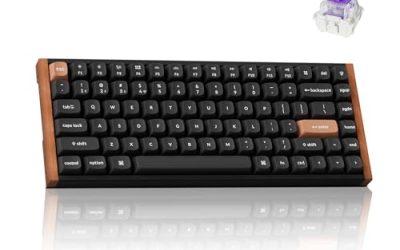
| Keychron K3 Pro (low-profile mechanical) | Best for typing feel and light gaming | Bluetooth 5.1 plus USB-C wired, 75% layout, hot-swappable | Usually $90–$120 |
| Dell first-party detachable keyboard cover | Best for Latitude detachables | Pogo-pin connection, no pairing, model-specific | Usually $120–$220 |
Specs and prices come from each manufacturer’s published listings. Street prices move, so treat the ranges as general guides.
First, check which kind of Dell tablet you own
Dell sells few pure tablets. Most “Dell tablets” are Windows detachables or rugged tablets that run full Windows, so ordinary Bluetooth keyboards work with them. Three situations cover nearly everyone:
- Detachable with a keyboard connector (Latitude 7320 Detachable, Latitude 7350 Detachable): a first-party cover attaches magnetically and talks over pogo pins. Third-party Bluetooth keyboards still work as a backup.
- Rugged tablet (Latitude 7230 Rugged Extreme Tablet and similar): these are built for field work, so the keyboard is usually a separate accessory. A Bluetooth keyboard or a USB-C wired one both work.
- Older Venue-era or Android Dell tablet: these are Bluetooth-only. Check that it supports the Bluetooth HID profile. Almost all do, but Android layout quirks apply.
Best overall: Logitech MX Keys Mini
The MX Keys Mini has a full-size key feel in a 60%-plus layout with a function row. It also has backlighting that switches on when your hands approach, and Easy-Switch keys for up to three paired devices. It suits people who dock a Dell tablet at a desk and carry it to meetings, because the same keyboard also pairs with a phone. Trade-off: it weighs around 500 g, so it is not a case-style keyboard, and the arrow keys are compact.
Best ultraportable: Logitech Keys-To-Go 2
This is a thin, light Bluetooth keyboard that fits in a bag next to a 12-inch tablet. It suits email, notes and form entry in the field, where a bulky keyboard would defeat the point of a tablet. Trade-off: the shallow keys have less travel than a laptop keyboard. It has no stand, so you need a kickstand or a case, which most Dell detachables and rugged tablets have.
Best budget: Logitech Pebble Keys 2 K380s
For $30–$50 you get a quiet, round-key Bluetooth keyboard that pairs with three devices. It runs on replaceable batteries for a long time, per Logitech’s published battery claims. It suits students and anyone who wants a spare keyboard in a drawer. Trade-off: there is no backlight and no USB-C charging. The layout is compact, with a small cursor cluster.
Best Dell-matched desk keyboard: Dell Multi-Device Wireless Keyboard
Dell’s multi-device keyboards (the KB700 and KB740 compact family) pair over Bluetooth or a 2.4 GHz receiver. They suit offices where IT already standardizes on Dell peripherals and Dell Peripheral Manager. Trade-off: they are less pleasant for travel than the Logitech options, and the 2.4 GHz receiver uses a USB-A port, which you may need an adapter for on a tablet. Bluetooth avoids that.
Best for typing feel and light gaming: Keychron K3 Pro
If you play games through cloud streaming or remote desktop on your Dell tablet, a low-profile mechanical board helps. The K3 Pro offers Bluetooth 5.1 or wired USB-C, a 75% layout with dedicated arrows, hot-swappable switches and QMK/VIA remapping. Trade-off: it is heavier and thicker than a travel keyboard, and the battery lasts a shorter time with backlighting on. Wired USB-C avoids Bluetooth latency entirely.
Best for Latitude detachables: Dell’s own keyboard cover
With a Latitude 7320 or 7350 Detachable, the cover connects through pogo pins, so there is no pairing and no battery to charge. It also protects the screen and props the tablet up. Check the exact part number against your model, because covers are not interchangeable across generations. Trade-off: it costs more than a generic Bluetooth keyboard, and it is useless on any other tablet.
Decision matrix: match your situation to a pick
| Your situation | Choose | Why |
|---|---|---|
| Latitude 7320/7350 Detachable, mostly mobile | Dell first-party cover | No pairing, no charging, fits the case |
| Desk dock plus occasional travel | MX Keys Mini | Full-size feel, 3-device switching |
| Carry in a small bag all day | Keys-To-Go 2 | Roughly 180 g |
| Under $50 total budget | K380s | Cheapest reliable multi-device option |
| Rugged tablet in a vehicle or warehouse | Wired USB-C keyboard or K380s | Fewer pairing failures; cheap to replace |
| Cloud gaming or remote desktop | K3 Pro (wired mode) | Fast key response and arrow-key layout |
How to choose: the numbers that matter
1. Weight versus tablet weight
Many Dell 12-inch detachables weigh roughly 0.8–0.9 kg with their cover. Add a 500 g keyboard and your bag carries about 1.3–1.4 kg for input and display alone. A 180 g keyboard lowers that to about 1.0–1.1 kg. If you carry it every day, that 300 g difference is the main reason to pick an ultraportable.
2. Worked battery example
Battery claims vary, so run your own numbers. As an illustration, a keyboard with a 1,500 mAh battery that averages 3 mA with backlight off lasts 1,500 ÷ 3 = 500 hours. At 8 hours of typing per day, that is about 62 days. With the backlight at a 25 mA average, it drops to 1,500 ÷ 25 = 60 hours, or about 7.5 working days. That is why backlit boards often need weekly charging. These figures are illustrative, not published specs for any listed model.
3. Connection type and latency
Bluetooth typically adds roughly 10–30 ms, which is invisible while typing. A 2.4 GHz receiver or a USB-C cable can cut that to a few milliseconds. Wired also uses no keyboard battery, but it draws a small amount of power from the tablet. Pick wired only if you plan to play, or if pairing keeps failing.
4. Layout and OS keys
Choose a keyboard with Windows legends, or one that can switch between Windows and Android or macOS layouts, and a dedicated Fn row if you use shortcuts. A 60% board without a function row forces awkward key combinations for F-keys.
Setup settings that prevent most problems
- Pair in Settings > Bluetooth & devices > Add device. Put the keyboard in pairing mode first, because the tablet only lists devices that are advertising.
- Update the tablet’s Bluetooth driver through Dell Command | Update. Old drivers cause dropped keystrokes and failed reconnects after sleep.
- Turn off power saving for the Bluetooth adapter. In Device Manager, open the adapter’s Properties > Power Management and untick “Allow the computer to turn off this device to save power”. This stops the first keystrokes after wake from being lost.
- Set the keyboard layout under Time & language > Language & region. A US keyboard on a UK layout swaps the @ and ” keys.
- Check Fn Lock. If F-keys do nothing or always act as media keys, toggle Fn Lock, which on many boards is Fn plus Esc.
Frequently Asked Questions
Will any Bluetooth keyboard work with a Dell tablet?
Almost always yes. Dell tablets running Windows support standard Bluetooth keyboards through the HID profile, so you do not need Dell-branded hardware. The exceptions are pogo-pin detachable covers, which only fit specific Latitude models.
Do I need a Dell-branded keyboard for a Latitude Detachable?
Only if you want the attached cover with a pogo-pin connection, no pairing and a built-in stand. A Bluetooth keyboard from another brand works well, but the tablet is then loose rather than a single laptop-style unit.
Is a wired keyboard better for a Dell rugged tablet?
It can be. Wired USB-C removes pairing failures and keyboard batteries, which matters in vehicles and warehouses. Check that the tablet has a free USB-C or USB-A port, because a hub may be needed if you also charge it.
Can I use a mechanical keyboard with a Dell tablet?
Yes, if it supports Bluetooth or a USB-C connection. Boards like the Keychron K3 Pro work on Windows tablets. They are heavier and thicker than travel boards, so they suit desk use rather than carrying around.
Why does my keyboard disconnect after the tablet sleeps?
This is usually Bluetooth power management or an outdated driver. Disable the “turn off this device to save power” option for the adapter, update drivers with Dell Command | Update, and remove and re-pair the keyboard if it still drops.
Should I get a keyboard with a trackpad?
If your tablet has no kickstand and you work from a lap or train seat, yes. A trackpad lets you avoid reaching up to the touchscreen. At a desk, a separate mouse is faster and a trackpad adds weight and cost.
Related guides
More from Amazon
Programs that pair well with the guide above. Offers and eligibility are set by Amazon and may change.
A free business account with business pricing and bulk-buying tools for work, shop or home office.
Create a business accountFree shipping on eligible items, Prime Video and more. Eligible new members can start with a free trial.
Start a Prime free trialAudiobooks and podcasts to listen to on the go. Eligible new members can start with a free trial.
Try Audible freeAd-free music streaming. Eligible new subscribers can start with a free trial.
Try Music Unlimited freeAs an Amazon Associate we earn from qualifying purchases.