The best customizable keyboards let you change the parts that shape how a board feels and works: hot-swappable switches, remappable keys through QMK or VIA-style software, and keycaps you can replace. This guide ranks seven options that come ready to use, explains how a prebuilt keyboard differs from a barebones kit, and covers what the premium end of the market actually buys.
Quick answer: choose a hot-swappable, wireless 75 percent board with QMK support if you want the easiest path to customization. Choose a barebones kit only if you are happy to buy switches and keycaps separately.
Our Top Picks
Top 3 picks at a glance
Customizable Keyboards at a Glance
All seven boards below are prebuilt, meaning you plug them in and type. Each offers at least one real customization path, such as hot-swap sockets, programmable firmware or a replaceable switch set. The table shows how they differ.
| Keyboard | Layout | Customization | Connection | Notable feature |
|---|---|---|---|---|
| Keychron K2 HE | 75 percent | QMK Launcher, magnetic switches, rapid trigger | 2.4 GHz, Bluetooth, Type-C | Aluminum and wood frame |
| Keychron V5 Max | 96 percent | QMK Launcher, hot-swap Gateron Red | 2.4 GHz, Bluetooth, USB-C | Number pad, PBT keycaps |
| AULA F75 Pro | 75 percent | Hot-swappable, pre-lubed Reaper switches | 2.4GHz, USB-C, BT5.0 | Knob, PBT keycaps |
| Womier SK80 | 75 percent | Hot-swappable, gasket mount | Wired | Color multimedia display |
| YUNZII B75 PRO | 75 percent | Hot-swap, gasket mount, knob | BT, USB-C, 2.4G | Pre-lubed creamy switches |
| Redragon K673 PRO | 80 percent | Gasket, 5-layer noise dampening, scroll knob | Tri-mode wireless | 81 keys |
| Razer Reclusa X Mini | 65 percent | Hot-swappable, 3 and 5-pin switches | Wired | Orange tactile switches Gen-3 |
How We Chose These Keyboards
This is a research-based guide. We did not use these keyboards ourselves. We compared maker specifications and product listings, focused on boards that state real customization features, and picked a spread of layouts, brands and tiers. Each brand has at most two entries. Because listings differ, any spec that is not stated is marked as not listed, and you should confirm details with the maker before buying.
The 7 Best Customizable Keyboards
Keychron K2 HE Wireless Magnetic Hall Effect Keyboard (75%)
As an Amazon Associate we earn from qualifying purchases at no extra cost to you.

The Keychron K2 HE is a 75 percent wireless custom keyboard with Gateron magnetic hall effect switches, rapid trigger, a QMK Launcher program, 2.4 GHz, Bluetooth and Type-C connections, and an aluminum and wood build for Mac, Windows and Linux.
This is the most advanced customizable board on the list. Magnetic switches let you tune actuation, and QMK support lets you remap keys and layers. It also looks like a premium desktop piece thanks to the wood accents.
- Layout: 75 percent
- Switch: Gateron magnetic hall effect, rapid trigger
- Software: QMK Launcher
- Connection: 2.4 GHz, Bluetooth, Type-C
- Build: aluminum and wood
Best for: enthusiasts who want tunable response and a premium look.
Skip if: you want a simple board with no setup.
Pros
- Adjustable actuation and rapid trigger
- QMK customization
- Multi-platform
- Premium materials
Cons
- Higher cost tier than most boards here
- Magnetic switches have fewer third-party options than standard sockets
Keychron V5 Max Custom Wireless Mechanical Keyboard (96%)

The Keychron V5 Max is a 96 percent wireless mechanical keyboard with a number pad, 2.4 GHz, Bluetooth and USB-C, QMK Launcher programmability, hot-swap Gateron Red switches, PBT keycaps and RGB for Mac, Windows and Linux.
If you want customization without losing the number pad, this is the strongest choice. Hot-swap sockets mean you can try new switches, and the compact 96 percent layout saves space compared with a full-size board.
- Layout: 96 percent with number pad
- Switch: Gateron Red, hot-swap
- Software: QMK Launcher
- Connection: 2.4 GHz, Bluetooth, USB-C
- Keycaps: PBT
Best for: people who use a number pad and still want to modify their board.
Skip if: you prefer a 60 or 65 percent layout.
Pros
- Number pad in a compact form
- Hot-swap and QMK
- Wireless options
- PBT keycaps
Cons
- Larger than 75 percent boards
- Linear Red switches may feel light to some
AULA F75 Pro Wireless Mechanical Keyboard (75%)

The AULA F75 Pro is a 75 percent wireless keyboard with hot-swappable switches, a knob, RGB backlighting, pre-lubed Reaper switches, side-printed PBT keycaps and 2.4GHz, USB-C and Bluetooth 5.0 connections.
This board gives many of the features of pricier custom keyboards in a ready-to-use package. Pre-lubed switches and PBT keycaps improve feel out of the box, and the hot-swap sockets let you change them later.
- Layout: 75 percent with knob
- Switch: pre-lubed Reaper, hot-swappable
- Keycaps: side-printed PBT
- Connection: 2.4GHz, USB-C, Bluetooth 5.0
- Lighting: RGB
Best for: anyone starting with customization who wants strong value.
Skip if: you need advanced firmware such as QMK (not listed here).
Pros
- Hot-swap and pre-lubed
- Wireless
- Knob
- Value tier
Cons
- Software depth not as broad as QMK
- Brand support may vary
Womier SK80 75% Keyboard with Color Multimedia Display

The Womier SK80 is a wired 75 percent mechanical keyboard with a color multimedia display, creamy sound, hot-swappable switches, gasket mount, RGB, and pre-lubed stabilizers for Mac and Windows.
The display adds personality, showing animations or information, while the gasket mount aims for a softer, deeper sound. It is a fun pick for a desk setup where looks matter as much as typing.
- Layout: 75 percent
- Features: color multimedia display
- Build: gasket mount, pre-lubed stabilizers
- Switches: hot-swappable
- Connection: wired
Best for: people who want a decorative, customizable desk keyboard.
Skip if: you need wireless.
Pros
- Display adds personality
- Gasket sound
- Hot-swappable
- Wired reliability
Cons
- No wireless
- Display features may not suit everyone
YUNZII B75 PRO 75% Wireless Mechanical Keyboard
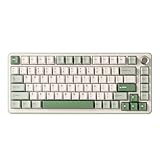
The YUNZII B75 PRO is a 75 percent wireless mechanical keyboard with a knob, hot-swap sockets, gasket mount, pre-lubed creamy switches and Bluetooth, USB-C and 2.4G connections, offered in colorways such as Matcha Green and Cocoa V2.
A good fit if you like the soft-colored custom keyboard look. The combination of gasket mount and pre-lubed switches is the usual recipe for a smooth, muted sound.
- Layout: 75 percent with knob
- Structure: gasket mount
- Switches: pre-lubed, hot-swap
- Connection: Bluetooth, USB-C, 2.4G
- Colors: Matcha Green, Cocoa V2
Best for: people who want a stylish ready-to-use custom board.
Skip if: you want deep software customization.
Pros
- Attractive colorways
- Wireless
- Hot-swappable
- Gasket mount
Cons
- Less well known brand
- Software details not listed here
Redragon K673 PRO Wireless 81-Key Gasket Keyboard

The Redragon K673 PRO is an 81-key, 80 percent wireless gaming keyboard with a gasket design, a scroll knob, multi-function control wheel, zero-delay tri-mode connections and cushioned five-layer noise dampening for a creamy, thocky sound.
This is a gasket board with sound-dampening layers and a control wheel. It aims at a deep sound, and tri-mode wireless gives flexibility between devices.
- Layout: 80 percent, 81 keys
- Structure: gasket, 5-layer noise dampening
- Controls: scroll knob and control wheel
- Connection: tri-mode wireless
- Use: gaming and typing
Best for: people who want a muted sound and a control wheel without custom building.
Skip if: you need advanced remapping (not listed here).
Pros
- Sound dampening
- Wireless tri-mode
- Control knob and wheel
- Compact 80 percent
Cons
- Customization depth not detailed
- Hot-swap not listed here
Razer Reclusa X Mini 65% Hot-Swappable Mechanical Keyboard

The Razer Reclusa X Mini is a 65 percent hot-swappable mechanical keyboard compatible with 3 and 5-pin switches, using Razer Orange Tactile Switches Gen-3, Chroma RGB, double ABS keycaps and sound dampening.
A compact, wired board from a major brand that lets you swap switches. It suits anyone who wants to keep arrow keys but still have a small footprint.
- Layout: 65 percent
- Switch: Razer Orange Tactile Gen-3, hot-swappable
- Compatibility: 3 and 5-pin switches
- Lighting: Chroma RGB
- Connection: wired
Best for: gamers who want a compact, swappable board from an established brand.
Skip if: you want wireless.
Pros
- Hot-swap with 3 and 5-pin
- Compact with arrows
- Sound dampening
- Major brand support
Cons
- Wired only
- Tactile switches are not for everyone
Also Consider
GTSP 75% Custom Barebones Keyboard Kit

A blank DIY 75 percent keyboard base with silent gasket mount, hot-swappable 3 and 5-pin sockets, south-facing RGB and plug-and-play operation. You add your own switches and keycaps. This is the route for builders.
Womier VK66 PRO 60% QMK/VIA Keyboard

A wired 60 percent mechanical keyboard with QMK and VIA support, hot-swappable gasket mount, RGB, PBT keycaps and POM linear switches for Windows and Mac. A compact option with deep software support.
SOLAKAKA KI99 Pro Wireless Mechanical Keyboard

A wireless mechanical keyboard with a silent switch, hot-swappable pre-lubed switches, gasket structure and RGB backlighting. It suits people who want a quieter custom-style board.
What Makes a Keyboard Customizable
Customization comes in layers. You can start with simple choices, such as keycaps and lighting, and go all the way to firmware-level changes.
Hot-swappable switches
Hot-swap sockets let you pull out switches and replace them without soldering. This is the single most useful customization feature for most people, because it lets you change the feel of the board in minutes. Check whether the sockets accept three-pin and five-pin switches, as the Razer Reclusa X Mini lists.
Programmable firmware: QMK and VIA
QMK is open firmware for remapping keys, layers and macros. VIA and similar tools provide a visual interface. Keychron boards such as the K2 HE and V5 Max list QMK Launcher support, and the Womier VK66 PRO lists QMK and VIA. Not every board lists the same level of support, so confirm the exact tool with the maker.
Keycaps and layout
Standard keycap sets fit most layouts, but some boards use non-standard bottom rows. Check whether the board supports common sizes if you plan to replace the keycaps. PBT keycaps are a popular upgrade because they resist shine and often sound deeper.
Case, plate and sound
Gasket mounts, foam and layered dampening change the sound and feel. They are the reason many boards describe a creamy or thocky sound.
Prebuilt Keyboard vs Barebones vs DIY
| Route | What you get | Effort | Best for |
|---|---|---|---|
| Prebuilt keyboard | Complete board, ready to use | Plug in and go | Most buyers |
| Hot-swap prebuilt | Complete board, switches replaceable | Low | Switch experimenters |
| Barebones kit | Case, plate and PCB, no switches or caps | Medium | Builders who want to choose parts |
| Fully DIY build | Parts bought separately | High | Enthusiasts |
Best Prebuilt Keyboards
The best prebuilt keyboards for customization are hot-swappable boards with wireless connections and firmware support. The AULA F75 Pro, Keychron V5 Max and YUNZII B75 PRO all fit this profile, and each ships ready to use. Prebuilt boards are the best starting point because you can type immediately and upgrade later.
Keychron: Why It Shows Up So Often
Keychron is a brand focused on customizable and wireless mechanical keyboards, with models for Mac, Windows and Linux. Many listings highlight hot-swap sockets, QMK support and aluminum or wood builds. The K2 HE and V5 Max in this list illustrate the brand’s range, from magnetic hall effect switches to a 96 percent layout with a number pad. Keychron also lists models in other formats, such as 60, 65 and full-size layouts. Compare the specific model because features vary between lines.
Best Keyboards on the Market: How to Think About It
There is no single best keyboard for everyone. The best choice depends on layout, switch feel, connection and software. Use these steps to narrow down options.
- Pick a layout: 60, 65, 75, 80, 96 percent or full size.
- Pick a switch feel: linear, tactile, silent or magnetic.
- Pick a connection: wired for simplicity, wireless for flexibility.
- Check customization: hot-swap, QMK or VIA, keycap replacement.
- Check build quality: aluminum, gasket, dampening and keycap material.
The Premium End: What the Most Expensive Mechanical Keyboard Buys You
The most expensive mechanical keyboards are usually fully custom builds or limited-run boards. They tend to use machined aluminum or other premium cases, specialist switches, high-end stabilizers and artisan keycaps. You pay for materials, tight tolerances and exclusivity rather than for a better ability to type. For most people, a hot-swappable prebuilt board in the middle tier gives most of the benefit.
If you do want to go further, a barebones kit like the GTSP above is a lower-cost way to learn building before you commit to premium parts.
Layout Sizes Explained
Layout is the first choice because it determines desk space and which keys you keep. Here is how the common sizes compare.
| Layout | Keys (approx.) | What you lose | Example in this list |
|---|---|---|---|
| 60 percent | 61-68 | Arrows, function row, nav keys | Womier VK66 PRO |
| 65 percent | 65-68 | Function row, some nav keys | Razer Reclusa X Mini |
| 75 percent | 80-84 | Number pad | Keychron K2 HE, AULA F75 Pro, Womier SK80, YUNZII B75 PRO |
| 80 percent (TKL) | 80-87 | Number pad | Redragon K673 PRO |
| 96 percent | 96-100 | Little, keys are compressed | Keychron V5 Max |
Switch Types and How They Feel
- Linear: smooth from top to bottom with no bump. Gateron Red and POM linear switches are examples.
- Tactile: a small bump near the actuation point, such as the Razer Orange Tactile switches.
- Clicky: a bump plus an audible click, loud in shared spaces.
- Magnetic hall effect: a magnet and sensor measure travel, so actuation can be adjusted in software.
- Silent: dampened versions that reduce noise.
How to Customize a Hot-Swap Board Step by Step
- Check the sockets. Confirm whether your board accepts three-pin and five-pin switches, and whether it supports plate-mounted switches.
- Buy a small switch sample pack. Trying a few types is cheaper than buying a full set of one type that you may dislike.
- Use a switch puller. Pull each switch straight up. Twisting can bend pins.
- Insert new switches. Align the pins, press gently until they seat, and make sure the pins are straight.
- Test every key. Use a key tester web page to confirm each switch registers.
- Adjust software. Remap keys and layers using the firmware tool listed by the maker.
Stabilizers, Lube and Foam
Stabilizers keep long keys such as space and enter from wobbling. Pre-lubed stabilizers, which the Womier SK80 lists, reduce rattle. Lubing switches reduces scratchiness, and foam inside the case dampens echo. These are the small changes that can make a board sound and feel much better without changing the main parts.
Keycap Profiles and Materials
Keycap profile affects finger travel and comfort. Cherry-style profiles are common and low, while others are taller or sculpted. PBT is durable and textured, while ABS is smooth and can shine over time. Check that your board uses a standard layout if you plan to buy aftermarket keycaps, and confirm the bottom-row sizes.
Wireless Customization Notes
Wireless boards often use a 2.4 GHz receiver for low latency and Bluetooth for multiple devices. Battery life varies with lighting and settings, and many listings do not state a precise runtime, so check the maker. Some firmware tools work only while the board is wired, so keep a USB-C cable handy.
Common Mistakes When Buying a Customizable Keyboard
- Choosing a barebones kit without budgeting for switches and keycaps.
- Assuming every hot-swap board accepts every switch. Check pin compatibility.
- Ignoring software support for your operating system.
- Buying a layout without the keys you use every day, such as arrows.
- Overpaying for premium materials before you know which switch feel you prefer.
Upgrade Path: What to Change First
If you already own a board, start with the cheapest changes. Replace the keycaps for sound and look, then swap switches if the board is hot-swappable, then add foam or lube. Firmware changes are free and reversible, so explore those early. Only move to a new case or custom build after you know what you like.
Who Should Skip a Customizable Keyboard
Customization is optional. If you only want a reliable board for typing, a standard keyboard with good switches and a warranty may be enough. Customizable boards ask you to make choices about switches, keycaps and software, and that is fun for some people and a chore for others. If you do not want to experiment, pick a prebuilt board with a switch type you already like and ignore the rest.
How the Seven Picks Differ in Practice
- Software depth: the Keychron boards list QMK Launcher support, which is the most flexible option here. The other boards offer simpler or unlisted software.
- Sound profile: gasket boards like the Womier SK80, YUNZII B75 PRO and Redragon K673 PRO aim at a deeper, softer sound. The Razer Reclusa X Mini uses sound dampening in a more traditional frame.
- Connection: the Keychron V5 Max, K2 HE, AULA F75 Pro, YUNZII B75 PRO and Redragon K673 PRO are wireless. The Womier SK80 and Razer Reclusa X Mini are wired.
- Layout: 65 percent for the Razer, 75 percent for four boards, 80 percent for the Redragon and 96 percent for the Keychron V5 Max.
- Switch variety: hot-swap boards give you the widest choice of aftermarket switches. The magnetic K2 HE uses magnetic switches, so check which replacements it supports.
If you are torn, a hot-swappable 75 percent wireless board is the safest middle path. It is compact, has the keys most people need, and lets you change feel later without buying a new keyboard.
Warranty, Support and Returns
Before buying, look at the seller and maker policies. Customizable keyboards are personal, and a return window can be valuable if the layout or switch feel is not right. Established brands also tend to publish firmware updates and documentation, which matters for QMK and wireless features. Keep your original packaging for a while in case you need to return or exchange the board.
Buying Guide: Thresholds That Matter
- Choose hot-swap if you may change switches later.
- Choose QMK or VIA support if you want layers and macros.
- Choose wireless if you move between devices; choose wired for fixed desks.
- Choose a gasket mount if you want a softer feel.
- Choose PBT keycaps if sound and durability matter to you.
- Check software support for your operating system.
Frequently Asked Questions
What are the best customizable keyboards?
Hot-swappable boards with QMK or VIA support are the best. In this list, the Keychron K2 HE, Keychron V5 Max and AULA F75 Pro cover advanced, number pad and value needs.
What is the best prebuilt keyboard to start customizing?
A hot-swappable, wireless 75 percent board such as the AULA F75 Pro is a good start. It works out of the box and lets you replace switches later.
Are Keychron keyboards worth it?
They are a strong choice if you want QMK support, hot-swap sockets and multi-platform support. Check the specific model because features and tiers vary.
What is the difference between a prebuilt and a barebones keyboard?
A prebuilt keyboard is complete and ready to use. A barebones kit has the case and circuit board but needs switches and keycaps.
What is the most expensive mechanical keyboard?
The priciest boards are typically fully custom or limited-run builds with machined cases and specialist parts. They are not necessary for good typing.
What are the best keyboards on the market right now?
It depends on your needs, but hot-swappable wireless 75 percent boards offer the best mix of features. Pick layout and switch feel first, then compare brands.
Do I need QMK to customize my keyboard?
No. Hot-swap sockets and replacement keycaps are customization too. QMK adds deeper remapping if you want layers and macros.
Which One Should You Buy?
- Best overall: Keychron V5 Max for a number pad, QMK and wireless.
- Most advanced: Keychron K2 HE for magnetic switches and rapid trigger.
- Best value: AULA F75 Pro.
- Best for looks: Womier SK80 or YUNZII B75 PRO.
- Best compact tactile: Razer Reclusa X Mini.
- Best for builders: GTSP barebones kit.
Sources
- Keychron, product pages and QMK Launcher documentation
- QMK Firmware, official documentation
- Razer, Reclusa X Mini product page
- Maker listings for AULA, Womier, YUNZII and Redragon boards
Last updated: November 2026
Related guides
More from Amazon
Programs that pair well with the guide above. Offers and eligibility are set by Amazon and may change.
A free business account with business pricing and bulk-buying tools for work, shop or home office.
Create a business accountFree shipping on eligible items, Prime Video and more. Eligible new members can start with a free trial.
Start a Prime free trialAudiobooks and podcasts to listen to on the go. Eligible new members can start with a free trial.
Try Audible freeAd-free music streaming. Eligible new subscribers can start with a free trial.
Try Music Unlimited freeAs an Amazon Associate we earn from qualifying purchases.


