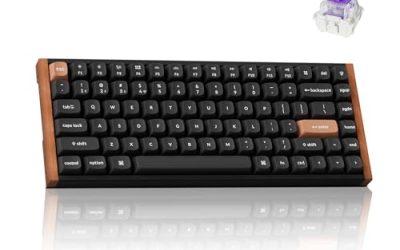
The best tablet keyboard for travel for most people is the Logitech Keys-To-Go 2: it is thin, light, pairs over Bluetooth with iPadOS, Android and Windows tablets, and doesn’t tie you to one tablet model. If you want a protective case with a trackpad, a Logitech Combo Touch or Apple Magic Keyboard (iPad) or a Samsung Book Cover Keyboard (Galaxy Tab) makes more sense, at the cost of extra weight and a higher price.
Quick comparison of the best travel keyboards for tablets
Weights and battery claims below are approximate and come from manufacturer spec sheets; check the exact variant for your tablet before buying. Prices are typical market ranges and move with sales and region.
| Pick | Best for | Key specs | Typical price |
|---|---|---|---|
| Logitech Keys-To-Go 2 | Best overall, any tablet | Bluetooth, ultra-thin, roughly 180 g, rechargeable, no trackpad | $60–$100 |
| Logitech Combo Touch | Best case + keyboard for iPad | Detachable keyboard, trackpad, kickstand case, tablet-specific fit, roughly 600–800 g with case | $150–$230 |
| Apple Magic Keyboard for iPad (Air/Pro) | Best premium laptop feel on iPad | Trackpad, backlit keys, magnetic mount, tablet-specific, heavy | $270–$350 |
| Samsung Book Cover Keyboard (Galaxy Tab S series) | Best for Galaxy Tab owners | Pogo-pin connection (no pairing), trackpad, model-specific | $100–$200 |
| Logitech MX Keys Mini | Best typing feel for a hotel desk | Compact 75% layout, backlit, multi-device, roughly 500 g | $100–$120 |
| Logitech Pebble Keys 2 K380s | Best budget | Compact, 3-device switching, long battery life, roughly 400 g | $30–$50 |
Best overall: Logitech Keys-To-Go 2
This is the keyboard you can forget is in your bag. It is a thin, fabric-feel slab with short-travel keys, and it pairs by Bluetooth, so it survives a tablet upgrade. It suits people who type emails, notes and documents on a tablet in cafes, planes and trains, and who already carry a stand or a case with a kickstand.
Main trade-off: the key travel is shallow and there is no trackpad, so you will reach for the touchscreen. It also doesn’t prop up the tablet, so budget for a folding stand.
Best case-and-keyboard combo for iPad: Logitech Combo Touch
Combo Touch gives you a protective case, a kickstand with adjustable angles and a detachable keyboard with a trackpad. It is a good fit if the tablet lives in your bag and your lap, and you want one object instead of three. Fit is tablet-specific, so match the exact iPad generation and screen size.
Main trade-off: weight. Case plus keyboard can push the total near or past a thin laptop, which defeats the point on ultralight trips.
Best premium option for iPad: Apple Magic Keyboard
The Magic Keyboard for iPad Air and iPad Pro is the most laptop-like option: a good trackpad, a stable magnetic mount and tight integration with iPadOS. It suits people who use the iPad as their main computer on the road.
Main trade-off: price and bulk. It is also model-specific, so it is a poor choice if you upgrade tablets often, and the fixed viewing angle range is narrower than a freestanding stand.
Best for Samsung Galaxy Tab: Book Cover Keyboard
Samsung’s first-party keyboard covers connect through contacts on the tablet rather than Bluetooth, so there is nothing to pair and no keyboard battery to charge. They also support Samsung DeX-style desktop workflows on supported Galaxy Tab models.
Main trade-off: they are model-specific and not useful with other brands. If you may switch tablets, a Bluetooth keyboard is safer.
Best typing feel: Logitech MX Keys Mini
This is the pick if you write for hours in hotel rooms or coworking spaces. The compact layout keeps a full set of keys, the backlight adapts to light, and it can switch between a tablet, phone and laptop. It travels fine in a backpack but not in a jacket pocket.
Main trade-off: it is roughly three times heavier than a slim folio-style keyboard and needs a separate stand.
Best budget: Logitech Pebble Keys 2 K380s
A compact, rounded keyboard with quiet keys, easy switching between three paired devices and battery life measured in months under normal use. It is the cheap, durable option for light travel and for tablets from any brand.
Main trade-off: it is thicker than a Keys-To-Go style keyboard and has no backlight, so late-night typing on planes is harder.
How to choose: a decision matrix
| Your situation | Choose | Why |
|---|---|---|
| Carry-on only, tablet used for notes and email | Keys-To-Go 2 + folding stand | Lowest weight and works with any tablet |
| iPad is your main device | Magic Keyboard or Combo Touch | Trackpad and a fixed, stable angle |
| Galaxy Tab with DeX workflow | Samsung Book Cover Keyboard | No pairing, no extra battery to manage |
| Long writing sessions in hotels | MX Keys Mini | Better key feel and backlight |
| Replace tablets every 2–3 years | Any Bluetooth keyboard | Not locked to one model’s dimensions |
| Tight budget, light use | Pebble Keys 2 K380s | Cheap, durable and multi-device |
Worked example: weight and battery budget
Take an 11-inch tablet that weighs about 460 g. Add a slim Bluetooth keyboard (about 180 g) and a 150 g folding stand: the kit weighs roughly 790 g. A tablet with a keyboard case that adds about 650 g comes to around 1,110 g, which is about 320 g more, roughly the weight of a large water bottle. Many 13-inch ultralight laptops weigh 1,000–1,300 g, so a heavy keyboard case erases the weight advantage of a tablet.
Battery math, for illustration (check your keyboard’s spec sheet for real values): a keyboard with a 500 mAh cell drawing an average of 1.5 mA during typical use with the backlight off lasts 500 ÷ 1.5 ≈ 333 hours. At 3 hours of typing a day, that is about 110 days. With a backlight drawing an average of 15 mA, the same cell gives 500 ÷ 15 ≈ 33 hours, about 11 days at 3 hours daily. The takeaway is that backlighting is the main driver of battery drain, so keep it low or off and bring a short USB-C cable.
| Setup | Approx. total weight | Trackpad | Extra stand needed |
|---|---|---|---|
| Tablet + slim keyboard + stand | ~790 g | No | Yes |
| Tablet + compact keyboard (~400 g) + stand | ~1,010 g | No | Yes |
| Tablet + keyboard case with trackpad | ~1,100 g | Yes | No |
What to check before you buy
- Connection type: Bluetooth works across brands and survives upgrades. Contact-based covers skip pairing but only fit one model family.
- Stand or case: a keyboard with no stand needs one. Count the stand’s weight and thickness in your bag budget.
- Key travel and layout: shallow keys save space but tire fast typists. Check the arrow keys and Escape/Home key positions, which small layouts often shrink.
- Tablet OS shortcuts: iPadOS and Android have their own shortcut sets. A keyboard with a dedicated row for the right OS is easier than remapping.
- Trackpad: useful on iPadOS and Samsung DeX, but not essential if you mostly type and use touch.
- Charging: USB-C is a plus, because you can share one cable with the tablet and phone.
- Multi-device switching: handy if a phone or laptop shares the keyboard, since most compact models store two or three pairings.
Frequently Asked Questions
Is a Bluetooth keyboard or a keyboard case better for travel?
A Bluetooth keyboard is lighter and works with any tablet, but needs a separate stand. A keyboard case is more convenient and has a trackpad, but weighs more and fits only one model family. Choose by how much weight you can accept.
Can I use any Bluetooth keyboard with an iPad or Android tablet?
Yes, most standard Bluetooth keyboards pair with iPadOS, Android and Windows tablets. Some OS-specific keys, such as media shortcuts or the Globe key, may be mislabeled, and you can often switch layouts in the keyboard’s mode setting or in the tablet’s settings.
Do I need a trackpad on a travel keyboard?
Not for writing and email, because touch handles most pointing. A trackpad helps for spreadsheets, text selection and DeX or Stage Manager style multitasking, so it is worth it if the tablet doubles as a laptop.
How long does a travel keyboard battery last?
Manufacturers claim from several weeks to many months for compact Bluetooth models with the backlight off. Backlighting cuts that sharply, as the worked example shows, so use it sparingly and carry a USB-C cable.
Are folding keyboards good for tablets?
They save the most pocket space, but the hinges add thickness and cost typing comfort. They suit short bursts of typing and very small bags, while thin slab keyboards are a better fit for regular writing on the road.
What size keyboard is best for a tablet?
Choose a keyboard about as wide as your tablet’s long edge so it feels balanced on a tray table. Compact 75% and 65% layouts cover most travel needs, while full-size boards are better left at home.
Related guides
More from Amazon
Programs that pair well with the guide above. Offers and eligibility are set by Amazon and may change.
A free business account with business pricing and bulk-buying tools for work, shop or home office.
Create a business accountFree shipping on eligible items, Prime Video and more. Eligible new members can start with a free trial.
Start a Prime free trialAudiobooks and podcasts to listen to on the go. Eligible new members can start with a free trial.
Try Audible freeAd-free music streaming. Eligible new subscribers can start with a free trial.
Try Music Unlimited freeAs an Amazon Associate we earn from qualifying purchases.