The best Bluetooth keyboard for a 9.7-inch tablet is usually a compact multi-device model like the Logitech K380 for desk use, or a slim portable one like the Logitech Keys-To-Go 2 for travel. A 9.7-inch tablet has no special keyboard standard: any modern Bluetooth keyboard pairs with it, and the real decisions are size, stand, battery type and OS key mapping. The sections below turn those into numbers you can check before buying.
As an Amazon Associate we earn from qualifying purchases at no extra cost to you.



Top 3 picks at a glance
Quick comparison of the picks
| Pick | Best for | Key specs | Typical price |
|---|---|---|---|
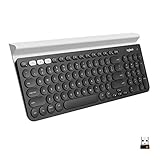
| Logitech K380 / K380s | Best overall, desk and couch | 3 device slots, full-size key pitch in a compact body, AAA batteries (rated by Logitech at up to 24 months) | $30–$50 |
| Logitech Keys-To-Go 2 | Best for travel | Ultra-thin, rechargeable, multi-device Bluetooth, fabric-like keys | $70–$100 |
| Microsoft Designer Compact Keyboard | Best budget-premium feel | Slim, low-profile keys, Bluetooth, rechargeable | $30–$60 |
| Logitech MX Keys Mini | Best for typing comfort | Scissor keys, backlight, rechargeable, up to 3 devices | $90–$120 |
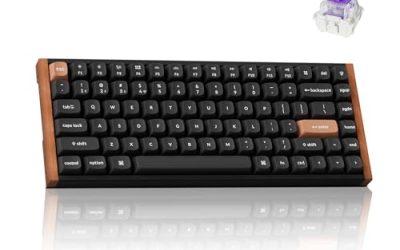
| Keychron K3 low-profile (wireless) | Best mechanical option | Low-profile switches, Bluetooth, 75% layout, multi-device | $80–$120 |
| Generic 9.7-inch case with detachable keyboard | Best for an all-in-one laptop feel | Fit specific to one tablet model, magnetic detach, built-in slot or stand | $25–$50 |
Check these four things first
1. Does the keyboard match your tablet’s age?
Most 9.7-inch tablets are older models. Examples are the 9.7-inch iPad (5th and 6th generation), the iPad Air 2, the 9.7-inch iPad Pro and the Samsung Galaxy Tab S2 9.7. Their Bluetooth radios are version 4.x, but Bluetooth is backward compatible, so a current Bluetooth 5 keyboard still pairs. The limit is software: older iPads stop at iPadOS 15–17 depending on the model, and the Tab S2 is stuck on an old Android release. Fixed-function keys, such as brightness and media, may behave differently as a result. Basic typing and shortcuts like copy and paste work everywhere.
2. Does the tablet physically fit the keyboard?
A 9.7-inch iPad is roughly 240 × 170 mm and about 7.5 mm thick, per Apple’s specs. Most case-and-keyboard combos add 4–6 mm. For a keyboard with a built-in slot, the slot needs to be at least 8 mm wide for the bare tablet, and 12–14 mm if you keep a case on. Some slim travel keyboards have a shallow groove or a separate cover stand, so check the stated tablet thickness range.
3. Will it stay upright on your lap?
A typical 9.7-inch tablet weighs about 440–470 g (Wi-Fi models). A standalone keyboard with a groove or stand must be heavy or wide enough not to tip back. A keyboard under 200 g with a tall tablet on a soft lap is the classic tipping setup. Prefer a keyboard-and-case combo with a rigid hinge for lap use, and a heavier standalone keyboard on a desk.
4. Battery type
Disposable AAA batteries are common on the cheapest and the longest-lasting models. Rechargeable models are more convenient but have a floor on standby life. Backlighting is the main variable. Use the runtime estimate below.
Worked example: battery life with and without backlight
These are illustrative figures, not manufacturer ratings. Assume a 200 mAh rechargeable keyboard battery and 2 hours of typing a day.
- Backlight off, average draw about 1 mA while connected: 200 mAh ÷ 1 mA = 200 hours. At 2 hours a day that is about 100 days.
- Backlight on, average draw about 10 mA: 200 ÷ 10 = 20 hours. At 2 hours a day that is about 10 days.
- Backlight on, but only 30% of typing time in the dark: blended draw about 3.7 mA, so about 54 hours, or roughly 27 days.
The lesson is that a backlight can cut runtime by around 90%. If you mostly type in daylight, a non-backlit keyboard or one with auto-off backlight is the better fit. Check the manufacturer’s rating for “backlight on” separately from “backlight off”.
Best overall: Logitech K380 / K380s
The K380 family is the safe answer for most 9.7-inch tablet owners. It has rounded keys, a compact body, and three Easy-Switch keys for switching between a tablet, phone and laptop. It also has OS-specific key labels for iOS, Android and Windows. It runs on AAA batteries, which Logitech rates for up to 24 months, and the K380s adds a rechargeable option in some regions. The trade-off is that it has no built-in tablet stand, so you need a case that stands up on its own or a separate stand. It is also a little too wide to slip into a small tablet sleeve.
Best for travel: Logitech Keys-To-Go 2
This is a thin, light, rechargeable keyboard that lives in the same bag as the tablet. Its keys are shallow, so it suits short writing sessions better than long ones. It is multi-device and suits a 9.7-inch iPad well because the keyboard is narrower than a full-size board. The trade-off is price: it costs two to three times the K380, and you still need a stand or case for the tablet.
Best budget-premium feel: Microsoft Designer Compact Keyboard
It is slim, quiet and has a good low-profile typing feel, with a rechargeable battery. It suits people who want something better than the cheapest options but do not want to spend $100. Its trade-off is a flat body with no tablet slot, and the multi-device switching is less convenient than on Logitech’s Easy-Switch keys.
Best for typing comfort: Logitech MX Keys Mini
This is a compact keyboard with sculpted scissor keys and a smart backlight. It suits students and writers who type for hours and use the 9.7-inch tablet as a second screen. The trade-off is price and size, as it is more of a desk keyboard than a travel one.
Best mechanical option: Keychron K3 low-profile wireless
If you like a mechanical feel, the Keychron K3 gives you low-profile switches in a 75% layout that is still small enough for a tablet desk. Its trade-off is weight and thickness, so a 9.7-inch tablet on a stand will look small next to it, and it is not a lap keyboard.
Best for a laptop feel: a fit-specific keyboard case
Cases made for a specific 9.7-inch tablet include a keyboard and a groove or hinge, so the tablet stays upright without a separate stand. They are cheap and good for a classroom or lap. Their trade-offs are small keys, cramped spacing and variable build quality. Many are made for one tablet model, so confirm the exact generation before ordering.
Decision matrix: which one fits your situation
| Your situation | Choose | Why |
|---|---|---|
| Desk, writing for hours | MX Keys Mini or K380 | Better key feel, stand not needed if you use a separate tablet stand |
| Commute or lap use | Keyboard case with hinge | One rigid unit, tablet cannot tip |
| Bag carry, light packing | Keys-To-Go 2 | Thin and light, rechargeable |
| Switch among tablet, phone, laptop | K380, MX Keys Mini or Keychron K3 | Multi-device pairing slots |
| Lowest price | K380 or generic case | $25–$50 range |
| Mechanical feel | Keychron K3 low-profile | Low-profile switches, desk use |
How to pair and set up
- Charge the keyboard or install fresh batteries, because low power causes many pairing failures.
- Turn on tablet Bluetooth and put the keyboard in pairing mode, usually by holding a Bluetooth or Easy-Switch key until it blinks.
- Select the keyboard in the tablet’s Bluetooth list and type the pairing code if shown.
- Choose the right layout in the tablet’s keyboard settings if the symbols do not match, for example the @ and ” keys swapped between US and UK layouts.
- Test the shortcuts you use most, such as copy and paste, app switching, and the on-screen keyboard toggle.
Frequently Asked Questions
Will any Bluetooth keyboard work with a 9.7-inch tablet?
Almost always yes, because Bluetooth keyboards follow a standard profile. Even a tablet with an older Bluetooth radio pairs with a newer keyboard. The usual problems are missing special keys on old software versions, not failing to connect.
Do I need a keyboard made specifically for my tablet?
Only if you want a case, a hinge or a slot that holds the tablet. A normal Bluetooth keyboard works with any tablet, and you add a stand or a case that stands up on its own. Fit-specific keyboards are really about physical fit rather than compatibility.
Why does my keyboard keep disconnecting from the tablet?
The most common causes are low battery, power-saving sleep and pairing conflicts with another device. Replace or recharge the battery, remove the old pairing entry, and pair again. If the keyboard has multiple device slots, make sure it is on the correct one.
Is a mechanical keyboard a good idea for a tablet?
It can be, if you use the tablet at a desk. Mechanical keyboards are heavier and thicker, so they are poor travel companions. A low-profile wireless model is the best compromise.
How long should a Bluetooth keyboard battery last?
It depends on the battery type and the backlight. AAA-powered models such as the K380 are rated by Logitech at up to 24 months, while rechargeable models with backlights may need charging every week or two with heavy use. Check the manufacturer’s rating with the backlight on and off.
Can I use a 9.7-inch tablet keyboard with my phone too?
Yes, if the keyboard has multi-device pairing. Models like the K380, Keys-To-Go 2, MX Keys Mini and Keychron K3 let you store several devices and switch with a key press. A single-device keyboard needs to be re-paired each time.
Related guides
More from Amazon
Programs that pair well with the guide above. Offers and eligibility are set by Amazon and may change.
A free business account with business pricing and bulk-buying tools for work, shop or home office.
Create a business accountFree shipping on eligible items, Prime Video and more. Eligible new members can start with a free trial.
Start a Prime free trialAudiobooks and podcasts to listen to on the go. Eligible new members can start with a free trial.
Try Audible freeAd-free music streaming. Eligible new subscribers can start with a free trial.
Try Music Unlimited freeAs an Amazon Associate we earn from qualifying purchases.