The best portable keyboard for most Android tablets is a compact, multi-device Bluetooth model such as the Logitech Pebble Keys 2 K380s, because it pairs with any tablet, runs for months on one battery and costs little. If you type for hours, a low-profile or slim rechargeable board like the Logitech MX Keys Mini or Keys-To-Go 2 is a better fit. Samsung Galaxy Tab owners who want zero pairing hassle should look at Samsung’s own Book Cover Keyboard.
As an Amazon Associate we earn from qualifying purchases at no extra cost to you.


Top 3 picks at a glance
Quick comparison of the picks
| Pick | Best for | Key specs | Price range |
|---|---|---|---|
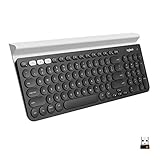
| Logitech Pebble Keys 2 K380s | Best overall | Bluetooth, up to 3 devices, compact layout, AAA-powered (battery rated in years) | Usually $30–$45 |
| Logitech Keys-To-Go 2 | Best ultra-thin | Slim, light, rechargeable, Bluetooth, multi-OS layout | Usually $60–$90 |
| Logitech MX Keys Mini | Best typing feel | Backlit, rechargeable, up to 3 devices, compact layout | Usually $80–$110 |
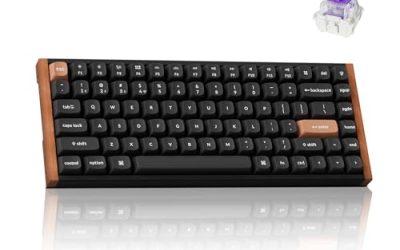
| Keychron K3 Max (low-profile mechanical) | Best mechanical | Bluetooth 5.x, 2.4 GHz and USB-C wired, 75% layout, hot-swappable | Usually $90–$120 |
| Samsung Book Cover Keyboard (model-specific) | Best for Galaxy Tab | Pogo-pin connection, no pairing, no battery, doubles as cover | Usually $100–$220 |
| Foldable Bluetooth keyboard (spec class) | Best budget / pocketable | Folds to phone size, 3-section or 2-section, small rechargeable cell | Usually $20–$45 |
Best overall: Logitech Pebble Keys 2 K380s
This is the default recommendation because it removes the usual failure points. It supports three Bluetooth connections, so one board can switch between a tablet, a phone and a laptop. It runs on a single AAA battery, so there is no charging routine, and Logitech rates battery life in years rather than days. It is also small and light enough to drop into a bag.
Trade-off: the keys are low-travel and slightly soft, and there is no backlight. It also has no stand, so you need a tablet case with a kickstand or a separate holder.
Best ultra-thin: Logitech Keys-To-Go 2
If you want a keyboard that disappears in a tablet sleeve, Keys-To-Go 2 is the pick. It is very thin and light and has a fabric-style covering. It is rechargeable and includes a layout that works across Android, Windows, iPadOS and others. It suits people who answer email or take notes on a tablet rather than write long documents.
Trade-off: key travel is shallow, so long sessions feel less comfortable than on a standard compact board. It also costs noticeably more than the K380s family.
Best typing feel: Logitech MX Keys Mini
MX Keys Mini has spherically dished keys, a firm chassis and a backlight that turns on when your hands approach. It uses a compact layout without a number pad, which keeps it near the width of a 12-inch tablet. Logitech’s spec sheet lists multi-day battery life with the backlight on and months with it off, which matters for the runtime math below.
Trade-off: it weighs about half a kilogram, so it is portable in a backpack, not in a jacket pocket.
Best mechanical: Keychron K3 Max
For people who like tactile switches, the low-profile K3 Max pairs over Bluetooth with Android tablets and can also connect through a 2.4 GHz receiver or USB-C cable. The wired mode is useful if you plug the tablet into a hub at a desk. Its 75% layout keeps arrow keys and a function row, which helps with Android shortcuts.
Trade-off: it is the heaviest and thickest pick here, and it is more keyboard than a tablet on a train tray table needs.
Best for Samsung Galaxy Tab: Book Cover Keyboard
Samsung’s Book Cover Keyboards connect through contacts on the tablet’s edge. That means no Bluetooth pairing, no battery to charge and no lag when waking the tablet. Many versions include a Galaxy-specific key row and a trackpad, and they work with Samsung DeX for a desktop-style layout.
Trade-off: each cover fits a specific tablet generation and size. If you upgrade your tablet, the keyboard usually does not carry over, so check the exact model before buying.
Best budget: a foldable Bluetooth keyboard
Foldable boards open to near full width and fold to roughly the size of a phone. They suit someone who types a few paragraphs a day while traveling and wants to spend under $45. Make sure the listing states Android support and a rechargeable battery over USB-C. Avoid models that only list iOS or Windows layouts.
Trade-off: hinges add flex, keys are cramped and typing speed drops. They also tend to sit unevenly on a lap.
How to choose: a decision matrix
| Your situation | Choose | Why |
|---|---|---|
| Galaxy Tab S-series, daily use with DeX | Samsung Book Cover Keyboard | No pairing, trackpad, protects screen |
| Any tablet, mixed with phone and laptop | Pebble Keys 2 K380s | 3-device switching, low cost |
| Writing 1,000+ words per session | MX Keys Mini or Keychron K3 Max | Better key travel and stability |
| Carry in a sleeve, light email and notes | Keys-To-Go 2 | Thinnest, lightest of the rechargeables |
| Under $45, occasional use | Foldable Bluetooth board | Pocket size, cheapest |
| Cloud gaming or remote desktop on the tablet | Keychron K3 Max in wired or 2.4 GHz mode | Lower input latency than Bluetooth |
Match keyboard width to tablet size
A keyboard wider than the tablet is awkward on a lap or small tray. These are approximate figures based on typical dimensions; check the manufacturer’s spec sheet for your exact model.
| Tablet class | Landscape width (approx.) | Comfortable keyboard |
|---|---|---|
| 8–9 inch | 19–21 cm | Foldable (folded) or ultra-compact; fine on a desk |
| 10–11 inch | 24–26 cm | Keys-To-Go 2 or a compact 60–65% board (about 28 cm wide) |
| 12–13 inch | 28–29 cm | K380s, MX Keys Mini (roughly 29–30 cm) |
| 14+ inch | 31–33 cm | 75% boards like the K3 Max; tenkeyless is workable at a desk |
Worked example: how long will the battery last?
Manufacturers publish battery life under their own test conditions, so a simple estimate helps you compare. The figures below are illustrative, not measured for any particular product.
- Rechargeable, backlight off: a 500 mAh cell at an average draw of 1.5 mA lasts 500 ÷ 1.5 ≈ 333 hours. At 4 hours of typing per day, that is about 83 days.
- Same keyboard, backlight on: if lighting raises the average draw to 15 mA, runtime falls to 500 ÷ 15 ≈ 33 hours, or about 8 days at 4 hours daily.
The takeaway is that backlighting can cut runtime by roughly ten times. If you travel without a charger, pick a battery-powered AAA model or keep the backlight off. Real-world draw also rises when the keyboard keeps trying to reconnect, so turn it off between sessions.
Android setup tips that fix common problems
- Pair from Android’s Bluetooth menu, not from the keyboard alone. Put the keyboard in pairing mode first, then select it. Some boards ask you to type a code and press Enter.
- Set the layout under physical keyboard settings. On most Android versions this is under System, Languages & input, Physical keyboard. If @ and ” are swapped or the # key is wrong, choose the correct regional layout (for example US or UK English). Menu names vary by Android version and manufacturer.
- Use the Android/ChromeOS mode on multi-OS keyboards. The mode selects the right Home, Back and Recent keys. Windows mode can leave those keys unmapped.
- Turn off the on-screen keyboard while the physical one is connected, if it keeps popping up. Look for a “Show on-screen keyboard” toggle in the same menu.
- Learn a few shortcuts. Alt+Tab switches apps, Ctrl+C/V/X work in most apps, and Alt+Esc often acts as Back on stock Android. Shortcuts differ by tablet maker.
Bluetooth versus wired or 2.4 GHz for gaming
For typing, Bluetooth latency is irrelevant. For cloud gaming, remote desktop and emulators with keyboard controls, extra delay is noticeable. A 2.4 GHz receiver or USB-C cable connection usually responds faster. Check that your tablet supports USB host mode before relying on a wired or dongle-based board, and remember that most tablets have only one USB-C port that also charges the device.
Frequently Asked Questions
Will any Bluetooth keyboard work with an Android tablet?
Almost any Bluetooth keyboard pairs, because Android supports the standard keyboard profile. The differences come in key mapping: Home, Back and Recent keys may not work unless the keyboard has an Android mode. Check the listing for explicit Android support.
Is a keyboard case better than a separate portable keyboard?
A keyboard case protects the screen and holds the tablet at an angle, so it is convenient for lap use. A separate keyboard offers better typing comfort and can be used with several devices. If you type for long periods, a separate board plus a good stand usually wins. If you prefer one grab-and-go piece, choose the case.
Do I need a trackpad?
Android is touch-first, so most people tap the screen instead. A trackpad helps when the tablet sits on a stand out of arm’s reach, or when you use Samsung DeX or desktop-mode windows. Keyboards without a trackpad still work with the touchscreen.
Can I use one keyboard with my phone, tablet and laptop?
Yes, if it supports multi-device pairing. The Logitech K380 family and MX Keys Mini both store three Bluetooth connections and switch with a dedicated key. You can type on your phone, then jump to the tablet without re-pairing.
Why does my keyboard lag or drop out on Android?
Common causes are low battery, interference from other 2.4 GHz devices, and the tablet’s aggressive battery optimization. Replace or charge the battery, move away from crowded Wi-Fi routers, and exempt your keyboard-related apps from battery restrictions if your tablet offers that option. If problems persist, remove the pairing and set it up again.
What size keyboard fits best in a tablet bag?
A keyboard around 28–30 cm wide fits tablet sleeves of 11–13 inches. Foldable models fit smaller pockets, and boards like the MX Keys Mini need a backpack compartment because they are thicker and heavier.
Related guides
More from Amazon
Programs that pair well with the guide above. Offers and eligibility are set by Amazon and may change.
A free business account with business pricing and bulk-buying tools for work, shop or home office.
Create a business accountFree shipping on eligible items, Prime Video and more. Eligible new members can start with a free trial.
Start a Prime free trialAudiobooks and podcasts to listen to on the go. Eligible new members can start with a free trial.
Try Audible freeAd-free music streaming. Eligible new subscribers can start with a free trial.
Try Music Unlimited freeAs an Amazon Associate we earn from qualifying purchases.