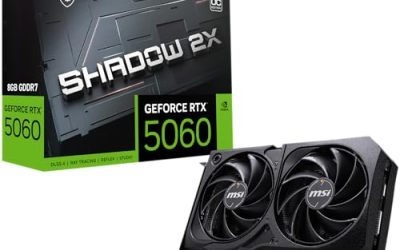
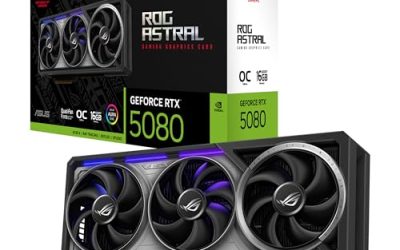
The best default graphics card for most gamers in 2026 is a 16GB mid-range model: the GeForce RTX 5070 Ti or Radeon RX 9070 XT for 1440p and entry 4K, and the RTX 5060 Ti 16GB or Radeon RX 9060 XT 16GB for 1080p and budget 1440p. “Default” here means the safe choice you can buy without a lot of research. Each pick has enough VRAM, current drivers and a reasonable power draw. This guide also covers whether to buy a stock-clocked or factory-overclocked version of the same chip.
The keyword is a little ambiguous, so this guide treats it as “which graphics card should I buy if I just want a good all-round choice?” It also covers the other common reading, which is reference-speed versus overclocked models.
As an Amazon Associate we earn from qualifying purchases at no extra cost to you.


Our Top Picks
 GIGABYTE GeForce RTX 5060 Ti WINDFORCE OC 8GRTX 5060 Ti8.19 x 4.72 x 1.57 inches1.42 poundsCheck on Amazon
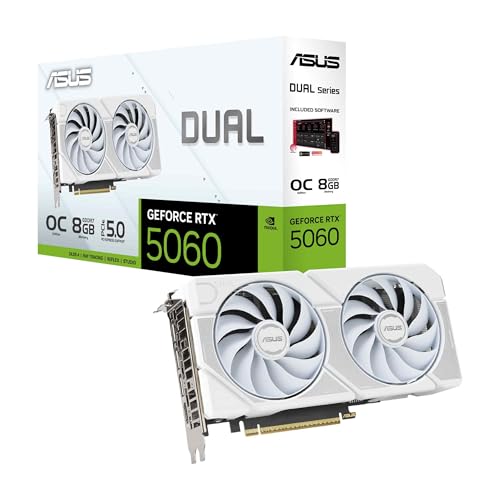 ASUS Dual GeForce RTX 5060 8GB GDDR7 WhiteRTX5060|8GB|OC9 x 4.8 x 0.1 inches2.4 poundsCheck on Amazon

Top 3 picks at a glance
Quick comparison of the default picks
| Pick | Best for | Key specs (per manufacturer) | Typical price range |
|---|---|---|---|
| GeForce RTX 5070 Ti | Best overall, 1440p high refresh and 4K | 16GB GDDR7, 256-bit, about 300W | $750–$950 |
| Radeon RX 9070 XT | Best value at the high end | 16GB GDDR6, 256-bit, about 304W | $600–$800 |
| GeForce RTX 5070 | Efficient 1440p, smaller cases | 12GB GDDR7, 192-bit, about 250W | $500–$650 |
| GeForce RTX 5060 Ti 16GB | Best budget default, 1080p and 1440p | 16GB GDDR7, 128-bit, about 180W | $430–$520 |
| Radeon RX 9060 XT 16GB | Budget 1440p on a tighter wallet | 16GB GDDR6, 128-bit, about 182W | $350–$450 |
| Intel Arc B580 | Cheapest sensible 1080p/1440p card | 12GB GDDR6, 192-bit, about 190W | $250–$320 |
| GeForce RTX 5080 | Premium 4K without going flagship | 16GB GDDR7, 256-bit, about 360W | $1,000–$1,400 |
Prices move with stock and memory costs, so treat these as general market ranges rather than fixed figures.
Best overall: GeForce RTX 5070 Ti
The RTX 5070 Ti pairs 16GB of GDDR7 with a 256-bit bus. That is enough memory for 1440p at maximum texture settings and for most 4K games with upscaling. It supports DLSS 4 with multi-frame generation, which gives it a feature edge in titles that support it. It suits anyone who wants to buy once and not think about VRAM for several years.
Trade-off: street prices often sit well above the launch price, and at about 300W it needs a solid 750W power supply. Raw performance per dollar usually favors AMD’s competing card.
Best value high-end: Radeon RX 9070 XT
The RX 9070 XT also has 16GB on a 256-bit bus. Published reviews generally place it close to the RTX 5070 Ti in rasterized games, often at a lower price. It uses FSR 4 upscaling, which supports a growing but still smaller list of games than DLSS. It suits players who care about raw frame rate per dollar and mostly play without heavy ray tracing.
Trade-off: ray-traced performance and software extras such as NVIDIA’s broadcast and creator tools generally favor GeForce. Check which upscaler your favorite games support.
Best for compact or efficient builds: GeForce RTX 5070
The RTX 5070 draws about 250W and is available in many two-fan designs. That makes it a good fit for mid-size cases and for older 650W power supplies. It is a strong 1440p card at high settings.
Trade-off: 12GB on a 192-bit bus is adequate today, but it is the first card in this list where a future VRAM-hungry game might force you to lower textures. If you can stretch to a 16GB card, do.
Best budget default: GeForce RTX 5060 Ti 16GB
The RTX 5060 Ti is sold in 8GB and 16GB versions. Buy the 16GB one. At about 180W it works with most existing power supplies, and it handles 1080p at high refresh and 1440p at high settings. It suits first-time builders and anyone upgrading from a GTX 10-series or RTX 20-series card.
Trade-off: the 128-bit bus limits memory bandwidth, so it falls behind larger cards more at 4K than at 1080p. The 8GB version is not a good default choice for new games.
Best cheaper alternatives: RX 9060 XT 16GB and Arc B580
The Radeon RX 9060 XT 16GB is usually cheaper than the RTX 5060 Ti 16GB and delivers similar rasterized performance in most reviews. The Intel Arc B580 costs less again and offers 12GB on a 192-bit bus, which is unusually generous at its price. Both are good 1080p and entry 1440p cards.
Trade-off: the Arc B580 is more sensitive to the CPU, and reviews have shown larger frame-rate drops with older processors. Driver maturity for older games can also vary. The RX 9060 XT is the safer of the two if your CPU is a few generations old.
Best premium step-up: GeForce RTX 5080
The RTX 5080 delivers strong 4K performance with 16GB of GDDR7 and a 256-bit bus, with a reputation for good overclocking headroom. It suits 4K 120Hz players who do not want to pay flagship prices. The RTX 5090 (32GB, around 575W) is a different class of product and not a “default” choice for most people.
Trade-off: it costs far more than the 5070 Ti for a performance gain that reviews typically put in the range of 10–20%, depending on the game and resolution.
How to choose: decision matrix
| Your situation | Default choice | Why |
|---|---|---|
| 1080p, 60–144Hz, tight budget | Arc B580 or RX 9060 XT 16GB | 12–16GB VRAM, low price, modest power |
| 1080p high refresh, older PSU (500–550W) | RX 9060 XT or RTX 5060 Ti 16GB | Draw of about 160–182W fits older supplies |
| 1440p, 100–165Hz | RTX 5070 or RX 9070 XT | Enough shader power to hold high settings |
| 1440p ultrawide or 4K 60Hz with upscaling | RTX 5070 Ti or RX 9070 XT | 16GB and a 256-bit bus |
| 4K 120Hz | RTX 5080 (or higher) | Most bandwidth and shader power outside the flagship |
| Heavy ray tracing, DLSS-supported games | GeForce RTX 50 series | Stronger ray-tracing and frame-generation support |
| Small case, under 2 slots of space | RTX 5060 Ti or RTX 5070 compact model | Lower heat and shorter coolers are widely available |
VRAM by resolution: the practical rule
As a rule of thumb drawn from how recent games behave, not a hard limit: 8GB is a compromise even at 1080p in new releases, 12GB is comfortable at 1080p and 1440p, and 16GB gives headroom for 1440p ultra textures and 4K. Textures and ray-tracing data use far more memory than the screen buffer itself. A single 4K frame buffer is only about 33MB (3840 × 2160 × 4 bytes), so the gap between resolutions comes mostly from higher-resolution assets and the extra buffers modern rendering uses. That is why a 16GB card is the sensible default for anything above 1080p.
Worked power budget: will your PSU handle it?
Take an RTX 5070 Ti build with a CPU that peaks around 120W:
- GPU: about 300W (manufacturer board power)
- CPU under gaming load: about 120W
- Motherboard, RAM, SSD, fans: about 75W
- Subtotal: 495W
- Add about 40% headroom for transient spikes and power-supply efficiency: 495 × 1.4 ≈ 690W
The next standard size up is a 750W supply, which matches the manufacturer’s usual recommendation for this class. Run the same math for an RTX 5060 Ti: 180 + 120 + 75 = 375W, times 1.4 gives about 525W, so a quality 550–650W unit is enough. Also check the connector. Many 16GB-class cards use a 12V-2×6 plug, though some partner models use 8-pin connectors, so confirm what your power supply provides or whether an adapter is included.
Stock versus factory-overclocked models
If “default” means the card at its reference clocks, here is the practical answer. Factory-overclocked versions of the same chip usually run only a few percent faster than stock-clocked ones, typically in the low single digits in published reviews. That gap rarely changes your experience. Cooler quality, noise level and warranty matter more than a 50–100MHz boost clock.
- Buy the cheapest model with a good cooler. A stock-clocked card with a three-fan heatsink is usually quieter than an overclocked card with a thin cooler.
- Check card length and thickness. Many 5070 Ti and 9070 XT models exceed 300mm and occupy 2.5 to 3 slots.
- Leave default settings alone at first. Modern GPUs boost automatically within power and temperature limits. A mild undervolt can reduce heat with little performance loss, but it is optional.
Frequently Asked Questions
What is the best default graphics card for most people?
A 16GB mid-range card is the safest pick: the RTX 5070 Ti or RX 9070 XT for 1440p and 4K, and the RTX 5060 Ti 16GB or RX 9060 XT 16GB for 1080p and budget 1440p. All four have enough VRAM for current games and modern upscaling support.
Is 8GB of VRAM still enough in 2026?
It works for older games and esports titles at 1080p, but many recent releases need lowered textures on 8GB cards. If you plan to keep the card for several years, 12GB is the minimum worth considering and 16GB is the safer choice.
Should I choose NVIDIA, AMD or Intel?
NVIDIA generally leads in ray tracing and in the number of games with DLSS support. AMD usually offers more rasterized performance per dollar. Intel’s Arc B-series is the cheapest way to get 12GB of VRAM but depends more on your CPU. Pick based on your budget and the games you play.
Are factory-overclocked graphics cards worth the extra cost?
Usually not. The performance difference is typically small, in the low single-digit percentages. Pay for a better cooler, lower noise and a longer warranty rather than a higher advertised boost clock.
Do I need to replace my power supply for a new graphics card?
Not always. Add up the card’s rated board power, your CPU’s gaming draw and about 75W for the rest, then multiply by roughly 1.4. If the result is under your supply’s wattage and it has the connectors you need, you can keep it. Cards at 300W and above often call for 750W.
Is it better to wait for the next generation of GPUs?
If your current card struggles now, buying a current-generation card makes sense. There is always a newer generation coming, and prices and availability change month to month. Waiting only pays off if your existing card still plays what you want at acceptable settings.
Related guides
More from Amazon
Programs that pair well with the guide above. Offers and eligibility are set by Amazon and may change.
A free business account with business pricing and bulk-buying tools for work, shop or home office.
Create a business accountFree shipping on eligible items, Prime Video and more. Eligible new members can start with a free trial.
Start a Prime free trialAudiobooks and podcasts to listen to on the go. Eligible new members can start with a free trial.
Try Audible freeAd-free music streaming. Eligible new subscribers can start with a free trial.
Try Music Unlimited freeAs an Amazon Associate we earn from qualifying purchases.