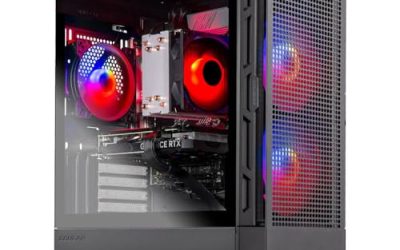
The best PC gaming computer for most people in 2026 is a 1440p-class system: a modern six- to eight-core CPU (a Ryzen 5 or Ryzen 7 class chip), a GPU in the RTX 5070 or Radeon RX 9070 class with 12-16GB of VRAM, 32GB of DDR5, a 1-2TB NVMe SSD and a quality 750W power supply. That setup usually costs $1,400-$1,900 as a prebuilt. It plays nearly every current game at high settings without paying for 4K-class hardware. The right pick shifts with your monitor, so the rest of this guide maps resolution, refresh rate and budget to a specific spec class.
Quick comparison: five spec classes
| Pick | Best for | Key specs | Typical price |
|---|---|---|---|
| Best overall (1440p) | High settings at 100-165Hz | Ryzen 5/7 class CPU, RTX 5070 or RX 9070 / 9070 XT, 32GB DDR5, 2TB NVMe, 750W PSU | $1,400-$1,900 |
| Best budget (1080p) | First gaming PC, 1080p at 60-144Hz | Six-core CPU, RTX 5060 or RX 9060 XT, 16-32GB DDR5, 1TB NVMe, 550-650W PSU | $800-$1,150 |
| Best for 4K | 4K at 60-120Hz, ray tracing | Ryzen 7 9800X3D class CPU, RTX 5080 (16GB) or RTX 5090 (32GB), 32GB DDR5, 2TB NVMe, 850-1000W+ PSU | $2,500-$4,500+ |
| Best for esports | 240Hz+ in CS2, Valorant, Fortnite | X3D-class CPU, RTX 5060 Ti or RX 9060 XT 16GB, 32GB DDR5 fast kit, 650-750W PSU | $1,200-$1,700 |
| Best for upgrading later | Buyers who plan to swap parts | ATX board on AM5, 750W+ ATX 3.x PSU, mesh-front case, two free M.2 slots | $1,300-$2,000 |
Best overall: the 1440p balanced build
This class suits anyone with a 1440p monitor at 144-165Hz, or anyone who wants a PC that stays relevant for four to five years. A GPU such as the RTX 5070 (12GB) or Radeon RX 9070 / 9070 XT (16GB) handles 1440p at high settings in most current games. Published reviews typically put results in a broad 80-160 fps range, varying with the game, settings, upscaling, CPU and patch version.
Main trade-off: the RTX 5070 has 12GB of VRAM, which is enough today but is the first thing to limit you at maximum texture settings with ray tracing. If you keep a GPU for many years, the 16GB Radeon cards or a step up to the RTX 5070 Ti are safer. NVIDIA still leads in ray tracing and DLSS support, while AMD tends to offer more VRAM per dollar.
Best budget: the 1080p starter
An RTX 5060 or Radeon RX 9060 XT paired with a six-core CPU gives you smooth 1080p at high settings, often 70-140 fps in mainstream titles, depending on the game. This is the right class for a 1080p 144Hz monitor. Where available, choose the 16GB version of the RX 9060 XT, or the RTX 5060 Ti 16GB, over an 8GB card if the price gap is small.
Main trade-off: 8GB cards can run out of VRAM in newer games at high textures, which shows up as stutter rather than a lower average fps. Plan on turning textures down a notch, or spend a bit more for 16GB.
Best for 4K: the high-end build
4K asks the GPU to render four times the pixels of 1080p. An RTX 5080 handles 4K well with upscaling, and an RTX 5090 (32GB, up to 575W board power per NVIDIA’s spec) is the only single card that approaches maxed-out 4K with ray tracing. Pair either with a fast CPU such as the Ryzen 7 9800X3D so the GPU is never waiting.
Main trade-off: cost and power. A 4K-class system needs a larger PSU, stronger case airflow and a 4K monitor that is itself often $400-$900.
Best for esports: frame rate over graphics
In competitive shooters the CPU matters more than the GPU. A Ryzen X3D chip (the 7800X3D or 9800X3D) is the usual recommendation because its large cache helps minimum frame rates. Add an RTX 5060 Ti or RX 9060 XT 16GB and a 240-360Hz 1080p or 1440p monitor. Expect well above 240 fps in the lightest esports titles, though results vary by game and settings.
Main trade-off: you gain little in cinematic single-player games, where a stronger GPU would help more.
How to choose: the numbers that matter
1. Match the GPU to pixels per second
GPU workload scales roughly with pixels drawn each second (resolution x frame rate). A worked comparison:
- 1080p at 60 fps: 1920 x 1080 x 60 = about 124 million pixels/sec
- 1440p at 144 fps: 2560 x 1440 x 144 = about 531 million pixels/sec (4.3x the first)
- 4K at 120 fps: 3840 x 2160 x 120 = about 995 million pixels/sec (8x the first)
This is a simplification, since CPU limits, ray tracing and upscaling change the real cost. It explains why a card that feels fast at 1080p 60Hz can disappoint at 1440p 144Hz. Buy the GPU for the resolution and refresh rate of the monitor you will actually use.
2. VRAM by resolution
| Resolution | Comfortable VRAM (approximate) | Note |
|---|---|---|
| 1080p | 8GB minimum, 12GB preferred | High textures in new games can exceed 8GB |
| 1440p | 12-16GB | Ray tracing and frame generation add roughly 1-2GB |
| 4K | 16GB or more | Maxed textures plus ray tracing can push past 16GB |
These are practical guideposts based on how current games behave, not hard limits. Individual games vary widely.
3. Power budget worked example
Take an RTX 5070 Ti (300W total graphics power per NVIDIA) and a Ryzen 7 9800X3D (about 160W peak package power). Add roughly 75W for the motherboard, RAM, SSDs and fans:
- 300W + 160W + 75W = 535W sustained peak
- With about 40% headroom for transient spikes and PSU efficiency: 535 x 1.4 = about 750W
So a quality 750W unit is the right size. For an RTX 5090 (575W) the same math gives 575 + 160 + 75 = 810W, and with about 25% headroom you land near 1,000W, which matches NVIDIA’s own recommendation. Choose a PSU with the ATX 3.x / PCIe 5.x 12V-2×6 connector for current high-end cards.
4. Decision matrix
| Your situation | Choose |
|---|---|
| 1080p 60-144Hz monitor, tight budget | RTX 5060 / RX 9060 XT, six-core CPU |
| 1440p 144-165Hz, one PC for 4+ years | RTX 5070 / RX 9070 XT, 32GB DDR5 |
| Mostly CS2, Valorant, Fortnite at 240Hz+ | X3D CPU, mid-range GPU |
| 4K TV or 4K 120Hz monitor | RTX 5080 or better, 850W+ PSU |
| Streaming and gaming together | Eight-core or better CPU, 32GB RAM, NVENC or AV1 encoder GPU |
| Want easy future upgrades | AM5 platform, ATX board, 750W+ PSU, roomy case |
Prebuilt or custom: what to check before paying
- Power supply: the listing should name the brand, wattage and efficiency rating. A vague “750W PSU” is a warning sign.
- RAM: confirm two sticks (dual channel) at DDR5. A single 32GB stick can cost noticeable performance.
- Motherboard: look for standard ATX or micro-ATX sizing and a named chipset (B650, B850, X870, B860 or Z890), not a proprietary board that blocks upgrades.
- Storage: NVMe SSD of at least 1TB. 2TB is worth it because many AAA games exceed 100GB each.
- Cooling: a tower air cooler or a 240-360mm AIO plus a mesh-front case beats a sealed glass front.
- Warranty: check parts coverage length and whether you can open the case without voiding it.
Building yourself typically saves 10-15% over a comparable prebuilt, though prebuilts on promotion can match or beat part-by-part pricing, especially for GPUs.
Frequently Asked Questions
How much should I spend on a gaming PC in 2026?
Around $800-$1,150 covers a solid 1080p system, and $1,400-$1,900 buys a strong 1440p machine. Above $2,500 you are paying mainly for 4K and maximum ray tracing. Most players get the best value in the middle tier.
Is 16GB of RAM enough for gaming?
16GB still runs most games, but 32GB DDR5 is the safer choice in 2026 for newer titles, background apps and streaming. The price difference is usually small, so 32GB is the sensible default for a new build.
Do I need an X3D processor?
Only if you chase high frame rates, such as 240Hz in esports titles or a high-end GPU at 1080p-1440p. For a 4K system or a mid-range GPU, a cheaper Ryzen 5 or Core-class CPU usually delivers nearly the same result because the GPU is the limit.
Is a prebuilt gaming PC worth it?
Yes, if the parts list is transparent and uses standard components. Prebuilts save assembly time and include a warranty, and during GPU shortages they can cost less than buying parts separately. Avoid ones that hide the PSU or motherboard model.
Should I buy an 8GB or 16GB graphics card?
Choose 16GB if the price gap is modest, especially for 1440p or if you keep GPUs for several years. An 8GB card is acceptable for 1080p on a strict budget, but expect to lower texture quality in some new releases.
What PSU wattage does a gaming PC need?
Add the GPU’s rated power, the CPU’s peak power and roughly 75W for everything else, then add 25-40% headroom. That means about 550-650W for entry-level builds, 750W for mid-range, and 1,000W or more for an RTX 5090 system.
Related guides
More from Amazon
Programs that pair well with the guide above. Offers and eligibility are set by Amazon and may change.
A free business account with business pricing and bulk-buying tools for work, shop or home office.
Create a business accountFree shipping on eligible items, Prime Video and more. Eligible new members can start with a free trial.
Start a Prime free trialAudiobooks and podcasts to listen to on the go. Eligible new members can start with a free trial.
Try Audible freeAd-free music streaming. Eligible new subscribers can start with a free trial.
Try Music Unlimited freeAs an Amazon Associate we earn from qualifying purchases.