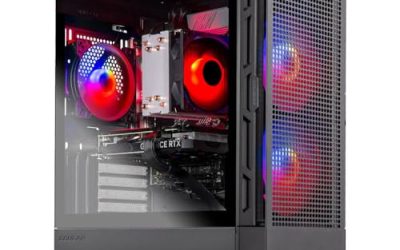
The best MSI gaming PC for most buyers in 2026 is an MPG Infinite X3-class desktop with a GeForce RTX 5070 Ti-class GPU, 32GB of DDR5 and a 2TB NVMe SSD. It is the best balance of 1440p and entry-level 4K performance, cooling headroom and upgrade room. If you are on a tighter budget, a MAG Infinite S3-class system with an RTX 5060 or 5060 Ti-class GPU is the smarter buy. Compact-case fans should look at the MPG Trident line.
MSI sells each desktop line in many configurations that change by region and retailer. The line name tells you the case, motherboard tier and cooling approach, but the GPU, PSU and RAM inside the exact SKU decide how the PC performs. This guide focuses on those details.
Quick comparison: MSI gaming PC picks by spec class
| Pick | Best for | Typical key specs (varies by SKU) | Usual price range |
|---|---|---|---|
| MPG Infinite X3 (RTX 5070 Ti class) | Best overall, 1440p high refresh and 4K | Core Ultra 7/9-class CPU, 16GB VRAM GPU, 32GB DDR5, 2TB NVMe, liquid cooling | $2,000–$3,000 |
| MAG Infinite S3 (RTX 5060 / 5060 Ti class) | Best budget, 1080p and 1440p esports | Core i5/Ultra 5 or Ryzen 5-class CPU, 16GB DDR5, 1TB NVMe | $1,000–$1,600 |
| MPG Trident (RTX 5070 class) | Best compact, shelf or living-room setups | Small-form-factor chassis, 12GB VRAM GPU, 32GB DDR5, 1–2TB NVMe | $1,500–$2,500 |
| MPG Infinite X3 or MEG-class (RTX 5080 class) | Best for 4K and heavy ray tracing | 16GB VRAM GPU, 360W-class board power, 32GB DDR5, 850W-class PSU | $2,800–$4,000 |
| MSI Aegis-class (RTX 5070 class) | Best value mid-range, 1440p | Mid-tier CPU, 12GB VRAM GPU, 16–32GB DDR5, 1–2TB NVMe | $1,400–$2,200 |
Best overall: MPG Infinite X3 with an RTX 5070 Ti-class GPU
The MPG line is MSI’s enthusiast tier. It usually brings a larger airflow-focused case, a stronger motherboard and liquid cooling. The RTX 5070 Ti class suits this tier because per NVIDIA’s spec sheet it has 16GB of GDDR7 on a 256-bit bus at around 300W board power. That is enough VRAM for maxed-out textures at 1440p and for most 4K games with upscaling.
Who it suits: players on a 1440p 165–240Hz monitor, or a 4K 120Hz display with DLSS. Main trade-off: the price premium over a DIY build with similar parts can be significant, and some SKUs use proprietary-sized parts that limit later swaps.
Best budget: MAG Infinite S3 with an RTX 5060-class GPU
The MAG line is MSI’s mainstream tier. It gives you a clean case and a sensible parts mix without enthusiast-level extras. RTX 5060-class cards use a 128-bit bus and a board power of about 145W, with the 5060 Ti at about 180W. Because of that low draw, a modest PSU and air cooling are enough.
Who it suits: 1080p and 1440p players, esports titles and games with moderate settings. Main trade-off: 8GB VRAM versions can run out of memory in newer games at high textures. If the SKU lets you choose, pick the 16GB RTX 5060 Ti-class version, or accept lowered texture settings.
Best compact: MPG Trident
The Trident line is MSI’s small-chassis desktop. It fits on a shelf or beside a TV and keeps cable clutter low. The trade-offs come from the size: GPU choice is limited to cards that fit, airflow is tighter and upgrades are harder. An RTX 5070-class card (12GB, 192-bit, about 250W) is a sensible ceiling for this format.
Who it suits: small desks, dorms and living rooms. Main trade-off: fan noise under sustained load, and a limited upgrade path.
Best for 4K: RTX 5080-class MSI desktops
For 4K at high settings, look for an RTX 5080-class configuration. Per NVIDIA, it has 16GB of GDDR7, a 256-bit bus and about 360W board power. Pair it with a 360mm liquid cooler, a quality 850W-class PSU and 32GB of DDR5. An RTX 5090-class card (32GB, 512-bit, about 575W) is only worth it if you run 4K at high refresh rates or do AI and creator work.
Best value mid-range: MSI Aegis-class desktops
Aegis systems sit between the MAG and MPG tiers on price. They are worth considering when a retailer discounts them, especially in RTX 5070-class form. Check the PSU and RAM configuration, because this is where mid-tier SKUs cut corners.
How to choose: decision criteria with numbers
1. Match the GPU to your resolution
The GPU matters more than any other part. These are general VRAM guidelines for modern games, not exact figures, since usage varies by title and settings.
| Target | GPU class | VRAM (spec) | Board power (spec) |
|---|---|---|---|
| 1080p high refresh | RTX 5060 | 8GB, 128-bit | ~145W |
| 1440p high settings | RTX 5060 Ti 16GB / RTX 5070 | 16GB / 12GB | ~180W / ~250W |
| 1440p ultra, entry 4K | RTX 5070 Ti | 16GB, 256-bit | ~300W |
| 4K high settings | RTX 5080 | 16GB, 256-bit | ~360W |
| 4K maxed, creator and AI | RTX 5090 | 32GB, 512-bit | ~575W |
2. Do the power budget before you buy
Prebuilts often ship with a PSU sized for the stock parts and little more. Here is a worked example for an RTX 5070 Ti-class build with a high-end CPU:
- GPU board power: about 300W
- CPU under heavy load: about 200W (high-end desktop chips can briefly draw more)
- Motherboard, RAM, SSDs, fans and pump: about 75W
- Sum: 300 + 200 + 75 = 575W
- Add about 30% headroom for transient spikes and efficiency: 575 × 1.3 ≈ 750W
So 750W is the floor for this class. If you plan to upgrade to an RTX 5080-class card later: 360 + 200 + 75 = 635W, and 635 × 1.3 ≈ 825W. In that case an 850W PSU saves you a later swap. A 650W PSU on a 5070 Ti-class system would work in light use but leaves little room for upgrades.
3. Check the less glamorous specs
- RAM: 32GB as two 16GB sticks gives dual-channel bandwidth and handles modern games plus background apps. 16GB is acceptable only in budget builds. A single 16GB stick runs in single-channel mode and is slower.
- Storage: 1TB fills up fast, since many current games exceed 100GB. Prefer 2TB, or confirm a second M.2 slot is free.
- Cooling: a 240mm or 360mm liquid cooler suits high-wattage CPUs. A basic air cooler is fine for mid-range chips.
- PSU rating: look for an 80 Plus Gold-class unit and a current-generation 12V-2×6 power connector on high-end GPUs.
- Warranty and support: compare the terms in your region. Prebuilt warranty policies differ from component warranties, and opening the case can matter for some.
4. Compare against the DIY price
Add up the retail prices of the CPU, GPU, motherboard, RAM, SSD, PSU, cooler and case, then compare. A prebuilt premium of roughly 10–25% is common. The premium is easier to justify when the system includes a high-demand GPU that is hard to find at list price. It is harder to justify when the case and PSU are generic.
Decision matrix: your situation to the right MSI PC
| Your situation | Choose | Why |
|---|---|---|
| 1080p monitor, competitive games, under $1,500 | MAG Infinite S3, RTX 5060 class | Low power draw, enough frames for esports |
| 1440p 165Hz monitor, mixed games | Aegis or MPG, RTX 5070 class | 12GB VRAM and a good price-to-performance balance |
| 1440p ultra or 4K 120Hz with DLSS | MPG Infinite X3, RTX 5070 Ti class | 16GB VRAM and room for cooling |
| Native 4K, ray tracing | RTX 5080 class, 850W+ PSU | Higher bandwidth and power headroom |
| Small desk or living room | MPG Trident | Compact chassis, accept a GPU ceiling |
| You plan to upgrade the GPU yearly | MPG with a standard ATX PSU | Standard parts ease swaps |
Common mistakes when buying an MSI prebuilt
- Buying by line name alone. Two systems from the same line can have different GPUs and PSUs. Read the exact SKU sheet.
- Ignoring the 8GB VRAM limit. It is fine at 1080p but can force lower texture settings at 1440p.
- Skipping the monitor. A 1440p 165Hz or faster display is what makes a mid-range GPU feel worthwhile. A 60Hz panel wastes it.
- Forgetting the space. Check the case dimensions against your desk or cabinet, especially for radiators and tall GPUs.
Frequently Asked Questions
Is an MSI prebuilt gaming PC worth it compared with building one?
It can be when the price is within roughly 10–25% of the parts total, or when the system includes a GPU that is hard to buy separately. You also get a single warranty and no assembly. Building yourself usually gives better PSU, RAM and case choices for the same money.
Which MSI gaming PC line is best for the money?
The MAG Infinite S3 class is usually the best value for 1080p and 1440p. If you want stronger cooling and an easier upgrade path, step up to the MPG Infinite X3 class. Check the exact GPU, PSU and RAM, because those matter more than the line name.
How much VRAM do I need in an MSI gaming PC?
For 1080p, 8GB works for many games but is tight in newer ones. For 1440p, 12–16GB is safer, and for 4K, 16GB or more is the target. These are general guidelines because VRAM use varies by game, texture settings and ray tracing.
Can I upgrade an MSI prebuilt later?
Often yes, particularly the GPU, RAM and SSDs. Check the PSU wattage, available M.2 and RAM slots and the case clearance first. Some compact or proprietary-style designs limit PSU and cooler changes.
What PSU wattage should my MSI gaming PC have?
Add the GPU board power, CPU load and about 75W for other parts, then multiply by about 1.3. For an RTX 5070 Ti-class system with a high-end CPU that works out to about 750W. For an RTX 5080-class system, plan for 850W.
Is MSI a good prebuilt brand?
MSI is a long-established maker of motherboards and graphics cards, and its desktops use that hardware ecosystem. Quality still depends on the specific SKU and component choices, so judge the exact configuration and warranty terms rather than the brand alone.
Related guides
More from Amazon
Programs that pair well with the guide above. Offers and eligibility are set by Amazon and may change.
A free business account with business pricing and bulk-buying tools for work, shop or home office.
Create a business accountFree shipping on eligible items, Prime Video and more. Eligible new members can start with a free trial.
Start a Prime free trialAudiobooks and podcasts to listen to on the go. Eligible new members can start with a free trial.
Try Audible freeAd-free music streaming. Eligible new subscribers can start with a free trial.
Try Music Unlimited freeAs an Amazon Associate we earn from qualifying purchases.