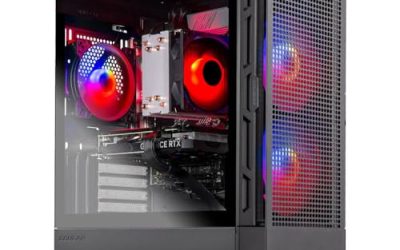
The best looking gaming PC in 2026 is usually a clean-lined, single-colour build in a well-chosen case. A Fractal North-style wood-and-mesh tower suits most people, and a panoramic-glass case such as the Hyte Y70 or Lian Li O11 Dynamic EVO suits showpiece builds. Looks come mostly from the case, cable management, GPU orientation and lighting restraint. The parts inside matter far less than how you pick and arrange them.
Quick comparison of the best looking options
| Pick | Best for | Look / key traits | Typical price (case or system) |
|---|---|---|---|
| Fractal North (Chalk White or Charcoal Black) | Best overall | Real wood front slats, mesh or glass side, living-room friendly | Case usually $140–$180 |
| Hyte Y70 / Lian Li O11 Dynamic EVO | Showpiece builds | Panoramic or dual-chamber glass, room for vertical GPU and radiators | Case usually $150–$260 |
| NZXT Player or Corsair Vengeance i-series | Best prebuilt | Factory cable work, matched fans and cooler, warranty support | System usually $1,300–$3,500 by GPU tier |
| Fractal Terra or similar small-form-factor case | Best compact | Small footprint, tidy, desk-friendly | Case usually $150–$200 |
| NZXT H6 Flow RGB or similar glass mid-tower | Best budget | Corner glass, preinstalled fans, simple layout | Case usually $90–$150 |
| Back-connector motherboard build (MSI Project Zero, Gigabyte Project Stealth or ASUS BTF class) | Cleanest cable-free look | Power and header connectors on the back of the board | Premium of roughly $0–$100 over a standard board, plus a compatible case |
Best overall: the wood-and-mesh minimalist tower
A Fractal North build looks like furniture rather than a gaming rig. Per the manufacturer’s spec sheet it pairs a mesh front with real walnut or oak slats. That suits desks in bedrooms, offices and living rooms. It works best with one accent colour, a white or black cooler and fans with no lighting at all.
Trade-off: the front panel limits airflow compared with a pure mesh case. Pair it with a sensible GPU and CPU rather than the hottest flagship parts, and check the case’s stated GPU and cooler clearances before buying.
Best for showpieces: panoramic glass and dual-chamber cases
The Hyte Y70 and the Lian Li O11 Dynamic EVO are built to display parts. Glass on two sides and a separated PSU chamber let you mount the GPU vertically or lay radiators along the side. A white GPU, white AIO and sleeved cables look sharp here.
Trade-off: everything is visible, so cable mistakes and dust show. Vertical GPU mounting also needs a PCIe riser. A riser rated for the PCIe generation you use avoids link-speed drops, and a thick card (3+ slots) can sit too close to the glass and choke on intake air. Check the case’s stated vertical GPU thickness limit.
Best prebuilt: factory-finished systems
If you do not want to route cables yourself, the NZXT Player series and Corsair Vengeance i-series are the usual clean-looking prebuilt choices. They use matched colours, tidy wiring and coordinated lighting software. Their appeal is a finished look plus one warranty contact for the whole system.
Trade-off: you pay a premium over a self-built equivalent, and some prebuilts use proprietary parts or limit upgrade paths. Look at the PSU, RAM and motherboard listed on the spec sheet, not just the GPU and CPU.
Best compact: small-form-factor builds
A small case such as the Fractal Terra, or a mini-ITX or micro-ATX design of similar size, looks good because there is less empty space to fill. Cable runs are short and the overall effect is deliberate. These are a strong choice for desk-top placement.
Trade-off: parts are tighter and more expensive. Cooler height, GPU length and PSU form factor (usually SFX) all need checking, and thermals get harder as the case shrinks.
Best budget: a glass mid-tower with discipline
A cheap glass case like the NZXT H6 Flow RGB, or a similar class with preinstalled fans, can look excellent if you hold back. Use fewer lit components, keep one colour, and spend the time on cable routing. Cable routing costs nothing and does more for looks than any extra RGB fan.
Trade-off: budget cases have thinner panels and fewer routing cutouts, so you will need extra ties and patience.
Best cleanest look: back-connector builds
Back-connector platforms such as MSI Project Zero, Gigabyte Project Stealth and the ASUS BTF class move power and header connectors to the back of the motherboard. The front of the build shows almost no cables. This needs a compatible case, so confirm that the board and case are listed as compatible by their manufacturers.
Trade-off: you have fewer motherboard and case options, and the rear cable work is more involved. It rewards planning.
How to choose: a decision matrix
| Your situation | Choose | Why |
|---|---|---|
| PC sits in a living room or bedroom | Wood-and-mesh minimalist tower | Blends in, no visible clutter |
| You want people to notice it | Panoramic glass, vertical GPU | Displays the card and cooler |
| You hate cable management | Factory-built prebuilt or back-connector build | Tidy work is already done or hidden |
| Small desk, short on space | Compact case (mini-ITX / micro-ATX) | Small footprint, clean lines |
| Under about $1,000 total | Budget glass case, one colour, minimal lighting | Spend effort, not money |
| Hot, high-wattage GPU | Mesh-front case with good airflow | Looks do not matter if the GPU throttles |
Worked example: how many lit fans can one header run?
Many motherboards give each addressable RGB (ARGB) header a 5V, 3A rating, which is 15W. A single LED at full white can draw roughly 60mA as a worst case. Dividing 3A by 0.06A gives about 50 LEDs per header at full white.
If each fan has about 18 LEDs, three fans total 54 LEDs, slightly over that worst case. In practice you rarely run full white, and most software limits brightness, but daisy-chaining a pump head, a strip and six fans on one header is asking for flicker or colour errors. The fix is to use a fan hub or controller with its own power feed, or reduce the number of lit components. Per each manufacturer’s spec sheet, check the LED count and header rating before buying.
Budget the looks, not just the parts
| Item | Share of a $1,800 build | Approx. cost | Visual payoff |
|---|---|---|---|
| Case | 8–10% | $140–$180 | Highest |
| Colour-matched cooler and fans | 4–6% | $70–$110 | High |
| Custom or sleeved cables | 1–2% | $25–$45 | High |
| Matching GPU colour | 0–3% premium | $0–$50 | Medium |
| Extra RGB strips and gadgets | 1–3% | $20–$50 | Low to negative |
The percentages are illustrative, not market data. The point is that the case, cooler colour and cables deliver most of the visual value for a small share of the budget. Extra lighting rarely does.
Design rules that make any build look better
- Pick one colour family. All white, all black, or one accent colour. Mixed finishes look unplanned.
- Match fan count and direction. Same fan model, same orientation, same lighting mode.
- Use fewer lit parts. Light only the elements you want seen, such as the GPU or a few fans.
- Route cables before closing up. Run them along edges, bundle with ties, and use the case’s rear channels.
- Choose RAM and a cooler to match. Tall, loud heatsinks can dominate the view and collide with coolers.
- Keep it dust-free. A glass case with dust looks worse than a plain one that is clean.
Frequently Asked Questions
What makes a gaming PC look good?
A consistent colour scheme, tidy cable management, a good case and restrained lighting. Most of the visual impact comes from the case and how the parts are arranged, not from the most expensive components.
Is a prebuilt or a custom build better looking?
Both can look excellent. A custom build gives full control over colours and parts, while a good prebuilt delivers a finished look with less effort. Poorly done custom builds and cheap prebuilts both tend to look messy, so execution matters more than the route.
Is RGB necessary for a good looking PC?
No. Many of the cleanest builds use no RGB or a single soft accent. If you do use it, limit it to a few components and keep colours consistent.
Does a vertical GPU mount look better?
It shows off the card’s design and can look impressive in a panoramic case. It requires a riser and enough clearance between the card and the glass, so airflow can suffer on thick cards. Check the case manufacturer’s stated limits first.
Do back-connector motherboards really hide the cables?
Yes, they move the power and header connectors to the back so the front shows very few cables. You need a compatible case and board combination, and the rear wiring takes more planning. They are best if a spotless interior is your top priority.
Can a good looking PC still perform well?
Yes, as long as the case has proper airflow. Panoramic glass and restrictive front panels can raise temperatures with hot GPUs, so match the case to the parts you plan to run. Published case reviews usually include thermal comparisons that help here.
Related guides
More from Amazon
Programs that pair well with the guide above. Offers and eligibility are set by Amazon and may change.
A free business account with business pricing and bulk-buying tools for work, shop or home office.
Create a business accountFree shipping on eligible items, Prime Video and more. Eligible new members can start with a free trial.
Start a Prime free trialAudiobooks and podcasts to listen to on the go. Eligible new members can start with a free trial.
Try Audible freeAd-free music streaming. Eligible new subscribers can start with a free trial.
Try Music Unlimited freeAs an Amazon Associate we earn from qualifying purchases.