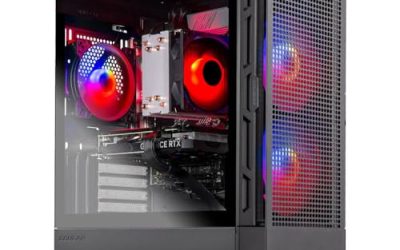
The best home-built gaming PC for most people in 2026 is an AM5 build with a 6-core Ryzen 5 9600X-class CPU, a 16GB-class GPU such as the Radeon RX 9070 XT or GeForce RTX 5070 Ti, 32GB of DDR5, a 2TB NVMe SSD and a quality 750W PSU. That gets you high-refresh 1440p today and leaves an upgrade path on the AM5 socket. Step down to an RTX 5060 Ti or RX 9060 XT for 1080p, or step up to a Ryzen 7 9800X3D for the fastest gaming CPU.
“Best home built PC” is really a question about which parts list to build, because a DIY PC is only as good as the balance between its CPU, GPU, memory, power supply and case. Below are five part-list classes, a worked power calculation, and a matrix that maps your monitor and budget to a build.
Quick comparison of the five builds
Prices are general whole-system market ranges for parts only (no monitor, OS or peripherals). They move with GPU stock and especially with DDR5 and SSD pricing, which has been volatile.
| Build | Best for | Key parts | Approx. cost |
|---|---|---|---|
| Budget 1080p | 1080p at 144Hz+, esports, first builds | Ryzen 5 7600-class, RX 9060 XT 16GB or RTX 5060 Ti, 16-32GB DDR5, 1TB NVMe, 550-650W PSU | $900-$1,200 |
| Best overall 1440p | 1440p at 144-165Hz | Ryzen 5 9600X, RTX 5070 or RX 9070 XT, 32GB DDR5, 2TB NVMe, 650-750W PSU | $1,400-$1,800 |
| High-refresh / 4K | Competitive 1440p 240Hz, 4K 60-120Hz | Ryzen 7 9800X3D, RTX 5070 Ti, 32GB DDR5, 2TB NVMe, 750-850W PSU | $2,000-$2,600 |
| Gaming + streaming/creating | Game, encode and edit on one box | Core Ultra 7 265K or Ryzen 9 9950X3D, RTX 5070 Ti, 64GB DDR5, 2TB NVMe, 850W PSU | $2,300-$3,200 |
| No-compromise 4K | 4K max settings, ray tracing | Ryzen 7 9800X3D, RTX 5090 (32GB), 32-64GB DDR5, 2-4TB NVMe, 1000W+ ATX 3.1 PSU | $4,000+ |
Best budget home-built PC: 1080p and esports
A Ryzen 5 7600-class CPU on a B650 board paired with a Radeon RX 9060 XT 16GB or GeForce RTX 5060 Ti is the sweet spot for 1080p. Both GPUs are 128-bit cards with a typical board power around 160-180W per the manufacturers’ specs, so a good 650W PSU is plenty. It suits esports titles at several hundred frames per second and modern AAA games at high settings, with results varying by game, patch and CPU.
Main trade-off: the narrow memory bus means these cards lose ground at 4K, and 8GB variants of the same GPU families can run out of VRAM in newer games at high texture settings. Buy the 16GB version if the price gap is small.
Best overall home-built PC: balanced 1440p
This is the build we would point most people toward: Ryzen 5 9600X (6 cores, 65W TDP per AMD’s spec sheet), 32GB DDR5-6000 and either an RTX 5070 (12GB GDDR7, 192-bit, 250W) or an RX 9070 XT (16GB, 256-bit, roughly 300W). Published reviews put cards in this class at roughly 100-200 FPS in many 1440p titles at high settings, depending on the game, upscaling, CPU and patch.
Pick the RX 9070 XT if you want 16GB of VRAM and strong raster performance per dollar. Pick the RTX 5070 if you value DLSS, NVIDIA’s ray-tracing and encoder features, or lower power draw.
Main trade-off: 12GB of VRAM on the RTX 5070 is adequate for 1440p today but has less headroom than 16GB for heavy texture packs and path tracing.
Best for high-refresh and 4K: X3D plus a 16GB GPU
The Ryzen 7 9800X3D (8 cores, 3D V-Cache, 120W TDP per AMD) is widely regarded as the top gaming CPU, which matters most in CPU-limited games and at 240Hz+ refresh rates. Pair it with an RTX 5070 Ti (16GB GDDR7, 256-bit, 300W) or an RX 9070 XT. This combination handles 1440p ultrawide and 4K at 60-120Hz with upscaling in most games.
Main trade-off: at 4K the GPU does most of the work, so the X3D chip’s advantage shrinks. If you only play at 4K, a cheaper CPU plus a stronger GPU often delivers more.
Best for streaming and content creation
If you stream, edit video or compile code alongside gaming, choose more cores: a Core Ultra 7 265K (20 cores) on LGA1851, or a Ryzen 9 9950X3D (16 cores with V-Cache) on AM5. Add 64GB of DDR5 and a 2TB NVMe boot drive, with a second drive for footage. Hardware encoders on modern NVIDIA and AMD GPUs handle most streaming, but extra CPU cores help with editing, exports and background apps.
Main trade-off: the 9950X3D costs far more than a 9800X3D for similar pure-gaming results, and the Core Ultra 7 265K draws up to 250W under heavy all-core loads per Intel’s spec, so it needs a capable cooler.
Best no-compromise build: RTX 5090
The GeForce RTX 5090 has 32GB of GDDR7 on a 512-bit bus and a 575W total graphics power rating per NVIDIA. It is the only single card that makes 4K at maximum settings with ray tracing realistic in the most demanding games. Pair it with a Ryzen 7 9800X3D, a quality 1000W-1200W ATX 3.1 power supply with a native 12V-2×6 cable, and a case with strong front-to-back airflow.
Main trade-off: cost, heat and size. Many RTX 5090 cards are 3-4 slots thick, so check case clearance before you buy.
How to choose: a power budget worked example
Size the PSU from peak component draw, then add headroom for transient spikes and efficiency. The rule of thumb used here is total peak draw x 1.3, rounded up to the next common PSU size.
| Build | CPU peak | GPU board power | Rest of system | Total peak | x1.3 | Buy |
|---|---|---|---|---|---|---|
| Budget 1080p | ~90W | ~180W | ~60W | ~330W | ~430W | 550-650W |
| 1440p (RTX 5070) | ~90W | 250W | ~70W | ~410W | ~535W | 650W |
| High-refresh (9800X3D + 5070 Ti) | ~160W | 300W | ~70W | ~530W | ~690W | 750-850W |
| RTX 5090 | ~160W | 575W | ~80W | ~815W | ~1,060W | 1000-1200W |
These results line up with NVIDIA’s own recommended PSU sizes: 650W for the RTX 5070, 750W for the RTX 5070 Ti and 1000W for the RTX 5090. CPU peak figures are approximate and depend on motherboard power limits. A more efficient 80 Plus Gold unit also runs cooler and quieter at 50-60% load, which is where most gaming sessions land.
Decision matrix: match your situation to a build
| Your situation | Choose | Why |
|---|---|---|
| 1080p 144-240Hz monitor, tight budget | Budget 1080p build | Any stronger GPU is wasted below 1440p in most games |
| 1440p 144-165Hz monitor | Best overall build | 16GB or 12GB GPU hits the refresh target in most titles |
| 1440p 240Hz+ for competitive shooters | High-refresh X3D build | 3D V-Cache raises CPU-limited frame rates and 1% lows |
| 4K 60-120Hz TV or monitor | RTX 5070 Ti / RX 9070 XT class or better | Needs 16GB VRAM and a 256-bit bus; use upscaling |
| Streaming, editing, compiling | Core Ultra 7 265K or 9950X3D | More cores and 64GB RAM prevent background slowdowns |
| Want to upgrade the CPU in 2-3 years | AM5 platform | AMD has committed to AM5 support through 2027 or later |
Parts that matter beyond CPU and GPU
- Memory: 32GB of DDR5-6000 CL30-36 is the standard for AM5. 16GB works for budget builds but limits you in newer games with background apps open.
- Storage: a 1-2TB PCIe 4.0 NVMe SSD is enough. PCIe 5.0 drives cost more and run hotter, with little real-world gaming gain.
- Motherboard: a B650 or B850 board covers most builds. Check for a PCIe 5.0 x16 slot, at least two M.2 slots, and good VRM cooling if you choose an X3D or a 9950X3D.
- Cooler: a good dual-tower air cooler or 240-360mm AIO handles every CPU here. The 9600X and 7600-class chips run fine on a budget tower cooler.
- Case: prioritize a mesh front panel and room for your GPU length. Check the case’s maximum GPU length against the card’s listed dimensions.
- PSU: choose an ATX 3.0 or 3.1 unit from a reputable brand with a 10-year warranty. Do not cut corners here, as the PSU protects every other part.
Building at home versus buying prebuilt
Building yourself usually saves money on equivalent parts and gives you control over the PSU, RAM and cooling, which prebuilts often skimp on. However, during GPU shortages or sales, a prebuilt with a current GPU can occasionally match the part-by-part price. Compare the complete part list, particularly the PSU brand and SSD, before deciding.
Frequently Asked Questions
What is the best CPU for a home-built gaming PC in 2026?
The Ryzen 7 9800X3D is generally considered the fastest gaming CPU, especially for high-refresh play. For most budgets, a Ryzen 5 9600X or similar 6-core AM5 chip delivers excellent 1440p performance at a much lower price. Choose more cores only if you also stream or create content.
How much does it cost to build a good gaming PC?
A capable 1080p build usually costs $900-$1,200, and a strong 1440p build typically costs $1,400-$1,800. High-end 4K builds with an RTX 5090 start around $4,000. Prices swing with GPU availability and memory costs, so check current prices before you commit.
How big a power supply do I need?
Add up the peak CPU and GPU power plus about 60-80W for the rest, then multiply by 1.3. For an RTX 5070 build that is roughly 650W, for an RTX 5070 Ti about 750W, and for an RTX 5090 about 1000W or more. Follow the GPU maker’s recommended PSU wattage as a minimum.
Is 16GB of RAM enough for gaming?
16GB still runs most games, but 32GB is the safer choice in 2026 because newer titles, browsers and streaming software use more memory. If DDR5 prices are high, start with 16GB in two sticks and add a matching kit later, preferably using the same model for stability.
Should I choose AMD or Intel for a new build?
AMD’s AM5 is the better default for gaming because X3D chips lead in gaming benchmarks and the socket has a longer upgrade path. Intel’s Core Ultra 200S series suits multi-threaded work and can be competitive on price, but its LGA1851 platform has a less certain upgrade future.
Is building a PC hard for a first-timer?
No. Modern builds are mostly plug-in parts with keyed connectors. The steps that cause most mistakes are seating the CPU and RAM fully, connecting the CPU power cable and fully inserting the GPU power connector. Follow your motherboard manual, test-boot before final cable management, and update the BIOS if the board needs it for your CPU.
Related guides
More from Amazon
Programs that pair well with the guide above. Offers and eligibility are set by Amazon and may change.
A free business account with business pricing and bulk-buying tools for work, shop or home office.
Create a business accountFree shipping on eligible items, Prime Video and more. Eligible new members can start with a free trial.
Start a Prime free trialAudiobooks and podcasts to listen to on the go. Eligible new members can start with a free trial.
Try Audible freeAd-free music streaming. Eligible new subscribers can start with a free trial.
Try Music Unlimited freeAs an Amazon Associate we earn from qualifying purchases.