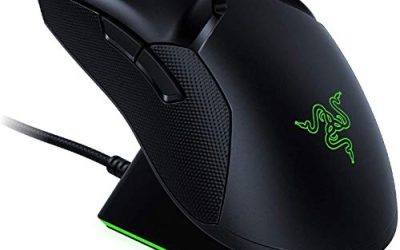
Choosing a mouse for Xbox begins with one honest check: does the game you actually play accept mouse input at all. A fast sensor and a comfortable shape mean nothing if the title locks you to a controller, so the smartest purchase is the mouse that fits your games, your seating position, and the way you hold a mouse during long sessions.
This guide is for Xbox players who want pointer aim in supported shooters and strategy games, couch players who need wireless freedom, and desk players who want a wired connection with no battery to manage. Each pick below is named with the sensor, connection, weight, and battery details shown on its Amazon product page, so you can compare the four mice on the same facts before you decide.
Top 3 picks at a glance


Quick Picks
As an Amazon Associate we earn from qualifying purchases.
| Product | Best for | Key spec from title |
|---|---|---|
| Corsair Dark Core RGB Pro SE | Palm-grip players who want three connection modes and Qi charging | 18,000 DPI optical sensor |
| Corsair Harpoon Wireless RGB | Lightweight wireless play on a smaller frame | 10,000 DPI optical sensor |
| HyperX Pulsefire Haste 2 Wireless | Fast flicks with a very light symmetrical shell | 26,000 DPI HyperX 26K sensor |
| Razer DeathAdder V2 | Right-handed ergonomic comfort for long shooter sessions | 20,000 DPI Focus+ optical sensor |
How to Choose
Check game support before you check the mouse
Xbox supports mouse and keyboard input only in games where the developer has enabled it, so your library decides whether a mouse is useful at all. Fortnite, Halo Infinite, Call of Duty titles, and several strategy and simulation games accept mouse input, while many action and sports titles do not, and the Xbox dashboard itself still needs a controller for navigation. Open the settings inside each game you play most, look for a mouse and keyboard section, and confirm that aiming, clicking, and menu navigation respond before you buy. A mouse that works in one supported shooter can sit unused in the next game on your list, which is why game support comes first and sensor numbers come second.
Pick wired or wireless for where you actually sit
A wired mouse removes battery anxiety and keeps latency predictable, which suits a desk setup where the console sits within cable reach and the cable can run cleanly to a mousepad. A wireless mouse suits couch play and living-room setups, where a cable across the floor becomes a trip hazard and a constant annoyance during long matches. Wireless models here use a USB dongle in a free console port, so check you have a spare port and a stable link. Bluetooth sounds convenient, yet a dedicated 2.4 GHz dongle is the steadier choice for fast aiming, while Bluetooth works better as a backup for menus and slower games.
Match the sensor and weight to your aim style
High DPI numbers look impressive on a box, but the useful question is whether the sensor tracks cleanly at the sensitivity you actually use, without smoothing or jitter during fast turns. Most players settle between 800 and 3,200 DPI for shooters, changing sensitivity in small steps until small wrist movements land exactly where they expect. Weight matters just as much: a light mouse near 60 grams makes flick shots and repeated repositioning easier, while a heavier mouse near 140 grams can feel steadier for slow, deliberate aiming. If you lift the mouse often to recenter, choose lighter; if you plant your palm and make small adjustments, a heavier contoured shape may feel more controlled.
Test the shape, buttons, and software limits on console
On Xbox, the extra buttons and lighting software that work on a PC may not carry over, so judge a mouse by its basic shape, click feel, and the controls you can reach easily. A right-handed ergonomic shell supports the palm during long sessions, while a symmetrical shell suits claw and fingertip grips and works for either hand. Side buttons should sit where your thumb rests naturally, not where you must stretch to find them mid-fight. Remember that DPI presets, button remapping, and lighting profiles usually need PC software to change, so set those profiles on a computer first if the mouse has onboard memory, then plug it into the console with your setup already saved.
The 4 Best Options
Corsair Dark Core RGB Pro SE
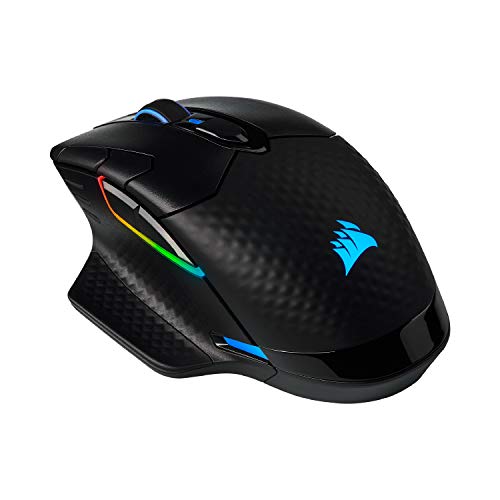
The Dark Core RGB Pro SE is the most flexible mouse in this group, because it connects three ways and carries a precise sensor across a wide sensitivity range. Its contoured right-handed shape fills the palm, and the two interchangeable side grips let you adjust the thumb area until the mouse feels planted rather than slippery. Qi wireless charging is a practical bonus for a desk setup, since you can top the battery up on a compatible pad between sessions. Eight programmable buttons give supported PC games plenty of shortcuts, though on Xbox you should expect only the core click, scroll, and side-button functions to matter in most titles.
Specs
- Custom PixArt PAW3392 optical sensor, up to 18,000 DPI, adjustable in 1 DPI steps
- Sub-1ms Slipstream wireless, low-latency Bluetooth, or USB wired connection
- Hyper-polling up to 2,000 Hz
- Up to 50 hours of battery life, Qi wireless charging
- Eight programmable buttons, Omron switches rated for 50 million clicks
- Weight: 142 grams
Best for: Palm-grip players who want wired, dongle, and Bluetooth options in one mouse.
Watch out for: At 142 grams it is the heaviest mouse here, so fast flick players should confirm the weight suits their aim style before buying.
Corsair Harpoon Wireless RGB
The Harpoon Wireless RGB is the straightforward pick for players who want a light wireless mouse without a complicated feature list. At 99 grams it moves easily across a mousepad, and the contoured shape with rubber side grips keeps it steady during quick turns and long holds. Three connection modes cover most setups: a sub-1ms Slipstream dongle for responsive play, Bluetooth for a second device, and a USB cable that lets you keep playing while the battery charges. Six programmable buttons cover the essentials, and the 10,000 DPI optical sensor tracks cleanly at the sensitivity levels most shooter players actually use.
Specs
- PixArt PMW3325 optical sensor, up to 10,000 DPI
- Sub-1ms Slipstream wireless, low-latency Bluetooth, or USB wired connection
- Up to 60 hours of battery life over Bluetooth, up to 30 hours over Slipstream with standard lighting
- Six programmable buttons, Omron switches rated for 50 million clicks
- Single-zone RGB lighting, contoured shape with rubber side grips
- Weight: 99 grams
Best for: Players who want a light, simple wireless mouse for couch or desk play.
Watch out for: Battery life drops noticeably on the Slipstream link with lighting on, so plan charging around longer sessions.
HyperX Pulsefire Haste 2 Wireless
The Pulsefire Haste 2 Wireless is built for speed, with a 61-gram symmetrical shell that feels almost weightless during fast flicks and repeated repositioning. Its HyperX 26K sensor tracks up to 26,000 DPI at 650 IPS, which gives precise control at high DPI. Dual wireless modes cover both a 2.4 GHz dongle for responsive gaming and Bluetooth for a laptop or tablet, while the USB-C cable lets you charge and play at the same time. HyperX lists compatibility with PC, Xbox Series X|S, Xbox One, PS5, and PS4, which makes this the clearest console match in the group for players who switch between systems.
Specs
- HyperX 26K sensor, up to 26,000 DPI, 650 IPS tracking speed, 50G acceleration
- Dual wireless: 2.4 GHz dongle and Bluetooth 5.0, plus USB-C wired mode
- Up to 100 hours of battery life
- Six buttons, HyperX Optical switches rated for 100 million clicks
- 370 mAh lithium-ion polymer battery
- Weight: 61 grams
Best for: Fast-paced shooter players who want the lightest mouse here and a clear Xbox compatibility listing.
Watch out for: Macros, DPI stages, and lighting changes need NGENUITY software on a PC, so set your profile there before moving the mouse to the console.
Razer DeathAdder V2

The DeathAdder V2 is the ergonomic anchor of this group, with a right-handed shape that supports the palm through long sessions without straining the wrist. Its Focus+ optical sensor reaches 20,000 DPI, and the optical mouse switches register clicks with a light, crisp feel that suits repeated firing in shooters. Eight programmable buttons, Chroma RGB lighting, and a drag-free Speedflex cable round out a wired package that needs no charging and no dongle. Razer lists the mouse as compatible with Xbox One for basic input in games that allow keyboard and mouse control, which is the correct expectation to set before you buy.
Specs
- Focus+ optical sensor, up to 20,000 DPI
- Razer Optical Mouse Switches, 8 programmable buttons
- Chroma RGB lighting, Speedflex cable for drag-free movement
- Onboard memory for up to 5 profiles
- Right-handed ergonomic design with rubberized side grips
- Weight: 82 grams
Best for: Right-handed players who want a comfortable wired mouse for long supported shooter sessions.
Watch out for: Razer describes Xbox use as basic input only, so advanced button remapping and Synapse features need a PC and may not carry over to console play.
Which One Fits Your Situation
You play from the couch and hate cables
Choose the Corsair Harpoon Wireless RGB, because its 99-gram body and Slipstream dongle keep aiming responsive without a cable crossing the room. Plug the dongle into a front USB port, keep the mouse within easy range, and use the USB cable only when the battery needs a top-up. Its simple six-button layout also means less to relearn when you switch between games.
You want the lightest mouse for fast flick shots
Choose the HyperX Pulsefire Haste 2 Wireless, because 61 grams makes repeated flicks and recentering far less tiring than a heavier shell. The 26,000 DPI sensor and dual wireless modes suit players who value speed above extra buttons, and the stated Xbox Series X|S and Xbox One compatibility removes the guesswork about console support.
You want one mouse for long sessions and many connection options
Choose the Corsair Dark Core RGB Pro SE, because its contoured palm shape, interchangeable side grips, and three connection modes cover desk play, couch play, and travel in a single package. Qi charging keeps the battery topped up on a compatible pad, and the 18,000 DPI sensor gives you room to fine-tune sensitivity in small steps.
You want a wired ergonomic mouse with no battery to manage
Choose the Razer DeathAdder V2, because its right-handed ergonomic shape, 82-gram body, and Speedflex cable suit long shooter sessions at a desk. Set your DPI and profiles on a PC first, then plug the cable into the console and play in supported games with basic mouse input, without worrying about charging or a wireless dongle.
Common Mistakes
- Buying a mouse before checking whether your favorite games accept mouse input on Xbox, since support is decided by each game developer.
- Expecting PC software features such as button remapping, macros, and lighting profiles to work on the console, when most of them need a PC to configure.
- Choosing the highest DPI setting by default, which makes aiming jumpy and hard to control instead of more precise.
- Using Bluetooth for fast competitive play when the 2.4 GHz dongle in the box gives a steadier, lower-latency link.
- Forgetting that the Xbox dashboard still needs a controller for navigation, so keep the controller nearby even after the mouse is plugged in.
Frequently Asked Questions
Can I use any gaming mouse with Xbox?
Most USB and wireless dongle mice connect to an Xbox, but only games that enable mouse and keyboard input will respond to them. Check the control options inside each game first, keep a controller nearby for dashboard navigation, and choose a mouse whose maker lists Xbox compatibility for the clearest match.
Do I need a keyboard as well as a mouse on Xbox?
A keyboard helps in games that use many keys, yet many supported shooters work with a mouse and a controller held in the other hand. If your game needs text chat, building menus, or many shortcuts, add a keyboard later; if you only need aiming and clicking, begin with the mouse alone.
Is wireless or wired better for Xbox gaming?
Wireless suits couch play because it removes a cable from the living room, while wired suits desk play because it removes battery management and keeps latency predictable. Use the 2.4 GHz dongle for fast games, keep Bluetooth as a backup, and plug in with USB when the battery runs low.
Why does my mouse work in one game but not another?
Xbox leaves mouse support to each game developer, so one title can enable full pointer aiming while another locks input to a controller. This is normal behavior, not a fault in the mouse, and the only fix is to play mouse-supported titles or check whether the developer added mouse support in a later update.
Related guides
More from Amazon
Programs that pair well with the guide above. Offers and eligibility are set by Amazon and may change.
A free business account with business pricing and bulk-buying tools for work, shop or home office.
Create a business accountFree shipping on eligible items, Prime Video and more. Eligible new members can start with a free trial.
Start a Prime free trialAudiobooks and podcasts to listen to on the go. Eligible new members can start with a free trial.
Try Audible freeAd-free music streaming. Eligible new subscribers can start with a free trial.
Try Music Unlimited freeAs an Amazon Associate we earn from qualifying purchases.