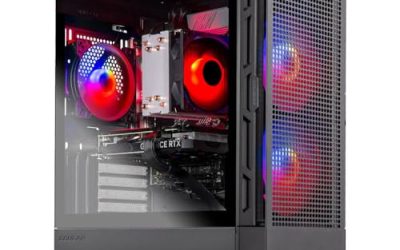
The best customizable gaming PC in 2026 comes from a builder that lets you choose the motherboard, PSU, RAM brand and storage by model, and that uses standard ATX parts you can swap later. Boutique configurators such as Maingear, Digital Storm, Velocity Micro and Falcon Northwest usually offer the deepest choice. NZXT’s custom builder and the CyberPowerPC and iBUYPOWER configurators cover the middle and budget tiers. Judge a “customizable” PC by how much of the parts list you can name, not by how many dropdowns appear.
As an Amazon Associate we earn from qualifying purchases at no extra cost to you.


Top 3 picks at a glance
Quick comparison of customizable options
Brands change their lineups often, so treat this as a map of builder types and confirm the current options in each configurator. Prices are general market ranges for a gaming-ready configuration.
| Pick | Best for | Key customization depth | Typical price range |
|---|---|---|---|
| Boutique pick-your-parts builders (Maingear, Digital Storm, Velocity Micro) | Best overall: named parts, clean cabling, long warranty | Motherboard, PSU, RAM kit, cooler and SSD often selectable by model | Usually $2,000–$5,000+ |
| Falcon Northwest | Premium, compact or show-quality builds | Chassis-specific; high choice within a curated parts list | Usually $3,500–$8,000+ |
| NZXT custom builder | Clean look, simple ordering, standard parts | GPU, CPU, RAM, storage, cooler and case color; fewer board choices | Usually $1,500–$4,000 |
| CyberPowerPC / iBUYPOWER configurators | Best budget customization | Many dropdowns; part brands vary and may be “or equivalent” | Usually $900–$3,500 |
| Alienware Aurora / Area-51, HP OMEN tower configurators | Big-brand support with preset upgrade tiers | CPU, GPU, RAM, storage tiers; chassis and PSU more fixed | Usually $1,500–$5,000 |
| Barebones kit from a retailer (you add parts) | Maximum control, lowest labor cost | Everything, since you choose each part | Varies with parts |
Best overall: boutique pick-your-parts builders
Maingear, Digital Storm and Velocity Micro-style builders suit buyers who want a specific board, PSU tier or cooler without assembling the PC. Their configurators generally list standard ATX parts. That means a later GPU, PSU or board swap should not involve proprietary connectors. The trade-off is price: you pay a premium over the parts, usually in the range of a few hundred dollars for labor, cable work, testing and support. If you only care about the GPU and CPU, that premium buys little.
Best for premium and compact builds: Falcon Northwest
Falcon Northwest builds to a curated parts list in its own chassis designs, including small-form-factor systems. You choose from fewer parts than at a big configurator, but the parts are vetted together. It suits buyers who value finish, thermals in a small case and direct support. The trade-off is cost and, in the smallest chassis, limited future upgrades such as GPU length or cooler height.
Best for a clean look with simple options: NZXT custom builder
NZXT’s builder lets you set CPU, GPU, RAM and storage in a short, readable flow and then ships a standard-part PC in NZXT’s own case styles. It suits people who want a tidy build without researching boards. The trade-off is that you often cannot choose the exact motherboard or PSU model, so check the final parts list before ordering.
Best budget customization: CyberPowerPC and iBUYPOWER
These configurators have the widest dropdowns at the lowest prices, so you can raise the GPU tier, double the SSD or pick an AIO cooler for a small upcharge. The catch is naming. Some lists show a PSU only as “750W 80+ Bronze” or a motherboard only as “B650 chipset.” Ask support for the exact brands, or choose a configuration that names them. Our related guides cover specific lineups in detail, so this section focuses on how to read the options.
Best with big-brand support: Alienware and HP OMEN configurators
Alienware Aurora and Area-51 and HP’s OMEN tower line let you move through CPU, GPU, memory and storage tiers, with onsite-style service plans available in some regions. They suit buyers who prefer a large company’s warranty process. The trade-off is that cases, boards and sometimes PSUs follow the company’s design, so long-term upgrades can be narrower. Confirm the PSU form factor and wattage before planning a bigger GPU.
How to choose: what to customize first
Spend your customization budget in this order, because it matches what is hard or costly to change later:
- Power supply: buy for the GPU you may own in three years, not today’s.
- Motherboard: pick a socket with a future. AM5 is the current AMD platform; check the board’s VRM, PCIe 5.0 slot and USB/Wi-Fi.
- GPU: the biggest performance lever and the part most often upgraded.
- RAM: 32GB (2x16GB) of DDR5 is the sensible gaming default; leave two slots open if you may expand.
- Storage: 1TB is tight for modern games, so prefer 2TB NVMe, and check for a free M.2 slot.
- Case and cooling: you can change these later, so spend less here unless airflow is poor.
Worked example: sizing the PSU for today and for an upgrade
A quick power budget shows why the PSU line in a configurator matters. These figures use manufacturers’ published board power and TDP ratings. Real draw varies with workload, power limits and the specific card.
| Config | GPU (board power) | CPU (peak package) | Rest of system | Estimated peak | Sensible PSU |
|---|---|---|---|---|---|
| Mid-range 1440p | RTX 5070 Ti, 300W | Ryzen 7 9700X, about 88W | ~75W | ~463W | 750W (about 62% load) |
| High-end 4K | RTX 5080, 360W | Ryzen 7 9800X3D, about 160W | ~80W | ~600W | 850W (about 71%) or 1000W (60%) |
| Flagship | RTX 5090, 575W | Ryzen 7 9800X3D, about 160W | ~80W | ~815W | 1000W minimum; 1200W for headroom (about 68%) |
The rule of thumb is to keep sustained load around 50–70% of the PSU rating, which leaves room for short GPU power spikes and keeps the unit efficient and quiet. Say you order the RTX 5080 build with an 850W PSU and later want an RTX 5090. The 815W estimate would put the PSU near 96% load. You would replace the PSU too, which costs more than choosing 1000W–1200W up front. NVIDIA’s published recommended PSU figures are 850W for the RTX 5080 and 1000W for the RTX 5090, so treat those as a floor.
Decision matrix: match your situation to a builder
| Your situation | Choose | Why |
|---|---|---|
| You want named parts and a 3+ year upgrade path | Boutique builder | Standard ATX parts, cable-managed, parts selectable by model |
| Under about $1,500, want GPU/SSD upgrades | CyberPowerPC or iBUYPOWER | Lowest cost per tier; verify PSU and board names |
| You want a tidy case and simple ordering | NZXT custom builder | Short flow, standard parts, fewer decisions |
| You need a large-company warranty and service plan | Alienware or HP OMEN | Structured support, but narrower swaps |
| Small chassis with high-end parts | Falcon Northwest or similar | Thermals validated for the chassis |
| You are comfortable with a screwdriver | Build it yourself | Full control; you handle compatibility and warranty per part |
Red flags in “customizable” configurators
- Unnamed PSU or board: “750W Bronze” with no brand or model can mean a low-grade unit. Ask for the model.
- Proprietary parts: non-standard PSU shapes, board layouts or front-panel connectors limit future swaps.
- Single-channel RAM: one 32GB stick costs less but halves memory bandwidth. Choose two matched sticks.
- “Or equivalent” parts: acceptable only if the builder lists the substitutes.
- Warranty voided by upgrades: read whether opening the case or replacing parts affects coverage, per the seller’s warranty terms.
Frequently Asked Questions
Is a customizable prebuilt better than building my own?
It is better if you value assembly, testing and one point of support more than saving the labor premium. Building yourself usually costs less and gives total parts control. A good configurator gets close to that control for a few hundred dollars more.
Which parts are most worth customizing?
The PSU, motherboard and GPU. They affect upgrade headroom and stability the most, and the PSU and board are the hardest to change later. Case color and RGB can wait.
Can I upgrade a customizable gaming PC later?
Usually yes, if it uses a standard ATX PSU, a standard motherboard and a standard case. Check the PSU wattage, GPU clearance in the case and free M.2 and RAM slots before you buy. Proprietary designs from some big-brand lines can restrict this.
How much RAM and storage should I choose?
32GB of DDR5 in two sticks and a 2TB NVMe SSD suit most gaming PCs in 2026. Pick 64GB only for heavy multitasking, streaming or creative work. Leave a free M.2 slot if you may add storage.
Does choosing custom parts void the warranty?
Not by itself, because the builder warrants the system it ships. Later upgrades are the grey area: some sellers keep coverage if you swap standard parts, others do not. Read the written warranty terms and ask before you open the case.
Is an AMD or Intel CPU better in a custom build?
For gaming, AMD’s X3D chips such as the Ryzen 7 9800X3D are widely regarded as the strongest choice for high-refresh play. Intel’s Core Ultra chips are competitive for mixed work and gaming. AM5 also offers a longer upgrade runway, but compare current reviews at your resolution.
Related guides
More from Amazon
Programs that pair well with the guide above. Offers and eligibility are set by Amazon and may change.
A free business account with business pricing and bulk-buying tools for work, shop or home office.
Create a business accountFree shipping on eligible items, Prime Video and more. Eligible new members can start with a free trial.
Start a Prime free trialAudiobooks and podcasts to listen to on the go. Eligible new members can start with a free trial.
Try Audible freeAd-free music streaming. Eligible new subscribers can start with a free trial.
Try Music Unlimited freeAs an Amazon Associate we earn from qualifying purchases.