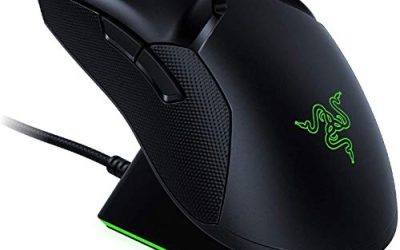
Choosing between Razer’s entry-level gaming mice is less about whether the shapes work — the DeathAdder, Basilisk and Cobra shells are long-established designs — and more about which compromises you accept. One model keeps things wired and simple, another trims weight for fast flicks, and the two wireless options trade rechargeable cells for long-running AA batteries. The sensor ceilings, button counts and switch types differ enough that the right pick depends on your grip, your games and whether a cable bothers you.
This roundup is for first-time gaming mouse buyers, laptop players who want to cut the cord, and smaller-handed players looking for a compact shell. Every pick below comes from Razer’s entry-level lines, and each one is described using the names and specifications published on its own Amazon product page, so you can match the listing claims against what your setup actually needs.
Top 3 picks at a glance


Quick Picks
As an Amazon Associate we earn from qualifying purchases.
| Product | Best for | Key spec from title |
|---|---|---|
| Razer DeathAdder Essential | A simple wired starter mouse | 6400 DPI optical sensor |
| Razer Cobra | Lightweight wired flick play | 58g lightweight design |
| Razer DeathAdder V2 X HyperSpeed | Wireless play with long battery life | 235 hr battery life |
| Razer Basilisk V3 X HyperSpeed | Wireless play with extra controls | 9 programmable controls |
How to Choose
Wired or Wireless at This End of the Range
Connection type is the first fork in the road. The wired picks here plug in over USB and never need charging, which suits a fixed desk setup where the cable stays managed once and forgotten. The wireless models use Razer’s HyperSpeed 2.4 GHz connection for gaming and add Bluetooth as a second mode for laptops and general use. Wireless frees your movement and tidies the desk, but it introduces batteries to monitor and a dongle to keep track of. Decide based on where you play: a permanent desktop favours wired simplicity, while a laptop that moves between rooms makes the stronger case for wireless.
Sensor Ceilings and DPI Steps
The four listings publish maximum sensitivities ranging from 6,400 DPI on the simplest model up to 18,000 DPI on the most advanced one here. In practice, most players settle far below those ceilings, so the headline number matters less than how the sensitivity adjusts. Check whether a mouse offers on-the-fly DPI switching through dedicated buttons, how many stages it stores, and whether fine adjustments happen in the software. A shooter player who swaps sensitivity between games benefits from quick hardware switching, while a single-game player may never touch the setting after the first week and can prioritise other features instead.
Shape, Size and Grip Fit
Razer’s entry lines cover three distinct shapes. The DeathAdder shell is a large right-handed ergonomic design that supports palm and relaxed claw grips. The Basilisk adds a thumb rest and a more sculpted right-handed profile aimed at palm grippers who play for long stretches. The Cobra is the outlier: a small, light, symmetrical-style shell that suits fingertip and claw grips and smaller hands. Because none of these listings publishes a one-size promise, compare the published dimensions and weight against your current mouse before ordering, especially if you are switching between shape families for the first time.
Batteries, Switches and What Gets Cut
Entry-level models save money in predictable places, and the listings show where. Both wireless picks run on a single AA battery rather than a built-in rechargeable cell, which delivers very long runtimes but means keeping spares around. Switch ratings also step down as you move through the range: the wired Cobra publishes optical switches, while the other models use mechanical switches with lower published click lifespans. Lighting is another cut — one wireless model here drops RGB entirely, and the simplest wired mouse offers a single green LED instead of full Chroma effects.
The 4 Best Options
Razer DeathAdder Essential

The DeathAdder Essential is the straightforward starting point in Razer’s range: a wired version of the company’s best-known ergonomic shape with the specification sheet trimmed to the essentials. Its optical sensor tops out at 6,400 DPI with on-the-fly adjustment, and the five Hyperesponse buttons cover the primary clicks, wheel and two side buttons most players actually use. Rubber side grips and a ridged, rubberised scroll wheel help it stay planted during longer sessions. For a first gaming mouse on a fixed desk, it delivers the classic DeathAdder fit without paying for wireless hardware or lighting extras.
Specs
- Optical sensor up to 6,400 DPI
- 5 Hyperesponse programmable buttons
- Mechanical switches rated up to 10 million clicks
- Rubber side grips
- Ridged, rubberised scroll wheel
- Wired USB connection
- Model RZ01-03850100-R3U1
Best for: New gaming mouse buyers who want the proven DeathAdder shape in its simplest wired form.
Watch out for: The lighting is a single green LED rather than adjustable RGB, and the right-handed shell will not suit left-handed players.
ASIN: B094PS5RZQ
Razer Cobra
The Cobra takes the opposite approach to the Essential: instead of a big ergonomic shell, it is a compact wired mouse built around a 58-gram lightweight design that favours quick, repeated flicks. Its Gen-3 optical switches are rated for a 90-million click lifecycle and actuate without the debounce delay associated with mechanical contacts. The 8,500 DPI optical sensor adjusts in fine steps through Razer’s software, and the flexible Speedflex cable plus full PTFE feet keep drag low on cloth pads. Claw and fingertip players with small to medium hands get the most from this shape.
Specs
- 58g lightweight design
- Gen-3 optical switches with a 90-million click lifecycle
- 8,500 DPI optical sensor
- Chroma RGB lighting with gradient underglow
- 100% PTFE mouse feet
- Speedflex cable, wired USB connection
- Dimensions 4.71 x 2.46 x 1.5 inches
- Model RZ01-04650100-R3U1
Best for: Competitive shooter players who use claw or fingertip grips and want the lightest wired option here.
Watch out for: It is wired only, and the small shell can feel cramped for large hands or full palm grips.
ASIN: B0C51J2ZXN
Razer DeathAdder V2 X HyperSpeed
This model brings the DeathAdder shape into wireless territory while staying in Razer’s entry tier. It connects through HyperSpeed Wireless for gaming or Bluetooth for everyday use, and the listing publishes up to 235 hours of runtime in HyperSpeed mode and up to 615 hours over Bluetooth from a single AA or AAA battery. The 5G Advanced sensor reaches 14,000 DPI, and the seven programmable buttons include two quick-access edge buttons beside the main click — a layout detail the wired Essential does not offer. It suits players who want the familiar ergonomic shell without a cable.
Specs
- Razer 5G Advanced 14K optical sensor (up to 14,000 DPI)
- 7 programmable buttons, including 2 quick-access edge buttons
- Gen-2 mechanical switches rated up to 60 million clicks
- HyperSpeed Wireless (2.4 GHz) and Bluetooth connectivity
- Up to 235 hours battery life on HyperSpeed, up to 615 hours on Bluetooth
- Runs on 1 AA or AAA battery
- Model RZ01-04130100-R3U1
Best for: Palm and relaxed-claw players who want DeathAdder ergonomics with dual-mode wireless freedom.
Watch out for: There is no built-in rechargeable battery, so you will swap AA or AAA cells, and the listing publishes no RGB lighting.
ASIN: B09GK3LTVC
Razer Basilisk V3 X HyperSpeed

The Basilisk V3 X HyperSpeed is the most control-heavy option in this group, pairing Razer’s sculpted right-handed Basilisk shape with nine programmable controls for players who bind abilities, items and shortcuts to the mouse. Its 5G Advanced optical sensor reaches 18,000 DPI, the highest ceiling among these four listings, and the Gen-2 mechanical switches carry a 60-million click rating. Battery life is published at up to 285 hours over HyperSpeed Wireless and up to 535 hours over Bluetooth from one AA battery, and Chroma RGB lighting is included for players who want their setup to match.
Specs
- Razer 5G Advanced 18K optical sensor (up to 18,000 DPI)
- 9 programmable controls
- Gen-2 mechanical switches rated up to 60 million clicks
- HyperSpeed Wireless (2.4 GHz) and Bluetooth connectivity
- Up to 285 hours battery life on HyperSpeed, up to 535 hours on Bluetooth
- Razer Chroma RGB lighting
- Runs on 1 AA battery (included)
- Model RZ01-04870100-R3U1
Best for: Players who map lots of commands to the mouse and want wireless play with the strongest spec sheet here.
Watch out for: The sculpted shape with its thumb rest is built for right-handed palm grips, and AA power means keeping a spare battery ready.
ASIN: B0BXBC26X8
Which One Fits Your Situation
A First Gaming Mouse for a Fixed Desk
Start with the Razer DeathAdder Essential. Its wired connection never needs charging, the five buttons cover everyday play, and the large ergonomic shell is forgiving while you work out which grip you prefer. It is the lowest-maintenance way into Razer’s range, and its simpler spec sheet is only a limitation if you already know you need wireless or extra buttons.
Fast Flicks in Competitive Shooters
Choose the Razer Cobra. The 58-gram shell, optical switches and low-drag Speedflex cable are all aimed at quick target changes, and the compact shape rewards claw and fingertip grips common in tactical shooters. The wired connection also means latency and battery life never enter the conversation mid-match, which keeps the focus entirely on aim and movement.
Wireless Play Between Desk and Laptop
Pick the Razer DeathAdder V2 X HyperSpeed. HyperSpeed mode handles gaming at the desk, Bluetooth pairs with a laptop for work or travel, and the published battery figures stretch to hundreds of hours per cell. The two extra edge buttons are genuinely useful for push-to-talk or DPI shifts, and the DeathAdder shape stays comfortable across both roles.
Long Sessions With Lots of Keybinds
Go with the Razer Basilisk V3 X HyperSpeed. Nine programmable controls give MMO, MOBA and strategy players room for ability rotations without reaching across the keyboard, and the thumb-rest shape supports the hand through extended sessions. Its sensor ceiling and switch ratings are also the strongest pairing here, so it doubles as the longest-lasting upgrade of the four.
Common Mistakes
- Choosing by the highest DPI number instead of shape fit, when most players use a fraction of the published maximum.
- Buying a wireless model without checking its battery type, then being caught out when the single AA cell runs flat.
- Assuming every Razer mouse includes Chroma RGB — the DeathAdder V2 X HyperSpeed in this list publishes no RGB lighting.
- Ignoring hand size: the compact Cobra and the large DeathAdder shell sit at opposite ends of the fit range.
- Skipping the software setup, which is where button remapping, DPI stages and lighting controls actually live on these models.
Frequently Asked Questions
Are these really Razer’s entry-level models?
Yes. Each pick comes from the lines Razer positions at the start of its range: the Essential branding on the wired DeathAdder, the standard Cobra rather than the Cobra Pro, and the X versions of the DeathAdder V2 and Basilisk V3 wireless families. Their listings reflect that positioning through simpler switch types, AA battery power and trimmed lighting compared with Razer’s flagship models.
Do I need Razer Synapse to use these mice?
No — all four work as soon as they are plugged in or paired, with basic clicks, scrolling and default sensitivity stages available immediately. Synapse becomes necessary when you want to remap the programmable buttons, build macros, set custom DPI stages or adjust lighting effects. It is a free download, but check that your operating system is supported before relying on those features.
Which of these mice suits small hands best?
The Razer Cobra is the clear fit. Its listing publishes the smallest dimensions of the group at 4.71 x 2.46 x 1.5 inches and a 58-gram weight, and the compact shell is designed around claw and fingertip control. The two DeathAdder models and the Basilisk use larger right-handed ergonomic shapes that can overwhelm smaller hands, especially in a palm grip.
How long do the wireless models run on a battery?
The listings publish up to 235 hours for the DeathAdder V2 X HyperSpeed in HyperSpeed mode and up to 615 hours over Bluetooth, while the Basilisk V3 X HyperSpeed is listed at up to 285 hours on HyperSpeed and up to 535 hours on Bluetooth. Both run on AA cells, so real-world life depends on how often you switch modes and play.
Related guides
More from Amazon
Programs that pair well with the guide above. Offers and eligibility are set by Amazon and may change.
A free business account with business pricing and bulk-buying tools for work, shop or home office.
Create a business accountFree shipping on eligible items, Prime Video and more. Eligible new members can start with a free trial.
Start a Prime free trialAudiobooks and podcasts to listen to on the go. Eligible new members can start with a free trial.
Try Audible freeAd-free music streaming. Eligible new subscribers can start with a free trial.
Try Music Unlimited freeAs an Amazon Associate we earn from qualifying purchases.