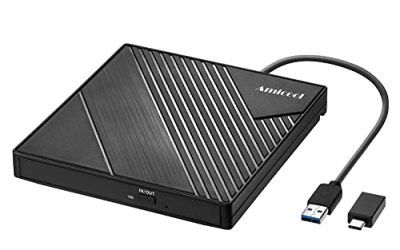
An external disk enclosure is the cheapest route to a serious backup system, because you reuse bare SATA drives instead of paying for a sealed portable unit. But “for backups” changes the shopping list. A drive that only needs to be fast for a weekend copy job can live in almost any shell, while one that holds family photos for a decade needs reliable power, sensible cooling, and a way to swap a failed disk without rebuilding everything. The first decision is whether you want one drive in a simple case or several drives in a multi-bay tower.
This guide is for home-lab tinkerers, photographers, small offices, and anyone with a pile of spare 2.5 inch or 3.5 inch drives who wants a dependable backup target in 2026. Seven enclosures are compared using only what their titles state: bay count, drive size support, interface, capacity ceilings, and extras like tool-free trays and fans. Nothing here replaces a real backup routine, but the right enclosure makes that routine easier to keep up.
Our Top Picks


Top 3 picks at a glance
Quick Picks
As an Amazon Associate we earn from qualifying purchases at no extra cost to you.




| Product | Best for | Key spec from the title |
|---|---|---|
| ORICO 3.5/2.5 Inch USB 3.0 Enclosure | A single big backup drive | Up to 20 TB, tool-free, 12V/2A power supply |
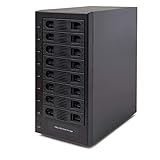
| CENMATE 10 Bay RAID Enclosure | Large home-lab or office archives | 10 bays, cooling fan, USB A/C 3.0 plus eSATA |
| IO CREST 8-Bay Enclosure | Multi-drive backup over USB | Multi-bay via USB interface, 8 bays |
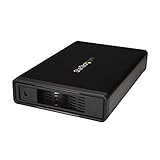
| StarTech S351BMU33ET | Quiet desk backups with USB or eSATA | Trayless 3.5 inch, UASP, up to 5Gbps, fanless |
| CENMATE Aluminum 3.5 Inch Enclosure | Hot-swappable single drive rotation | UASP, hot swappable, up to 30T listed |
| BENFEI 2.5 Inch Enclosure | Portable SSD or laptop-drive backups | 6Gbps, tool-free, UASP, SATA III |
| UGREEN 2.5/3.5 Inch Enclosure | Flexible one-bay case for either drive size | USB 3.0 to SATA III, UASP, 12V adapter |
How to Choose
One bay or many
A single-bay case is simple and cheap: slide in a drive, copy, then unplug and store it. Multi-bay units such as the 8-bay IO CREST and 10-bay CENMATE hold a whole collection in one chassis, which suits anyone consolidating old drives. The trade-off is power draw, noise, and a bigger footprint. If you only back up a laptop, one bay is plenty.
Interface and speed
USB 3.0 gives up to 5Gbps, which is enough for spinning hard drives; they rarely exceed that on their own. UASP, listed on the StarTech, CENMATE single-bay, BENFEI, and UGREEN, reduces protocol overhead and helps with many small files, so it is worth wanting. For SSDs, the BENFEI lists 6Gbps SATA III. An eSATA port, as on the StarTech and CENMATE 10-bay, adds an alternative for desktops that still have one.
Capacity limits and drive size
Check the stated ceiling before filling a case: the ORICO lists drives up to 20 TB, and the single-bay CENMATE lists up to 30T. Confirm 2.5 inch versus 3.5 inch support, because 3.5 inch drives need an external power adapter and 2.5 inch drives often run from USB alone. Cases that accept both sizes, like the ORICO and UGREEN, are flexible if your spare drives vary.
RAID is not a backup, and what to ignore
Multi-bay cases that mention RAID can mirror or stripe drives, but a mirrored pair copies mistakes and deletions to both disks. Treat RAID as uptime protection and keep a separate copy of important files elsewhere. Ignore colorful marketing claims and focus on fans, tray quality, and power supply. Budget cases most often cut corners on ventilation, power brick quality, and instructions.
The 7 Best Options
ORICO USB 3.0 3.5/2.5 Inch Enclosure
The ORICO takes both 3.5 inch and 2.5 inch SATA drives in a tool-free case, with a stated ceiling of 20 TB and a 12V/2A power supply. It is a straightforward pick for someone who owns one large drive and wants it available as a backup target. Because the case accepts either drive size, it also doubles as a way to read an old laptop drive or copy data off a retired disk when the need arises.
- Strength: accepts both common drive sizes, so spare drives of either type work.
- Strength: tool-free installation means no screwdriver is required.
- Trade-off: it is a single bay, so growth means buying another case.
Skip it if you want multiple drives managed from one chassis or if you need eSATA. Photographers with several terabytes of archives will outgrow one bay quickly and should plan the next step.
CENMATE 10 Bay RAID Enclosure
The CENMATE 10 Bay is an aluminum tower with a cooling fan for 2.5 and 3.5 inch SATA drives, connecting through USB A or C 3.0 or an eSATA cable. It targets users with a large archive of old drives to consolidate. Small studios and home-lab owners can park a whole generation of retired drives in one place and run scheduled copy jobs against them overnight.
- Strength: ten bays cover a big archive in one place.
- Strength: a cooling fan and aluminum body address heat during long copy jobs.
- Trade-off: a fan and ten drives mean more noise, power use, and desk space.
Skip it if you only back up one laptop or want a silent setup. Remember that RAID modes in a case like this protect against a disk failure, not against accidental deletion, so a separate copy remains necessary.
IO CREST 8-Bay Enclosure
The IO CREST supports eight drives over a USB interface, and it is the plainest of the multi-bay options in terms of the information in its title. It suits a buyer who needs several bays without extra features. Because the headline is sparse, comparing the full specification on the product page matters more here than with the others, particularly for drive size support and cooling.
- Strength: eight bays offer room for a growing collection.
- Strength: connection over USB works with most computers.
- Trade-off: the title says little about fans, drive size, or speed, so read the full page carefully.
Skip it if you want detailed specs in the headline or a published capacity limit. Buyers who dislike guessing should lean toward a model whose title lists fans, capacity, and interface explicitly.
StarTech 3.5in SATA HDD Enclosure S351BMU33ET
The StarTech is a compact, fanless 3.5 inch enclosure with trayless installation, USB 3.0 or eSATA host options, and UASP at up to 5Gbps. Quiet operation makes it a good desk companion for periodic backups, and the trayless design means a drive slides in without screws or carriers, which keeps repeated swaps painless.
- Strength: fanless and quiet, according to its title.
- Strength: both USB and eSATA hosts are supported.
- Trade-off: it handles 3.5 inch drives only, per the listing.
Skip it if you have 2.5 inch laptop drives or SSDs to use. Notebook owners will want a different case, since this one is built around the full-size desktop drive.
CENMATE Aluminum 3.5 Inch Enclosure
This single-bay aluminum case lists UASP, hot-swap support, and drives up to 30T. It is built for people who rotate drives, plugging one in, copying, then swapping to the next. That workflow is the classic way to keep one copy at home and a second in a drawer, car, or office for protection against fire and theft.
- Strength: hot-swappable operation suits rotating backup drives.
- Strength: a high listed capacity ceiling gives room to grow.
- Trade-off: it supports 3.5 inch drives only.
Skip it if you need 2.5 inch compatibility or multiple bays. Anyone who wants an enclosure for a laptop drive should consider a 2.5 inch case.
BENFEI 2.5 Inch SATA to USB Enclosure
The BENFEI is a tool-free case for 2.5 inch SATA drives, with 6Gbps, SATA III, and UASP support, and a description that it is optimized for SSD. It fits portable backups using laptop drives or small SSDs. Because a 2.5 inch drive often runs from a single cable, the arrangement keeps a backup kit small enough to toss in a laptop bag.
- Strength: SSD-oriented speed support is stated.
- Strength: tool-free installation keeps setup quick.
- Trade-off: it cannot hold a 3.5 inch desktop drive.
Skip it if your backup drive is a full-size 3.5 inch disk. It is also the wrong pick for a large archive that needs several bays.
UGREEN 2.5/3.5 Inch SATA Enclosure
The UGREEN supports both 2.5 and 3.5 inch SATA HDDs and SSDs, with USB 3.0 to SATA III, UASP, a 12V power adapter, and compatibility named for WD and Seagate drives. It is a flexible single-bay choice, which makes sense when spare drives of mixed sizes are lying around and you want one case to handle whichever you pick.
- Strength: two drive sizes in one case.
- Strength: UASP support and a stated power adapter for 3.5 inch drives.
- Trade-off: it holds only one drive.
Skip it if you want RAID, multiple bays, or a built-in fan. People who plan to run the drive for many hours should think about ventilation too.
Which One Fits Your Situation
You are consolidating a stack of old drives
The CENMATE 10 Bay or the IO CREST 8-Bay are the ones built to host many drives at once. Pick the CENMATE if the cooling fan and eSATA matter to you.
You back up a laptop weekly
The BENFEI 2.5 inch case keeps the setup compact with SSD-ready speeds, and the UGREEN handles laptop drives and a spare desktop disk in the same shell.
You want a quiet, always-there backup disk
The StarTech fanless enclosure suits a shelf next to a desktop, particularly if your machine has an eSATA port.
You rotate drives to keep an offsite copy
The single-bay CENMATE with hot swap suits that routine, and the ORICO is a good partner with its tool-free design for putting spare drives into service.
Common Mistakes
- Treating a RAID enclosure as a complete backup when deletions copy to every disk.
- Forgetting that 3.5 inch drives need an external power adapter.
- Ignoring the maximum drive capacity in the listing.
- Choosing a fan-cooled tower for a silent bedroom desk.
- Filling the case once and never testing a restore.
Related guides
- Replacement Cables For Gaming Mice And Headsets
- Indoor Security Cameras Without Subscription
- Nvidia Control Panel Best Settings For Gaming
Frequently Asked Questions
Do I need UASP?
It is not required, but it reduces overhead and can speed up transfers with many small files. Several enclosures here list it, and it works when both the case and your computer support it.
Can I use SSDs in these enclosures?
Yes, where 2.5 inch SATA drives are supported. The BENFEI is described as optimized for SSD, and the ORICO and UGREEN accept 2.5 inch drives as well.
Is a multi-bay enclosure better than several single cases?
It saves cables and desk clutter, but costs more and uses more power. Single cases are easier to rotate and store offsite. A common compromise is one multi-bay tower for the main archive and a single-bay case for the rotating offsite copy.
Does the enclosure include the hard drive?
No. These listings are for the enclosure; you supply the SATA drives separately, and the drives themselves are a separate buying decision based on capacity and reliability. Check the product page for what is included in the box.
Related guides
More from Amazon
Programs that pair well with the guide above. Offers and eligibility are set by Amazon and may change.
A free business account with business pricing and bulk-buying tools for work, shop or home office.
Create a business accountFree shipping on eligible items, Prime Video and more. Eligible new members can start with a free trial.
Start a Prime free trialAudiobooks and podcasts to listen to on the go. Eligible new members can start with a free trial.
Try Audible freeAd-free music streaming. Eligible new subscribers can start with a free trial.
Try Music Unlimited freeAs an Amazon Associate we earn from qualifying purchases.