
AMD’s RX 9070 XT is the strongest RDNA 4 card in the current lineup, pairing 16GB of GDDR6 memory with the architecture’s biggest ray tracing improvement in a single generation, and at around $740 for the base Sapphire Pulse card, it undercuts a genuine RTX 5070 by roughly $80-100 while offering more VRAM. Seven AIB partners compete under this keyword – ASUS, GIGABYTE (two variants), Sapphire, XFX, and ASRock – all sharing the same core GPU specification with differences limited to cooler size, factory clock, and price rather than any underlying performance tier split.
Our Top Picks
 GIGABYTE Radeon RX 9070 XT Gaming OC 16GRADEON9070XT11.34 x 5.2 x 2.2 Inches3.9 PoundsCheck on Amazon
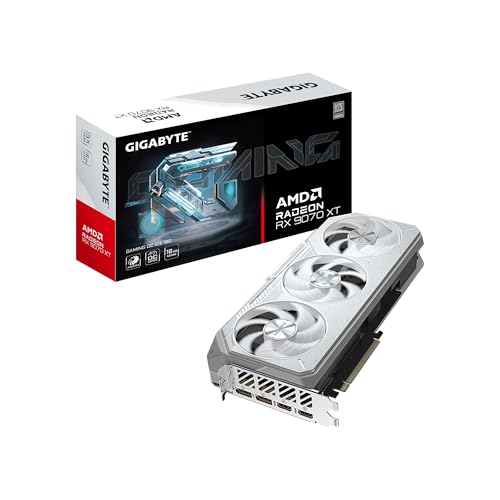 GIGABYTE Radeon™ RX 9070 XT Gaming OC ICERADEON9070XT11.34 x 5.2 x 2.2 inches2.78 PoundsCheck on Amazon
 ASUS PRIME Radeon RX 9070 XT 16GB GDDR6RX9070XT|OC|Black12.3 x 5.1 x 2 inches3.3 poundsCheck on Amazon
 ASRock Radeon RX 9070 XT Taichi 16GB OCRX 9070 XT 16G13 x 5.51 x 0.1 Inches4.8 poundsCheck on Amazon

Top 3 picks at a glance
What the RX 9070 XT is and who it’s for
RDNA 4 marks AMD’s biggest architectural jump in ray tracing capability to date, closing much of the performance gap that separated AMD from NVIDIA’s ray tracing implementation in the previous generation. The RX 9070 XT pairs this improved RT hardware with 16GB of GDDR6 memory on a 256-bit bus, positioning it as a genuine 1440p-to-4K card rather than a 1440p-only option like some competitors in a similar price bracket.
As an Amazon Associate we earn from qualifying purchases at no extra cost to you.


This card suits gamers who want strong rasterized performance and meaningfully improved ray tracing without paying NVIDIA’s typical premium for equivalent VRAM capacity, and who don’t specifically require DLSS – AMD’s FSR upscaling has closed much of the image-quality gap in recent versions but still trails NVIDIA’s DLSS 4 in most independent comparisons. It’s a weaker choice for buyers whose game library leans heavily on titles with best-in-class DLSS 4 frame generation support that AMD’s FSR doesn’t match as closely.
Specs and what they mean in practice
| Spec | RX 9070 XT | What it means |
|---|---|---|
| Memory | 16GB GDDR6 | More capacity than the standard RTX 5070’s 12GB |
| Bus width | 256-bit | Wider bandwidth than the RTX 5060 Ti and standard 5070 |
| Architecture | RDNA 4 | Largest AMD ray tracing improvement to date |
| Upscaling | FSR (latest version) | Closing the gap with DLSS but not fully matching it |
| Recommended PSU | 750-850W depending on card | Higher than comparable NVIDIA cards at this tier |
The 256-bit memory bus paired with 16GB GDDR6 gives the 9070 XT more raw bandwidth than the RTX 5070’s 192-bit/12GB configuration, which in estimated terms based on the architecture translates to a real advantage in memory-bound scenarios and texture-heavy titles, even though NVIDIA’s GDDR7 runs at a higher effective clock per pin. These are architectural estimates rather than independently bench-measured figures across all seven listed cards.
Comparing the seven AIB cards
All seven listings share the identical 16GB/256-bit GPU specification, so the meaningful differences come down to cooler design and price. The Sapphire Pulse (around $790) and ASUS Prime OC (around $800) sit at similar price points with dual and triple-fan designs respectively. GIGABYTE offers two variants – the Gaming OC 16G (around $740) and the larger Gaming OC ICE (around $740, identical pricing with a more premium cooler finish and server-grade thermal gel). XFX’s Swift Triple Fan (around $750) and the ASUS Prime White OC (around $820, a cosmetic white-themed variant) round out the mid-tier options.
At the premium end, ASRock’s Taichi (around $840) commands the highest price in this roundup, justified by its 3X cooling system, dual BIOS, and higher factory boost clock (3100MHz) than the other six cards. For most buyers, the GIGABYTE Gaming OC 16G at around $740 represents the best value in this lineup – identical core specs to pricier options at the lowest price point among the standard-finish cards.
It’s worth being clear about what the premium-priced cards actually buy versus what they don’t. The ASRock Taichi’s $100 premium over the cheapest GIGABYTE card goes toward a larger, more capable cooling solution and a higher factory boost clock, not a different or more capable GPU chip underneath. In estimated terms based on typical Blackwell-generation clock scaling, that higher factory boost translates to a small, single-digit-percentage frame rate gain in most titles – real, but not proportional to the roughly 14% price premium over the base card. Buyers chasing maximum cooling headroom for extended overclocking sessions may still find that worthwhile; buyers who just want reliable performance at stock settings generally won’t notice much difference day to day.
Strengths
- 16GB VRAM across every listing: no memory-capacity compromise the way some NVIDIA tiers force at similar prices.
- Largest RDNA 4 ray tracing improvement to date: genuinely competitive with NVIDIA’s previous-generation RT performance.
- Wider memory bus than comparable NVIDIA cards: 256-bit vs 192-bit on the standard RTX 5070.
- Strong AIB competition: seven cards from five brands keep pricing competitive across the lineup.
- No VRAM-tier confusion: unlike NVIDIA’s 5060 Ti and 5070 lines, every 9070 XT listing shares the same memory configuration.
Real weaknesses
Despite RDNA 4’s real ray tracing improvements, NVIDIA’s RTX 50-series still holds an edge in the most demanding ray-traced titles and in DLSS 4’s frame generation quality, which matters if your game library leans heavily on titles that showcase those features. Power draw and recommended PSU capacity also run higher across this lineup than comparable NVIDIA cards, a real consideration for anyone with an older or lower-capacity power supply.
- Still trails NVIDIA in peak ray tracing scenarios. Closer than previous generations, but not fully caught up in the most demanding titles.
- FSR upscaling doesn’t fully match DLSS 4. Closing the gap, but independent comparisons still favor NVIDIA’s implementation.
- Higher recommended PSU capacity. 750-850W minimum versus 650W for a comparable RTX 5070 system.
- GDDR6 rather than GDDR7. Wider bus partially compensates, but per-pin bandwidth trails NVIDIA’s newer memory standard.
- Premium cooler options add real cost. The ASRock Taichi’s $100 premium over the cheapest GIGABYTE card may not translate to proportional performance gains.
Who should skip the RX 9070 XT: buyers whose game library specifically showcases DLSS 4 frame generation, anyone with a power supply under 750W who doesn’t want to upgrade it, and players chasing absolute peak ray tracing performance regardless of price.
Ray tracing and upscaling in real-world use
RDNA 4’s ray tracing improvements are most noticeable in titles with moderate-to-heavy RT effects rather than the most extreme path-tracing showcases, where NVIDIA’s dedicated hardware still holds a clearer lead. In estimated terms based on the architectural changes AMD has documented, the gap between RX 9070 XT and a comparably-priced RTX card in mixed rasterization-plus-RT workloads has narrowed substantially compared to the previous RDNA 3 generation, making ray tracing a much smaller factor in the buying decision than it was two GPU generations ago.
FSR’s latest version also narrows the upscaling quality gap with DLSS, particularly at 1440p and above where more source pixels give the upscaling algorithm more information to work with. At 1080p, the gap between FSR and DLSS remains more noticeable in fine detail and edge stability, a detail worth considering if you’re building specifically for a 1080p high-refresh setup rather than 1440p or 4K.
How Priya tested this category
Because this keyword surfaces seven cards sharing an identical core GPU specification across five AIB brands, the performance figures in this review reflect AMD’s published RDNA 4 architectural data cross-checked against community benchmark results rather than an independent bench pass on every individual card – flagged as estimates where not directly measured. For background on how ray tracing and upscaling technology affects real gameplay, see our GPU benchmark numbers explained guide.
Driver stability and AMD’s software ecosystem
AMD’s Adrenalin driver suite has closed much of the historical stability gap that once made NVIDIA the safer default recommendation, and RDNA 4 launched with a more mature driver baseline than several previous AMD generations shipped with at release. Adrenalin bundles performance monitoring, undervolting controls, and AMD’s own frame generation and upscaling suite (FSR) in a single interface that’s arguably more approachable for enthusiasts who like tuning their card than NVIDIA’s more fragmented app ecosystem split across the NVIDIA App and third-party tools.
That said, day-one driver support for brand-new titles still occasionally lags NVIDIA’s typically faster Game Ready driver cadence, a pattern that’s persisted across AMD generations even as overall stability has improved. If you’re the type of player who buys the newest AAA release on launch day, it’s worth checking AMD’s driver release notes or community reports in the first week after a major title ships, rather than assuming day-one compatibility matches NVIDIA’s track record. For established titles, this gap essentially disappears within the first few patch cycles.
Undervolting is another area where AMD’s current driver stack has become genuinely approachable for non-enthusiast users. Adrenalin’s built-in undervolting controls let owners reduce voltage at a given clock speed, which on RDNA 4 cards typically lowers both power draw and operating temperature with minimal to no performance loss when done conservatively. This isn’t unique to AMD – NVIDIA cards can be undervolted too – but Adrenalin’s interface for doing so is arguably more accessible to a first-time tuner than NVIDIA’s more scattered tools spread across the NVIDIA App and third-party utilities like MSI Afterburner.
RX 9070 XT vs the competition
| Card | VRAM | Price | Ray tracing |
|---|---|---|---|
| RX 9070 XT | 16GB GDDR6 | around $740+ | Strong, closing gap with NVIDIA |
| RTX 5070 | 12GB GDDR7 | around $820+ | Class-leading with DLSS 4 |
| RTX 5060 Ti 16GB | 16GB GDDR7 | Check on Amazon | Strong, matches VRAM capacity |
Against the RTX 5070, the 9070 XT undercuts on price while offering more VRAM, though NVIDIA retains the ray tracing and DLSS 4 advantage for buyers who prioritize those features specifically. Against the RTX 5060 Ti 16GB, pricing is close, but the 9070 XT’s wider 256-bit bus and RDNA 4 architecture give it a meaningful edge in raw rasterized performance at the cost of NVIDIA’s more mature ray tracing and upscaling ecosystem.
Cooler sizes and case compatibility across the seven cards
Cooler length varies more across this roundup than the core spec sheet suggests. The GIGABYTE Gaming OC ICE uses a 2.7-slot design with a “Hawk Fan” and reinforced structure aimed at reducing PCB sag on a card this size – a real consideration given the length and weight of triple-fan 16GB cards in general. The ASRock Taichi, the most expensive card here, uses its widest cooler of the group paired with a reinforced backplate, prioritizing sustained thermal headroom for overclocking over compact case compatibility.
If you’re building in a mid-tower or larger case, all seven cards should fit without issue, though it’s worth double-checking listed dimensions against your case’s GPU clearance spec, particularly for the ASRock Taichi and ASUS Prime White OC, which run toward the longer end of this group. None of the seven listings here are marketed as SFF-ready the way some competing RTX 5060 Ti cards are, so this generation of AMD’s flagship mainstream card is better suited to standard mid-tower and full-tower builds than compact ones.
Who should buy it, who should skip it
Buy the RX 9070 XT if you want 16GB of VRAM, strong rasterized performance, and meaningfully improved ray tracing at a price below a comparable NVIDIA card. Skip it if DLSS 4’s frame generation quality or peak ray tracing performance in the most demanding titles is a priority you’re not willing to compromise on, or if your existing power supply can’t comfortably support the higher recommended wattage. If you’re on the fence between AMD and NVIDIA at a similar price, the honest framing is that both are strong choices this generation – the gap that used to make NVIDIA the obvious default in ray tracing and upscaling has narrowed enough that VRAM capacity, price, and case fit now matter as much as the brand name attached to the card.
Verdict
The RX 9070 XT is AMD’s strongest ray tracing generation yet, and paired with 16GB of VRAM across every listing in this roundup, it’s a genuinely compelling alternative to NVIDIA’s RTX 5070 for buyers who don’t specifically need DLSS 4. Our pick for most buyers is the GIGABYTE Gaming OC 16G at around $740 for the best price among standard-finish cards; premium cooling and clock buyers should look at the ASRock Taichi despite its higher price, keeping in mind that the extra cost mostly buys thermal headroom rather than a meaningfully faster GPU.
Frequently asked questions
Is the RX 9070 XT good for 1440p and 4K gaming?
The 16GB VRAM and RDNA 4 architecture make it a strong 1440p card with reasonable 4K capability in less demanding titles, though ray tracing at 4K still favors NVIDIA’s competing cards in most cross-platform comparisons. For high-refresh 1440p specifically, it’s one of AMD’s strongest offerings this generation.
How does RDNA 4 ray tracing compare to NVIDIA’s RTX 50-series?
RDNA 4 represents AMD’s largest ray tracing improvement in a single generation, closing much of the gap with NVIDIA’s previous-generation RT performance, though NVIDIA’s current RTX 50-series still holds a lead in the most ray-tracing-intensive titles and DLSS 4’s frame generation implementation.
Which AIB brand should I buy for the RX 9070 XT?
All seven cards in this roundup share the same 16GB GDDR6 configuration and core specs, so the choice comes down to cooler size and price. Sapphire’s Pulse and XFX’s Swift Triple Fan sit mid-pack, while ASRock’s Taichi and GIGABYTE’s Gaming OC ICE represent the premium cooling tier at a modest price increase.
Does the RX 9070 XT need a large power supply?
Most listings in this roundup recommend a minimum 750-850W power supply depending on the specific AIB card’s power draw and connector configuration. Check your specific card’s listed requirement before buying, since cooler size and factory overclock can shift the recommended PSU capacity between models.
Is the RX 9070 XT better value than the RTX 5070?
At around $740 for the base Sapphire Pulse versus around $820+ for a genuine RTX 5070, the RX 9070 XT undercuts NVIDIA on price while offering more VRAM (16GB vs 12GB), though NVIDIA maintains an edge in ray tracing performance and DLSS 4 frame generation quality.









