
Cheap graphics cards are no longer limited to low settings and outdated games. The best budget GPUs can handle 1080p gaming well, and some are capable of 1440p with sensible settings. The catch is that “cheap” covers several very different products: new entry-level cards, older mid-range cards, and used models that may offer excellent value but carry more risk.
The right choice depends on your monitor, games, power supply, and willingness to adjust settings. A card that is cheap at checkout can become poor value if it needs a new power supply, has too little VRAM, or struggles with the features you actually use.
As an Amazon Associate we earn from qualifying purchases at no extra cost to you.

Our Top Picks
 GIGABYTE GeForce RTX 3050 WINDFORCE OC V2 6GStandard7.5 x 4.4 x 0.1 Inches0.88 PoundsCheck on Amazon
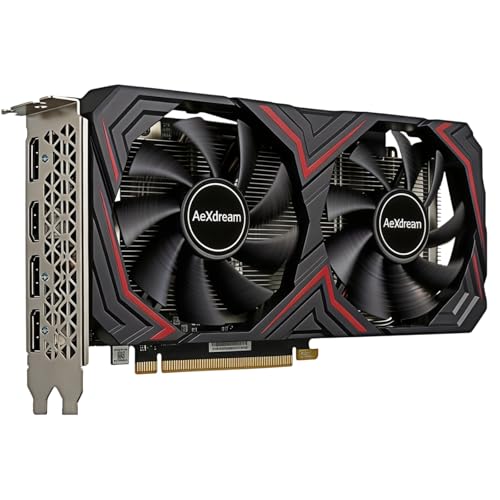

The best cheap graphics card categories
| Category | Best for | Main advantage | Main drawback |
|---|---|---|---|
| Entry-level new GPU | 1080p gaming and general upgrades | Warranty, low power use, modern features | Limited performance headroom |
| Budget 1080p GPU | High-refresh 1080p monitors | Strong rasterized gaming performance | Ray tracing and upscaling may be weaker |
| Used previous-generation GPU | Maximum performance per dollar | Often much faster than new budget cards | No guaranteed condition or warranty |
| Intel Arc budget GPU | New systems with modern software | Good memory capacity and competitive pricing | Driver support can still vary by game |
For most buyers, start by checking budget 1080p graphics cards. This avoids paying for features you will not use while giving you enough performance for current games.
What to expect from the cheapest new cards
The least expensive new cards are suitable for esports games, older releases, and modern games at 1080p using medium settings. They are also useful for replacing an aging card in a desktop that cannot run current software smoothly.
Do not expect them to deliver high frame rates in every demanding game. At this price, you may need to use upscaling, reduce shadows, or select a medium-quality preset. That is not a failure if your target is a 60Hz monitor. It becomes a problem if you own a 144Hz display and want to play visually demanding games at maximum settings.
Check VRAM before buying. A 6GB card can still be adequate for competitive games and many single-player titles, but 8GB gives you more room for high-resolution textures and future releases. VRAM is not the only measure of speed, though. A slower card with more memory is not automatically better than a faster card with less.
The sensible 1080p sweet spot
The strongest cheap graphics cards are usually the models positioned just above entry-level products. They tend to offer a much better experience for a relatively small price increase, particularly if you play at 1080p with a high-refresh monitor.
AMD cards in this range often provide strong traditional, or rasterized, performance for the money. They are a good fit if your priority is frame rate in games that do not rely heavily on ray tracing. NVIDIA cards usually have an advantage in ray tracing, DLSS support, streaming features, and some creative applications, although you may pay more for comparable conventional gaming performance.
Intel Arc cards can be attractive when their price and game compatibility line up. They generally benefit from a modern system with Resizable BAR enabled. On an older PC, performance may be less consistent, so check your motherboard and processor before choosing one. Search current prices for Intel Arc graphics cards rather than assuming every discounted listing is a bargain.
When a used graphics card makes sense
A used previous-generation mid-range card can outperform a new budget card at the same price. This is often the best route for buyers who want 1440p capability or higher settings without spending much.
The risk is condition. A card used for years in a poorly ventilated case may have noisy fans, a failing fan bearing, or degraded thermal performance. Mining history is not an automatic reason to reject a card, but it increases the importance of testing. Ask for a screenshot showing temperatures and performance under load, and buy through a marketplace with meaningful buyer protection when possible.
Inspect the exact power connector and size before purchasing. Some older performance cards use more power than modern budget models and may require one or two PCIe power cables. A low-cost GPU is not cheap if you also need a new power supply or a larger case.
Buying used is a reasonable choice for an experienced PC builder who can test hardware. For a gift, a family computer, or a first PC build, a new card with a warranty is usually worth the extra cost. You can compare current new and refurbished listings through refurbished graphics cards, but confirm the seller’s return policy before ordering.
AMD, Intel, or NVIDIA?
Choose AMD when you want the most conventional gaming performance for your budget and mostly play at 1080p. AMD is particularly compelling when a sale places a higher-tier card close to the price of an entry-level NVIDIA model.
Choose NVIDIA when ray tracing, DLSS, CUDA-based applications, or strong video-encoding support matter to you. It can be the better option for streaming or software that specifically benefits from NVIDIA hardware, even when its raw frame rate per dollar is not the highest.
Choose Intel when the card offers clearly better memory capacity or pricing and your system is reasonably modern. Intel’s drivers have improved considerably, but occasional game-specific issues and uneven older-game performance remain reasons to check recent reviews before buying.
Five checks before you buy
- Match the card to your monitor. A 1080p 60Hz display does not require the same GPU as a 1440p 165Hz monitor.
- Check the power supply. Confirm wattage, PCIe cables, and whether the unit is from a reliable manufacturer.
- Measure the case. Budget cards may be short, but many factory-overclocked versions use two slots or more.
- Check outputs. Make sure the card has the HDMI or DisplayPort connections your monitors need.
- Compare total cost. Include a power supply, adapters, shipping, and any necessary case changes.
Cheap-card mistakes to avoid
Do not buy based only on the amount of VRAM, boost-clock numbers, or the word “gaming” in a product listing. These details can hide a weak GPU core, narrow memory bandwidth, or a cooler that runs hot and loud.
Also avoid paying a premium for a factory-overclocked version when the standard model is significantly cheaper. The real-world difference is usually small, and manual settings or a slightly lower quality preset matter far more. If two cards use the same GPU, choose the one with the better price, cooler reputation, return policy, and physical fit.
FAQ
What is the cheapest type of graphics card worth buying?
A current entry-level card is worthwhile for 1080p gaming, esports, and older games. Below that point, integrated graphics or a carefully tested used card may offer better value.
Is 8GB of VRAM enough for a cheap gaming PC?
It is generally a sensible target for 1080p. You may still need to lower texture quality in demanding games, and VRAM alone does not determine performance.
Should I buy a used graphics card?
Yes, if you can verify its condition and have buyer protection. Used cards can be excellent value, but avoid listings with no return option or no clear information about testing.
Do I need ray tracing on a budget?
No. Ray tracing is optional and can reduce frame rates substantially. If you prefer smoother performance, prioritize conventional gaming speed and use rasterized settings instead.



