
Our Top Picks
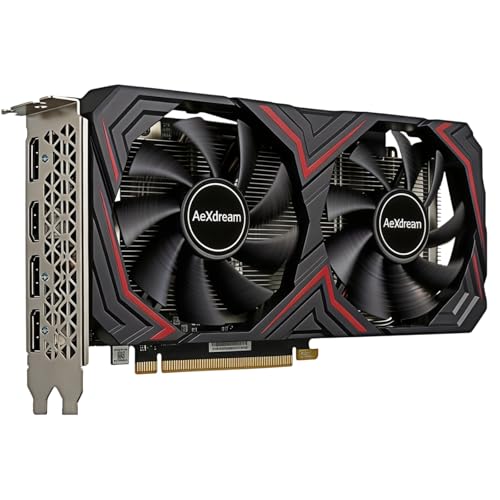

Best Price Value Graphics Card: What to Buy
The best-value graphics card is not always the cheapest card or the fastest one. It is the model that delivers the performance you need without forcing expensive upgrades elsewhere in the PC. For most buyers, that means targeting sensible 1080p or 1440p performance, enough video memory for current games, and a power requirement your existing system can handle.
Prices change frequently, so think in terms of price ranges rather than one permanent winner. A card that is excellent value at $280 can become a poor purchase at $350, while a discounted higher-tier card may suddenly be the better deal. Before shopping, decide your resolution, monitor refresh rate, and whether you care about ray tracing, upscaling, or content creation.
Quick picks by budget
| Budget | Best fit | What to expect | Main compromise |
|---|---|---|---|
| Under $250 | Entry-level AMD, Intel, or NVIDIA card | Good 1080p gaming with sensible settings | Less headroom for ray tracing and demanding new games |
| $250-$400 | Midrange card with 12GB or more where possible | Strong 1080p and usable 1440p performance | Prices and performance vary widely between generations |
| $400-$600 | Upper-midrange AMD or NVIDIA card | Comfortable 1440p gaming and higher refresh rates | Value falls quickly if you only use a 1080p monitor |
| Over $600 | High-end card | High-refresh 1440p, 4K, or demanding ray tracing | Large price increases for smaller frame-rate gains |
Best value for most 1080p buyers
A modern midrange card is usually the safest choice for a 1080p gaming PC. Look for a product with at least 8GB of VRAM, although 12GB is more comfortable if the price difference is reasonable. This class of card can handle competitive games at high frame rates and most single-player games at high settings.
AMD often offers the strongest traditional rasterized performance per dollar in this range. That makes it a good fit if you mainly play games such as Fortnite, Counter-Strike, Baldur’s Gate 3, racing games, or other titles where standard rendering matters more than ray tracing. The downside is that AMD’s ray-tracing performance and software features may not match NVIDIA’s in some games.
NVIDIA’s equivalent cards can cost more, but the premium may be worthwhile if you use DLSS, ray tracing, AI-assisted creative applications, or CUDA-dependent software. If you only want maximum frames per dollar with ray tracing disabled, paying extra for NVIDIA is harder to justify. Compare current prices among 1080p gaming graphics cards rather than assuming one brand always wins.
Best value for 1440p gaming
For 1440p, the sweet spot is usually a card with 12GB or 16GB of VRAM and enough bandwidth to maintain performance at higher texture settings. You do not need a flagship card for a 1440p monitor, but buying too close to the entry level can leave you lowering settings sooner than expected.
AMD is often compelling here because its cards can deliver strong raster performance and generous memory capacity. This is particularly useful for games with large textures or poorly optimized PC ports. However, AMD’s value depends on the actual street price. A discounted NVIDIA card with better upscaling and ray tracing can be the smarter purchase if the gap is small.
NVIDIA is the safer all-round choice for buyers who want to enable ray tracing regularly. DLSS support can make a significant difference in demanding games, and NVIDIA’s feature ecosystem remains useful for streaming, video work, and some 3D applications. The trade-off is that you may receive less raw performance or less VRAM for the same money.
Intel’s Arc cards deserve consideration when heavily discounted. They can offer impressive value, especially in newer games using modern graphics APIs, and they often provide useful media-encoding features. Their failure mode is consistency: older games, unusual engines, emulators, and certain productivity applications can expose driver or compatibility weaknesses. Check recent reviews for the games you actually play before choosing an Intel Arc graphics card.
When the cheaper card is enough
Buy the cheaper option if you use a 1080p 60Hz monitor, play older or competitive games, and do not plan to upgrade your display soon. A more powerful card will not improve the experience much once the monitor is already showing a stable 60 frames per second.
The cheaper card is also fine for a compact office-and-gaming PC, provided its cooling system and power supply are appropriate. Smaller cards can be easier to install and quieter at moderate loads. Do not assume a physically smaller model is automatically better, though: compact coolers may run hotter and louder, particularly inside a poorly ventilated case.
Pay more when you have a 1440p or 4K monitor, want high refresh rates, use ray tracing, or expect to keep the card for several years. Extra VRAM can extend useful life, but it is not a substitute for a sufficiently fast GPU. A card with plenty of memory can still struggle if its core performance is too low.
Check these details before buying
- Power supply: Confirm the recommended wattage, available PCIe power connectors, and the age of your PSU. An adapter may work, but a weak or aging unit can cause crashes, black screens, or shutdowns.
- Case clearance: Measure graphics-card length, height, and thickness. Many current cards occupy two or three expansion slots and can block adjacent slots or front-mounted radiators.
- VRAM: Prefer 12GB or more for a new 1440p purchase when the price is reasonable. Do not overpay solely for memory if the GPU itself is underpowered.
- Upscaling support: DLSS, FSR, and XeSS can improve frame rates, but image quality varies by game and setting. Treat them as useful features, not guaranteed replacements for raw performance.
- Used hardware: A used card can be excellent value, but test temperatures, fan noise, video outputs, and stability. Avoid listings with no return window, especially for cards that have seen heavy mining or unclear operating conditions.
For a general-purpose upgrade, compare 12GB 1440p gaming graphics cards first, then check independent benchmarks for your games. Benchmark averages matter, but one-percent lows, VRAM use, noise, and power draw often determine whether a card feels good to own.
FAQ
Is AMD or NVIDIA better value?
AMD is often better for standard gaming performance per dollar, while NVIDIA can justify its higher price through ray tracing, DLSS, CUDA support, and broader software compatibility. Compare specific cards at current prices rather than choosing by brand alone.
Is 8GB of VRAM enough?
It remains usable for 1080p gaming, especially with sensible texture settings. For a new card intended for 1440p or several years of use, 12GB or more provides more breathing room.
Are Intel Arc graphics cards worth buying?
They can be, particularly at a substantial discount and for newer games. Check compatibility with your game library first, because older titles and unusual software can still produce inconsistent results.
Should I buy a more expensive card for future-proofing?
Buy for the monitor and games you expect to use within the next few years. A modest step up can be worthwhile, but paying hundreds more for performance you cannot currently see is usually poor value.



