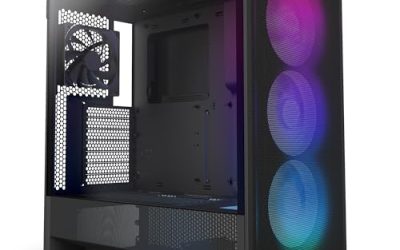
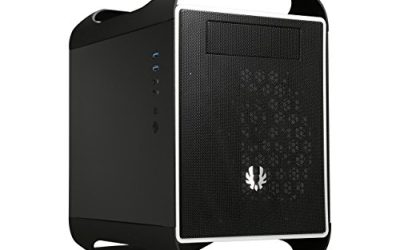
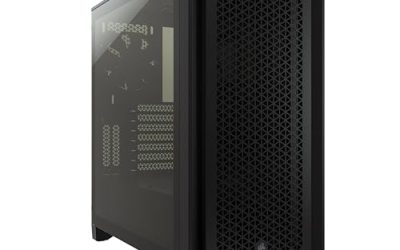
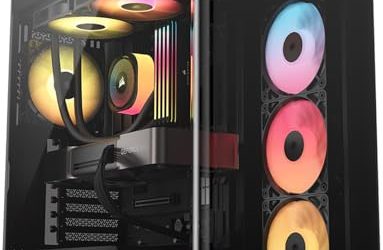
Dust is the enemy of every PC build. It creeps through intake fans, settles on heatsinks, clogs filters that were never installed, and pushes temperatures higher while fans spin louder to compensate. A case with proper dust filters changes that routine: instead of opening the side panel every few weeks with compressed air, you slide a filter out, rinse or wipe it, and put it back. The five cases in this guide all list dust filters among their features, and each one pairs that protection with a different strength — modular construction, panoramic glass, or generous cooling headroom.


This guide is for builders who want a clean interior without giving up airflow, glass, or room for large parts. Every case below was picked from its Amazon listing, using only the specifications the listing itself states — filter placement, fan counts, radiator and GPU clearance, and motherboard support. Use the quick picks to narrow the field, then read the full section for the case that matches your build.
Quick Picks
As an Amazon Associate we earn from qualifying purchases
| Product | Best for | Key spec from title |
|---|---|---|
| Cooler Master MasterFrame 600 | Builders who rebuild often and want a modular frame | 410mm GPU and 420mm radiator support |
| Lian Li O11 Dynamic EVO | Glass showcase builds with heavy cooling | Up to 3x 360 radiators and 10 fans |
| Vetroo AL900 | Panoramic glass builds with fast filter cleaning | Magnetic dust filters, top and bottom |
| KEDIERS C570 | First builds that need fans and lighting included | 5 PWM ARGB fans included |
| GAMDIAS AURA GC2 ELITE ARGB | Strong intake airflow behind a mesh front | 4 built-in 120mm ARGB PWM fans |
How to Choose
Filter Placement and Access
Dust filters only help if they sit where air enters and come out without a fight. Look for filters on the front intake, the top, and beneath the power supply, since those are the paths dust follows into a build. Magnetic filters are the easiest to remove: pull them off, wash or wipe them, and press them back into place. Fixed filters behind a front panel work too, but check how the panel comes off before you buy, because a filter you cannot reach is a filter you will never clean. Filters on the top and bottom as well as the front give the most complete coverage, and they matter most in homes with pets or carpet.
Airflow Versus Filtration
Every dust filter adds some resistance to airflow, so the case needs enough fans and open area to stay cool. Mesh front panels pair well with filters because the mesh blocks larger particles while letting air through, and several cases here combine a mesh front with a magnetic filter behind it. Count the included fans before judging cooling: a case with four or five fans already installed moves air from day one, while a case with one fan leaves you buying the rest. Radiator support matters too — a 360mm mount gives room for a large liquid cooler, and the number of fan mounts tells you how far the case can scale when you add a hotter graphics card.
Size, Clearance, and Motherboard Support
Measure your parts before you fall for a case. Graphics card length is the first number to check: the cases here list maximum GPU lengths from 260mm to 410mm, and a long card will not fit a shorter case. CPU cooler height matters the same way — the GAMDIAS model here lists 160mm of clearance. Motherboard support decides the rest — most of these cases take ATX, Micro ATX, and Mini ITX boards, while the MasterFrame 600 stretches from Mini ITX to E-ATX. Radiator mounts add another check: a 360mm mount fits a large liquid cooler, a 240mm mount fits a mid-size one, and no radiator mount at all forces you onto air cooling. Check all four numbers first.
Glass, Lighting, and the Look of the Build
A filtered case still has to look right on your desk. The Vetroo AL900 wraps the build in 270 degrees of tempered glass, so the interior stays visible from the front and the side at once. The Lian Li O11 Dynamic EVO pairs front and side glass with a dual-chamber layout that hides cables behind the motherboard tray. The other three keep a simpler glass side panel and put the emphasis on airflow and lighting: the KEDIERS C570 and GAMDIAS AURA GC2 ELITE both ship with ARGB fans already installed, so the case glows without extra purchases. Pick the look you will still like in a year, because the case is the part of the build you see every day.
The 5 Best Options
Cooler Master MasterFrame 600
The MasterFrame 600 is the builder’s case here. Its premium aluminum chassis is modular, so panels and mounts can be rearranged as the build changes, and the listed dust filter keeps intake air clean. Four high-airflow PWM fans come installed, more cooling out of the box than most cases at this size, and 410mm of GPU clearance plus 420mm of radiator support leave room for long graphics cards and large liquid coolers. Motherboard support runs from Mini ITX to E-ATX, so the same case can host a compact board today and a workstation board later. It suits builders who change parts often and want a frame that adapts.
Specs
- Dust Filter listed in special features
- Premium aluminum modular chassis
- 4x high-airflow PWM fans included
- 410mm GPU support and 420mm radiator support
- Mini ITX to E-ATX motherboard support
- Mid Tower
Best for: Builders who rebuild often and want a modular aluminum frame with long-GPU room.
Watch out for: The listing names a dust filter in the special features without detailing every filter position, so check the listing for placement before you order.
Lian Li O11 Dynamic EVO
The O11 Dynamic EVO is the showcase pick. Front and side tempered glass panels put the build on display, while the dual-chamber layout moves cables and drives behind the motherboard tray for a clean look. Mesh panels provide dust filtering, and a white dust filter is listed among the features, so the case protects the interior it shows off. Cooling headroom is generous: the listing supports up to three 360mm radiators and a maximum of ten fans, with nine storage drive mounting spaces for builders who keep large local libraries. It fits builders who want a glass showcase with serious cooling and a tidy interior.
Specs
- Mid-tower chassis with front and side tempered glass panels
- Mesh panels provide dust filtering; white dust filter listed among features
- Supports up to 3x 360 radiators and a maximum of 10 fans
- 9 storage drive mounting spaces
- Dual-chamber layout
Best for: Glass showcase builds with heavy cooling and a tidy, cable-free look.
Watch out for: This ASIN is the White version; other colours may carry different ASINs, so order the exact listing you want.
Vetroo AL900
The AL900 is the panoramic pick. Its 270-degree full-view tempered glass wraps two sides of the build, and the magnetic dust filters on the top and bottom pull off in seconds for cleaning — the easiest filter access in this guide. A pre-installed ARGB and PWM FDB fan lights the interior from the start, and the case supports a 360mm radiator and ten fans for builders who plan to add cooling later. Maximum GPU length is 410mm, so long graphics cards fit, and motherboard support covers ATX, M-ATX, and YTX boards. It fits builders who want a glass showcase with filters that are simple to clean.
Specs
- Dust Filter in special features; magnetic dust filter on top and bottom
- 270° full-view tempered glass
- Pre-installed ARGB and PWM FDB fan
- Supports 360mm radiator and 10 fans
- ATX, M-ATX and YTX motherboard support; max GPU length 410mm
- Mid Tower
Best for: Panoramic glass builds where filters must come off fast for cleaning.
Watch out for: This ASIN is the Pink colour variant (model AL900 PINK); other colours may carry different ASINs.
KEDIERS C570
The C570 is the ready-to-light pick. Five PWM ARGB fans come installed, so the case arrives glowing and moving air without extra fan purchases, and the listed dust filter guards the intake. A tempered glass side panel shows the build, and the white finish keeps the whole setup bright. Motherboard support covers ATX, Micro ATX, and Mini ITX boards in a mid-tower frame, which covers the boards most builders actually use. It is a straightforward choice for a first build or a clean rebuild: fans, lighting, glass, and a filter are already in the box, and the builder only needs to add parts.
Specs
- Dust Filter in special features
- Tempered glass side panel
- 5 PWM ARGB fans included
- ATX, Micro ATX, Mini ITX motherboard support
- Mid Tower; White C570
Best for: First builds that need fans, lighting, glass, and a filter already in the box.
Watch out for: The listing does not state radiator or GPU clearance figures, so check your parts against the case dimensions before ordering.
GAMDIAS AURA GC2 ELITE ARGB
The AURA GC2 ELITE is the mesh-front pick. A mesh front panel feeds air to four built-in 120mm ARGB PWM fans, and a magnetic dust filter sits behind the mesh to catch what the panel misses. The case supports up to six 120mm fans and a 360mm AIO or radiator, so cooling can grow well past the four fans in the box. Clearance figures are stated plainly: 260mm for the GPU or VGA card and 160mm for a CPU air cooler, with a PSU shroud and tempered glass rounding out a tidy mid-tower. It fits builders who want strong intake airflow with a filter they can pull off and clean.
Specs
- Magnetic dust filter; mesh front panel
- 4 built-in 120mm ARGB PWM fans
- Supports up to 6x 120mm fans, 360mm AIO/radiator
- 260mm GPU/VGA and 160mm CPU air cooler clearance
- ATX, Micro-ATX, Mini-ITX; tempered glass; PSU shroud
Best for: Strong intake airflow with a magnetic filter behind a mesh front.
Watch out for: GPU clearance tops out at 260mm, so long graphics cards will not fit — measure before ordering.
Which One Fits Your Situation
You rebuild often and swap parts
The MasterFrame 600 is the pick here. Its modular aluminum chassis rearranges as the build changes, and motherboard support from Mini ITX to E-ATX means the same case can host a compact board now and a workstation board later. Four PWM fans and 410mm of GPU clearance cover most upgrades without new cooling.
You want a glass showcase
Choose the Lian Li O11 Dynamic EVO or the Vetroo AL900. The O11 pairs front and side glass with a dual-chamber layout and room for three 360mm radiators, while the AL900 wraps the build in 270 degrees of glass with magnetic filters on the top and bottom. Pick the O11 for maximum cooling, the AL900 for the widest view and the easiest filter access.
You want fans and lighting already installed
The KEDIERS C570 is the simplest choice. Five PWM ARGB fans come in the box, so the case lights up and moves air the moment the build is done, with a tempered glass panel to show it off. The GAMDIAS AURA GC2 ELITE is the alternative if you prefer a mesh front and four 120mm ARGB fans with room to add two more.
Your graphics card is long
Measure first, then pick the MasterFrame 600 or the Vetroo AL900, both of which list 410mm of GPU clearance. The GAMDIAS AURA GC2 ELITE caps GPU length at 260mm, so it suits shorter cards only, and the KEDIERS C570 lists no GPU clearance figure at all. A case rated below your card’s length will not fit it, no matter how good the filters are.
Common Mistakes
- Buying a case for its filters and never cleaning them — a clogged filter blocks more air than no filter at all, so set a monthly routine to pull magnetic filters off and wipe them.
- Choosing a case before measuring the graphics card — the GAMDIAS model here caps GPU length at 260mm, and a long card will not fit a case rated below its length.
- Assuming every filter is magnetic — some sit behind a front panel or under the power supply, so check the listing for how each filter comes out before ordering.
- Ordering the wrong colour variant — the Vetroo AL900 ASIN in this guide is the Pink version, and other colours may carry different ASINs, so confirm the exact listing.
- Ignoring motherboard support — most cases here take ATX, Micro ATX, and Mini ITX, but only the MasterFrame 600 stretches to E-ATX, so workstation boards need that check.
Frequently Asked Questions
Do dust filters reduce airflow?
Yes, every filter adds some resistance, which is why the cases in this guide pair filters with strong fan counts or mesh fronts. Four or five included fans move enough air to offset the filter, and a mesh front panel lets air through while the filter behind it catches dust. Clean the filters regularly, because a clogged filter blocks far more air than a clean one.
How often should I clean the dust filters?
Once a month is a good routine for most homes, and more often if you have pets or carpet near the desk. Magnetic filters pull off in seconds — wipe or rinse them, let them dry fully, and press them back into place. Never run the case with a filter removed for long, since dust will settle straight onto the fans and heatsinks.
Which case fits the longest graphics cards?
The Cooler Master MasterFrame 600 and the Vetroo AL900 both list 410mm of GPU clearance, the most in this guide. The Lian Li O11 Dynamic EVO lists no single GPU length in its listing, so check its dimensions against your card before ordering. The GAMDIAS AURA GC2 ELITE caps GPU length at 260mm, which suits shorter cards only.
Are magnetic dust filters better than fixed ones?
Magnetic filters are easier to clean because they pull off the case in seconds and press back on without tools or panel removal. Fixed filters work just as well at catching dust, but they take more effort to reach, especially behind a front panel. Either type protects the build — pick magnetic when you want cleaning to take seconds instead of minutes.
Related guides
More from Amazon
Programs that pair well with the guide above. Offers and eligibility are set by Amazon and may change.
A free business account with business pricing and bulk-buying tools for work, shop or home office.
Create a business accountFree shipping on eligible items, Prime Video and more. Eligible new members can start with a free trial.
Start a Prime free trialAudiobooks and podcasts to listen to on the go. Eligible new members can start with a free trial.
Try Audible freeAd-free music streaming. Eligible new subscribers can start with a free trial.
Try Music Unlimited freeAs an Amazon Associate we earn from qualifying purchases.