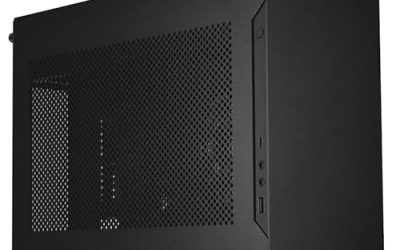
Our Short List of 3

- Best for: A spare-parts build where stated clearances and drive bays matter more than lighting or glass.
- Supports Micro ATX, DTX, and ITX motherboards up to 25.5 x 25.5 cm
- Supports a standard ATX power supply, 150 x 140 x 86 mm
- Graphics card up to 250 mm long, 225 mm with a front 120 mm fan fitted
- Holds 3 x 3.5 inch HDDs and 1 x 2.5 inch SSD

- Best for: A tiny office or media PC where desk space matters and the parts run cool.
- 17.1-liter volume with a 0.8T steel chassis
- Fits a standard ATX power supply
- Graphics card up to 260 mm long
- CPU cooler up to 137 mm tall

- Best for: A basic second machine built from parts whose sizes are already known.
- Supports Micro ATX and ITX motherboards
- Front USB 3.0 port
- Supports a 3.5 inch HDD
- Compact mini-tower form factor for small desks
All 3 Picks at a Glance
| Product | Specs | Action |
|---|---|---|
| JOYJOM Micro ATX Case (Black) |
| Check price on Amazon |
| Zalman CUBIX Compact Micro-ATX Case |
| Check price on Amazon |
| Iesooy Micro ATX Case |
| Check price on Amazon |
The case is the part of a gaming build that buyers squeeze last, and that squeeze causes the most avoidable trouble. A shell at this tier can still decide whether the graphics card slides in, whether the cooler clears the side panel, and whether the power supply mounts without an adapter. When the budget stops below forty, the question changes from which case looks best to which case states the clearances a build actually needs.
This guide covers builders who buy online and need a compact, honest enclosure for a micro ATX or mini-ITX board with a real graphics card. Each pick below comes from what its Amazon listing states about board support, graphics card length, cooling, and front ports, with no room for guesswork about fit, and the shortlist stays small because few cases still meet this tier with a live listing.
Our Top Picks
Top 3 picks at a glance
Quick Picks
As an Amazon Associate we earn from qualifying purchases
| Product | Best for | Key spec from title |
|---|---|---|
| JOYJOM Micro ATX Case (Black) | Cheapest plain box for a spare-parts build | Micro ATX, DTX, ITX; USB3.0; 3.5 inch HDD support |
| Zalman CUBIX Compact Micro-ATX Case | Tiny desk footprint with a standard power supply | Fits ATX power supply; 0.8T steel; 80mm fan |
| Iesooy Micro ATX Case | Basic second machine with a hard drive to reuse | Micro ATX/ITX; USB3.0; 3.5 inch HDD support |
How to Choose
Measure the graphics card first
A graphics card limit is the number that decides the whole build at this tier, so read it before anything else. The JOYJOM lists a 250mm maximum that drops to 225mm when a front fan is fitted, while the Zalman CUBIX lists 260mm, and those small gaps decide whether a dual-fan card fits or hits the front panel. Measure the card from its bracket to its tail, leave a few millimeters for cable bends, and treat any listing that states no GPU limit as a warning sign rather than a blank check. A card that is 5mm too long is a return, not a workaround, so check the number twice before paying.
Check the power supply format
A compact case can hide a costly surprise when it needs a small-format power supply, so confirm the format on the listing before ordering. The Zalman CUBIX states that it fits a standard ATX supply, and the JOYJOM lists a standard ATX supply size, which keeps the build on ordinary, widely available parts. If a listing says nothing about the supply, assume the buyer must verify it separately, because a wrong guess means returning either the case or the supply. A supply that is too long can also block drive bays, so compare its length with the case depth as well.
Count the fans and the mounts
Cooling at this tier comes down to how many fans the case ships with and how many more it can mount. The Zalman CUBIX arrives with a single 80mm fan, which suits a low-power build and little else, while the JOYJOM lists mounts for two 120mm fans at the front plus one 80mm fan at the rear, giving a buyer a path to real airflow. Fan mounts matter more than a mesh pattern on paper, because a case with nowhere to put a fan cannot cool a gaming card no matter how open its panels look. Plan the fan layout before ordering parts, since a case that needs extra fans adds cost after the build starts.
Read the front panel like a checklist
Front ports decide daily convenience long after the build is finished, so treat them as a checklist rather than a footnote. A single USB 3.0 port plus a USB 2.0 port and audio jacks covers a headset, a flash drive, and a phone cable, and that is exactly what the plain boxes in this guide list. The Zalman CUBIX-G style extras, such as a Type-C port, do not appear in this tier, so a buyer who needs Type-C should plan on a rear port or an adapter instead of expecting it on the front. Write the port list down next to the parts list, so nothing about daily use is left to memory.
The 3 Best Options
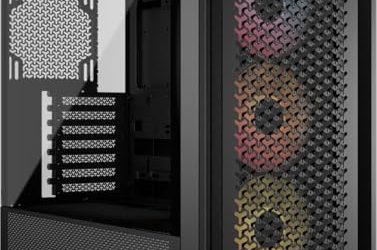
JOYJOM Micro ATX Case (Black)
- Best for: A spare-parts build where stated clearances and drive bays matter more than lighting or glass.
- Supports Micro ATX, DTX, and ITX motherboards up to 25.5 x 25.5 cm
- Supports a standard ATX power supply, 150 x 140 x 86 mm
- Graphics card up to 250 mm long, 225 mm with a front 120 mm fan fitted
- Holds 3 x 3.5 inch HDDs and 1 x 2.5 inch SSD
A spare-parts build where stated clearances and drive bays matter more than lighting or glass.
Confirm it is still sold before buying, and re-check the graphics card limit against the exact card, since the front fan mount shortens the usable length.
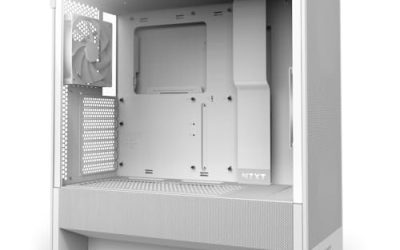
This unbranded-looking black box is the most complete specification sheet in the group, and that is why it leads. It supports Micro ATX, DTX, and ITX boards, takes a standard ATX power supply, and states a 250mm graphics card limit that falls to 225mm with a front fan installed. Three 3.5 inch drive bays plus a 2.5 inch bay make it the natural home for a build assembled from salvaged storage, while the 0.8mm steel body and vented panels keep the design plain and functional.
Watch out for: Confirm it is still sold before buying, and re-check the graphics card limit against the exact card, since the front fan mount shortens the usable length.
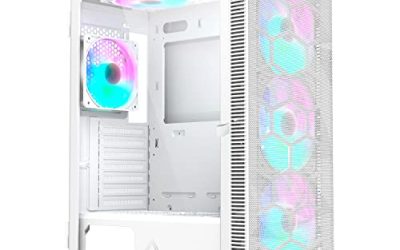
Zalman CUBIX Compact Micro-ATX Case
- Best for: A tiny office or media PC where desk space matters and the parts run cool.
- 17.1-liter volume with a 0.8T steel chassis
- Fits a standard ATX power supply
- Graphics card up to 260 mm long
- CPU cooler up to 137 mm tall
A tiny office or media PC where desk space matters and the parts run cool.
Confirm it is still sold before buying, and plan on a low-power build, since one 80mm fan leaves little headroom for a hot graphics card.
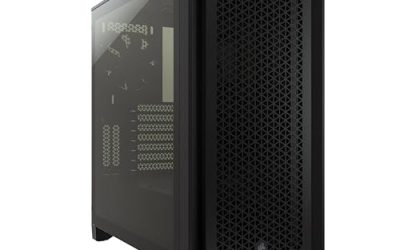
The CUBIX is the smallest case in this guide at 17.1 liters, and it earns its place by pairing that footprint with a standard ATX power supply mount. A single pre-installed 80mm fan and a perforated front panel handle basic airflow, while the listing states room for a graphics card up to 260mm and a CPU cooler up to 137mm. Its heavy-duty 0.8T steel frame suits a living-room media box or a classroom machine that gets moved often, where a plain black finish stays neutral.
Watch out for: Confirm it is still sold before buying, and plan on a low-power build, since one 80mm fan leaves little headroom for a hot graphics card.
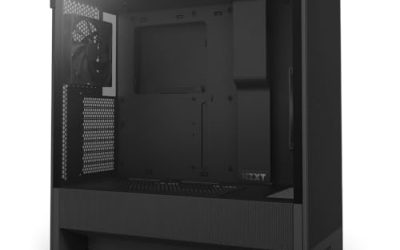
Iesooy Micro ATX Case
- Best for: A basic second machine built from parts whose sizes are already known.
- Supports Micro ATX and ITX motherboards
- Front USB 3.0 port
- Supports a 3.5 inch HDD
- Compact mini-tower form factor for small desks
A basic second machine built from parts whose sizes are already known.
Confirm it is still sold before buying, and measure the graphics card and cooler against the case before ordering, since this listing states no GPU or cooler limit.
The Iesooy covers the same basic brief as the JOYJOM, with Micro ATX and ITX support, a USB 3.0 front port, and room for a 3.5 inch hard drive. Its listing states fewer numbers than the JOYJOM, so it suits a buyer who already knows the parts fit and simply needs a plain enclosure for a second machine. Think of a garage computer, a retro-gaming box, or a small file server that mostly sits in a corner, where the case only has to hold the board and the supply securely.
Watch out for: Confirm it is still sold before buying, and measure the graphics card and cooler against the case before ordering, since this listing states no GPU or cooler limit.
Which One Fits Your Situation
You are reusing old parts on a tight budget
Pick the JOYJOM, because its listing states the full set of limits a salvaged build needs: board sizes, power supply size, graphics card length, cooler height, and drive bays. Old hard drives get three bays, and the stated fan mounts leave a path to better airflow later, so the case keeps working as spare parts get swapped.
You want the smallest box that still takes a graphics card
Pick the Zalman CUBIX, because its 17.1-liter body is the most compact here while still listing a 260mm graphics card limit and a standard ATX power supply mount. Keep the parts modest, since the single 80mm fan suits low-power hardware best, and check the cooler height before ordering a tall air cooler.
You need a plain spare machine for a corner desk
Pick the Iesooy, because it covers the basics without extras that add cost or complexity. It works when the parts are already measured and the machine will sit mostly untouched, serving files, retro games, or light desktop work, and its plain steel shell draws no attention in a shared room.
You are building a first gaming PC with a short card
Pick the JOYJOM again, because its stated 250mm graphics card limit fits most compact dual-fan cards, and its two front fan mounts let a first-time builder add cooling as the build grows. The USB 3.0 front port keeps everyday accessories within easy reach, and the drive bays leave room for a bulk storage drive later.
Common Mistakes
- Buying a case before measuring the graphics card, then finding the card hits the front panel or the fan mount.
- Assuming every compact case fits a standard ATX power supply without checking the listing.
- Treating a glass front as airflow, when a solid panel with no intake can throttle a gaming card.
- Counting pre-installed fans as cooling, when only the intake fans move fresh air over the parts.
- Forgetting the drive bays, then having nowhere to mount a reused hard drive.
Frequently Asked Questions
Can a case in this tier fit a full-size graphics card?
No, and buyers should not expect it to. The cases here list limits around 250mm to 260mm, which covers compact dual-fan cards but not long triple-fan models. Measure the card from bracket to tail, compare it with the stated limit, and remember that a front fan can shorten the usable length further. Short single-fan cards and compact dual-fan cards are the realistic match for the limits stated here.
Do these cases include a power supply?
No, none of the three listings includes a power supply. Each case expects the buyer to supply a standard ATX unit, and the Zalman CUBIX and JOYJOM state that format on their listings. Budget separately for the supply, and confirm its length against the case before ordering. That keeps the choice of wattage and quality in the buyer’s hands.
Is a single small fan enough for gaming?
It depends on the parts inside. A single 80mm fan suits a low-power office or media build, but a gaming card needs more intake air than that. The JOYJOM lists mounts for two front 120mm fans plus a rear 80mm fan, so a buyer planning to game should use those mounts rather than relying on one small fan. Check the listing for mount positions before ordering fans.
What should I measure before ordering?
Measure the graphics card length, the CPU cooler height, and the power supply dimensions, then compare all three with the numbers on the listing. Also check the board size, because these cases take Micro ATX or smaller boards rather than full ATX. Writing the three numbers down before ordering prevents the most common return in this tier. A tape measure and the listing page are all this check needs.
Related guides
More from Amazon
Programs that pair well with the guide above. Offers and eligibility are set by Amazon and may change.
A free business account with business pricing and bulk-buying tools for work, shop or home office.
Create a business accountFree shipping on eligible items, Prime Video and more. Eligible new members can start with a free trial.
Start a Prime free trialAudiobooks and podcasts to listen to on the go. Eligible new members can start with a free trial.
Try Audible freeAd-free music streaming. Eligible new subscribers can start with a free trial.
Try Music Unlimited freeAs an Amazon Associate we earn from qualifying purchases.