As an Amazon Associate we earn from qualifying purchases.
A good-looking RGB PC case does more than hold your parts. It decides how much of your build you can see, how light from your fans, memory and graphics card spreads across the desk, and whether cables disappear or fight the lighting for attention. The best designs share a few traits: large tempered glass panels, lighting built into the case or supplied by included RGB fans, and a layout that keeps the visible chamber clean.
This guide compares five PC cases chosen for appearance: a dual-chamber showcase with light strips, a wraparound-glass airflow tower, a four-glass-panel Corsair design, a panoramic case built around a vertically mounted graphics card, and a mesh-front tower whose RGB fans shine through the front panel. Looks are subjective, so the focus is on objective points: how much glass there is, what lighting is included, how the interior is divided, and whether your cooler and graphics card will fit.
Disclosure: This article contains affiliate links. If you buy through a link on this page, we may earn a commission at no extra cost to you.
Top 3 picks at a glance


Quick Picks
- Best overall look: Lian Li O11D EVO RGB — front and side glass, ARGB light strips along the top and bottom edges, and a reversible dual-chamber layout that hides cables completely.
- Best wraparound glass with airflow: NZXT H9 Flow RGB (2025) — a large dual-chamber tower with a pre-installed RGB fan unit, tempered glass and room for a 420 mm radiator.
- Best all-glass classic tower: Corsair iCUE 5000X RGB — tempered glass on four sides, three included RGB fans and a lighting controller in the box.
- Best panoramic showcase: HYTE Y60 — three-piece panoramic glass and a vertical graphics card mount that turns the GPU into the centrepiece.
- Best RGB behind mesh: Lian Li LANCOOL III RGB — three front ARGB fans glowing through fine mesh, hinged glass doors and the most radiator room in this group.
1. Lian Li O11D EVO RGB — Best Overall Look

The O11D EVO RGB is the case most builders picture when they think of a showpiece RGB build, and the listing describes it as an E-ATX mid-tower with ARGB lighting strips, front and side tempered glass panels and a reversible chassis. Two addressable RGB strips run along the top and bottom edges of the front glass, framing the interior like a picture frame. Because the strips are built into the case rather than added later, the lighting looks intentional from every angle, and it syncs with the rest of your build through a standard motherboard ARGB connection or Lian Li’s own control ecosystem.
The dual-chamber layout is the other half of the look. The power supply, drives and most cabling live in a second chamber behind the motherboard tray, so the glass chamber shows only the board, cooler, graphics card and fans. The chassis is reversible, so you can flip it to present the build from either side of the desk.
Specifications
- Form factor: Mid-tower, dual chamber
- Motherboard support: E-ATX, ATX, Micro-ATX and Mini-ITX, per the listing description
- Panels: Tempered glass front and side
- Included lighting: ARGB strips at the top and bottom of the front panel
- Radiator support: Up to 420 mm at the top, with additional radiator positions on the side and bottom
- Layout: Reversible chassis, second chamber for power supply and cable routing
Pros
- Built-in ARGB strips give a finished look even before you add RGB fans
- Dual chamber keeps the visible side almost completely free of cables
- Reversible design suits desks where the PC sits on either side
- Very wide radiator and fan support for a full custom loop look
Cons
- Fans are not the focus of the package, so most builders add a matched set of RGB fans, which raises the total build cost
- The wide dual-chamber footprint takes more desk space than a conventional tower
- Glass on two sides means fingerprints and dust show quickly
View the Lian Li O11D EVO RGB on Amazon
2. NZXT H9 Flow RGB (2025) — Best Wraparound Glass With Airflow
The H9 Flow RGB (2025) is NZXT’s large dual-chamber ATX mid-tower, and the listing highlights a 420 mm RGB fan unit and a 120 mm fan included in the box, 420 mm radiator support, tempered glass and back-connect motherboard readiness. Where the earlier H9 designs leaned on glass at the expense of intake, this Flow version pairs the wraparound glass look with a perforated top and an airflow-focused interior, so the lighting you see through the glass comes from a case that can also breathe.
The visual signature is the continuous glass corner: front and side panels meet with minimal framing, so RGB fans along the side and bottom read as one unbroken wall of light, and the included fan unit means the case glows in a coordinated way as soon as you build in it. Support for back-connect motherboards, whose connectors sit on the rear of the tray, removes most visible cables from the main chamber entirely.
Specifications
- Form factor: Dual-chamber ATX mid-tower
- Motherboard support: ATX and smaller, including back-connect designs, per the listing
- Included fans: One 420 mm RGB fan unit and one 120 mm fan, per the listing title
- Panels: Tempered glass front and side
- Radiator support: Up to 420 mm
- Lighting control: NZXT CAM ecosystem via compatible NZXT controllers and motherboards
Pros
- Included RGB fan unit delivers a coordinated glow out of the box
- Wraparound glass corner gives an uninterrupted view of fans and components
- Back-connect motherboard support produces an exceptionally clean interior
- Large radiator support suits a top-mounted liquid cooler with RGB fans
Cons
- A big case that needs a deep desk and careful planning for smaller rooms
- The full NZXT lighting experience works best with NZXT’s own control hardware
- Glass-heavy design is heavier than a mesh tower of similar size
View the NZXT H9 Flow RGB (2025) on Amazon
3. Corsair iCUE 5000X RGB — Best All-Glass Classic Tower
The Corsair iCUE 5000X RGB takes the opposite approach to the dual-chamber cases above: it is a conventional single-chamber mid-tower wrapped in tempered glass on four sides — front, top and both side panels on the white version described by the listing records (model CC-9011213-WW). Three included SP RGB ELITE 120 mm fans sit behind the front glass panel, so the front of the case glows as clearly as the side, and a Corsair Lighting Node CORE controller is included to run the lighting through Corsair’s iCUE software.
As a traditional layout, the 5000X RGB is the easiest here to build in when moving parts from an existing tower: the power supply sits under a shroud, routing uses Corsair’s RapidRoute channels, and there is room for multiple 360 mm radiators. The glass top is the trade-off — striking to look at, but cooling relies on the front and side mounting positions.
Specifications
- Form factor: Mid-tower, single chamber with power supply shroud
- Motherboard support: E-ATX, ATX, Micro-ATX and Mini-ITX
- Panels: Tempered glass on four sides, per the product description
- Included fans: Three 120 mm SP RGB ELITE fans with a Lighting Node CORE controller
- Radiator support: Up to 360 mm in multiple positions, including the front and the motherboard tray side
- Cable management: RapidRoute cable channel system
Pros
- Glass on the front as well as the side, so the RGB fans are visible from the front of the desk
- Fans and lighting controller included, with mature iCUE software control
- Familiar single-chamber layout that suits first-time showcase builders
- Strong radiator flexibility for an all-in-one liquid cooler look
Cons
- Glass top panel limits top exhaust options compared with mesh-top rivals
- iCUE lighting works best when the rest of the build also uses Corsair components
- Four glass panels make it one of the heavier mid-towers here
View the Corsair iCUE 5000X RGB on Amazon
4. HYTE Y60 — Best Panoramic Showcase
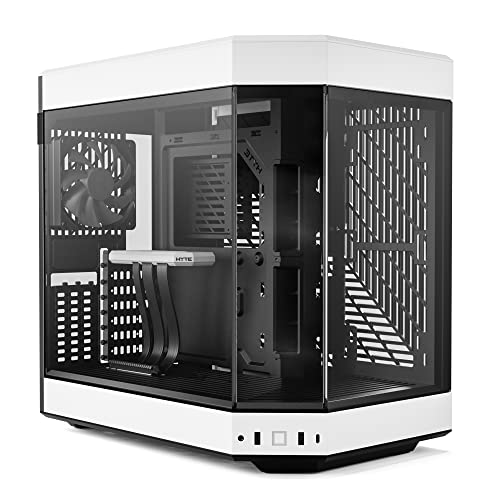
The HYTE Y60, listed in white as model CS-HYTE-Y60-BW, is built around one idea: the graphics card should be the centrepiece of the build. Its three-piece panoramic tempered glass wraps the front corner of the case without a supporting pillar, and a PCIe 4.0 riser cable is included in the box so the graphics card mounts vertically, facing the glass, showing off its cooler design and its own RGB lighting instead of hiding its backplate against the motherboard.
The Y60 is a dual-chamber design, with the power supply and cables in the rear chamber. Unlike the other picks, the case does not supply the main RGB fans — the lighting comes from the components you choose: the vertical GPU, RGB fans you add, and your cooler. That makes it the most customisable canvas here, and the best choice if you already own RGB parts you want to display.
Specifications
- Form factor: Dual-chamber mid-tower
- Motherboard support: E-ATX, ATX, Micro-ATX and Mini-ITX, per the listing description
- Panels: Three-piece panoramic tempered glass
- Included accessory: PCIe 4.0 riser cable for vertical graphics card mounting
- Graphics card display: Vertical mount as the default presentation
- Cooling layout: Side, bottom and rear fan positions around a central airflow channel
Pros
- Panoramic corner glass with no pillar gives the clearest GPU view in this group
- Vertical GPU mount and riser cable included, so the showcase layout works out of the box
- Dual chamber keeps cables and the power supply out of sight
- Distinctive shape that stands out next to conventional towers
Cons
- No headline RGB fan package included, so the lighting budget sits with your components
- Vertical mounting puts the GPU fans close to the glass, so check clearance for very thick cards on the listing before ordering
- The wide, angled footprint does not suit narrow desks
5. Lian Li LANCOOL III RGB — Best RGB Behind Mesh

The LANCOOL III RGB proves a case does not need a glass front to look good lit up. Its front is fine mesh, and behind it sit three 140 mm ARGB fans whose light glows through the mesh in a soft, diffused pattern that many builders prefer to bare fans behind glass. A fourth 140 mm fan is fitted at the rear, the side panels are hinged tempered glass doors that swing open without tools, and the listing describes the case as a spacious E-ATX chassis with four 140 mm PWM fans pre-installed.
Visually, the LANCOOL III RGB is the most understated case here when switched off and one of the most dramatic when lit, because the mesh turns each front fan into a smooth disc of colour. It is also the most practical showpiece: the mesh feeds air directly to the fans, the interior accepts very large cards and radiators, and the hinged doors make adjustments easy.
Specifications
- Form factor: Mid-tower with hinged glass side doors
- Motherboard support: E-ATX, ATX, Micro-ATX and Mini-ITX
- Included fans: Four 140 mm PWM fans, with ARGB lighting on the front set, per the listing description
- Panels: Fine mesh front and top, tempered glass sides
- Radiator support: Up to 420 mm at the top and 360 mm at the front
- Storage and layout: Modular drive cages and a power supply shroud with a glass display cut-out
Pros
- Front ARGB fans shine through mesh for a diffused, premium lighting effect
- Hinged glass doors open without tools for quick access and cleaning
- Largest cooling support in this guide, including a 420 mm top radiator position
- Looks good lit or unlit, which suits shared living spaces
Cons
- The mesh front hides fine component detail, so it is a lighting showcase rather than a component showcase
- Large and heavy for a mid-tower, especially once a full build is installed
- Front lighting colour depends on the fans fitted, so changing the look means changing fans
View the Lian Li LANCOOL III RGB on Amazon
How to Choose the Best Looking RGB PC Case for Your Build
Decide what the glass is for. If you want to see components — the GPU, the cooler, tidy cables — choose a dual-chamber or panoramic case such as the O11D EVO RGB, H9 Flow RGB or Y60. If you mainly want colour and glow, a mesh-front case such as the LANCOOL III RGB delivers the lighting effect with better intake airflow and less visible dust.
Check what lighting is included. Some cases arrive with RGB fans and a controller, notably the 5000X RGB and the H9 Flow RGB. Others, such as the O11D EVO RGB, include light strips but expect you to add fans, and the Y60 expects your components to provide most of the light. Count the fans and controllers you still need before comparing cases, because a matched set of RGB fans is a real part of the total cost of the finished look.
Match the lighting ecosystem. A build looks best when the case, fans, cooler and memory follow one control system — iCUE, CAM or motherboard ARGB sync — so effects sweep across the whole PC. If you already own parts from one brand, favour the case that keeps you in that ecosystem.
Measure your graphics card and cooler. Showcase cases present the GPU prominently, which means its length, thickness and mounting style matter. Vertical mounts need a riser cable and enough space between the card and the glass. Radiator positions differ too: the LANCOOL III RGB and O11D EVO RGB accept very large top radiators, while the 5000X RGB centres on 360 mm positions. Confirm the exact clearance figures on the product listing for your chosen case before ordering.
Think about the desk, not just the case. A wide dual-chamber case needs a deep, sturdy desk and space around it so both glass panels can be seen. In a glass case cables are a visual component too: dual-chamber layouts and back-connect boards hide the most, and a modular power supply keeps the visible chamber clean.
FAQs
Do RGB fans in a case sync with my motherboard?
In most cases, yes, provided the fans or strips use a standard addressable RGB connection and your board has a matching header, or you use the maker’s controller and software. Corsair and NZXT lean on iCUE and CAM, so check that your existing fans match before you buy.
Does a glass front panel hurt cooling?
A solid glass front restricts direct intake compared with mesh, which is why the 5000X RGB draws air through side vents and the H9 Flow RGB pairs glass with perforated panels. A mesh front, as on the LANCOOL III RGB, remains the simplest route to strong intake. For most gaming builds either approach works; the difference shows most with very hot components and few fans.
Is a dual-chamber case worth it for looks alone?
For a showcase build, usually yes. Moving the power supply, drives and cable bulk into a second chamber is the biggest reason builds in these cases look so clean through the glass. The trade-off is width, so measure your desk first.
Can I turn the RGB off or set a single colour?
Yes. Every case here allows the lighting to be dimmed, set to a static colour or switched off through its software or motherboard sync — a subtle single-colour glow for work, a full spectrum effect for gaming.
What size case should I choose for a first RGB build?
A mid-tower is the sensible default. All five cases here fit ATX and, in several cases, E-ATX boards, long graphics cards and large radiators. Go larger only for a custom loop with multiple radiators; go smaller and you give up the glass area that makes an RGB build worth displaying.
Conclusion
For most builders, the Lian Li O11D EVO RGB is the best looking RGB PC case in this group: its built-in light strips, clean dual chamber and reversible layout produce a finished, framed look with the least extra work. Choose the NZXT H9 Flow RGB if you want that same wraparound glass style with a coordinated RGB fan unit already installed and back-connect motherboard support. Pick the Corsair iCUE 5000X RGB for a classic tower wrapped in glass with fans and a controller in the box, the HYTE Y60 if your graphics card deserves to be the centrepiece behind panoramic glass, and the Lian Li LANCOOL III RGB if you prefer your lighting diffused through mesh with the strongest airflow and radiator support of the five.
Whichever you choose, decide on one lighting ecosystem, budget for any fans the case does not include, and confirm card and radiator clearances on the listing before you order.
Related guides
More from Amazon
Programs that pair well with the guide above. Offers and eligibility are set by Amazon and may change.
A free business account with business pricing and bulk-buying tools for work, shop or home office.
Create a business accountFree shipping on eligible items, Prime Video and more. Eligible new members can start with a free trial.
Start a Prime free trialAudiobooks and podcasts to listen to on the go. Eligible new members can start with a free trial.
Try Audible freeAd-free music streaming. Eligible new subscribers can start with a free trial.
Try Music Unlimited freeAs an Amazon Associate we earn from qualifying purchases.