
The best-looking graphics cards are not always the fastest, and they are rarely the cheapest. A card can have excellent performance but look out of place in a compact white build, a glass-sided case, or a quiet workstation. The right choice depends on three things: your case, the rest of your components, and how much attention you want the GPU to attract.
Before shopping, check the card’s length, thickness, power connector position, and lighting controls. A three-slot card may fit your motherboard but block expansion slots or interfere with bottom-mounted fans. Some modern high-end cards also use a large power connector that needs careful cable bending clearance. These practical details matter more than a product photo.
As an Amazon Associate we earn from qualifying purchases at no extra cost to you.


Our Top Picks
 GIGABYTE Radeon RX 9070 XT Gaming OC 16GRADEON9070XT11.34 x 5.2 x 2.2 Inches3.9 PoundsCheck on Amazon
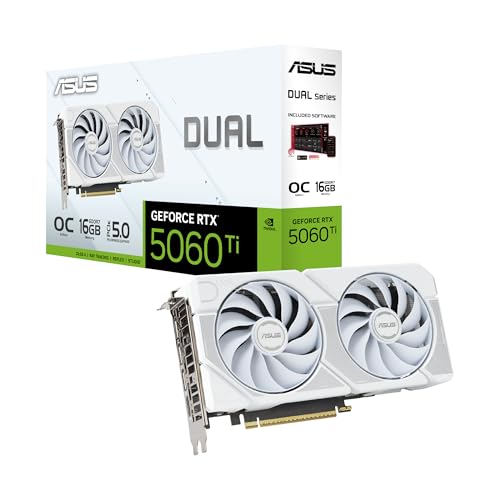 ASUS Dual GeForce RTX 5060 Ti 16GB GDDR7RTX5060Ti|OC|16GB|White9 x 4.7 x 0.1 inches1.4 PoundsCheck on Amazon
 GIGABYTE GeForce RTX 4070 Super WINDFORCE OC 12G2" x 5" x 10.3"10.27 x 4.96 x 0.1 inches2.8 PoundsCheck on Amazon
Top 3 picks at a glance
Quick picks for different builds
| Build style | Best visual direction | What to watch for |
|---|---|---|
| Minimalist or workstation | Plain black or white shroud with little or no RGB | Some premium cards are long and unusually thick |
| White gaming PC | White or silver card with restrained lighting | White models often cost more and may sell out quickly |
| RGB showcase build | Card with a visible side light bar or illuminated fans | Lighting software can be inconsistent between brands |
| Small-form-factor PC | Short, two-slot card with a compact cooler | Thermals and noise are usually worse than on larger cards |
| Budget upgrade | Simple dual-fan design | Cheaper plastic shrouds can look less substantial through glass |
Best-looking minimalist graphics cards
For a clean build, the black graphics cards from major board partners are usually the safest choice. Dark cards disappear into a black case and do not force you to coordinate lighting software. They also tend to be easier to match with black motherboards, memory, power supplies, and fans.
Look for a straight-edged shroud, a backplate, and a logo that can be turned off. NVIDIA cards in the RTX 4070 and RTX 4080 performance classes are commonly available in understated designs from several manufacturers. AMD’s Radeon RX 7800 XT and RX 7900 XT classes also have some restrained options, although individual cooler designs vary considerably.
The trade-off is that minimalist cards can look bland in a showcase case. A plain black cooler may also be visually dominated by a bright motherboard or a vertical RGB strip. If the GPU is mounted vertically, check photos of the side edge rather than judging the front fan design; the side is what you will actually see.
Best-looking white graphics cards
A white graphics card makes the largest visual difference in a white or silver PC. It can break up an otherwise dark interior and gives a glass-sided case a deliberate, coordinated appearance. White versions are available across AMD, Intel, and NVIDIA ranges, but availability depends heavily on the exact GPU and retailer.
ASUS, Gigabyte, MSI, Zotac, and other board partners have produced white or silver variants, but do not assume every model in a product family comes in both colors. Search the full model name and inspect the rear I/O area, backplate, and fan blades. Some “white” cards use a mostly white front with a dark backplate, while others are silver, gray, or off-white.
White is also less forgiving. Dust, fingerprints, and yellowing from smoke or heavy exposure to sunlight are easier to notice. A card with white fans but a black heatsink visible through the blades may not look as uniform as the marketing images suggest. The extra price is worth paying when appearance is a priority, but it is not a performance upgrade. If the cheaper black version saves a meaningful amount, it is the sensible choice for a closed case.
Best-looking RGB graphics cards
RGB graphics cards suit buyers who want the GPU to act as a centerpiece. The most effective designs use a single side light bar or illuminated logo rather than covering the entire shroud in bright strips. Side lighting is especially useful when the card is mounted normally and viewed through a tempered-glass side panel.
Before buying, confirm that the lighting can be disabled and whether it works with your motherboard’s control software. A card may advertise RGB but provide only a basic built-in effect. Conflicting software can cause flickering, startup resets, or another application taking control of the lighting. This is annoying rather than dangerous, but it undermines an expensive showcase build.
High-end cards often look more impressive because they use metal plates, larger heatsinks, and reinforced frames. They also take up more space. A three-and-a-half-slot cooler can cover neighboring slots and make a second expansion card impossible to install. Measure the available clearance from the motherboard to the side panel, not just the case’s advertised maximum GPU length.
Best-looking AMD Radeon cards
AMD’s Radeon range is a good fit for buyers who want strong rasterized gaming performance and a distinctive cooler without automatically paying for the fastest available GPU. The Radeon RX 7800 XT is a practical middle ground for a gaming build, while the RX 7900 XT and RX 7900 XTX suit high-resolution displays and larger cases.
Sapphire Nitro+ models are known for substantial coolers and a more premium appearance, while PowerColor Hellhound models generally favor a cleaner, gaming-focused design. Exact dimensions and lighting differ by generation, so verify the particular card rather than relying on the brand’s general reputation. For a cheaper build, a basic dual-fan Radeon is often visually fine once installed horizontally; spending more on the cooler mainly buys lower noise, better materials, and a more polished presentation.
Best-looking NVIDIA GeForce cards
NVIDIA cards offer the broadest range of visual styles, from compact entry-level models to large, highly finished high-end coolers. A GeForce RTX 4070 Super graphics card is a sensible place to start for a premium-looking gaming PC without moving into the largest and heaviest designs.
For a professional-looking system, ASUS ProArt cards are among the more restrained options where available. They use neutral colors and minimal lighting, making them suitable for a desk that also serves as a work area. More aggressive Republic of Gamers, Aorus, and similar ranges are better for a show build, but their larger shrouds can be difficult to fit.
The expensive option is not automatically the best-looking one. A flagship card can overwhelm a compact case and leave little room for cable routing. If your PC sits under a desk, a midrange card with a backplate may provide almost the same visual result for much less money.
Intel and compact graphics cards
Intel Arc cards can be attractive in budget and midrange builds because some reference-style designs are simple and uncluttered. They are worth considering when you want a modern-looking card without elaborate lighting. Driver support has improved, but game compatibility and performance can vary more than with established NVIDIA and AMD alternatives, particularly in older games.
Compact cards are the correct choice for small cases, not merely a style preference. Search for compact dual-fan graphics cards and compare exact measurements. The failure mode here is buying a short card that is still too thick, or choosing a low-profile model with cooling that becomes loud under sustained gaming. A larger two-fan card is usually the better compromise if your case permits it.
What to check before buying
Measure GPU length, height, and thickness, then allow space for power cables. Check whether the card blocks motherboard headers or adjacent PCIe slots. Decide whether you want visible lighting, and confirm that it can be controlled or switched off. Read reviews for fan noise and coil whine; neither issue is guaranteed by the brand or price.
Finally, prioritize the GPU tier before the appearance. A beautiful card that cannot drive your monitor at the settings you want is a poor purchase. Once performance, fit, and warranty are right, choose the cooler style that matches the case. That order prevents cosmetic upgrades from consuming money that would have bought a faster or quieter system.
FAQ
Are white graphics cards worth the extra cost?
Only if the card is visible and the color is central to your build. A white card does not perform better, and the black version is usually the better value in a closed or dark case.
Do more expensive graphics cards look better?
Often, but not always. Premium models commonly use better backplates and materials, while some midrange cards have cleaner designs. Compare the side view and installed photos rather than the box art.
Is RGB on a graphics card useful?
It is useful for appearance, not performance. Check that the lighting can be disabled and that the card supports the control software you already use.
What is the best-looking card for a small PC?
Choose the shortest card that still has a cooler suited to your GPU’s power draw. Confirm thickness and cable clearance; a compact card that runs hot and loud is not a successful design.



