Almost every laptop makes the same compromise: speakers small enough to fit the chassis, firing at the desk or your knees, with dialogue that disappears under a fan’s hum. A compact external pair is the cheapest meaningful upgrade a laptop can get, but the right pair depends on your desk and your ports. Some run entirely from one USB cable, some split power and audio across two leads, and one here adds Bluetooth for the times the laptop stays in a bag.
This guide is for students in dorm rooms, remote workers on kitchen-table desks, and anyone whose film nights are let down by built-in sound. The picks were chosen from their Amazon listings: connection and power exactly as each listing states them, output figures only where a listing prints them, and sizes that genuinely belong beside a laptop rather than under a television. If a listing does not state how a speaker connects or powers itself, the article says so instead of guessing.
Our Top Picks

Top 3 picks at a glance
Quick Picks
As an Amazon Associate we earn from qualifying purchases.
| Product | Best for | Key spec from title |
|---|---|---|
| Creative Pebble V3 | One cable plus Bluetooth | USB audio over USB-C with Bluetooth 5.0 |
| Creative Pebble V2 | Small desks with a USB-C port | USB-C powered, 3.5mm AUX-in, up to 8W RMS |
| Logitech S150 | The simplest possible setup | One USB cable carries power and digital audio |
| Amazon Basics Stereo 2.0 Speakers (V620) | A basic pair for a spare laptop | USB-powered with 3.5mm aux input |
| Razer Nommo V2 X | Films and games at a home desk | Two 3-inch full-range drivers, THX Spatial Audio |
How to Choose
One cable or two: how the sound gets there
Laptop speakers connect in three ways, and each has a consequence. USB audio models, like the Pebble V3 and the Logitech S150, carry sound digitally over the same cable that powers them, bypassing a noisy laptop headphone stage entirely. AUX models, like the Pebble V2 and the Amazon Basics pair, take power from USB but sound from the 3.5mm jack, so they inherit whatever quality that jack offers — and they work with docks, monitors and phones too. Bluetooth, offered by the V3, trades a cable for convenience and a small delay that matters in games more than in films.
Power source decides volume and placement
USB-powered speakers sip electricity from the laptop itself, which keeps them portable and socket-free but caps how loud they can go; the listings here quote figures like 2.4W and 8W RMS. That is plenty at arm’s length and disappointing across a room. If your laptop desk is also your film screen, a larger pair with its own power arrangement is the honest upgrade, but it also ties the setup to one desk. Count your free USB ports before choosing, too: a pair that needs a port for power and another device chain behind it can crowd a port-poor ultrabook quickly.
Judge output figures at desk distance
Speaker listings mix RMS and peak figures, and the two are not interchangeable: RMS describes sustained output, peak describes a momentary ceiling, so a pair quoting both, like the Pebble V3 at 8W RMS and 16W peak, is being more informative than one quoting peak alone. At desk distance, driver size and placement matter as much as watts. Angled, far-field style designs aim sound up at your ears instead of across the desk, which is why small pairs often sound clearer than their figures suggest. Read the listing’s own numbers, compare like with like, and distrust any figure the listing never prints.
Controls and extras that actually earn their space
On a laptop desk, reaching the speaker matters. A volume knob or front controls, as on the S150 and the Amazon Basics pair, beat opening system settings mid-call, and a mute control is worth real money to anyone who takes meetings at the same desk. Beyond that, judge extras by your routine: a dialog mode helps if the laptop is your television, RGB lighting helps nobody hear better but may match a gaming setup, and a wireless control pod only earns its keep on a fixed desk where the speakers sit out of reach.
The 5 Best Options
Creative Pebble V3

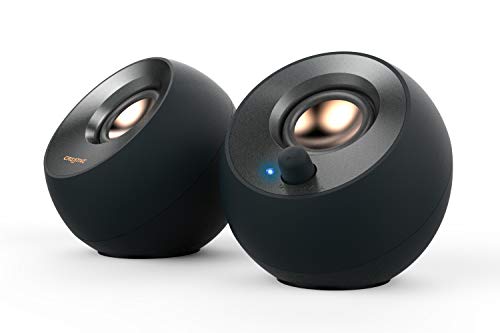
The V3 is the tidiest answer for a modern laptop. One USB-C cable carries both power and digital audio, so there is no separate aux lead snaking across the desk, and Bluetooth 5.0 covers the moments when the laptop is across the room or you want music from a phone instead. Creative adds a Clear Dialog enhancement aimed at voices in films and calls, and the listing rates the pair at 8W RMS with 16W peak. For a laptop that lives on a small desk and doubles as your television, it is the most flexible pair here.
Specs
- Connection: USB-C with USB audio; Bluetooth 5.0
- Power: via USB-C
- Output: 8W RMS, 16W peak (as listed)
- Feature: Clear Dialog enhancement
- Colour: Black
Best for: Laptop users who want one cable on the desk and Bluetooth as a backup.
Watch out for: This code was tied through secondary records rather than the live page, so confirm the live listing resolves to the Pebble V3 in black before ordering.
ASIN: B08F57GSJ7
Creative Pebble V2
The V2 keeps the same pebble-shaped design but splits the jobs: power arrives over USB-C, with a Type-A adapter included for older laptops, while audio travels through a standard 3.5mm AUX input. That split is quietly useful — the speakers work with anything that has a headphone jack, including docks and monitors — and the extended cable between the pair suits wider laptop setups. Output is rated at up to 8W RMS in the listing, the same ceiling as the V3, so the choice between them is about connection, not loudness.
Specs
- Power: USB-C (Type-A adapter included)
- Audio input: 3.5mm AUX-in
- Output: up to 8W RMS (as listed)
- Form factor: 2.0 speaker pair
- Cable: extended cable between the speakers (as listed)
Best for: Mixed desks where the speakers may also serve a dock, monitor or older laptop.
Watch out for: Audio is analogue over AUX, so a laptop with a noisy headphone output passes that noise along; USB-audio models like the V3 avoid it.
ASIN: B07VVP8BGD
Logitech S150
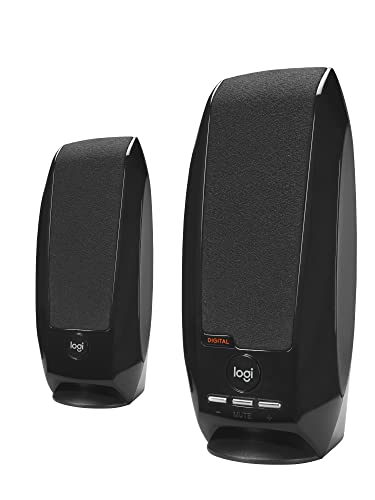
The S150 removes every decision except where to put them. A single USB connection supplies both power and digital audio — the listing calls this its Digital Sound design — so there are no batteries, no wall socket and no aux cable. Output is modest at 2.4W in total, which is enough for calls, videos and background music at arm’s length and not much more. Front controls handle volume and mute without reaching for the laptop. For a work laptop that travels between desks, that one-cable simplicity is the entire argument, and it is a good one.
Specs
- Connection: single USB for power and digital audio
- Output: 2.4W total, 1.2W RMS per speaker (per listing-derived content)
- Controls: front volume and mute
- Form factor: 2.0 USB speaker pair
Best for: Hot-desking and travel, where one cable and zero setup matter most.
Watch out for: The low output ceiling fills a desk, not a room; film fans and music listeners should step up to the Pebble V2 or V3.
ASIN: B000ZH98LU
Amazon Basics Stereo 2.0 Speakers (V620)
This is the no-research pair: USB power from the laptop, audio through a 3.5mm aux input, and a volume control on the speaker. Nothing in the listing promises more than that, and for a spare laptop, a child’s homework machine or a kitchen counter setup, nothing more is needed. The black V620 finish is the version registered here; a silver variant exists under a different listing, so check the colour and model on the page match what you intend to order. Expect tidy, clear sound for speech and video rather than anything approaching room-filling volume.
Specs
- Power: USB-powered from the PC or laptop
- Audio input: 3.5mm aux
- Controls: volume control
- Model: V620, black, one pair
Best for: A spare or secondary laptop that just needs clearer, louder sound than its own speakers.
Watch out for: The silver version is a separate listing, so confirm the black V620 model on the live page before ordering.
ASIN: B07DDK3W5D
Razer Nommo V2 X

The Nommo V2 X is the step up for a laptop that anchors a home desk. Two 3-inch full-range drivers, rear-facing bass ports and THX Spatial Audio put it in a different league from the USB-powered minis here, and the listing quotes a maximum sound pressure level of 96dB. A wireless control pod is included for adjusting things from your chair. It is a gaming-leaning design in size and styling, so measure your desk first. One caution: the captured listing does not state its wired connection or power source in text, so verify both on the live page.
Specs
- Drivers: two 3-inch full-range drivers
- Audio: THX Spatial Audio; max sound pressure level 96dB (as listed)
- Design: rear-facing bass ports
- Included: wireless control pod
- Model: RZ05-04760100-R3U1
Best for: A fixed home desk where the laptop doubles as the entertainment screen.
Watch out for: The listing text captured for this model does not spell out its wired connection type or power source, and a conflicting code for it circulates on mirror sites — confirm the connection, power and code on the live listing before ordering.
ASIN: B0C2XNQNN9
Which One Fits Your Situation
A dorm desk with one free port
Port scarcity rules this choice. The Logitech S150 needs a single USB connection for both power and sound, leaving your other port free for a drive or a charger. If the laptop has USB-C and you also want music from your phone, the Pebble V3 covers both over one cable plus Bluetooth. Either way, skip pairs that need a wall socket; dorm desks rarely have one to spare.
Video calls at a kitchen-table office
Speech clarity beats bass here. Any of the small pairs will lift voices well above built-in speakers, but the Pebble V3’s Clear Dialog enhancement is aimed squarely at this job, and its Bluetooth means the laptop can sit closed on a dock. Keep the pair either side of the screen, close to ear height, so callers sound present rather than distant.
Films and games on a home desk
This is where the small pairs run out of road and the Nommo V2 X earns its footprint: bigger drivers, bass ports and spatial processing make films feel like events rather than streams. Measure the desk before ordering, and confirm the live listing’s connection and power details, since the captured listing text does not state them. For casual viewing, the Pebble V2 at a desk is honestly enough.
A second laptop or a shared family machine
Shared machines need speakers that ask nothing of anyone. The Amazon Basics pair is the fit: plug in USB for power, plug in the aux lead, turn the volume knob. There is no pairing, no app and no setting to undo, which is exactly what a homework laptop or a kitchen machine needs. Keep the Pebble models for a desk that belongs to one person.
Common Mistakes
- Expecting USB-powered mini speakers to fill a living room the way a soundbar would.
- Buying an AUX-fed pair for a laptop whose noisy headphone jack is the very problem being fixed.
- Comparing one listing’s peak wattage against another listing’s RMS wattage as if they matched.
- Ordering a colour variant such as the white Pebble or silver Amazon Basics pair from a different listing than the one you read.
- Assuming a listing states a speaker’s connection and power source when it never prints them; check the live page.
Frequently Asked Questions
Can USB-powered speakers damage or drain a laptop?
They draw the power the USB port is designed to supply, and the draw of the small pairs here is modest, so damage is not a realistic concern. Battery life is the honest trade-off: speakers powered by the laptop spend its charge, which matters on a train and not at a desk. If you work unplugged for long stretches, plug the speakers into a powered hub instead.
Is USB audio better than a 3.5mm connection?
It can be, because the conversion happens in the speaker rather than in the laptop, whose headphone output may add hiss or hum. That is the route the Pebble V3 and Logitech S150 take. A 3.5mm connection is more universal, though: it works with docks, monitors and older machines. If your laptop’s jack already sounds clean, the practical difference is small and compatibility should win.
How loud are 8W speakers, really?
At desk distance, an 8W RMS pair is comfortably louder and fuller than any built-in laptop speakers, with headroom to spare for films and calls. Across a living room, the same pair will sound thin and strained. Wattage also is not the whole story: driver size, cabinet design and how close you sit all shape the result. Treat the figure as a desk-scale indicator, not a room-scale promise.
Do I need a sound card as well as speakers?
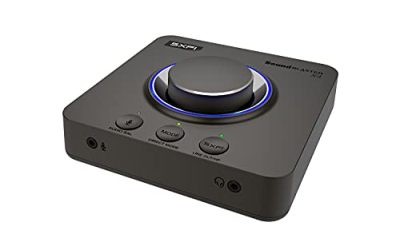
Usually not. These speakers take their signal straight from the laptop over USB or its headphone jack, so no extra hardware sits between them. A separate USB sound adapter only enters the picture when the laptop’s jack is broken or noisy and you are using AUX-fed speakers, or when you also need a better headphone and microphone path for calls. Buy for the problem you actually have.
Related guides
More from Amazon
Programs that pair well with the guide above. Offers and eligibility are set by Amazon and may change.
A free business account with business pricing and bulk-buying tools for work, shop or home office.
Create a business accountFree shipping on eligible items, Prime Video and more. Eligible new members can start with a free trial.
Start a Prime free trialAudiobooks and podcasts to listen to on the go. Eligible new members can start with a free trial.
Try Audible freeAd-free music streaming. Eligible new subscribers can start with a free trial.
Try Music Unlimited freeAs an Amazon Associate we earn from qualifying purchases.