As an Amazon Associate, we earn from qualifying purchases made through links on this page.
Most PCs still ship without a usable digital audio output. Many motherboards dropped the optical port years ago, laptops almost never have one, and the analog jack on a compact PC often picks up GPU coil whine and other electrical noise. If your speakers, soundbar, AV receiver or desktop DAC expects a digital feed, an external USB sound card with a digital output is the simplest way to add one: plug in USB, run one optical cable, and your PC audio stays digital until it reaches the device that is actually good at converting it.
This roundup only includes external sound cards that have a real digital output — an optical Toslink or coaxial S/PDIF socket you can feed into a receiver, soundbar or DAC. That filter removes most popular USB DACs, because the majority are analog-only. Every pick below states exactly which kind of digital output it has, what that output can carry, and where its limits are, so you can match the card to the input on your own gear.
Top 3 picks at a glance


What to look for in an external sound card with digital out
Optical vs coaxial. Both carry the same S/PDIF data, so there is no sound-quality difference between a Toslink optical output and a coaxial one. Optical has one practical advantage: it is electrically isolated, which breaks the ground loop that causes buzzing between a PC and a receiver. Coaxial-output USB sound cards have become rare — ASUS’s Xonar U7 MKII was the best-known example, and it is now discontinued and hard to buy new — so every current pick in this roundup uses optical. If your receiver only has a coaxial input free, you will need an optical-to-coaxial converter box between the card and the receiver.
Pass-through is not the same as encoding. S/PDIF has limited bandwidth. Over one optical cable you can send uncompressed stereo PCM, or a compressed Dolby Digital / DTS bitstream. Movies and streaming apps often include a ready-made Dolby Digital track that a sound card can simply pass through untouched. PC games, however, generate their surround sound live as multichannel PCM, which does not fit down an optical cable unless something encodes it in real time. Only a card with Dolby Digital Live (or the rarer DTS Connect) can turn live game audio into a 5.1 bitstream your receiver understands. If you mainly play games through a home-theater receiver, that feature matters more than any DAC specification.
Check the sample-rate cap on the digital output. A card may advertise 24-bit/192 kHz playback while quietly limiting its optical output to 48 kHz. That is fine for games and Dolby/DTS pass-through, but it matters if you planned to send high-resolution stereo music to an external DAC. The per-product notes below call out each card’s digital-out ceiling where the manufacturer publishes one.
Full-size Toslink vs mini-Toslink. Some compact cards hide the optical output inside a 3.5 mm combo jack (mini-Toslink). These work fine, but they need a mini-Toslink-to-Toslink cable or adapter instead of the standard optical cable you may already own.
Decide whether you also need the analog side. If the digital output feeds your receiver, the card’s own DAC only affects its headphone and line outputs. Buyers who also game on headphones should still care about the headphone amplifier’s rated impedance range; buyers who only need a digital transport can save complexity and pick the simplest adapter that passes the formats they need.
Creative Sound Blaster X4 — the most complete digital-out package
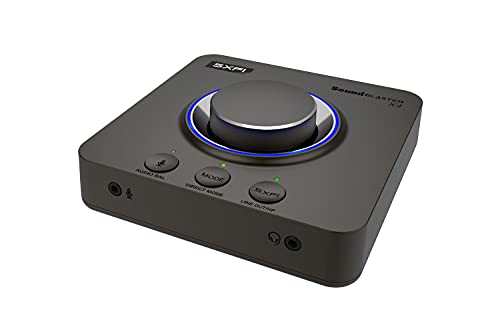
Digital output: full-size optical Toslink (S/PDIF), plus a matching optical input.
The Sound Blaster X4 is the easiest recommendation in this category because it was designed around exactly this job. Its optical output can carry ordinary stereo PCM, pass Dolby Digital bitstreams through, and — on Windows — use Dolby Digital Live to encode your PC’s live multichannel game audio into a Dolby Digital 5.1 signal in real time, down a single optical cable, for an AV receiver to decode. That one feature is what separates it from most USB audio gear.
Around the digital output, the X4 is a full desktop sound card: a hi-res DAC rated for 24-bit/192 kHz playback, discrete 7.1 surround for multi-channel speaker setups over analog, Super X-Fi headphone processing, a headphone amplifier rated for headphones up to 600 ohms, mic input with Creative’s SmartComms noise-reduction tools, and an Audio Balance knob that mixes two sources. It connects over USB-C and also accepts console audio through its optical input.
Who it is for: PC gamers with a home-theater receiver or a soundbar who want real 5.1 from games, not just from movies, plus a strong headphone output at the same desk.
Limitations: Dolby Digital Live encoding is a Windows feature, so Mac users get pass-through and stereo only. Optical still cannot carry uncompressed multichannel audio, so the 7.1 story over a single cable is always the encoded kind. Super X-Fi needs a one-time ear-and-face profile setup in the app to sound right.
Creative Sound BlasterX G6 — best for headphones, with optical out as a bonus
Digital output: optical Toslink via a mini-Toslink combo jack (the 3.5 mm line-out doubles as the optical output). A matching optical input is also a combo jack.
The G6 is primarily a headphone device: a 32-bit/384 kHz DAC with a 130 dB dynamic range, a discrete Xamp headphone bi-amplifier, and support for headphones from 16 to 600 ohms. Its optical connections make it unusually flexible for its size. The optical input decodes Dolby Digital from a console, and the optical output lets you hand audio onward to powered speakers or a receiver in digital form instead of using the G6’s own analog stage.
It also works across PC, PlayStation 5, PlayStation 4, Xbox One and Nintendo Switch, with virtual 7.1 surround and Scout Mode processing for games, and sidetone control for your own microphone.
Who it is for: Headphone-first gamers who want one small box for PC and console, and who occasionally want to feed a receiver or digital-input speakers without swapping hardware.
Limitations: The optical output carries stereo PCM rather than a real-time-encoded 5.1 stream, so for PC games through a receiver the X4’s Dolby Digital Live is the better tool; the G6’s surround strength is on its headphone output. The combo jacks mean you need a mini-Toslink cable or adapter, and the unit still uses a micro-USB connection rather than USB-C. On PlayStation 5, some features need an HDMI-to-optical converter that is not included.
Creative Sound Blaster GC7 — streamer controls and a full-size optical output
Digital output: full-size optical Toslink (S/PDIF), plus a full-size optical input.
The GC7 is a larger desktop control box aimed at gamers and streamers. Around its optical in/out pair it adds a GameVoice Mix dial for balancing game and chat audio on the hardware, programmable buttons, Super X-Fi and SXFI Battle Mode processing, Scout Mode, and Dolby Audio decoding through the optical input. Its AKM DAC supports playback up to 24-bit/192 kHz on the analog side, and the headphone output is rated for 32 to 300 ohm headphones. It runs over USB-C and targets PC, Mac, PlayStation 4 and 5, and Nintendo Switch.
As a digital transport it is straightforward: send the GC7’s optical output to an AV receiver, an integrated amplifier or powered speakers with an optical input, and the downstream device handles conversion.
Who it is for: Streamers and console-plus-PC players who want physical controls and chat mixing on the desk, and a standard full-size optical output for a receiver or digital speakers.
Limitations: Creative’s published specification caps the GC7’s optical output at 16/24-bit PCM at 48 kHz, which is fine for games and Dolby pass-through but not for high-resolution stereo feeds to a DAC. It is a stereo card on the analog side, with no discrete 5.1 or 7.1 speaker outputs. Xbox support is the weak spot in its platform list compared with the PlayStation and Switch support it leads with.
StarTech.com USB Sound Card with SPDIF (ICUSBAUDIO2D) — the simple, honest adapter

Digital output: optical S/PDIF through a 3.5 mm mini-Toslink-style jack.
StarTech’s adapter is the budget utility option: a bus-powered USB sound card built around a C-Media CM6533 chip, offering 96 kHz/24-bit audio and an S/PDIF output with AC3 (Dolby Digital) and DTS pass-through support. That pass-through is the point of the device — connect it to a receiver and pre-encoded surround from movies and media apps reaches the receiver untouched. It also covers the basics on the analog side with a 4-position TRRS headset jack, a separate microphone input, a hardware volume knob and a bass/treble boost switch, all on a short attached USB cable.
Who it is for: Laptop and small-PC owners who simply need an optical output for a receiver or soundbar, mainly for movies, streaming and general audio, and who do not need a gaming feature set.
Limitations: StarTech lists 5.1 surround support over S/PDIF as Windows-only, and there is no real-time Dolby Digital Live encoding, so live PC game audio over optical is stereo. The analog side is stereo only, with no published headphone-amp figures for demanding headphones, and the software package is basic compared with the Creative cards.
Comparison table
| Product | Digital output | What the digital out carries | Max analog playback | Headphone support | Best for |
|---|---|---|---|---|---|
| Creative Sound Blaster X4 | Optical Toslink (full-size), in and out | Stereo PCM, Dolby Digital pass-through, Dolby Digital Live 5.1 encoding (Windows) | 24-bit/192 kHz | Up to 600 ohms | Games in 5.1 through an AV receiver |
| Creative Sound BlasterX G6 | Optical via mini-Toslink combo jack, in and out | Stereo PCM | 32-bit/384 kHz | 16–600 ohms | Headphones on PC and console |
| Creative Sound Blaster GC7 | Optical Toslink (full-size), in and out | Stereo PCM capped at 48 kHz, Dolby pass-through | 24-bit/192 kHz | 32–300 ohms | Streamers who want hardware controls |
| StarTech.com ICUSBAUDIO2D | Optical S/PDIF via 3.5 mm jack | Stereo PCM, Dolby Digital (AC3) and DTS pass-through | 24-bit/96 kHz | Not specified by the manufacturer | Adding optical out to a laptop on a budget |
FAQ
Why buy a sound card just for a digital output?
Because many PCs and almost all laptops lack one. If your receiver, soundbar or DAC has an optical input sitting unused, a USB sound card with S/PDIF out is the cheapest way to feed it a clean digital signal and bypass noisy onboard analog audio entirely.
Is optical or coaxial digital output better?
Neither sounds better — both carry identical S/PDIF data. Optical additionally prevents ground-loop hum between a PC and a receiver. Coaxial outputs have largely disappeared from current USB sound cards, so optical is the realistic choice today.
Can these cards send 5.1 game audio to my AV receiver?
Only with the right feature. Movies can pass their ready-made Dolby Digital or DTS track through any of these cards. Games generate surround live, so for 5.1 from games you need real-time encoding: the Sound Blaster X4’s Dolby Digital Live does this on Windows. Without it, optical game audio is stereo.
If I use the digital output, does the card’s DAC still matter?
Not for the digital path. With S/PDIF out, the card acts as a transport and the receiver or external DAC does the conversion. The card’s DAC and headphone amp only matter for its own analog outputs, which is why headphone users should still compare those specifications.
Will an external sound card with digital out work with a laptop or console?
On a laptop, yes — all four picks are USB and bus-powered or USB-powered. Console support varies by model: the G6 covers PlayStation, Xbox One and Switch, the GC7 focuses on PlayStation and Switch, and console use generally runs through the optical connection rather than USB audio.
Conclusion
If your goal is PC gaming through a home-theater receiver, the Creative Sound Blaster X4 is the standout pick because Dolby Digital Live solves the one problem an optical cable creates for games. Headphone players who want digital flexibility in a small box should look at the Sound BlasterX G6, streamers who want physical mix controls get them from the Sound Blaster GC7, and anyone who simply needs to add an optical output to a laptop can do it with the StarTech ICUSBAUDIO2D. Whichever you choose, confirm that your receiver or soundbar has a free optical input, and check whether you need a standard Toslink cable or a mini-Toslink one before ordering.
Related guides
More from Amazon
Programs that pair well with the guide above. Offers and eligibility are set by Amazon and may change.
A free business account with business pricing and bulk-buying tools for work, shop or home office.
Create a business accountFree shipping on eligible items, Prime Video and more. Eligible new members can start with a free trial.
Start a Prime free trialAudiobooks and podcasts to listen to on the go. Eligible new members can start with a free trial.
Try Audible freeAd-free music streaming. Eligible new subscribers can start with a free trial.
Try Music Unlimited freeAs an Amazon Associate we earn from qualifying purchases.