The best USB extender for most gaming PCs is a short, thick-gauge passive extension cable (up to about 2 m for USB 3.x). Once you need 3 m or more, or a high-bandwidth device such as a 4K webcam or VR headset, switch to an active repeater cable. For runs beyond roughly 5 m, an optical USB cable or a USB-over-Ethernet extender is the safer choice. The right pick depends on your distance, your device’s bandwidth, and whether it draws power from the port.
As an Amazon Associate we earn from qualifying purchases at no extra cost to you.
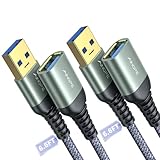


Our Top Picks
Top 3 picks at a glance
Quick comparison of extender types
| Pick | Best for | Key specs | Price range |
|---|---|---|---|
| Passive USB 3.x extension cable (24 AWG power wires) | Keyboards, mice, headsets, DACs, desk-to-case runs | Up to about 2 m at 5 Gbps; about 1 m at 10 Gbps | Budget |
| Active USB 3.x repeater cable | Webcams, capture cards, VR headsets, 3-5 m runs | Built-in signal booster; typically 5 Gbps; often chainable; some need external power | Budget to mid-range |
| Active USB 2.0 repeater chain | Peripherals, wheels, dongles over long runs | 480 Mbps; 5 m per segment; up to 25 m with five segments (USB 2.0 spec) | Budget |
| Optical (fiber) USB cable | Long runs of 10 m and up, VR, streaming rigs, clean routing | 5 or 10 Gbps; very long reach; immune to interference; thin and light | Premium |
| USB-over-Ethernet extender (Cat5e/Cat6) | Different rooms, a PC in a closet or rack | Usually USB 2.0 speeds; reach depends on the vendor, often tens of metres | Mid-range to premium |
| Powered USB hub with extension lead | Many peripherals at the desk from one port | External power adapter; multiple ports; shares one upstream link | Budget to mid-range |
Best overall: a short passive USB 3.x extension cable
For desk-to-case or desk-to-rear-panel runs, a passive male-to-female USB 3.x extension cable is cheap, reliable and needs no extra power. Look for 24 AWG power conductors, a braided or foil-shielded jacket and a stated 5 Gbps rating. It suits keyboards, mice, headsets, wireless dongles and USB DACs, and fits anyone who just wants a port closer to the desk.
Trade-off: the USB 3.x specification effectively limits passive cables to about 3 m, and cheap 28 AWG versions often struggle well before that. Past 2 m, you are gambling on signal quality.
Best for webcams, capture cards and VR: an active repeater cable
An active repeater has a chip in the connector that reconditions the signal, so a 5 Gbps link survives 5 m or more. It is the right fit for a 4K webcam on a monitor arm, a capture card for a console, or a PC-tethered VR headset. Meta’s own Quest Link cable, for example, is a 5 m cable with a built-in booster and is a useful reference for the class.
Trade-off: active cables are directional (a labelled PC end and device end), and some are fussy with certain motherboard controllers. Some also need external power for bus-powered devices. Check the compatibility notes before buying.
Best for long runs: optical USB cable
Optical USB cables, such as Corning’s optical line, convert the signal to light, so length barely matters and electrical noise cannot interfere. They are the go-to for 10 m or longer runs, such as a PC under a desk in another corner of the room feeding a VR play space. The cable is thin and flexible, which helps routing.
Trade-off: they cost the most. Many do not carry enough power for bus-powered devices, so a headset or camera may need its own adapter at the far end. Do not bend them tightly or crush them under chair wheels.
Best for another room: USB-over-Ethernet extender
These kits send USB through Cat5e or Cat6 cable, usually at USB 2.0 speeds. They suit a wheel, flight stick, keyboard or hub when the PC lives in a closet, rack or another room. A sender plugs into the PC, a receiver at the desk powers the devices, and you run ordinary network cable between them.
Trade-off: speed is limited, so they are poor for webcams, VR or storage. Also never plug the cable into a network switch unless the vendor says it supports that, because these are point-to-point links.
Worked calculation 1: will your device fit in the bandwidth?
Many people blame the cable when the real problem is bandwidth. USB 3.0 at 5 Gbps uses 8b/10b encoding, so usable throughput is about 4 Gbps (roughly 500 MB/s) before protocol overhead. An uncompressed webcam stream (YUY2, 2 bytes per pixel) shows the difference:
- 1080p at 60 fps: 1920 × 1080 × 2 bytes × 60 = about 249 MB/s, or about 2.0 Gbps. This fits on 5 Gbps, and not on USB 2.0 (480 Mbps).
- 4K at 30 fps: 3840 × 2160 × 2 bytes × 30 = about 498 MB/s, or about 4.0 Gbps. This is right at the ceiling of a 5 Gbps link, so any marginal cable, extra hub or shared port will cause dropouts.
The takeaway: a USB 2.0 extender (including an Ethernet-based one) cannot carry uncompressed 1080p60 at all, whatever the cable quality. Webcams that compress to MJPEG or H.264 use far less bandwidth, but quality and latency depend on the model.
Worked calculation 2: voltage drop on a long passive cable
USB sends 5 V down the same cable as the data, and the copper wire resistance eats some of it. The current flows out on the power wire and back on the ground, so the effective length is double the cable length. Using standard copper resistance (about 0.213 ohm per metre for 28 AWG, about 0.084 ohm per metre for 24 AWG) and a device drawing 0.9 A (the USB 3.0 limit) over a 3 m cable:
| Wire gauge | Round-trip resistance (6 m of copper) | Voltage drop at 0.9 A | Voltage at the device (from 5.0 V) |
|---|---|---|---|
| 28 AWG | about 1.28 ohm | about 1.15 V | about 3.85 V (too low) |
| 24 AWG | about 0.51 ohm | about 0.45 V | about 4.55 V (borderline but workable) |
USB devices are specified to work down to roughly 4.4 V at the device, so a thin 3 m cable can make a power-hungry headset or camera disconnect randomly, even though a light mouse works fine. This is why thick-gauge cables matter for bus-powered gear, and why an active or powered extender beats a long passive run.
Decision matrix: your situation to the right extender
| Your situation | Choose this | Why |
|---|---|---|
| Keyboard, mouse or headset, 2 m or less | Passive USB 3.x extension, 24 AWG | Low bandwidth and low power; no active parts needed |
| Webcam 1080p60 or 4K, 3-5 m | Active USB 3.x repeater | Needs 2-4 Gbps and stable 5 V |
| PC VR headset, 5 m or more | Active repeater built for VR, or optical with a powered end | Sustained bandwidth plus power |
| External SSD or capture card | Short passive cable or active repeater, never a USB 2.0 extender | Throughput matters; USB 2.0 caps near 40 MB/s in practice |
| Wheel, pedals or flight stick in another room | USB-over-Ethernet extender | Low bandwidth, long distance |
| Four or more peripherals at the desk | Powered hub on one extension | Avoids overloading one port’s current limit |
| Run longer than 10 m at high speed | Optical USB cable | No signal or electrical limits |
How to choose: the checks that matter
- Measure the real path. Add the route around the desk, not the straight-line distance. Add 20 to 30 percent for slack.
- Match the speed rating to the device. A 10 Gbps SSD on a 5 Gbps extension will run at 5 Gbps at best, and more likely lower on a marginal cable.
- Check wire gauge and shielding. The manufacturer’s spec sheet should list the AWG for power wires. If it does not say, assume the thinner option.
- Avoid daisy-chaining passive cables. Two 2 m passive cables joined together behave like one 4 m cable, with extra connector loss. Use one active cable instead.
- Plug into the motherboard’s rear ports. Front-panel headers add their own cable length and loss.
- Keep it away from power bricks and unshielded fans. Interference hurts USB 3.x, and it also disrupts 2.4 GHz wireless dongles.
Troubleshooting if a device drops out after adding an extender
- Plug the device straight into the PC. If it works, the extender is the cause.
- Move it to another rear USB port, ideally on a different controller.
- Swap in a shorter or thicker cable to separate power problems from signal problems.
- For bus-powered gear, try a powered hub at the far end.
- Disable USB selective suspend in Windows power options if the device disconnects only when idle.
Frequently Asked Questions
How long can a USB extension cable be?
Per the USB specifications, a USB 2.0 cable is limited to 5 m and a USB 3.x passive cable to about 3 m in practice. Faster 10 Gbps links shrink that to around 1 m. Active repeater and optical cables extend these limits considerably.
Do USB extension cables reduce speed?
A good, short extension has no meaningful effect on speed. Poor-quality or overly long passive cables raise error rates, which forces retransmissions and may make the connection fall back to USB 2.0 speeds. That fallback is a common reason an external drive suddenly seems slow.
Can I use a USB extender for a VR headset?
Yes, but use a cable designed for the headset, or a high-quality active or optical cable. VR links need sustained high bandwidth and stable power, and many generic extensions fail on one or both. Check the headset maker’s compatibility guidance first.
Are active USB extension cables worth it?
They are worth it once you pass about 3 m or use a bandwidth-hungry device such as a 4K webcam or capture card. For a keyboard or mouse a passive cable is enough, and an active cable adds cost and potential compatibility quirks without any benefit.
Is a USB hub the same as an extender?
No. A hub splits one port into several and shares the bandwidth between them. An extender just lengthens the connection. A powered hub can act as a partial extender because it re-drives the signal, but each hub counts toward the USB limit of five hubs in a chain.
Can I extend USB through a wall or to another room?
For low-speed peripherals, a USB-over-Ethernet extender through in-wall Cat5e or Cat6 is the usual answer. For high-speed devices, an optical USB cable is the better option, provided you can route it safely without sharp bends.
Related guides
More from Amazon
Programs that pair well with the guide above. Offers and eligibility are set by Amazon and may change.
A free business account with business pricing and bulk-buying tools for work, shop or home office.
Create a business accountFree shipping on eligible items, Prime Video and more. Eligible new members can start with a free trial.
Start a Prime free trialAudiobooks and podcasts to listen to on the go. Eligible new members can start with a free trial.
Try Audible freeAd-free music streaming. Eligible new subscribers can start with a free trial.
Try Music Unlimited freeAs an Amazon Associate we earn from qualifying purchases.