A first gaming setup usually arrives one piece at a time, and the keyboard and mouse are where beginners feel every shortcut. A combo set solves the pairing problem in a single box: the lighting matches, the software story is simpler, and nothing needs a second purchase to start playing. The four wired sets below were chosen because their Amazon listings publish the details a new player actually needs — switch type, anti-ghosting counts, mouse DPI ranges — rather than hiding behind bundle language.
They split along one main line. Two sets are membrane-style value bundles built for plug-and-play simplicity, one is a genuine mechanical keyboard combo for players who want the real switch feel from day one, and one keeps things deliberately plain for shared or family desks. All four are wired, which keeps the first setup free of pairing menus, dongles and batteries while you learn.
Top 3 picks at a glance

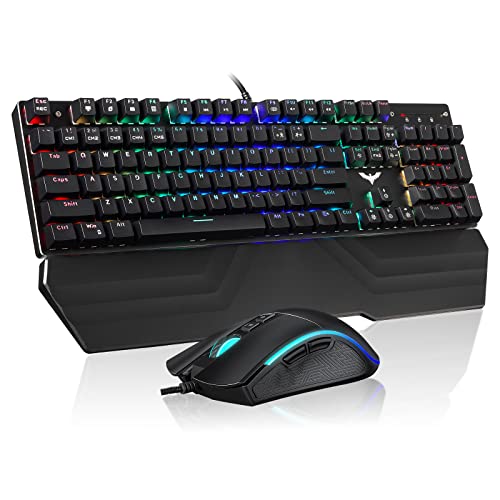
Quick Picks
As an Amazon Associate we earn from qualifying purchases
| Product | Best for | Key spec from title |
|---|---|---|
| Redragon S101-3 PRO | Software and macro keys included | Programmable keyboard mouse with software |
| Redragon S107 | Plug and play with anti-ghosting | 25-key anti-ghosting, 10000 DPI mouse |
| Havit KB389L | A real mechanical keyboard feel | Mechanical, blue switches, 104 keys |
| MageGee K1 | Simple, clean-looking first setup | 104 key RGB LED backlit keyboard |
How to Choose
Membrane versus mechanical at the start
Two of these sets use membrane-style keyboards and one, the Havit KB389L, is genuinely mechanical with blue switches across 104 keys. Mechanical switches give a distinct, clicky press that many players prefer for games and typing, and the KB389L adds an all-metal panel and a detachable wrist rest. Membrane sets like the Redragon bundles are quieter and simpler, with backlighting and gaming features layered on top. Neither is a wrong first step: choose mechanical if the typing feel matters to you daily, and membrane if the desk is shared or the room is quiet.
Anti-ghosting and rollover in plain terms
When you hold several keys at once — running diagonally while reloading, for example — a basic keyboard can drop some of those presses. Anti-ghosting figures tell you how many simultaneous keys the board handles reliably. The Redragon S107 specifies 25-key anti-ghosting, while the Havit claims full N-key rollover with anti-ghosting, the strongest statement in this group. For a beginner, anything in this range covers real gameplay comfortably. What matters is that the listing states a number at all; sets that stay silent on the subject are the ones to skip.
The mouse half of the bundle
Combo mice are often an afterthought, so read their numbers separately. The S107’s mouse reaches 10,000 DPI with 1000 Hz polling and programmable buttons through software. The Havit’s mouse offers six DPI levels from 800 to 4800 with 7-colour lighting effects. The S101-3 PRO’s mouse is programmable with software support alongside the keyboard. A beginner will outgrow a bundle mouse before the keyboard, so treat the mouse as a solid starter whose DPI range and button count cover shooters and strategy games while you learn your preferences.
Software, macros and keeping it simple
The Redragon S101-3 PRO leans furthest into software, with programmable keyboard and mouse functions and independent macro record keys for players who want to automate repeated commands. The S107 keeps macros lighter and emphasises plug and play. The MageGee K1 barely mentions software at all, which is its own kind of feature for a family desk. Decide how much tinkering you enjoy: macro keys are fun for strategy games and streaming, but a beginner who never records one loses nothing by choosing the simpler set.
The 4 Best Options
Redragon S101-3 PRO

The S101-3 PRO is the feature-led starter set: an RGB backlit keyboard and mouse, both programmable through software, with independent macro record keys that most bundles at this level skip entirely. The keyboard measures 17.91 by 7.2 by 0.91 inches and the combo weighs 2.16 pounds, so it fills a standard desk without crowding it. Because the software covers both devices, a beginner learns one program instead of two. It suits new players who already know they enjoy customising — rebinding keys, recording macros, matching lighting — and want the tools included from the first day.
Specs
- Type: wired keyboard and mouse combo set
- Keyboard: RGB backlit, programmable with software
- Macro keys: independent macro record keys
- Mouse: programmable with software support
- Keyboard dimensions: 17.91 x 7.2 x 0.91 in
- Combo weight: 2.16 lb
Best for: beginners who want macros and software customisation included from day one.
Watch out for: sibling versions of this set exist in other colours and bundles; this pick is the black S101-3 PRO listing named here.
ASIN: B00NLZUM36
Redragon S107
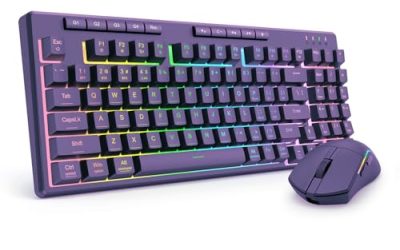
The updated S107 is the plug-and-play pick with unusually honest numbers for a starter bundle: a keyboard with 25-key anti-ghosting and a mouse that reaches 10,000 DPI with 1000 Hz polling, programmable through software. RGB lighting covers both halves of the set. There is less macro hardware than the S101-3 PRO, which many beginners will experience as a simpler first week — connect the cables and play. It fits new players who want credible gaming specifications without a configuration project, and its mouse specification is strong enough to outlast the usual bundle-mouse upgrade itch.
Specs
- Type: wired keyboard and mouse combo
- Keyboard: RGB, 25-key anti-ghosting
- Mouse: up to 10,000 DPI, 1000 Hz polling, programmable with software
- Lighting: RGB on keyboard and mouse
- Setup: plug and play for PC and laptop
Best for: new players who want real gaming numbers with zero setup friction.
Watch out for: macro support is lighter than the S101-3 PRO, so keen macro users should choose that set instead.
ASIN: B0DWMQRK3M
Havit KB389L
The KB389L is the set for beginners who already know a membrane keyboard will not satisfy them. Its keyboard is mechanical with blue switches across 104 keys, an all-metal panel, floating keys, 14 backlit modes, full N-key rollover and a detachable wrist rest — a specification that reads like a standalone gaming keyboard, because essentially it is one. The bundled mouse is programmable with six DPI levels from 800 to 4800 and 7-colour lighting effects. If your first setup doubles as a homework or work desk, the typing experience here is the strongest argument in this entire group.
Specs
- Type: wired USB keyboard and mouse combo
- Keyboard: mechanical, blue switches, 104 keys
- Panel: all-metal with floating keys design
- Lighting: RGB backlighting, 14 backlit modes
- Rollover: full N-key rollover and anti-ghosting
- Wrist rest: detachable
- Mouse: programmable, 6 DPI levels 800 / 1600 / 2400 / 3200 / 4000 / 4800, 7-colour lighting effects
Best for: beginners who type as much as they game and want a true mechanical feel immediately.
Watch out for: blue switches are clicky and audible, which shared rooms and late-night sessions may not forgive; stock was not freshly confirmed at checking time.
ASIN: B07QS6MG8B
MageGee K1

The K1 is the quiet minimalist of the group: a wired 104-key keyboard with RGB LED backlighting and a matching mouse, in a white finish that suits desks doing double duty in bedrooms and family rooms. The listing keeps its claims short — keyboard, mouse, backlighting, PC and laptop compatibility — and that restraint is the appeal for a first setup that should simply work when a younger player sits down. There is no software story to learn and no macro system to configure. It is the set to hand someone who wants to start playing this evening, not this weekend.
Specs
- Type: wired keyboard and mouse combo
- Keyboard: 104 keys, RGB LED backlit
- Colour: white
- Compatibility: PC and laptop
Best for: younger players and shared family desks that need simple, tidy gear.
Watch out for: the listing publishes fewer specifications than its rivals here, so players who care about anti-ghosting figures should pick the S107 or the Havit.
ASIN: B07W6ZTMWP
Which One Fits Your Situation
You want to learn macros and customisation
Start with the S101-3 PRO. Independent macro record keys plus software for both devices give you the full beginner’s workshop in one box, and the backlit full-size keyboard leaves room to grow into strategy games and streaming hotkeys. Expect the first evening to include some setup time; that is the price of the deepest toolkit here, and for a tinkerer it is time well spent.
You want to play within ten minutes of opening the box
The S107 is your set. Plug and play is its stated design, the 25-key anti-ghosting covers real gameplay, and the 10,000 DPI mouse with 1000 Hz polling means the hardware will not be the reason a beginner struggles. It is also the easiest recommendation for a gift, because the recipient needs no patience for configuration before the first match.
This desk is for schoolwork first, gaming second
Choose the Havit KB389L. The mechanical blue switches and metal panel make long typing sessions the best in this group, the detachable wrist rest supports essay-length evenings, and full N-key rollover means the same board handles fast games without complaint. Just warn the household: blue switches announce every keystroke, so a quiet room may prefer the membrane sets.
The setup belongs to a younger player
The MageGee K1 keeps things calm: a clean white finish, backlighting to make it feel like gaming gear, and nothing complicated to configure or break. Parents setting up a first family PC will appreciate the absence of software accounts and pairing steps. When the player grows serious, the keyboard is the natural first upgrade while the mouse continues as a spare.
Common Mistakes
- Assuming every combo keyboard is mechanical; most starter bundles are membrane, and the listing’s switch description is the only reliable guide.
- Ignoring anti-ghosting figures, then losing key presses when several movement and action keys are held together.
- Judging the bundle by the keyboard alone while the mouse — the device aim depends on — carries a weak specification.
- Buying a clicky blue-switch set for a shared or quiet room without warning the people who will hear it.
- Mixing up colour and bundle variants at checkout; sibling versions of these sets carry different ASINs.
Frequently Asked Questions
Is a combo set worse than buying a keyboard and mouse separately?
Separately bought gear offers more choice, but a combo guarantees matched lighting, one software story and a lower total effort for a first setup. The sets here publish real specifications — anti-ghosting counts, DPI ranges, switch types — so a beginner is not flying blind. Many players keep a good combo keyboard for years and upgrade only the mouse later, which spreads the cost sensibly.
What does anti-ghosting mean for a new player?
It describes how many keys the keyboard can register correctly when pressed at the same time. Games constantly combine keys — moving, sprinting, jumping, reloading — and a board without enough coverage can silently drop one of them. The S107’s 25-key figure and the Havit’s full N-key rollover both sit comfortably above what beginner gameplay demands, so either set removes the worry entirely.
Are blue switches a good first mechanical switch?
Blue switches are clicky and tactile, giving clear feedback that many new mechanical users enjoy for both typing and games. The trade-off is noise: every press is audible, which matters in shared bedrooms, classrooms or late-night sessions. If the desk is private, the Havit KB389L’s blue switches are a characterful starting point. If it is not, choose a membrane set now and revisit switches later.
When should a beginner upgrade from a combo?
Upgrade the piece that limits you first. For most players that is the mouse, once they know their grip style and sensitivity preferences, because aim depends on it directly. The keyboard usually lasts longer, especially a mechanical one like the Havit’s. There is no deadline: a combo that still feels comfortable and registers every input is doing its job, whatever its age.
Related guides
More from Amazon
Programs that pair well with the guide above. Offers and eligibility are set by Amazon and may change.
A free business account with business pricing and bulk-buying tools for work, shop or home office.
Create a business accountFree shipping on eligible items, Prime Video and more. Eligible new members can start with a free trial.
Start a Prime free trialAudiobooks and podcasts to listen to on the go. Eligible new members can start with a free trial.
Try Audible freeAd-free music streaming. Eligible new subscribers can start with a free trial.
Try Music Unlimited freeAs an Amazon Associate we earn from qualifying purchases.