A compact combo set is really two decisions folded into one box: how much keyboard you can give up, and whether the bundled mouse is a genuine gaming mouse or a filler item. Shrink the board too far and everyday keys land on a function layer; ignore the mouse specs and you can end up with a sharp keyboard paired with a sensor that holds back your aim.
The five sets below suit different buyers: players who want a true mechanical tenkeyless board, low-sensitivity shooter fans chasing mouse room, and laptop users who need a kit that travels. Each pick was chosen from the names and specification fields printed on its Amazon product page, so the layouts, switch types and sensor figures quoted here come from the listings themselves.
Top 3 picks at a glance


Quick Picks
As an Amazon Associate we earn from qualifying purchases.
| Product | Best for | Key spec from title |
|---|---|---|
| Redragon K552-RGB-BA Keyboard and Mouse Combo | First mechanical setup that keeps arrow keys | 87-key tenkeyless mechanical keyboard |
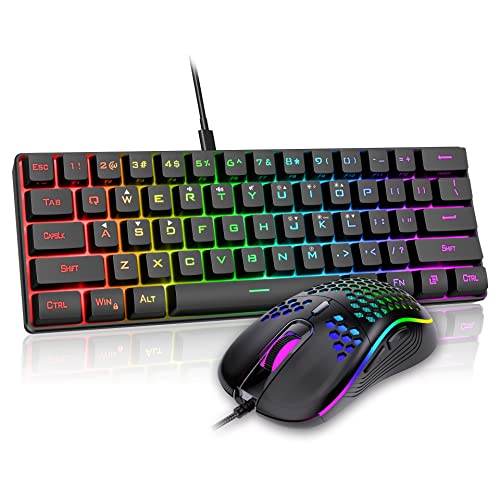
| RedThunder 60% Wired Gaming Keyboard and Mouse Combo | Low-sensitivity FPS play on a tight desk | 61 keys with a 7,200 DPI honeycomb mouse |
| RedThunder K62 60% Wireless Gaming Keyboard and Mouse Combo | A cable-free small desk | 61 keys on one shared 2.4 GHz receiver |
| Snpurdiri K68 60% Wireless Gaming Keyboard and Mouse Combo | Laptop and travel setups | 68 keys in a 311 mm wide board |
| ZIYOU LANG T60 Pro Wired Gaming Keyboard and Mouse Combo | Mechanical feel with a coiled-cable desk look | 62 keys with a 6,400 DPI honeycomb mouse |
How to Choose
Layout size: what a 60% or tenkeyless board removes
A full-size board carries a number pad, a function row and a navigation cluster. A tenkeyless design drops only the number pad, keeping arrows and F-keys in their usual places, while a 60% board cuts all three groups and moves them onto an Fn layer. That trade decides how the set feels day to day: tenkeyless suits mixed gaming and typing, whereas 60% frees the most mouse room but asks you to learn layered shortcuts for arrows, Delete and the F-row before it feels natural.
Connection: wired USB or a shared 2.4 GHz receiver
Wired sets plug in and stay put, with no batteries to manage and no wireless link to drop mid-match; each device usually needs its own USB port. Wireless combos in this group run both halves through a single 2.4 GHz receiver, which keeps a laptop dock tidy and makes the kit easy to move between machines. The trade-offs are charging discipline and receiver care, because losing that one dongle can sideline the keyboard and the mouse at the same time.
Switch type: true mechanical versus mechanical feel
Listings use similar language for two very different keyboards. A true mechanical board, such as the Redragon and ZIYOU LANG sets here, has an individual switch under every key, and the switch colour sets the feel: blue types click audibly, red types run smooth and linear, brown types add a tactile bump. Mechanical-feel sets from RedThunder and Snpurdiri use a membrane instead, shaped to imitate some of that travel and resistance, but the keys sit on a shared membrane sheet and no switch can be swapped when one wears out.
Mouse quality: DPI range, weight and shell
A combo lives or dies on its mouse, so read that half of the listing as carefully as the keyboard. Check the maximum DPI and whether it adjusts in steps you will actually use, the shell weight if you play at low sensitivity and flick hard, and whether the shape is a perforated honeycomb, which sheds grams and palm heat, or a solid shell. Programmable side buttons matter for shooters and MOBAs; a plain three-button mouse limits what you can bind.
The 5 Best Options
Redragon K552-RGB-BA Keyboard and Mouse Combo
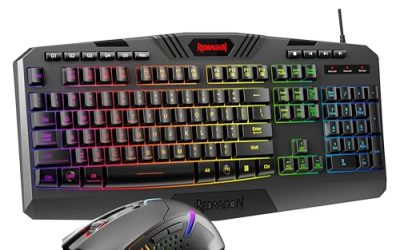
This is the set for a player who wants a genuinely mechanical keyboard without surrendering the arrow keys or the function row. The K552 board keeps an 87-key tenkeyless layout in a metal frame, so it trims the number pad and little else, and its blue-type mechanical switches give a firm, clicky keystroke that suits deliberate typists. The bundled M602 Griffin mouse is a full-size programmable model rather than a token extra, and the wired USB connections keep the whole pairing simple for a first gaming desk.
Specs
- Keyboard: 87-key tenkeyless layout
- Switches: mechanical, blue type (listed as a Cherry Blue equivalent)
- Frame: metal, with RGB LED backlighting
- Mouse: Redragon M602 Griffin, up to 7,200 DPI (adjustable 800/1,200/1,600/2,400/7,200)
- Mouse: 10G acceleration, programmable buttons, RGB backlight
- Connectivity: wired USB for both devices
- In the box: K552 keyboard, M602 mouse, user manual
- Model: K552-RGB-BA
Best for: A first mechanical setup on a desk that still needs arrow keys and an F-row for work or study.
Watch out for: The blue-type switches click loudly, which carries in shared rooms, and each device needs its own USB port, so check your free ports before ordering.
ASIN: B07F3MDC2Q
RedThunder 60% Wired Gaming Keyboard and Mouse Combo
RedThunder’s wired set is built around one idea: give the mouse as much desk as possible. The 61-key board leaves a wide sweep area on the right side, and the bundled honeycomb mouse weighs about 65 grams, so low-sensitivity players can flick and re-centre without dragging a heavy shell. A wired link on both halves removes battery management entirely, and the keyboard’s water-resistant design adds some insurance against desk spills. It is the most single-minded set here, aimed at shooter players who already know they can live on a function layer.
Specs
- Keyboard: 61-key 60% layout, RGB backlit
- Keyboard: water-resistant design
- Mouse: honeycomb optical mouse, up to 7,200 DPI
- Mouse: about 65 g, 1,000 Hz polling rate, 40G acceleration
- Connectivity: wired USB
- Compatibility listed: PC, Mac, PS5, Xbox
- Model: K62
Best for: FPS players on small desks who aim with their whole arm and want the lightest bundled mouse here.
Watch out for: Arrows and the F-row sit behind the Fn key, so confirm you are comfortable with layered shortcuts; RedThunder also sells a wireless set under the same K62 name, so check the listing says wired.
ASIN: B096FV2HND
RedThunder K62 60% Wireless Gaming Keyboard and Mouse Combo
Where the wired RedThunder chases mouse room, this K62 set chases a clean desk. Both halves share a single 2.4 GHz receiver that stores in the bottom of the mouse, so one USB port runs the whole setup and the kit moves between a desktop and a laptop in seconds. The keyboard is a membrane design tuned for a mechanical feel, with RGB backlighting and a translucent panel, and both devices recharge over USB-C. It suits a small home desk that doubles for work, where cables are the enemy.
Specs
- Keyboard: 61-key 60% layout, membrane with mechanical feel
- Backlighting: RGB, with a translucent built-in panel
- Connectivity: 2.4 GHz wireless, one shared USB receiver stored in the mouse
- Batteries: 2,000 mAh keyboard, 500 mAh mouse, USB-C charging
- Mouse: lightweight honeycomb optical mouse
- Set weight: 0.64 kg
- In the box: keyboard, mouse, USB cable, USB receiver
- Model: K62
Best for: A small desk shared between gaming and work, where a single receiver and no cables matter most.
Watch out for: RedThunder’s own listing prints the mouse sensor as 3,600 DPI in its description and 3,200 DPI in its comparison table, so do not buy it for an exact sensor figure; confirm a live offer on the listing before ordering.
ASIN: B0CHRCY3GW
Snpurdiri K68 60% Wireless Gaming Keyboard and Mouse Combo
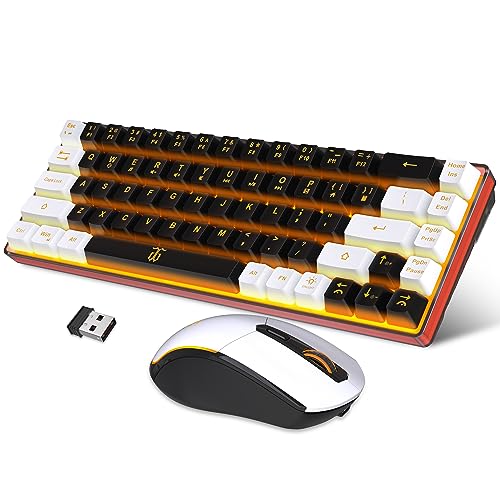
The K68 is the travel pick: at 311 mm wide, its 68-key board is closer to a laptop keyboard than a desktop one, and the extra keys over a strict 61-key layout buy back dedicated arrows on many variants. Keyboard and mouse share one tiny receiver that slots into the underside of the board, the keyboard battery is rated for more than 44 hours of use per charge, and the membrane keys stay quiet enough for a shared room or a train table. Nothing here needs software, which keeps setup to a single plug-in.
Specs
- Keyboard: 68-key 60% layout, 311 x 102 x 38 mm
- Keys: membrane with mechanical feel, RGB backlight, anti-ghosting
- Connectivity: 2.4 GHz wireless, one shared receiver stored under the keyboard
- Range: up to 10 m
- Batteries: 2,000 mAh keyboard, 500 mAh mouse
- Mouse: 6-button, up to 3,200 DPI
- Model: K68
Best for: Laptop gamers and students who carry their setup between rooms or buildings.
Watch out for: Snpurdiri sells near-identical versions of this combo with different key counts and colours, so check the key count and colourway on the exact listing variant before ordering.
ASIN: B0CC58MF5X
ZIYOU LANG T60 Pro Wired Gaming Keyboard and Mouse Combo

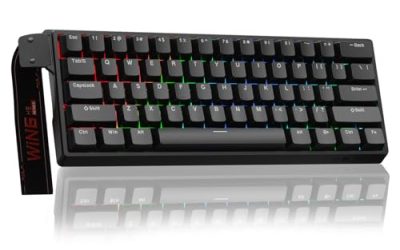
The T60 Pro is the enthusiast-leaning option: a 62-key mechanical board with doubleshot ABS keycaps and a coiled USB-C cable on an aviator connector, the kind of detail usually bought as a separate upgrade. The wired link keeps response consistent, and the honeycomb mouse offers six DPI steps topping out at 6,400, enough range for both desktop work and shooters. It is a set for someone who likes the compact custom-keyboard look and wants it in one box, with a cable they can later swap onto another board.
Specs
- Keyboard: 62-key 60% layout, mechanical switches
- Keycaps: doubleshot ABS
- Cable: coiled USB-C with aviator connector, included
- Mouse: honeycomb RGB mouse, up to 6,400 DPI in 6 steps (800/1,600/2,400/3,200/4,800/6,400)
- Connectivity: wired
- Model: T60
Best for: Players who want the compact custom-board aesthetic, a detachable coiled cable and real mechanical switches.
Watch out for: Variants of this set ship with different switch types, listed variously as blue, brown or red, and more than one key layout appears under this name, so confirm the switch and layout printed on the exact listing before ordering.
ASIN: B0CPHMXYNJ
Which One Fits Your Situation
You play shooters at low sensitivity on a narrow desk
Pick the wired RedThunder 60% set. Its 61-key board leaves the widest possible sweep for your aiming arm, the 65-gram honeycomb mouse is the lightest bundled mouse in this group, and the wired connection means no battery ever dies mid-round. You give up dedicated arrow keys, but for pure shooter play that trade is usually worth it.
You want one kit for a gaming PC and a work laptop
The RedThunder K62 wireless set fits a two-machine life. One receiver runs both halves, so moving the kit means moving a single dongle instead of unplugging two cables and re-routing them. The rechargeable batteries keep the desk clear, and the mechanical-feel membrane keys are quiet and civilised enough for daytime typing before an evening session.
You are upgrading from a basic office keyboard and mouse
Start with the Redragon K552-RGB-BA set. It is the only tenkeyless option here, so your arrow keys, F-row and typing habits carry over unchanged, while the mechanical switches and programmable mouse still deliver a clear step up for gaming. Nothing needs charging, and there is no function layer to learn.
Your setup travels in a backpack
Take the Snpurdiri K68. The board is barely wider than a laptop at 311 mm, the receiver hides inside the keyboard so it cannot snag or get lost in transit, and the rated battery life covers days of use between charges. The quiet membrane keys also behave in libraries and shared spaces.
Common Mistakes
- Buying a 60% board without checking where the arrow keys and F-row went, then finding your favourite game or work app leans on them constantly.
- Reading “mechanical feel” as “mechanical” and expecting replaceable switches from a membrane keyboard.
- Judging a combo by its keyboard alone and never checking the bundled mouse’s DPI range, weight or button count.
- Losing the shared wireless receiver, which can disable both halves of a 2.4 GHz set at once.
- Ordering a colour or switch variant from the listing photos without confirming the variant selector, since several of these sets sell near-identical versions.
Frequently Asked Questions
Is a 60% keyboard enough for gaming?
For most games, yes. Movement, abilities and communication sit on the main key cluster, which a 60% board keeps intact. The compromise shows up outside matches: arrow keys, Delete and the F-row live on an Fn layer, so strategy games with many hotkeys and heavy spreadsheet work feel slower until the shortcuts become habit.
Are combo sets worse than buying a keyboard and mouse separately?
A combo trades peak choice for simplicity and matched styling. The keyboards in these sets cover the same layouts you would buy alone, but the bundled mice are mid-range rather than flagship, so a competitive player may later upgrade the mouse while keeping the board. For a first or second setup, the single-box route is usually the sensible spend.
Do these sets work with consoles and Mac?
The wired RedThunder set lists PC, Mac, PS5 and Xbox in its title, and the other sets target Windows PCs first. Console support depends on the game as much as the hardware, since many console titles ignore keyboard input entirely. Check your game’s input settings before assuming any set will work on a console.
Should I choose wired or wireless for fast-paced games?
A wired set removes charging and any chance of a flat battery ending a session, which is why the two wired picks here suit long shooter sessions. Modern 2.4 GHz combos are responsive enough for casual and ranked play alike, and they win on desk tidiness and portability. Bluetooth is the mode to avoid for gaming, and none of these sets relies on it.
Related guides
More from Amazon
Programs that pair well with the guide above. Offers and eligibility are set by Amazon and may change.
A free business account with business pricing and bulk-buying tools for work, shop or home office.
Create a business accountFree shipping on eligible items, Prime Video and more. Eligible new members can start with a free trial.
Start a Prime free trialAudiobooks and podcasts to listen to on the go. Eligible new members can start with a free trial.
Try Audible freeAd-free music streaming. Eligible new subscribers can start with a free trial.
Try Music Unlimited freeAs an Amazon Associate we earn from qualifying purchases.