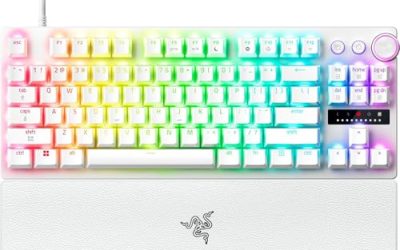
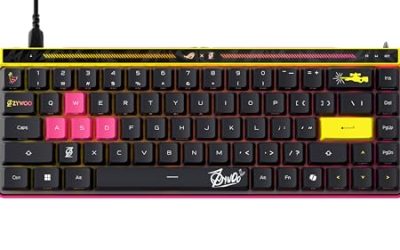
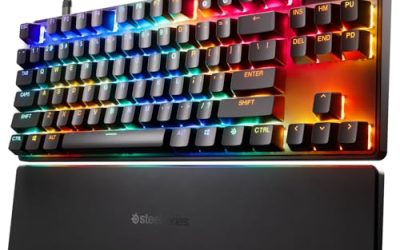
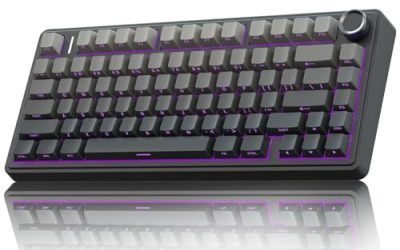
The real decision with a budget Apex Legends keyboard is not whether magnetic switches beat the membrane board you are replacing, because they do. It is which corners a cheaper board can safely cut. Case materials, keycap quality and software polish can all drop a tier without hurting your movement, but the switch sensing, rapid trigger reset and polling rate are the parts that show up in every tap-strafe and counter-strafe, so those are what your money has to protect.
This roundup covers four groups: first-time Hall effect buyers, ranked grinders on small desks, players who still need arrow keys, and anyone upgrading from a basic mechanical board. Every pick below was chosen from the product names and specifications published on its Amazon page.
Our Top Picks

Top 3 picks at a glance
Quick Picks
As an Amazon Associate we earn from qualifying purchases.
| Product | Best for | Key spec from title |
|---|---|---|
| Aula WIN60 HE | The lowest-cost route into rapid trigger on a tight desk | 8000 Hz polling rate |
| AULA WIN68 HE MAX | Players who want arrow keys without leaving the budget tier | 0.02 mm actuation accuracy |
| MechLands Aula Hero68 HE | Players who want sound dampening and a lightbox design | 0.01 mm adjustable actuation |
| DrunkDeer G65 | Players who want the deepest actuation range to tune | 0.2 to 3.8 mm adjustable actuation |
How to Choose
Rapid Trigger and Actuation Range
Rapid trigger is the feature that matters most for Apex movement, because a key resets the moment it starts rising instead of waiting for a fixed release point. That makes repeated A and D taps cleaner for counter-strafing and helps tap-strafes chain without a dead press in between. Look for an adjustable actuation range with fine steps, so movement keys can sit shallow while less-used binds stay deeper and harder to hit by accident. Boards that only offer rapid trigger as an on-off toggle, with no per-key depth control, give up most of the benefit.
Polling Rate and Latency
Polling rate decides how often the keyboard reports its state to the PC. Most budget Hall effect boards now report at 8000 Hz, which trims the wait between a key movement and the report leaving the keyboard. The gain is small next to rapid trigger, but it costs nothing extra at this tier, so treat 1000 Hz boards as the exception that needs a reason, such as a wider actuation range or a layout you prefer. Remember that polling only covers the keyboard side; your monitor refresh and in-game frame rate still cap what you can actually see.
Layout and Desk Space
Apex is played with wide mouse sweeps, so a compact board buys real mousepad room. A 60 percent layout drops the arrow keys and function row behind a modifier layer, which suits players whose binds live on WASD and nearby keys. A 65 percent or 68-key layout keeps dedicated arrows for menus, loot screens and out-of-game use, at the cost of a slightly wider footprint. Neither choice changes switch performance, so decide by how often you reach for arrows and F keys rather than by which layout looks more competitive in photos.
Software, Switches and Keycaps
Every board here is tuned through software, and the driver is where budget boards differ most. Web drivers that run in a browser tab are easier to live with than heavyweight downloads, and per-key actuation, rapid trigger sensitivity and SOCD-style last-input priority should all be adjustable without an account. Hot-swappable magnetic switches are worth having because a worn movement key can be replaced in seconds. Keycaps are the easiest corner to forgive: thin ABS caps on a cheap board can be swapped later, while a weak sensor cannot.
The 4 Best Options
Aula WIN60 HE

The WIN60 HE is the entry point of this roundup: a wired 60 percent board that keeps the two specs that matter, Hall effect switches with rapid trigger and an 8000 Hz polling rate, and trims almost everything else. Its actuation adjusts across a wide range in fine steps, so WASD can sit shallow for fast resets while your ability keys stay deeper. For a first magnetic board bought mainly to clean up strafing, it covers the Apex brief without paying for wireless radios or an aluminum case you may never miss.
Specs
- Layout: 60 percent compact
- Switches: Hall effect magnetic, hot-swappable
- Actuation: adjustable, 0.08 to 3.4 mm
- Rapid trigger: supported, RT mode
- Polling rate: 8000 Hz
- Connection: wired USB-C
- Backlighting: RGB
- Dimensions: 27.94 x 12.7 x 2.79 cm
- Weight: 989 g
Best for: first-time Hall effect buyers who want rapid trigger at the lowest entry cost.
Watch out for: this listing sells through the CORBOBO storefront rather than an Aula-branded page, so confirm the model name and seller on the listing before ordering.
ASIN: B0DSMWJD6M
AULA WIN68 HE MAX
The WIN68 HE MAX stretches the same budget formula to 68 keys, which restores dedicated arrow keys for loot screens, death-box menus and everyday desktop use. Aula rates the MAX version with finer keystroke accuracy than the standard WIN68 HE, and the adjustable actuation works with a fast trigger mode aimed at exactly the repeated directional taps Apex movement is built on. It stays wired and keeps an 8000 Hz polling rate, so the extra keys do not cost you the response figures that make the smaller board appealing in the first place.
Specs
- Layout: 68 keys
- Switches: Hall effect magnetic
- Actuation: adjustable, fast trigger mode, up to 0.02 mm keystroke accuracy
- Polling rate: 8000 Hz
- Connection: wired
- Backlighting: RGB
- Weight: not stated
- Dimensions: not stated
Best for: players who want arrow keys and rapid trigger in the same budget board.
Watch out for: a second listing code circulates for this model, so check that the listing title names the WIN68 HE MAX before ordering.
ASIN: B0F19329R8
MechLands Aula Hero68 HE
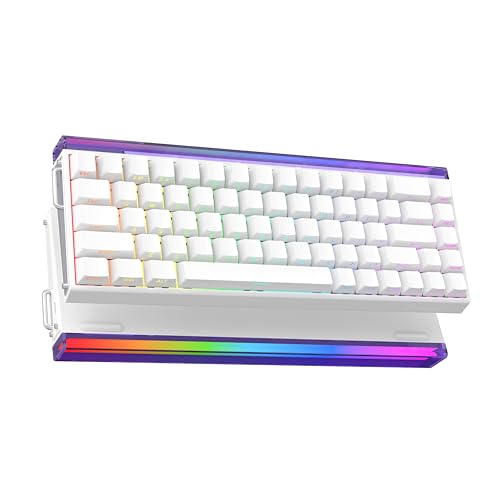
The Hero68 HE is the comfort pick of the four. Its five-layer sound dampening and tray-mounted build target the hollow clatter that makes cheap boards tiring in a shared room, and an RGB lightbox runs along the case for players who still want the desk to glow. Performance is not traded away: the Meteor magnetic switches adjust down to very shallow rapid trigger settings, and dynamic keystroke features such as DKS, mod-tap and last-input priority are all on board for advanced movement binds and quick weapon swaps.
Specs
- Layout: 65 percent, 68 keys
- Color: White
- Switches: Meteor magnetic (Hall effect), hot-swappable
- Actuation: adjustable, rapid trigger range 0.01 to 3.4 mm
- Polling rate: 8000 Hz
- Latency: 0.125 ms
- Connection: USB-C wired
- Features: DKS, mod-tap, toggle key, Snap Key (SOCD), five-layer sound dampening, RGB lightbox
- Case material: plastic
- Weight: 2.46 pounds
- Dimensions: not stated
Best for: players in shared rooms who want a quieter budget board with full rapid trigger features.
Watch out for: the listing’s product-dimensions field is garbled, so check the physical size against the listing images before ordering; this listing is the white version.
ASIN: B0F6XKYCGY
DrunkDeer G65

The G65 is the tuner’s pick. Its actuation range runs deeper than the other boards here, from 0.2 to 3.8 mm in 0.1 mm steps, and rapid trigger sensitivity is adjustable across its own wide range, which suits players who like a heavier, more deliberate press on some binds and a hair trigger on others. DrunkDeer’s Last Win mode prioritizes the most recent directional key, a direct help for counter-strafing, and tuning happens in a web driver with nothing to install. The trade is polling: this board reports at 1000 Hz where the others run 8000 Hz.
Specs
- Layout: 65 percent ANSI, 68 keys
- Switches: magnetic (Hall effect)
- Actuation: adjustable 0.2 to 3.8 mm, 0.1 mm steps
- Rapid trigger sensitivity: 0.1 to 3.6 mm
- Polling rate: 1000 Hz
- Connection: USB-C wired
- Backlighting: RGB, 18 effects
- Keycaps: ABS, OEM profile
- Dimensions: 11.42 x 4.72 x 1.61 inches
- Weight: 1.69 pounds
Best for: players who want the widest actuation range and last-input priority for counter-strafes.
Watch out for: several G65 variants circulate, including PBT-keycap and barebone versions, so confirm the keycap option on the listing before ordering.
ASIN: B0CHVWZBW3
Which One Fits Your Situation
You play on a small desk and live on WASD
Pick the Aula WIN60 HE. The 60 percent footprint leaves the most room for the wide, low-sensitivity mouse sweeps Apex rewards, and nothing in your movement binds needs the missing arrow cluster. You still get rapid trigger and 8000 Hz polling, which are the two specs your strafing actually depends on, at the lowest cost in this roundup.
You need arrow keys for menus and everyday use
Pick the AULA WIN68 HE MAX or the MechLands Aula Hero68 HE. Both keep dedicated arrows for death-box menus and desktop work. The MAX is the leaner choice if you only care about keys and response figures; the Hero68 HE adds sound dampening and a lightbox if the board also has to behave in a shared space.
You play in a shared room or stream from your bedroom
Pick the MechLands Aula Hero68 HE. Five-layer sound dampening takes the edge off bottom-out noise that carries through thin walls and open microphones, while the magnetic switches still deliver shallow rapid trigger settings for movement. It is the only board here that treats noise as a first-order feature rather than an afterthought.
You like tuning every key to a different depth
Pick the DrunkDeer G65. Its actuation range is the deepest here and both the actuation point and rapid trigger sensitivity adjust in fine steps, so jump, crouch and movement keys can each sit at a different depth. Accept the 1000 Hz polling rate as the trade for that tuning range and the Last Win directional priority.
Common Mistakes
- Buying a standard mechanical keyboard because it is cheaper, then discovering it has no rapid trigger at all.
- Setting every key to the shallowest actuation, which causes accidental ability and grenade presses during fights.
- Chasing 8000 Hz polling while playing on a low-refresh monitor that cannot show the difference.
- Ignoring the seller and variant on the listing, then receiving a different keycap set or the non-MAX version of a board.
- Leaving SOCD or last-input priority enabled without checking how it behaves with your existing movement binds.
Frequently Asked Questions
Does rapid trigger actually help movement in Apex Legends?
Yes, within limits. Rapid trigger lets a movement key reset the instant it starts rising, so alternating A and D taps for counter-strafing register with less dead travel, and tap-strafes chain more consistently. It will not fix poor timing or positioning, but on the same player it removes a small, repeatable delay from every direction change, which is exactly the input Apex movement tech repeats hundreds of times per match.
Is 8000 Hz polling worth it on a budget keyboard?
It is worth having when it costs nothing extra, which is the case for three of the four boards here. The improvement over 1000 Hz is a fraction of the gain rapid trigger gives you, and it shrinks further on lower-refresh monitors. Treat polling rate as a tiebreaker between otherwise similar boards rather than the main reason to buy one, and never pay a large premium for it alone.
What actuation point should I set for movement keys?
Start movement keys shallow, somewhere in the lower third of your board’s range, with rapid trigger sensitivity matched closely so resets feel instant. Keep keys you hit under pressure, such as ultimates and grenades, noticeably deeper to avoid accidents. Then adjust in small steps over several sessions; a setting that feels fast in the firing range but causes misfires in ranked fights is set too shallow for real play.
Can I play Apex on a 60 percent board without arrow keys?
Yes. Everything Apex needs in a fight sits around WASD, and the function row and arrows move behind a modifier layer for menus and desktop use. The adjustment usually takes a few days of reaching for arrows that are no longer separate keys. If you spend as much time editing, writing or navigating spreadsheets as playing, a 68-key board avoids the layer habit entirely.
Related guides
More from Amazon
Programs that pair well with the guide above. Offers and eligibility are set by Amazon and may change.
A free business account with business pricing and bulk-buying tools for work, shop or home office.
Create a business accountFree shipping on eligible items, Prime Video and more. Eligible new members can start with a free trial.
Start a Prime free trialAudiobooks and podcasts to listen to on the go. Eligible new members can start with a free trial.
Try Audible freeAd-free music streaming. Eligible new subscribers can start with a free trial.
Try Music Unlimited freeAs an Amazon Associate we earn from qualifying purchases.