Our Short List of 3
All 4 Picks at a Glance
| Product | Specs | Action |
|---|---|---|
 Razer Basilisk V3 Pro | Check price on Amazon | |
 Razer DeathAdder V3 Pro | Check price on Amazon | |
 Logitech G502 X Plus | Check price on Amazon | |
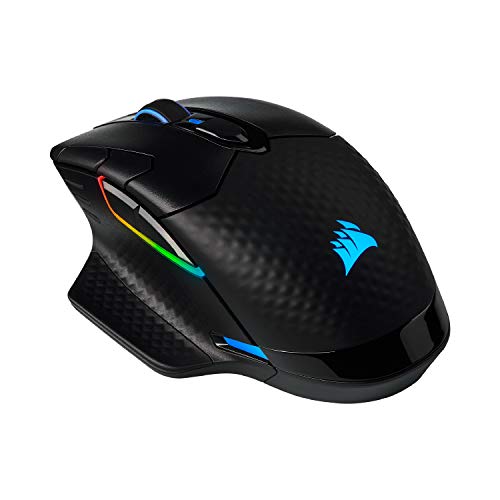 Corsair Dark Core RGB Pro SE | Check price on Amazon |
An ergonomic gaming mouse is not just a comfort accessory. The right contoured shell fills your palm, angles your wrist closer to a neutral handshake posture, and puts the thumb buttons where your thumb already rests, so you are not constantly re-gripping during long ranked sessions, raids, or ranked-to-casual marathons that stretch past midnight. This guide is for right-handed players who feel wrist, thumb, or ring-finger strain with flat symmetrical mice, or who simply prefer a shaped shell that supports a palm or relaxed claw grip. Every pick below is a genuine gaming mouse with a gaming-grade optical sensor, programmable buttons, and listed dimensions you can compare against your own hand before buying. The picks are based on manufacturer specifications and Amazon listing details, not on any claim of lab measurement, so the deciding factors here are the published numbers: shell length and height, weight, sensor, polling rate, and battery life.
Disclosure: As an Amazon Associate, we earn from qualifying purchases. Product details and availability can change; check the Amazon listing before you buy.
Our Top Picks
- Razer Basilisk V3 Pro Customizable RGB Wireless GamingMouse5.12 x 2.96 x 1.67 inches0.24 poundsCheck on Amazon
- Razer DeathAdder V3 Pro Wireless Gaming Mouse1000 Hz5.01 x 2.65 x 1.69 inches0.1 poundsCheck on Amazon
- Logitech G502 X Plus Wireless RGB Gaming MouseWireless7.1 x 4.6 x 2.7 inches0.84 poundsCheck on Amazon
Top 3 picks at a glance
Quick picks at a glance
| Product | ASIN | Best for |
|---|---|---|
| Razer Basilisk V3 Pro | B0B6Y3XYFG | Full palm support with the most controls |
| Razer DeathAdder V3 Pro | B0B6XZLNHQ | Palm and relaxed claw comfort at a low weight |
| Logitech G502 X Plus | B092CB69Q4 | A sculpted thumb rest and a deep button layout |
| Corsair Dark Core RGB Pro SE | B082LVNJ4W | Wide hands that want pinky-side support |
What matters most for ergonomic gaming comfort
Shell shape and hump placement. An ergonomic shell is sculpted for one hand, usually the right, with a hump that peaks toward the rear or middle of the mouse. A rear-weighted hump supports palm grip and takes pressure off your fingertips; a taller, more central hump suits relaxed claw. What matters is that the curve matches how your hand naturally drapes, because a mismatch forces your fingers to hover and tense.
Length, width, and height in millimetres. Ergonomic mice run larger than esports symmetrical mice. Lengths here span roughly 120 to 131 mm. As a rough guide from the listed dimensions, hands under about 17 cm long usually do better at the shorter end of that range, while hands over 19 cm can use the full length of the biggest shells without their fingertips hanging off the front edge.
Thumb rest and button placement. A flared thumb rest or textured side panel keeps your thumb parked instead of dragging on the pad, and it gives the side buttons a consistent reach. Check the listed button count and whether there is a third thumb control, such as a sniper or DPI-shift button, if you bind abilities to your thumb.
Weight and balance. Ergonomic mice carry more shell, more buttons, and often RGB, so they weigh more than stripped-down esports mice. The picks here range from 63 g to about 136 g. Heavier shells feel planted for low-sensitivity arm aiming in tactical shooters; lighter ones reduce the load your wrist moves thousands of times per session.
Sensor and polling rate. Comfort should not cost tracking quality. All four picks use flagship-class optical sensors rated between 18,000 and 30,000 DPI with at least 1,000 Hz polling, and two of them can poll faster than standard with the right connection mode.
Battery life and connection modes. If you play wirelessly, listed battery life decides how often the mouse leaves your desk. The range here runs from tens of hours on the feature-heavy models to around 120 hours on the most efficient one, and two picks add Bluetooth for a second device.
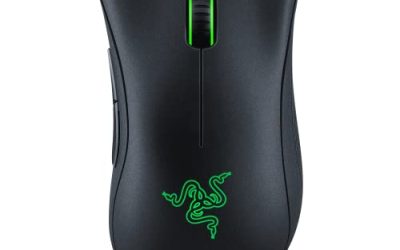
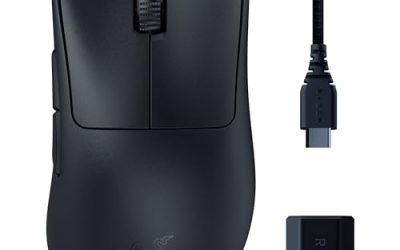
Razer Basilisk V3 Pro
Why it fits ergonomic gaming. The Basilisk V3 Pro has the most overtly sculpted shell in this group: a pronounced right-hand contour, a wide thumb rest with textured rubber side grips, and a removable DPI clutch that sits exactly under the thumb tip. The tilt wheel adds left and right inputs on top of the usual click, which spreads work across more fingers instead of forcing your index finger to do everything. For players who rest their whole hand on the mouse and steer with their arm, the 130 mm length gives the palm full contact from heel to fingertip.
Trade-offs. At roughly 112 g it is one of the heavier wireless options here, and the shape is firmly right-handed with no left-handed version. The fastest polling mode needs a separate dongle purchase.
Best for / Skip if. Best for palm-grip players who want maximum buttons and a supportive thumb rest. Skip it if you play fingertip grip or want the lightest possible mouse for fast flicks.
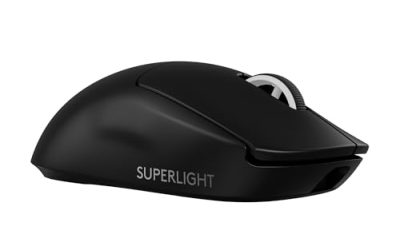
Razer DeathAdder V3 Pro
Why it fits ergonomic gaming. The DeathAdder shape is the long-running reference for ergonomic gaming mice: a flowing right-hand curve with a high rear hump that fills the palm and flared main buttons that cradle the index and middle fingers. What makes the V3 Pro unusual is that it delivers that full ergonomic shell at about 63 g, roughly half the weight of the Basilisk V3 Pro, so your wrist moves far less mass while keeping palm support. The two side buttons are large and easy to find without looking.
Trade-offs. There is no thumb rest wing and no tilt wheel, and the button count is the lowest here at five programmable buttons. There is no Bluetooth mode, so it is a one-device mouse.
Best for / Skip if. Best for palm and relaxed claw players who want ergonomic support without weight, including FPS players. Skip it if you need many thumb buttons for MMO or MOBA binds.
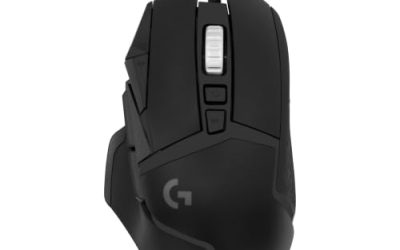
Logitech G502 X Plus
Why it fits ergonomic gaming. The G502 X Plus is the longest and widest shell in this guide, and its sculpting is built around control density: a broad thumb platform, a removable DPI-shift button you can flip or blank off, two extra buttons beside the left click, and a dual-mode scroll wheel. For larger hands that feel cramped on narrower mice, the 131.4 mm length and wide rear give the palm and ring finger somewhere to rest instead of curling around the shell. LIGHTFORCE hybrid optical-mechanical switches are rated for crisp, consistent clicks over the life of the mouse.
Trade-offs. At about 102 g it is mid-weight, and the busy button layout takes time to learn. There is no Bluetooth, and the tall control count is wasted if you only ever use two side buttons.
Best for / Skip if. Best for larger hands and players who bind many actions to the mouse across shooters and RPGs. Skip it if your hand is small or you prefer a clean, minimal shell.
Corsair Dark Core RGB Pro SE
Why it fits ergonomic gaming. The Dark Core RGB Pro SE attacks the side of ergonomic fit most mice ignore: the pinky side. It ships with two interchangeable right-side grips, including a winged rest that supports your ring and pinky fingers instead of letting them drag on the pad, and the overall shell is the widest here at up to 89 mm across with that grip fitted. The contoured shape, textured surfaces, and eight programmable buttons make it a genuine gaming mouse that happens to prioritise full-hand support, and the SE version adds Qi charging so it can top up on a compatible pad.
Trade-offs. It is the heaviest pick in this guide at roughly 136 g, which rules it out for fast, low-sensitivity flick play. Its 18,000 DPI sensor ceiling is lower on paper than the 25K and 30K sensors above, though all of them far exceed what any player uses in practice.
Best for / Skip if. Best for wide hands, palm grippers, and anyone whose pinky drags or cramps on narrower mice. Skip it if weight is your top priority.
How to choose between these picks
Start with your hand and your grip, not the spec sheet. Measure your hand from wrist crease to the tip of your middle finger. If you are under roughly 17 cm and use a palm grip, the DeathAdder V3 Pro’s 128 mm shell is the safest ergonomic fit here. Between about 17 and 19 cm, all four work, so decide on features: the Basilisk V3 Pro if you want a thumb rest, tilt wheel, and Bluetooth; the Dark Core RGB Pro SE if your pinky needs support. Over roughly 19 cm, or if your fingers currently spill off the front of your mouse, the G502 X Plus has the length to fix that.
Then weigh your genre. Shooter players who still want an ergonomic shape should take the DeathAdder V3 Pro for its 63 g shell. Players who split time between MMOs, MOBAs, and shooters get more from the Basilisk V3 Pro or G502 X Plus and their deeper button layouts. Finally, check the connection column: only the Basilisk V3 Pro and Dark Core RGB Pro SE offer Bluetooth for a second device such as a laptop or tablet.
Setup, positioning, and care
Ergonomics come from the whole setup, not the shell alone. Set your chair and desk so your forearm rests roughly level with the pad and your wrist stays straight rather than bent upward; a mouse that is too tall for your desk height will undo the benefit of its shape. In your mouse software, set DPI so a full pad swipe turns your character comfortably without wrist-only steering, and use the on-the-fly DPI controls several of these mice offer to slow down for menus or precision shots. Keep the sensor lens and the PTFE feet clean with a dry microfiber cloth, and replace worn feet rather than pressing harder to compensate. For wireless models, charge on a schedule that matches the listed battery life instead of waiting for a mid-match low-battery warning, and store the USB receiver in the mouse’s storage slot when travelling so it is not lost.
FAQ
Is an ergonomic gaming mouse better for wrist pain than a symmetrical one?
A contoured shell can reduce the finger hovering and sideways wrist bend that aggravate strain during long sessions, because the hand rests on the shape instead of gripping a flat shell. It is not a medical fix, though; desk height, breaks, and overall posture matter just as much, and persistent pain deserves professional advice.
Can left-handed players use these mice?
All four picks are sculpted for the right hand, so left-handed players are better served by a symmetrical or ambidextrous gaming mouse with side buttons on the right side. The shapes here cannot be mirrored in software.
Does a heavier ergonomic mouse hurt gaming performance?
Weight is a trade-off, not a defect. The roughly 136 g Dark Core RGB Pro SE feels planted for deliberate aiming but tiring for constant flicks, while the 63 g DeathAdder V3 Pro shows that ergonomic shaping and low weight can coexist. Match the weight to how much you lift and reposition the mouse in your games.
What DPI should I set on an ergonomic gaming mouse?
The sensors here go far beyond usable settings. Most players settle between 400 and 3,200 DPI and adjust in-game sensitivity from there. The useful ergonomic feature is not the maximum number but step-less or fine-step adjustment, such as the Dark Core’s 1 DPI steps, which lets you land exactly on a comfortable setting.
Do I need the high polling rate dongles?
Not for comfort. The standard 1,000 Hz polling on every pick here already reports position every millisecond. The optional 8,000 Hz dongle for the two Razer models and the 2,000 Hz hyper-polling on the Corsair are competitive-play extras that trade battery life for smaller input intervals.
Conclusion
For most right-handed players, the Razer Basilisk V3 Pro is the complete ergonomic package: a supportive thumb rest, a tilt wheel, three connection modes, and a top-tier sensor. If you want that same palm-filling comfort at half the weight for shooters, choose the Razer DeathAdder V3 Pro. Larger hands that need length and a dense control layout should take the Logitech G502 X Plus, and wide hands that want genuine pinky support should take the Corsair Dark Core RGB Pro SE. Measure your hand, match it to the listed dimensions, and any of the four will be a clear comfort upgrade over a flat office mouse.
Related guides
More from Amazon
Programs that pair well with the guide above. Offers and eligibility are set by Amazon and may change.
A free business account with business pricing and bulk-buying tools for work, shop or home office.
Create a business accountFree shipping on eligible items, Prime Video and more. Eligible new members can start with a free trial.
Start a Prime free trialAudiobooks and podcasts to listen to on the go. Eligible new members can start with a free trial.
Try Audible freeAd-free music streaming. Eligible new subscribers can start with a free trial.
Try Music Unlimited freeAs an Amazon Associate we earn from qualifying purchases.