
The best Radeon RX 6900 XT card is usually the Sapphire Nitro+ AMD Radeon RX 6900 XT. It combines a strong cooler, sensible factory tuning, and better build quality than many cheaper versions. However, it is not automatically the best buy at every price. The RX 6900 XT is now an older, used-market graphics card, so condition, warranty, and price matter as much as the cooler design.
If you are shopping for one today, compare available RX 6900 XT graphics cards carefully rather than paying extra for a familiar badge. All versions use the same GPU and 16GB of GDDR6 memory. The differences are mainly cooling, noise, power limits, size, and the likelihood that the card has had a hard mining or overclocking life.
Our Top Picks

Best RX 6900 XT card: Sapphire Nitro+
The Sapphire Nitro+ is the most balanced RX 6900 XT design. Its large triple-fan cooler gives the GPU enough thermal headroom for sustained gaming, while its substantial heatsink generally avoids the high-pitched fan noise associated with smaller cards. It is also a sensible choice for owners who want to adjust fan curves or experiment with undervolting.
Its main drawback is size. Nitro+ cards are long, thick, and often occupy close to three expansion slots. Check your case clearance and whether the card will block a nearby PCIe slot. You should also use two separate PCIe power cables from the power supply rather than daisy-chaining one cable across both connectors.
Buy the Nitro+ when its price is close to other well-cooled 6900 XT models. Do not pay a large premium simply because it is a Sapphire. A clean, well-priced competitor can perform within a few percentage points of it.
Other good RX 6900 XT options
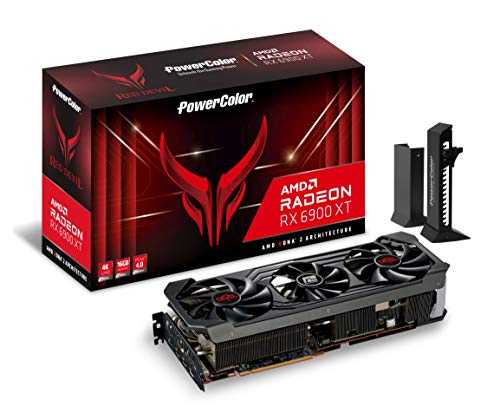
PowerColor Red Devil RX 6900 XT
The PowerColor Red Devil is another high-end version with a large cooler, robust power delivery, and a higher power limit than basic models. It suits someone who wants low temperatures or plans to tune the card. Its cooler can be quiet once the card is undervolted, but the card is physically large and heavy.
Inspect the included support bracket if buying used. A heavy triple-slot card can sag in a case, particularly when installed horizontally without support. Sag is not guaranteed to damage the card, but avoiding unnecessary strain is good practice.
XFX Speedster MERC 319 RX 6900 XT
The XFX Speedster MERC 319 is a strong option if it is meaningfully cheaper than the Sapphire or PowerColor cards. It uses a long triple-fan cooler and is generally aimed at buyers who want cooling performance over compact dimensions.
Measure before buying. The MERC 319 is one of the cards most likely to cause problems in a compact or mid-sized case. Check both maximum GPU length and front-radiator clearance. A case may technically support the card while leaving too little space for its power connectors.
Reference AMD RX 6900 XT
The AMD reference design is worth considering when it is substantially cheaper or when you need a shorter card. It has a dual-fan layout and a more conservative physical footprint than many custom models. That can make it easier to install.
The trade-off is more concentrated heat and potentially higher fan noise under long gaming sessions. It is not a poor card, but it offers less cooling margin than the large Sapphire, PowerColor, and XFX models. It is best for a well-ventilated case, a reasonable undervolt, and buyers who prioritize price or compatibility.
RX 6900 XT card comparison
| Card type | Best for | Advantages | Things to check |
|---|---|---|---|
| Sapphire Nitro+ | Most buyers | Strong cooling, good acoustics, useful tuning headroom | Large and usually expensive |
| PowerColor Red Devil | Quiet operation and overclocking | Heavy cooler and high power limit | Three-slot size, card sag, power consumption |
| XFX Speedster MERC 319 | Value buyers wanting a large cooler | Good temperatures when priced well | Very long; verify case clearance |
| AMD reference model | Smaller cases and lower prices | Shorter, simpler, easier to fit | Can run warmer and louder |
Performance, ray tracing, and value
The RX 6900 XT remains a fast 1440p card and can handle many games at 4K with sensible settings. Its 16GB memory is useful for high-resolution textures and newer games that are becoming less comfortable on 8GB cards. Rasterized performance—the traditional rendering used in many games—is its strongest area.
Ray tracing is a weaker point. NVIDIA cards from the same generation generally deliver better ray-tracing performance and have access to more mature upscaling support through DLSS. AMD’s FSR can still help, but image quality and game support vary by implementation. If ray tracing is central to your gaming preferences, compare the 6900 XT against a similarly priced used NVIDIA card before buying.
The 6900 XT also lacks newer efficiency and media features found on current-generation cards. Its power draw is high, particularly when the factory power limit is raised. A quality 750W power supply is a sensible baseline for a normal system, while heavily overclocked builds may justify more. Avoid pairing a used 6900 XT with an old, low-quality power supply just to save money.
For current pricing, also check newer RX 7800 XT cards. The newer card is not dramatically faster in every rasterized game, but it brings a current warranty, better availability, improved efficiency, and newer video features. If the price gap is small, the 7800 XT is usually the safer purchase.
What to check when buying used
Most RX 6900 XT cards are now purchased used, refurbished, or from old inventory. Ask for the exact model, a photograph of the serial label, and evidence that the card works under load. A screenshot showing a game or benchmark is more useful than a desktop display alone.
- Listen for fan noise: rattling, grinding, or clicking can indicate worn fan bearings.
- Check temperatures: a large gap between GPU temperature and hotspot temperature can suggest poor mounting or dried thermal compound.
- Inspect the PCB and connectors: burnt power sockets, corrosion, missing screws, and damaged fans are warning signs.
- Confirm outputs: test HDMI and DisplayPort if possible, especially if the card will drive multiple monitors.
- Verify warranty terms: some warranties do not transfer to a second owner.
Mining history alone does not prove a card is bad. Continuous operation can wear fans and memory components, but a carefully maintained mining card may be healthier than a gaming card that was repeatedly overheated. The problem is that sellers rarely provide enough information to judge this confidently, so price accordingly.
Who should buy an RX 6900 XT?
Buy one if you want strong 1440p performance, need 16GB of memory, and can find a clean card at a substantial discount to newer products. The Sapphire Nitro+, PowerColor Red Devil, and XFX MERC 319 are the versions I would prioritize, provided they fit your case and are not overpriced.
Choose a reference card when space or price matters more than low noise. Choose a newer GPU instead when you need a new warranty, efficient power use, strong ray tracing, or modern encoding features. For a 1080p gaming system, the cheaper RX 6800 or RX 6700 XT can also be sufficient; paying extra for a 6900 XT only makes sense if you have a high-refresh monitor or plan to move to 1440p.
FAQ
Is the Sapphire Nitro+ the fastest RX 6900 XT?
Not by a meaningful margin. Its main advantages are cooling, noise, and power-limit headroom. Most RX 6900 XT cards perform within a small range at stock settings.
Is an RX 6900 XT good for 4K gaming?
Yes, especially in rasterized games, but you may need to lower demanding settings or use upscaling. Ray-traced 4K gaming is much less comfortable.
How much power does an RX 6900 XT need?
A quality 750W power supply is a sensible starting point for a typical system. Use separate PCIe power cables and choose a higher wattage unit for aggressive overclocking or a power-hungry processor.
Should I buy a used RX 6900 XT?
It can be good value if the card passes a load test, has healthy fans and temperatures, and is clearly cheaper than a newer equivalent. Avoid listings with no return protection or no proof that the card works.



