
A 2GB DDR3 graphics card can still make sense for an older desktop, a low-cost repair, or a system that only needs to run lighter games. It is not a modern gaming upgrade, however. DDR3 video memory and the old GPUs usually paired with it are several generations behind current entry-level cards.
The important distinction is between adding a basic display adapter and buying a card that can deliver playable gaming performance. If your budget is extremely tight, a used card may be worthwhile. If you can spend more, even a newer 4GB card with GDDR5 or GDDR6 is usually a much better long-term purchase.
Our Top Picks
 msi Gaming RTX 3050 Ventus 2X 6G OC1.7" x 4.3" x 7.4"7.4 x 4.3 x 0.1 inches1.3 PoundsCheck on Amazon
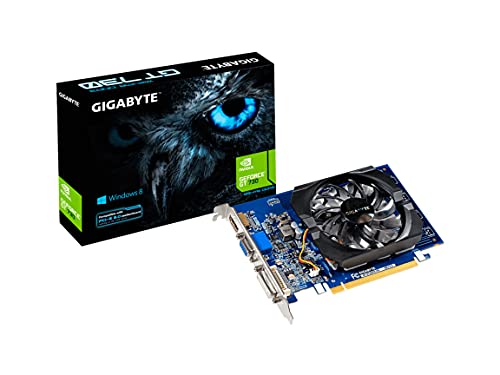


What to expect from a 2GB DDR3 graphics card
Most 2GB DDR3 cards use low-end chips such as NVIDIA’s GeForce GT 710 or GT 730, or older AMD Radeon chips in the R5 230 and HD 6450 class. These cards commonly have passive cooling, small fans, or very low power requirements. That makes them easy to install, but their graphics processors are weak.
Expect older esports games and undemanding titles to run at 720p or low settings, depending on the exact GPU. Older games such as Skyrim, Portal 2, or League of Legends may be playable with sensible settings. Modern AAA games, current competitive shooters, and anything demanding ray tracing are generally poor matches.
Do not assume that “2GB” means the card is fast. Capacity only describes how much data the card can store. DDR3 memory is much slower than GDDR5 or GDDR6, and the GPU itself matters more than the memory size in this category.
The best 2GB DDR3 options by use case
| Card type | Best for | Main strengths | Main weaknesses |
|---|---|---|---|
| GeForce GT 730 2GB DDR3 | Very light gaming and general upgrades | Common, inexpensive, low power | Many different versions; weak performance |
| GeForce GT 710 2GB DDR3 | Display output and basic older games | Cheap, widely compatible, often fanless | Too slow for demanding gaming |
| Radeon R5 230 2GB DDR3 | Older AMD-based systems and multi-monitor use | Low power, several display configurations | Very old architecture and limited game support |
| Radeon HD 6450 2GB DDR3 | Legacy PCs and video playback | Usually inexpensive on the used market | Not a sensible choice for modern games |
GeForce GT 730 2GB DDR3
The GT 730 is usually the most reasonable starting point if you specifically need a 2GB DDR3 card for gaming. It is available in many board designs, including compact and low-profile versions, and generally draws little power. In older or lightweight games, it can provide a clear improvement over integrated graphics.
The problem is that “GT 730” covers several different hardware versions. Some use DDR3 memory and others use faster GDDR5 memory. Core counts and clock speeds also vary between models. Read the full specification rather than relying on the name alone. A GT 730 with GDDR5 is preferable for gaming, but it does not meet a strict DDR3 requirement.
Choose a GeForce GT 730 2GB DDR3 graphics card when you need a cheap replacement and your expectations are limited to older or less demanding games.
GeForce GT 710 2GB DDR3
The GT 710 is better described as a display and basic multimedia card than a gaming card. It is useful when a desktop has no working video output, when you need extra monitors, or when integrated graphics are unavailable. It can handle simple older games, but its performance is usually below the GT 730.
A fanless GT 710 is attractive for office PCs because it is silent and produces little heat. That same low-power design does not make it fast. Buying one for modern gaming often leads to disappointment: games may launch, but frame rates can be uneven even at low resolution.
The cheaper option is fine if the computer is mainly used for browsing, office work, emulation of older systems, or video playback. It is not fine if the main goal is playing recent PC releases.
Radeon R5 230 and HD 6450
AMD’s R5 230 and HD 6450 are generally only worth considering when you find a very cheap used card that fits a specific older computer. They can restore display output, support some multi-monitor arrangements, and run older DirectX games. Their low price is their main advantage.
These cards are also more likely to be affected by age. Used examples may have worn fans, damaged video outputs, or compatibility issues with newer operating systems. Driver support is limited compared with current products, and performance is below what most people now consider gaming-ready.
Consider a Radeon R5 230 2GB DDR3 card only for a low-cost legacy upgrade. If the price is close to a newer entry-level card, skip it.
What to check before buying
Confirm the memory type. Listings can mix DDR3 and GDDR5 versions under the same GPU name. Check the manufacturer’s specification and the photographs of the label. Do not pay extra for a card simply because it says 2GB.
Check the slot and case. These cards normally use a PCI Express x16 slot, but older office PCs may have physical or BIOS compatibility limitations. A low-profile case needs a low-profile card and the correct short bracket. Some listings include the bracket; some do not.
Check the outputs. VGA, DVI, and HDMI combinations vary. Older cards may have HDMI limited to older resolutions or refresh rates. If you use a modern monitor, verify that the available output supports the resolution you need.
Check power requirements. Most cards in this class draw power from the motherboard and do not need a six-pin connector. That is helpful for old prebuilt systems with small power supplies. Still, inspect the manufacturer’s requirements rather than assuming every version is identical.
Look for a return policy. Low-end DDR3 cards are often old stock or refurbished. A card may arrive with a noisy fan, unstable memory, missing bracket, or a damaged port. Testing it immediately with a game or graphics benchmark is sensible.
When to buy something better
If gaming is the priority, increase the budget before increasing the memory capacity. A newer entry-level graphics card with GDDR5 or GDDR6 will usually be substantially faster and receive better driver support. Even a used card from a newer generation can be a better buy than a new GT 710.
Search for a low-profile GDDR5 graphics card if your case is compact. If you have a standard-sized case and a stronger power supply, a budget GDDR6 gaming graphics card is a more sensible starting point for current games.
In short, choose a 2GB DDR3 card only when low cost, low power use, or compatibility with an old PC matters more than gaming speed. For a dedicated gaming upgrade, it is usually better to save for a newer GPU.
FAQ
Can a 2GB DDR3 graphics card run modern games?
Some may launch at very low settings, but modern games will often have poor frame rates, stuttering, or unsupported features. These cards are better suited to older and lightweight titles.
Is a GT 730 better than a GT 710?
Usually, yes, but specifications vary. Compare the exact GPU and memory type. A GT 730 with DDR3 is generally faster than a GT 710, while a GT 730 with GDDR5 is faster still.
Will a 2GB card work in any desktop?
No. Check for a compatible PCI Express slot, enough case space, the correct bracket, suitable display outputs, and operating-system driver support.
Should I buy new or used?
Used can be sensible for this old category if the seller offers returns and the card is tested. Avoid untested listings unless the price is low enough to accept total failure.



